Canon PIXMA TS9520 Wireless Photo All-in-One Printer Review for 2026
The Importance of Choosing the Right Printer for Your Needs
In today’s fast-paced digital environment, selecting the right printer can significantly impact productivity and workflow efficiency. Whether you’re managing a small office, creating personal projects, or handling high-volume printing tasks, the right printer can streamline operations and reduce downtime. Printers vary widely in their capabilities, from basic monochrome models to advanced multifunctional devices that handle color printing, scanning, and copying. Understanding the specific requirements of your environment—such as print volume, media types, connectivity needs, and output quality—can help you make an informed decision. For instance, a home user might prioritize ease of use and cost-effective printing, while a professional photographer may need a printer that supports high-resolution photo output and specialized media. Additionally, the integration of modern technologies like wireless connectivity and mobile printing can enhance convenience and flexibility. This review focuses on the Canon PIXMA TS9520, a versatile all-in-one printer designed to meet the demands of both home and office users. By examining its technical specifications, connectivity options, and performance benchmarks, we can determine its suitability for various printing scenarios and user profiles.
Quick Overview
| Feature | Details |
|---|---|
| Printer Type | Inkjet All-in-One |
| Supported Functions | Print, Scan, Copy |
| Print Resolution | 4800 x 1200 dpi (color), 4800 optimized dpi (black and white) |
| Media Sizes | 3.5 x 3.5 inches to 11 x 17 inches |
| Connectivity | Wi-Fi, Ethernet, Mopria Print Service, AirPrint |
| Duty Cycle | Not specified |
| Ink System | 5-color individual dye-based ink |
| Warranty | Limited warranty |
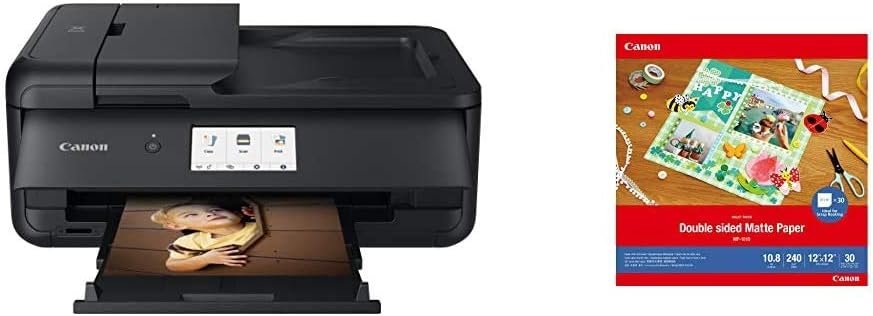
The Canon PIXMA TS9520 is a multifunctional printer that combines printing, scanning, and copying capabilities into a single device. Its high-resolution output and support for various media sizes make it suitable for both everyday tasks and creative projects. The wireless connectivity options ensure seamless integration with mobile devices, while the included double-sided matte photo paper expands its versatility for photo printing and scrapbooking. These features collectively position the TS9520 as a practical solution for users seeking a reliable and flexible printing solution.
Print Quality and Resolution Performance
The Canon PIXMA TS9520 delivers high-quality output through its 5-color individual ink system, which allows for precise color reproduction and sharp text. The printer’s maximum color print resolution of 4800 x 1200 dpi ensures detailed graphics and vibrant photos, making it suitable for both professional and personal use. This resolution level is particularly beneficial for users who require high-fidelity output, such as photographers and graphic designers. The black and white print resolution of 4800 optimized dpi further enhances text clarity and detail, which is essential for documents and reports. The printer’s ability to handle various media types, including glossy photo paper, adds to its versatility. However, the use of dye-based ink may affect print longevity, especially when exposed to sunlight or moisture. This consideration is important for users who need long-term archival quality.
Color Accuracy and Ink Management
The 5-color individual ink system of the TS9520 allows for more precise color management compared to traditional four-color inkjet systems. This configuration enables the printer to produce a wider color gamut, which is crucial for accurate photo reproduction. The inclusion of a dedicated black ink cartridge also helps in achieving deeper blacks and improved text clarity. However, the use of dye-based ink may result in less fade resistance compared to pigment-based inks. Users who prioritize long-term print preservation should consider this limitation when evaluating the printer’s suitability for archival purposes.
Text and Graphic Output
The TS9520’s high-resolution printing capabilities are particularly advantageous for tasks requiring sharp text and intricate graphics. The 4800 x 1200 dpi color resolution ensures that printed documents maintain clarity and detail, even when printed at smaller sizes. This makes the printer suitable for creating professional-looking reports, presentations, and marketing materials. The printer’s ability to handle both text and graphics efficiently is a significant benefit for users who frequently work with mixed content types. However, the printer’s performance with complex graphics or large image files may depend on the connected device’s processing power and memory, as the printer’s internal processor is limited to a single-core configuration.
Connectivity and Device Compatibility
The Canon PIXMA TS9520 offers a range of connectivity options that enhance its usability across different devices and environments. The printer supports Wi-Fi, Ethernet, Mopria Print Service, and AirPrint, making it compatible with a variety of smartphones, tablets, and computers. This wireless capability allows users to print from mobile devices without the need for physical connections, which is particularly useful for users who frequently work on-the-go. The Ethernet port provides a stable connection for users who require consistent printing performance, such as in office settings. However, the lack of USB 3.0 support may limit data transfer speeds when connecting to older devices. The printer’s compatibility with both iOS and Android devices ensures that users can leverage mobile printing features effectively.
Wireless Printing and Network Integration
The TS9520’s wireless capabilities are designed to simplify the printing process for users who rely on mobile devices. The support for AirPrint and Mopria Print Service means that users can print directly from their smartphones and tablets without the need for additional software or drivers. This feature is particularly beneficial for users who need to print documents or photos on-the-go. However, the printer’s reliance on a stable Wi-Fi network may pose challenges in environments with limited or unstable internet connectivity. Users should ensure that their network is optimized for printing to avoid delays or print job failures.
Cross-Platform Compatibility
The TS9520’s compatibility with both iOS and Android devices ensures that users can seamlessly integrate the printer into their mobile workflows. The inclusion of a dedicated mobile app, such as the Canon Creative Park app, further enhances the user experience by providing additional printing options and customization features. However, the printer’s limited support for certain operating systems or software may affect its usability for users with specific requirements. The printer’s reliance on a single Ethernet port also means that users who require multiple network connections may need to consider alternative solutions.
Media Support and Versatility
The Canon PIXMA TS9520 is designed to handle a wide range of media types, which enhances its versatility for different printing tasks. The printer supports various paper sizes, including 3.5 x 3.5 inches to 11 x 17 inches, making it suitable for both standard and specialty printing needs. The inclusion of double-sided matte photo paper expands the printer’s capabilities for creating scrapbook pages and other creative projects. This media type is ideal for users who require a balance between print quality and cost-effectiveness. However, the printer’s ability to handle specialty media such as glossy or textured paper may be limited by its design and the availability of compatible paper types.
Double-Sided Printing and Media Compatibility
The TS9520’s support for double-sided printing is a significant advantage for users who need to maximize paper usage. This feature allows users to print on both sides of a sheet, reducing the overall cost per print job. The use of double-sided matte photo paper is particularly beneficial for creating scrapbooking pages and other creative projects, as it provides a smooth surface for printing. However, the printer’s performance with specialty media such as glossy or textured paper may vary depending on the paper’s weight and finish. Users should ensure that the paper they select is compatible with the printer’s specifications to avoid issues with print quality or feed reliability.
Paper Handling and Tray Capacity
The TS9520’s paper tray capacity of up to 150 sheets is suitable for users who require a moderate print volume. This capacity ensures that users can print multiple documents without frequently reloading paper. However, the printer’s paper handling capabilities may be limited for high-volume printing tasks, as the tray size is not designed for large-scale production. The printer’s ability to handle different paper types and sizes also depends on the quality of the paper used, as poorly manufactured paper may cause feeding issues or print defects. Users should select high-quality paper that meets the printer’s specifications to ensure optimal performance.
Pros & Cons
Pros
- High-Resolution Output: The TS9520’s 4800 x 1200 dpi color resolution and 4800 optimized dpi black and white resolution ensure sharp text and detailed graphics, making it suitable for both professional and personal use.
- Versatile Media Support: The printer supports a wide range of paper sizes and types, including glossy photo paper and double-sided matte photo paper, enhancing its versatility for different printing tasks.
- Wireless Connectivity: The TS9520 offers Wi-Fi, Ethernet, Mopria Print Service, and AirPrint connectivity, allowing users to print from smartphones, tablets, and computers without the need for physical connections.
- User-Friendly Features: The inclusion of a dedicated mobile app and support for both iOS and Android devices simplifies the printing process and enhances user experience.
- Dual-Sided Printing: The printer’s support for double-sided printing reduces paper usage and cost per print job, making it an economical choice for users with moderate print volumes.
Cons
- Limited Paper Size Support: While the printer supports up to 11 x 17 inches, it may not be suitable for users who require larger media sizes or specialized paper types.
- Dye-Based Ink Limitations: The use of dye-based ink may affect print longevity, particularly when exposed to sunlight or moisture, which is a consideration for users requiring long-term archival quality.
- Single-Core Processor: The TS9520’s single-core processor may limit its performance with complex graphics or large image files, especially when connected to older devices with limited processing power.
- No USB 3.0 Support: The lack of USB 3.0 support may result in slower data transfer speeds when connecting to older devices, which could impact printing efficiency.
- Limited Duty Cycle Information: The printer’s duty cycle specifications are not provided, which may make it challenging for users to assess its suitability for high-volume printing environments.
Final Verdict: Who This Printer Is Best For (and Who Should Skip It)
The Canon PIXMA TS9520 is an excellent choice for users who require a versatile all-in-one printer that supports high-resolution printing, wireless connectivity, and a range of media types. It is particularly well-suited for home users, small businesses, and creative professionals who need a reliable solution for both everyday printing and photo projects. The printer’s ability to handle double-sided printing and its compatibility with mobile devices make it a practical choice for users who value convenience and flexibility. However, the TS9520 may not be the best option for users who require high-volume printing capabilities, specialized media support, or long-term archival quality. The use of dye-based ink and the lack of USB 3.0 support are important considerations for users with specific requirements. Overall, the TS9520 is a solid choice for those seeking a balance between performance, versatility, and cost-effectiveness in a multifunctional printer.
Frequently Asked Questions (FAQs)
What print resolution does the Canon PIXMA TS9520 offer?
The Canon PIXMA TS9520 provides a maximum color print resolution of 4800 x 1200 dpi and a black and white print resolution of 4800 optimized dpi, ensuring high-quality output for photos and documents.
Can the Canon PIXMA TS9520 print on double-sided matte photo paper?
Yes, the TS9520 supports double-sided printing with its included matte photo paper, making it ideal for creating scrapbook pages and other creative projects.
What connectivity options are available for the Canon PIXMA TS9520?
The printer supports Wi-Fi, Ethernet, Mopria Print Service, and AirPrint, allowing seamless printing from smartphones, tablets, and computers.
Does the Canon PIXMA TS9520 use dye-based ink?
Yes, the TS9520 uses a 5-color individual dye-based ink system, which provides vibrant colors but may affect print longevity in harsh conditions.
What is the maximum media size supported by the Canon PIXMA TS9520?
The TS9520 can handle media sizes ranging from 3.5 x 3.5 inches to 11 x 17 inches, offering flexibility for various printing needs.
Is the Canon PIXMA TS9520 suitable for high-volume printing?
The TS9520 is designed for moderate print volumes with a 150-sheet tray capacity, but its duty cycle specifications are not detailed, making it less ideal for high-volume environments.
Can the Canon PIXMA TS9520 print from mobile devices?
Yes, the TS9520 supports wireless printing via AirPrint and Mopria Print Service, allowing users to print from iOS and Android devices without additional software.
What are the limitations of using dye-based ink in the Canon PIXMA TS9520?
Dye-based ink may fade over time when exposed to sunlight or moisture, which is a consideration for users requiring long-term archival quality.