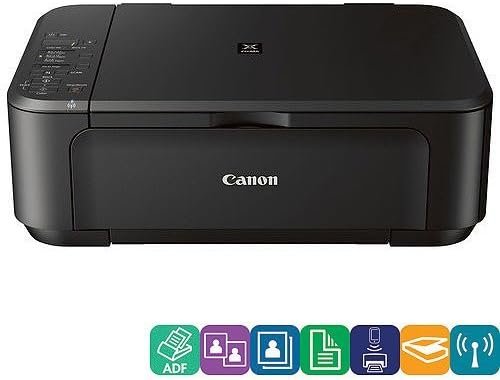
Canon PIXMA MG3222 Wireless Color Photo Printer with Scanner and Copier
The Importance of Choosing the Right Printer
In today’s fast-paced digital environment, the right printer can significantly impact productivity and efficiency. Whether for home use, small business operations, or personal projects, selecting a printer that meets specific needs is crucial. Factors such as print quality, speed, connectivity, and media compatibility play a vital role in determining the best fit for a user’s workflow. For example, a family might prioritize a printer that handles photo printing and document scanning, while a small office may require a device that supports high-volume printing and wireless connectivity. Understanding these requirements helps users make informed decisions, ensuring the chosen printer aligns with their intended usage and output expectations. Additionally, considering ongoing maintenance, consumable costs, and durability ensures long-term satisfaction. By evaluating these elements, users can navigate the market effectively and select a printer that balances performance, reliability, and versatility for their specific needs.
Quick Overview
| Feature | Details |
|---|---|
| Printer Type | Inkjet Color Printer |
| Connectivity | Wi-Fi, Hi-Speed USB |
| Print Resolution | Up to 4800 x 1200 dpi (Color), 600 x 600 dpi (Black) |
| Print Speed | Up to 5.00 pages per minute (Color), 9.00 pages per minute (Monochrome) |
| Media Sizes | 4″ x 6″, 5″ x 7″, 8″ x 10″, Letter, Legal, U.S. #10 Envelopes |
| Supported Functions | Print, Scan, Copy |
| Duty Cycle | Not Specified |
| Ink System | Inkjet |
| Weight | 15 Pounds |
The Canon PIXMA MG3222 offers a versatile solution for users needing wireless printing, scanning, and copying capabilities. Its combination of high-resolution output and multiple connectivity options makes it suitable for both home and small office environments, where reliable performance and ease of use are essential.

Print Quality and Resolution
The Canon PIXMA MG3222 delivers high-quality color prints through its advanced inkjet technology, which supports resolutions up to 4800 x 1200 dpi for color output and 600 x 600 dpi for black-and-white printing. This resolution range ensures sharp text and detailed graphics, making it ideal for both everyday documents and photo printing. The printer’s optical resolution of 1200 x 2400 dpi, with interpolated capabilities reaching 19,200 x 19,200 dpi, enhances fine detail reproduction, particularly beneficial for photographic prints. These specifications make the MG3222 a strong contender for users prioritizing image clarity and text precision. However, the interpolated resolution may not be as effective for large-format prints or high-volume output, where consistent performance across varying media types is critical.
Color Accuracy and Photo Output
The MG3222’s color accuracy is supported by its high-resolution print head and advanced ink formulation, which allows for vibrant and consistent color reproduction. This makes it suitable for users who frequently print photos or graphics, as the printer can maintain color consistency across multiple prints. The ability to handle various media types, including photo paper and standard letter-sized paper, further enhances its versatility. However, users should note that the printer’s performance may vary slightly depending on the specific paper type and ink quality used, which is a common consideration in inkjet printing.
Text Clarity and Monochrome Output
For text-based documents, the MG3222’s monochrome printing capability of up to 9.00 pages per minute ensures efficient handling of everyday printing needs. The 600 x 600 dpi resolution provides clear and legible text, suitable for reports, invoices, and other professional documents. While this resolution is adequate for most office tasks, it may not meet the demands of users requiring extremely high-precision text output, such as those in graphic design or publishing. The printer’s performance in this area is typical for an inkjet model in its price range, balancing speed with readability.
Media Compatibility and Print Stability
The MG3222 supports a range of media sizes, including standard letter and legal paper, as well as 4″ x 6″ and 5″ x 7″ photo prints. This versatility allows users to print both everyday documents and high-quality photos without frequent media changes. However, the printer’s duty cycle is not specified in the technical documentation, which means users should consider the potential impact of continuous printing on inkjet printhead longevity. While the printer is designed for regular use, heavy-duty applications may require additional maintenance to ensure consistent performance over time.
Connectivity and Wireless Integration
The Canon PIXMA MG3222 features wireless LAN (IEEE 802.11b/g/n) connectivity, enabling seamless printing from mobile devices and computers without the need for physical cables. This wireless capability is particularly advantageous for users who prioritize convenience and mobility, as it allows printing from smartphones, tablets, and laptops without direct USB connections. Additionally, the printer supports Hi-Speed USB for faster data transfer when connected directly to a computer, which is useful for large print jobs or when wireless connectivity is not available. The inclusion of network scanning and push scan (USB only) functions further enhances its usability in both home and small office environments. However, the reliance on wireless connectivity may introduce potential latency or connectivity issues, which users should be aware of when using the printer in environments with unstable Wi-Fi networks.
Wireless Printing and Device Compatibility
The MG3222’s wireless printing functionality is compatible with a variety of devices, including iOS and Android smartphones, as well as Windows and macOS computers. This broad compatibility ensures that users can print from multiple platforms without additional setup. The printer’s support for cloud-based printing services, such as Apple AirPrint and Google Cloud Print, further simplifies the printing process. However, users should ensure that their devices are running the latest firmware and drivers to maintain optimal performance. While the wireless capabilities are robust, they may not match the reliability of wired connections in high-demand scenarios.
Network Scanning and Data Transfer
The MG3222’s network scanning feature allows users to scan documents directly to a computer or cloud storage, reducing the need for physical media transfer. This is particularly useful for users who frequently need to digitize documents or share files remotely. The push scan function, available via USB, provides an alternative for users who prefer a more direct method of scanning. However, the absence of a dedicated scanner interface or advanced scanning options may limit the printer’s appeal to users requiring specialized scanning capabilities. The printer’s data transfer speeds via USB are generally reliable, but users should consider the potential for delays in high-volume scanning tasks.
Print Speed and Workload Capacity
The Canon PIXMA MG3222 offers a print speed of up to 5.00 pages per minute for color prints and 9.00 pages per minute for monochrome output. These speeds are suitable for typical home and small office use, where printing demands are moderate. The printer’s ability to handle both color and monochrome tasks efficiently makes it a practical choice for users who require a balance between speed and quality. However, the print speed may not meet the requirements of high-volume printing environments, such as busy offices or commercial print shops, where faster output is essential. The printer’s performance in high-volume scenarios is expected to be consistent with its specifications, but users should consider the potential impact of continuous use on ink consumption and printhead maintenance.
Duty Cycle and Continuous Use
The MG3222’s duty cycle is not explicitly specified in the technical documentation, which means users should refer to the manufacturer’s guidelines for recommended usage patterns. While the printer is designed for regular home and small office use, its suitability for heavy-duty applications may be limited. Users who require frequent, high-volume printing should consider the potential need for additional maintenance or replacement parts to ensure long-term reliability. The printer’s design for moderate use aligns with its intended market, but users with higher workload demands may need to evaluate alternative models with more robust specifications.
Ink Consumption and Cost Efficiency
The MG3222’s inkjet system is designed for cost-effective printing, with ink cartridges that provide a balance between print quality and longevity. However, the printer’s ink consumption rate may vary depending on the type of media used and the print settings selected. Users should be aware that frequent printing, especially at high resolutions, may lead to increased ink usage and associated costs. While the printer’s ink system is efficient for everyday use, users with high-volume printing needs should consider the potential impact on operational expenses over time.
Pros & Cons
Pros
- The Canon PIXMA MG3222 offers high-resolution color printing, up to 4800 x 1200 dpi, ensuring sharp and detailed output for photos and graphics.
- Its wireless LAN connectivity and Hi-Speed USB support provide flexible printing options, suitable for both home and small office environments.
- The printer supports a range of media sizes, including 4″ x 6″ and 8″ x 10″ prints, enhancing its versatility for different printing needs.
- The inclusion of scanning and copying functions makes it a multifunctional device, reducing the need for separate hardware.
- The printer’s monochrome printing speed of up to 9.00 pages per minute is efficient for everyday document printing.
- The design is compact and user-friendly, making it easy to set up and operate for non-technical users.
- The printer’s compatibility with Apple AirPrint and Google Cloud Print simplifies wireless printing across multiple devices.
Cons
- The MG3222’s duty cycle is not specified, which may limit its suitability for high-volume printing environments.
- The reliance on wireless connectivity could introduce potential latency or connectivity issues in unstable networks.
- The printer’s ink consumption rate may be higher for frequent or high-resolution printing, affecting long-term cost efficiency.
- The absence of advanced scanning options may limit its appeal to users requiring specialized scanning capabilities.
- The printer’s performance in large-format printing or high-speed output may not meet the demands of commercial users.
- The lack of a dedicated scanner interface could be a drawback for users prioritizing scanning functionality.
- The printer’s design for moderate use may not align with the needs of users requiring continuous, heavy-duty printing.
Final Verdict: Who This Printer Is Best For (and Who Should Skip It)
The Canon PIXMA MG3222 is well-suited for home users and small office environments where moderate printing needs and versatility are prioritized. Its high-resolution color printing, wireless connectivity, and multifunctional capabilities make it an attractive option for families, students, and professionals who require a balance between quality and ease of use. The printer’s support for various media sizes and its compatibility with popular cloud and mobile printing services further enhance its appeal. However, users with high-volume printing requirements, such as busy offices or commercial print shops, may find the MG3222’s performance and duty cycle limitations unsuitable. Additionally, those seeking advanced scanning features or specialized printing capabilities may need to consider alternative models with more robust specifications. Overall, the MG3222 is a reliable choice for everyday printing tasks but may not meet the demands of heavy-duty or specialized applications.
Frequently Asked Questions (FAQs)
What is the maximum print resolution of the Canon PIXMA MG3222?
The Canon PIXMA MG3222 supports a maximum print resolution of 4800 x 1200 dpi for color prints and 600 x 600 dpi for monochrome output. This resolution range ensures sharp text and detailed graphics, making it suitable for both everyday documents and photo printing.
Does the Canon PIXMA MG3222 support wireless printing?
Yes, the Canon PIXMA MG3222 includes wireless LAN (IEEE 802.11b/g/n) connectivity, allowing seamless printing from mobile devices and computers without the need for physical cables. It also supports Hi-Speed USB for faster data transfer when connected directly to a computer.
What media sizes can the Canon PIXMA MG3222 handle?
The Canon PIXMA MG3222 supports a variety of media sizes, including 4″ x 6″, 5″ x 7″, 8″ x 10″, Letter, Legal, and U.S. #10 envelopes. This versatility allows users to print both standard documents and high-quality photos without frequent media changes.
Can the Canon PIXMA MG3222 scan and copy documents?
Yes, the Canon PIXMA MG3222 includes built-in scanning and copying functions, making it a multifunctional device. Users can scan documents directly to a computer or cloud storage and copy pages for quick duplication without the need for additional hardware.
What is the print speed of the Canon PIXMA MG3222?
The Canon PIXMA MG3222 offers a print speed of up to 5.00 pages per minute for color prints and 9.00 pages per minute for monochrome output. These speeds are suitable for typical home and small office use, where printing demands are moderate.
Is the Canon PIXMA MG3222 suitable for high-volume printing?
The Canon PIXMA MG3222 is designed for regular home and small office use, with a focus on moderate printing needs. While it can handle typical workloads efficiently, its duty cycle is not specified, making it less suitable for high-volume printing environments such as busy offices or commercial print shops.
What connectivity options does the Canon PIXMA MG3222 offer?
The Canon PIXMA MG3222 provides wireless LAN (IEEE 802.11b/g/n) connectivity for seamless printing from mobile devices and computers, as well as Hi-Speed USB for faster data transfer. It also supports network scanning and push scan (USB only) for enhanced usability.
What are the limitations of the Canon PIXMA MG3222?
The Canon PIXMA MG3222 may have limitations in high-volume printing environments due to its unspecified duty cycle. Its reliance on wireless connectivity could introduce latency or connectivity issues in unstable networks. Additionally, the printer’s ink consumption rate may be higher for frequent or high-resolution printing, affecting long-term cost efficiency.