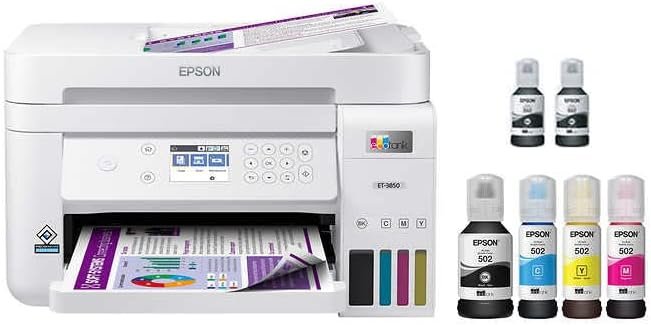
Epson EcoTank ET-3850 Review: High-Resolution Wireless Color Printer for Home and Office Use
Choosing the Right Printer: A Critical Decision for Productivity
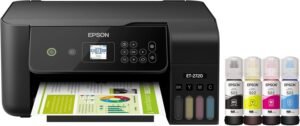
In today’s fast-paced environments, selecting the right printer is more than a convenience—it’s a strategic decision that directly impacts productivity, cost efficiency, and workflow reliability. Whether you’re managing a home office, running a small business, or requiring multifunctional capabilities for personal use, the printer you choose must align with your specific needs. Printers vary widely in technology, performance, and design, and understanding these differences is essential to avoid misalignment between expectations and outcomes. For instance, a high-resolution color printer may be ideal for creative professionals, while a monochrome laser printer might better suit a busy office. Similarly, connectivity options, media compatibility, and maintenance requirements can significantly affect long-term usability. This review focuses on the Epson EcoTank ET-3850, a wireless color all-in-one printer designed for users who demand versatility, quality, and ease of use. By analyzing its specifications, functionality, and user feedback, we aim to provide a comprehensive evaluation of its suitability for various environments and workflows.
Quick Overview
| Feature | Details |
|---|---|
| Printer Type | Inkjet All-in-One |
| Technology | EcoTank Cartridge-Free System |
| Functions | Print, Scan, Copy, Ethernet Connectivity |
| Print Resolution | 5760 x 1440 dpi (Color/Black & White) |
| Print Speed | 8.5 ppm (Color), 15.5 ppm (Monochrome) |
| Media Support | Glossy Photo Paper, Standard Paper (Up to 8.5 x 14 inches) |
| Connectivity | Wireless, USB 2.0, Ethernet |
| Duty Cycle | 1,000 pages per month (Recommended) |
| Ink System | EcoTank Tank Refill System |
| Warranty | Limited Warranty |
The Epson EcoTank ET-3850 combines high-resolution printing with multifunctional capabilities, making it a compelling option for users who require a reliable, all-in-one device. Its wireless connectivity and Ethernet port ensure flexibility in setup, while the EcoTank system reduces ongoing costs by eliminating frequent cartridge replacements. The printer’s ability to handle both standard and glossy photo paper expands its versatility, catering to a range of printing needs from documents to creative projects.

Print Quality and Resolution: Meeting High Standards
The Epson EcoTank ET-3850 delivers exceptional print quality through its advanced inkjet technology and high-resolution output. With a maximum print resolution of 5760 x 1440 dpi for both color and black-and-white prints, the printer ensures sharp, detailed output suitable for professional documents, photographs, and graphic designs. This resolution is achieved through Epson’s PrecisionCore print head technology, which optimizes ink placement for clarity and color accuracy. The printer’s ability to produce consistent color reproduction across multiple pages is particularly beneficial for users who frequently print marketing materials, reports, or photo albums. Additionally, the inclusion of a dedicated black ink bottle enhances text clarity and ensures high-contrast monochrome prints, which is critical for business correspondence and data sheets. For users prioritizing print quality, the ET-3850’s resolution capabilities align well with the demands of both home and small office environments.

Color Accuracy and Photo Printing
The ET-3850’s color printing capabilities are tailored for users who require accurate and vibrant color reproduction. Its four-color ink system—black, cyan, magenta, and yellow—supports a wide color gamut, allowing for rich, detailed images. The printer’s ability to handle glossy photo paper ensures that prints maintain their vibrancy and detail, even when exposed to light. This makes it an ideal choice for photographers, designers, and anyone needing to produce high-quality, visually appealing prints. The printer’s resolution and color accuracy also make it suitable for printing marketing materials, brochures, and other graphic-oriented content. However, users should note that while the ET-3850 excels in color output, its performance with specialized media such as metallic or textured papers may vary, as these are not explicitly mentioned in its supported media list.
Black-and-White Print Performance
For monochrome printing, the ET-3850 delivers crisp, high-contrast text through its dedicated black ink system. The 15.5 ppm monochrome print speed ensures that users can quickly produce documents without compromising on readability. The printer’s black ink is formulated to produce sharp, consistent text, making it suitable for business reports, invoices, and other professional documents. The high resolution of 5760 x 1440 dpi ensures that even small fonts and intricate details remain legible, which is crucial for users who frequently print detailed reports or spreadsheets. However, the printer’s monochrome output may not be as fast as laser printers for high-volume document printing, which could be a consideration for users with heavy text-based printing needs.
Connectivity and Compatibility: Flexibility Across Devices
The Epson EcoTank ET-3850 offers a range of connectivity options that enhance its versatility in different environments. Its wireless capabilities allow seamless integration with smartphones, tablets, and computers, enabling users to print from mobile devices without the need for physical cables. The inclusion of a USB 2.0 port and an Ethernet port further expands its compatibility, making it suitable for both home and office settings. The printer’s ability to connect to a variety of devices ensures that users can print on the go, which is particularly beneficial for remote workers or those who frequently share documents across multiple platforms. Additionally, the printer’s support for mobile printing through an app interface simplifies the printing process, allowing users to manage print jobs directly from their mobile devices. These connectivity features collectively contribute to a more flexible and user-friendly printing experience, catering to a wide range of user preferences and workflows.
Wireless Printing and Mobile Integration
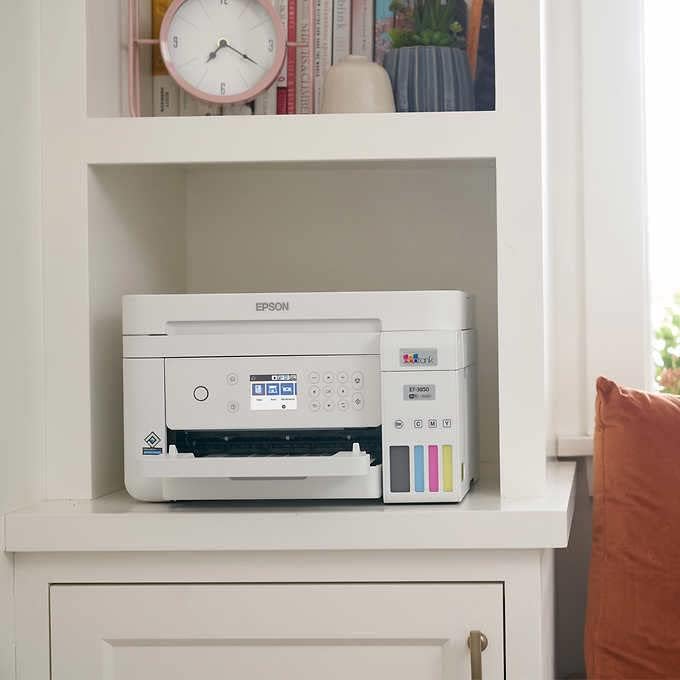
The ET-3850’s wireless printing capabilities are a significant advantage for users who prioritize convenience and mobility. By connecting to a Wi-Fi network, users can print documents, photos, and other files directly from their smartphones or tablets, eliminating the need for physical cables. The printer’s mobile app interface provides an intuitive way to manage print jobs, set print preferences, and monitor ink levels. This feature is particularly beneficial for users who frequently work remotely or need to print documents from multiple devices. However, the effectiveness of wireless printing depends on a stable internet connection, and users should ensure their network is secure to prevent potential security risks. Overall, the ET-3850’s wireless capabilities enhance its usability in dynamic environments where mobility and flexibility are key.
Ethernet and USB Connectivity
In addition to wireless connectivity, the ET-3850 supports Ethernet and USB 2.0 ports, making it compatible with a variety of devices and network configurations. The Ethernet port allows for direct network printing, which is ideal for office environments where multiple users need to access the printer simultaneously. The USB 2.0 port provides a reliable connection for users who prefer a wired setup or need to print from older devices that may not support wireless connectivity. These options ensure that the printer remains accessible in different scenarios, whether it’s a home office setup or a small business environment. The combination of wired and wireless connectivity options provides users with the flexibility to choose the most suitable method based on their specific needs and preferences.
Media Support and Versatility: Catering to Diverse Printing Needs
The Epson EcoTank ET-3850 is designed to handle a wide range of media types, making it suitable for both standard and specialized printing tasks. Its support for glossy photo paper, standard paper, and other common media types ensures that users can produce high-quality prints for various purposes. The printer’s maximum media size of 8.5 x 14 inches allows for larger prints, which is particularly useful for photographers and graphic designers. Additionally, the inclusion of an automatic document feeder (ADF) enables users to scan and copy multi-page documents efficiently. However, the printer’s media compatibility list does not explicitly mention specialized papers such as metallic or textured variants, which may limit its use for certain creative projects. For users who require a broader range of media support, the ET-3850 may need to be supplemented with additional accessories or alternative printing solutions.

Handling Different Paper Types and Sizes
The ET-3850’s ability to handle different paper types and sizes enhances its versatility in various printing scenarios. Its support for glossy photo paper ensures that users can produce vibrant, high-quality images, while its compatibility with standard paper makes it suitable for everyday documents. The printer’s maximum media size of 8.5 x 14 inches allows for larger prints, which is beneficial for users who need to create posters, banners, or other large-format content. However, the printer’s performance with thicker or specialty papers may vary, as these are not explicitly listed in its supported media types. Users who frequently print on unconventional paper types may need to test the printer’s compatibility with these materials to ensure optimal results.
Automatic Document Feeder and Scanning Capabilities
The inclusion of an automatic document feeder (ADF) in the ET-3850 significantly improves its efficiency for scanning and copying multi-page documents. The ADF can handle up to 250 sheets, allowing users to process large volumes of documents without manual intervention. This feature is particularly beneficial for small businesses or home offices that frequently need to scan and copy multiple pages. The printer’s flatbed scanner also provides flexibility for scanning individual pages or documents that may not fit into the ADF. However, the ADF’s capacity is limited to 250 sheets, which may not be sufficient for users with extremely high-volume scanning needs. Overall, the ADF and flatbed scanner combination offers a practical solution for document management, though users should consider their specific scanning requirements before purchasing.

Pros and Cons: Evaluating the Epson EcoTank ET-3850
Pros
- High Print Resolution: The 5760 x 1440 dpi resolution ensures sharp, detailed output for both color and black-and-white prints, making it suitable for professional and creative applications.
- Wireless Connectivity: The printer’s wireless capabilities allow seamless printing from smartphones, tablets, and computers, enhancing mobility and convenience.
- EcoTank Ink System: The tank refill system reduces long-term costs by eliminating the need for frequent cartridge replacements, making it cost-effective for regular use.
- Multifunctionality: With print, scan, and copy capabilities, the ET-3850 serves as a versatile all-in-one device, ideal for home offices and small businesses.
- Compatibility with Various Media: The printer supports glossy photo paper and standard paper sizes, expanding its usability for different printing needs.
- Automatic Duplex Printing: The built-in auto-duplex feature reduces paper usage and enhances document organization, which is beneficial for users who frequently print double-sided documents.
Cons
- Size and Weight: The printer’s dimensions and weight (14.8″D x 14.8″W x 9.4″H, 13.17 pounds) may make it challenging to fit in small spaces, limiting its suitability for compact environments.
- Limited Media Compatibility: While the printer supports standard and glossy paper, it does not explicitly mention compatibility with specialized media such as metallic or textured papers, which may restrict creative applications.
- Print Speed for Monochrome: Although the monochrome print speed is adequate for most users, it may not match the speed of laser printers for high-volume text-based printing tasks.
- Warranty Limitations: The limited warranty may not provide sufficient coverage for long-term reliability, which could be a concern for users seeking extended support.
- Setup Complexity: While the printer offers wireless connectivity, some users may find the initial setup and configuration of the mobile app interface to be somewhat complex, requiring additional troubleshooting.
Final Verdict: Who This Printer Is Best For (and Who Should Skip It)
The Epson EcoTank ET-3850 is best suited for users who require a versatile, high-quality all-in-one printer for home or small office environments. Its high-resolution printing capabilities, wireless connectivity, and EcoTank ink system make it an excellent choice for individuals or businesses that prioritize cost-effective, reliable printing with a range of functions. The printer’s ability to handle both standard and glossy photo paper expands its usability for creative projects, while the automatic document feeder and flatbed scanner enhance document management efficiency. However, the ET-3850 may not be the ideal choice for users with high-volume printing needs, particularly those requiring faster monochrome print speeds or specialized media compatibility. Additionally, its size and weight could be a drawback for users with limited space. For those seeking a balance between quality, versatility, and cost-efficiency, the ET-3850 remains a strong contender in the multifunction printer market.

Frequently Asked Questions (FAQs)
What are the print resolution capabilities of the Epson EcoTank ET-3850?
The Epson EcoTank ET-3850 offers a maximum print resolution of 5760 x 1440 dpi for both color and black-and-white prints, ensuring sharp, detailed output suitable for professional documents and photographs.
How does the wireless connectivity work on the ET-3850?
The ET-3850 supports wireless printing through a dedicated app interface, allowing users to print from smartphones, tablets, and computers without the need for physical cables, provided the printer is connected to a stable Wi-Fi network.
What types of media can the ET-3850 handle?
The printer supports standard paper and glossy photo paper up to 8.5 x 14 inches. It is compatible with a range of media types, though specialized papers like metallic or textured variants are not explicitly listed in its supported media list.
Is the ET-3850 suitable for high-volume printing?
While the ET-3850 is designed for regular use with a recommended duty cycle of 1,000 pages per month, its monochrome print speed may not match the efficiency of laser printers for high-volume text-based printing tasks.
What are the connectivity options for the ET-3850?
The printer offers wireless connectivity, a USB 2.0 port, and an Ethernet port, providing flexibility for users who prefer wired connections or need to integrate the printer into a networked environment.
How does the EcoTank ink system work on the ET-3850?
The EcoTank system uses refillable ink tanks rather than traditional cartridges, reducing long-term costs by eliminating the need for frequent cartridge replacements and allowing users to refill ink as needed.
Can the ET-3850 handle duplex printing?
Yes, the ET-3850 includes an automatic duplex printing feature, enabling users to print on both sides of the paper without manual intervention, which helps reduce paper usage and enhance document organization.
What is the warranty coverage for the ET-3850?
The printer comes with a limited warranty, which may not provide extended support for long-term reliability. Users should review the warranty terms for specific coverage details.