Epson EcoTank ET-2800 Review: Cartridge-Free Printing for Home and Office Use
The Importance of Choosing the Right Printer
Selecting the right printer is a critical decision for both home and office users, as it directly impacts productivity, cost efficiency, and output quality. With the rise of digital workflows, printers have evolved beyond basic document printing to include scanning, copying, and even mobile connectivity. The Epson EcoTank ET-2800 represents a significant advancement in inkjet technology, offering a cartridge-free design that reduces long-term costs and simplifies maintenance. For families and small businesses, the ET-2800’s combination of high-capacity ink tanks, wireless connectivity, and built-in scanning capabilities addresses common pain points like frequent ink refills and limited media compatibility. Its ability to handle both everyday printing tasks and occasional photo printing makes it a versatile option for environments where reliability and affordability are key priorities. Understanding the technical specifications, connectivity options, and operational limitations of the ET-2800 is essential for evaluating whether it aligns with specific printing needs in 2026.
Quick Overview
| Feature | Details |
|---|---|
| Printer Type | Inkjet (Cartridge-Free) |
| Printing Technology | EcoTank Refillable Ink System |
| Supported Functions | Print, Scan, Copy |
| Print Resolution | 5760 x 1440 DPI (Color), 5760 x 1440 DPI (Black) |
| Media Sizes | 4″ x 6″, 5″ x 7″, A6, Letter, Legal, A4, User-defined (2.2″ x 3.4″ to 8.5″ x 47.2″) |
| Connectivity | Wired (USB), Wireless (Wi-Fi) |
| Duty Cycle | 125 pages/month (Average) |
| Ink System | Dye-Based and Pigment-Based Inks |
| Warranty | 2-Year Limited Warranty |
The ET-2800’s refillable ink tanks and high-resolution printing capabilities make it well-suited for environments where frequent printing is required. Its support for a wide range of media types, including glossy photo paper and envelopes, enhances its versatility for both everyday and specialized tasks. The combination of wired and wireless connectivity ensures compatibility with modern devices, while the 2-year warranty provides basic peace of mind for users.

Cost-Effectiveness and Long-Term Savings
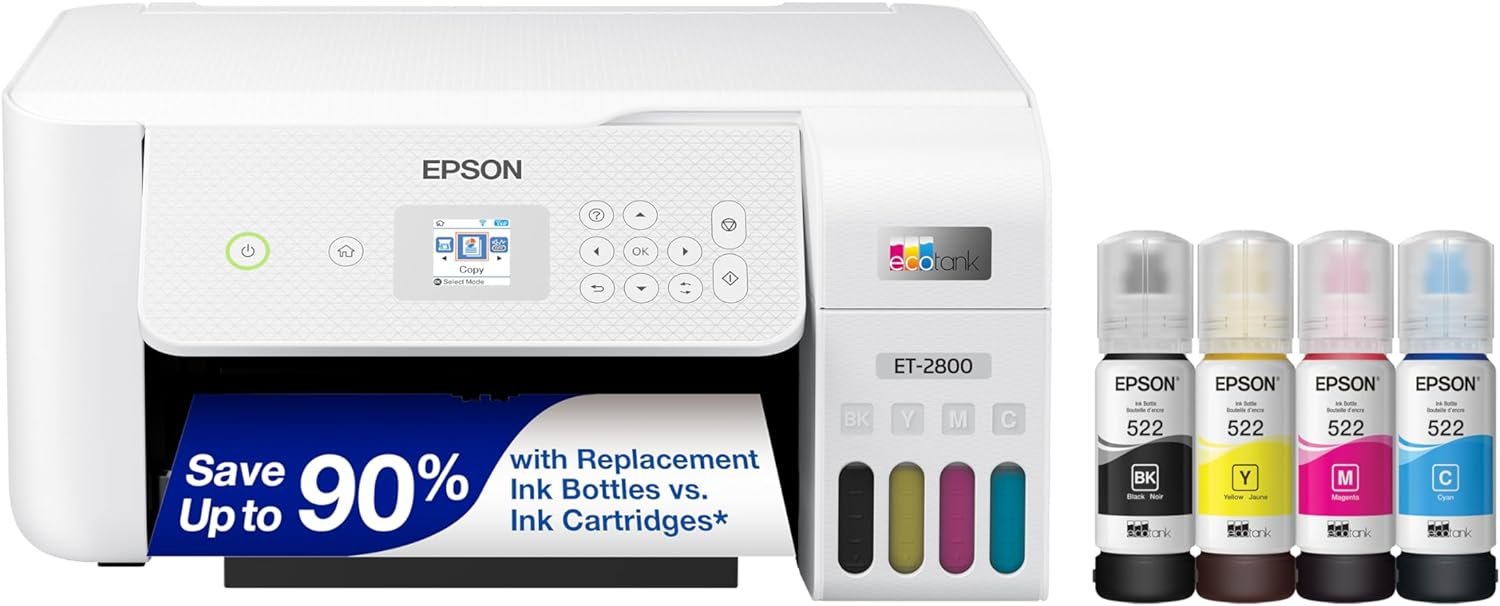
The ET-2800’s cartridge-free design is a standout feature, offering significant cost savings compared to traditional inkjet printers. By using high-capacity ink tanks, users can avoid the recurring expenses of individual ink cartridges. Epson’s EcoFit ink bottles are designed for easy refilling, reducing the need for frequent replacements. This system is particularly beneficial for households or small offices that print frequently, as it minimizes the risk of running out of ink during critical tasks. The printer’s ability to print up to 4,500 pages in black and 7,500 pages in color with a single set of ink bottles translates to long-term savings, especially when considering the high page yields associated with the EcoTank system. However, the initial cost of the printer and the need to purchase replacement ink bottles may make it less attractive for users with low print volumes.

Ink Tank Refillability and Maintenance
The ET-2800’s refillable ink tanks are engineered for convenience and sustainability, eliminating the need for disposable cartridges. Each ink bottle is designed to be easily filled using the EcoFit system, which ensures consistent ink flow and minimizes the risk of clogs. The printer’s maintenance requirements are relatively low, as the ink tanks are built to last for extended periods without needing frequent refills. However, users should be aware that the ink yield may decrease over time due to factors such as temperature variations and infrequent use. Regular refills are recommended to maintain optimal print quality and prevent issues related to dried-out ink channels.
Savings Compared to Traditional Cartridge Systems
According to Epson’s specifications, the ET-2800 can save up to 90% on ink costs compared to standard inkjet printers that use individual cartridges. This cost reduction is achieved by replacing multiple small cartridges with fewer, larger ink bottles that provide higher page yields. For users who print high volumes, such as families or small businesses, this can result in substantial long-term savings. The included ink bottles are sufficient for up to two years of regular use, depending on print frequency, further reducing the need for frequent replacements. However, the initial investment in the printer and the cost of replacement ink bottles may still make it a less cost-effective option for users with minimal printing needs.
Environmental and Sustainability Benefits
The ET-2800’s cartridge-free design also contributes to its environmental appeal by reducing the amount of plastic waste associated with disposable ink cartridges. By using refillable ink tanks, users can significantly decrease their carbon footprint and support sustainable printing practices. This aligns with growing consumer demand for eco-friendly technology, making the ET-2800 an attractive option for environmentally conscious users. However, the environmental impact of producing and distributing replacement ink bottles should also be considered, as it may offset some of the benefits of reduced cartridge waste.
Print Quality and Performance
The ET-2800’s print quality is a key factor in its appeal, particularly for users who require sharp text and vibrant color output. The printer utilizes Epson’s Micro Piezo Heat-Free Technology, which delivers precise ink droplet placement for high-resolution printing. This technology ensures that text remains crisp and legible, even when printed on standard paper. For color photos and graphics, the printer’s 5760 x 1440 DPI resolution provides excellent detail, making it suitable for both casual and professional use. The inclusion of both dye-based and pigment-based inks further enhances the printer’s versatility, as dye-based inks produce vibrant colors for photos, while pigment-based inks offer better durability for documents and text.

Text and Graphics Output
The ET-2800 excels in producing clear, legible text, which is essential for everyday printing tasks such as documents, letters, and forms. The high-resolution print heads ensure that even small fonts are printed without blurring or smudging, making the printer ideal for users who prioritize readability. For graphics and images, the printer’s color accuracy and tonal range are impressive, with the ability to render subtle gradients and sharp details. This makes the ET-2800 a strong contender for users who need to print both text and visual content with consistent quality.
Photo Printing Capabilities
When it comes to photo printing, the ET-2800’s performance is noteworthy, particularly for users who occasionally print high-quality images. The printer’s support for glossy photo paper and its ability to produce vibrant, long-lasting prints make it a viable option for home photographers. However, the printer’s photo printing capabilities are not as advanced as those of dedicated photo printers, which typically offer higher resolution and specialized color profiles. For users who require professional-grade photo printing, the ET-2800 may fall short, but it remains a solid choice for casual or occasional use.
Media Compatibility and Print Settings
The ET-2800 supports a wide range of media types, including standard paper, envelopes, and glossy photo paper, which enhances its versatility for different printing needs. The printer’s ability to adjust print settings for various media types ensures that users can achieve optimal results regardless of the paper they choose. However, the printer’s performance may vary depending on the specific media used, with some paper types potentially affecting print quality or drying times. Users should experiment with different media to find the best results for their specific tasks.
Connectivity and Usability
The ET-2800’s connectivity options and user interface are designed to simplify the printing experience, particularly for home users. The printer supports both wired (USB) and wireless (Wi-Fi) connections, allowing for flexibility in how users interact with the device. The built-in color display provides a user-friendly interface for navigating settings, adjusting print options, and accessing the Epson Smart Panel app. This app enables remote printing, scanning, and management of the printer’s functions, making it easier for users to integrate the device into their digital workflows. However, the printer’s reliance on an internet connection for certain features may pose challenges for users in areas with limited connectivity.

Wireless and Mobile Printing
The ET-2800’s wireless capabilities are a significant advantage, particularly for users who prefer to print from mobile devices or computers without the need for physical connections. The printer’s compatibility with Epson Connect™ allows for seamless integration with smartphones, tablets, and laptops, enabling users to print documents, photos, and scans from anywhere with an internet connection. The Epson Smart Panel app further enhances this functionality by providing a centralized location for managing print jobs, monitoring ink levels, and accessing additional features such as cloud printing. However, users should be aware that certain advanced features may require an active internet connection, which could be a limitation in environments with unreliable connectivity.
User Interface and Accessibility
The ET-2800’s color display and intuitive interface make it relatively easy to use, even for users who are not tech-savvy. The built-in display allows users to quickly access settings, adjust print quality, and navigate through the printer’s functions without needing to rely on external devices. The inclusion of a USB port provides an additional layer of convenience for users who prefer wired connections or need to print from older devices that lack wireless capabilities. However, the printer’s reliance on the Epson Smart Panel app for advanced features may be a drawback for users who prefer a more straightforward, button-based interface.
Integration with Smart Home Ecosystems
While the ET-2800 does not have direct integration with major smart home platforms like Alexa or Google Home, its support for Epson Connect™ and mobile printing capabilities allows for some level of smart home compatibility. Users can leverage the Epson Smart Panel app to control the printer remotely, but full integration with voice assistants is not available. This may be a limitation for users who rely on smart home automation for managing their devices, as the printer’s functionality is more limited in this regard compared to other modern printers.

Pros & Cons
Pros
- Refillable Ink Tanks: The EcoTank system eliminates the need for disposable cartridges, significantly reducing long-term printing costs.
- High-Resolution Printing: The 5760 x 1440 DPI resolution ensures sharp text and vibrant color output for both everyday and specialized printing tasks.
- Versatile Media Support: The printer’s compatibility with a wide range of media types, including glossy photo paper and envelopes, enhances its usability for different printing needs.
- Wireless and Mobile Printing: The support for Wi-Fi and the Epson Smart Panel app allows for convenient printing from mobile devices and computers without physical connections.
- Built-in Scanner and Copier: The high-resolution flatbed scanner and copy functions provide additional value for users who need to scan and copy documents.
- Sustainability Benefits: The cartridge-free design reduces plastic waste and supports eco-friendly printing practices.
- User-Friendly Interface: The color display and intuitive settings make the printer easy to operate, even for less tech-savvy users.
- 2-Year Warranty: The included warranty provides basic peace of mind for users, covering potential defects or malfunctions.
Cons
- Initial Cost and Replacement Ink: While the long-term cost is lower, the initial purchase price and the cost of replacement ink bottles may be higher than traditional inkjet printers.
- Media Size Limitations: The printer’s maximum media size is 8.5 x 14 inches, which may not be suitable for users who require larger paper formats.
- Dependence on Internet Connectivity: Certain features, such as cloud printing and remote management, require an active internet connection, which could be a limitation in areas with poor connectivity.
- Limited Smart Home Integration: The printer lacks direct integration with major smart home platforms, limiting its compatibility with voice assistants and automated systems.
- Refill Maintenance Requirements: Regular refills are necessary to maintain optimal print quality, which may be inconvenient for users who prefer a more hands-off approach.
- Potential Print Quality Variability: The print quality may vary depending on the media used and environmental factors such as temperature and humidity.
Final Verdict: Who This Printer Is Best For (and Who Should Skip It)
The Epson EcoTank ET-2800 is an excellent choice for home users and small businesses that prioritize cost-effectiveness, sustainability, and versatility in their printing needs. Its refillable ink tanks and high-resolution printing capabilities make it ideal for environments where frequent printing is required, and the built-in scanner and copier functions add significant value. The printer’s support for a wide range of media types and its wireless connectivity options further enhance its appeal for users who need a reliable and convenient printing solution. However, the ET-2800 may not be the best fit for users with very low print volumes, as the initial cost and the need for regular ink refills could outweigh the benefits. Additionally, users who require specialized photo printing or larger media sizes may find the ET-2800 lacking in certain aspects. For those seeking a balance between affordability, reliability, and multifunctionality, the ET-2800 remains a strong contender in the 2026 printer market.
Frequently Asked Questions (FAQs)
How does the Epson EcoTank ET-2800 save money compared to traditional inkjet printers?
The ET-2800 uses high-capacity ink tanks instead of individual cartridges, reducing long-term ink costs by up to 90%. This system allows users to print up to 4,500 pages in black and 7,500 pages in color with a single set of ink bottles, significantly lowering the frequency of replacements.
What types of media can the Epson EcoTank ET-2800 handle?
The printer supports a wide range of media types, including standard paper, envelopes, and glossy photo paper. It can print on paper sizes up to 8.5 x 14 inches, making it suitable for both everyday printing and occasional photo printing tasks.
Can the Epson EcoTank ET-2800 be used with wireless connectivity?
Yes, the ET-2800 supports both wired (USB) and wireless (Wi-Fi) connections. It also integrates with Epson Connect™ for seamless printing from mobile devices and computers, provided there is an active internet connection.
What is the print resolution of the Epson EcoTank ET-2800?
The printer offers a maximum print resolution of 5760 x 1440 DPI for color printing and 5760 x 1440 DPI for black printing. This high resolution ensures sharp text and vibrant color output for both documents and photos.
Does the Epson EcoTank ET-2800 have a built-in scanner and copier?
Yes, the ET-2800 includes a high-resolution flatbed scanner and a color display for easy document copying and navigation. These features make it a versatile all-in-one printer for home and small office use.
What is the warranty coverage for the Epson EcoTank ET-2800?
The printer comes with a 2-year limited warranty, which covers defects in materials and workmanship. This warranty provides basic peace of mind for users, though additional coverage may be available through Epson’s support services.
How easy is it to refill the ink tanks on the Epson EcoTank ET-2800?
The printer’s EcoFit system is designed for easy refilling, with ink bottles that are compatible with the printer’s refillable tanks. Users can refill the tanks without the need for specialized tools, making maintenance straightforward and convenient.
Is the Epson EcoTank ET-2800 suitable for photo printing?
The ET-2800 can produce high-quality photo prints, especially when using glossy photo paper. While it may not match the capabilities of dedicated photo printers, it is a solid choice for occasional photo printing and casual use.