Betife M832 Thermal Portable Printer Review: Best for On-the-Go Printing
The Importance of Choosing the Right Printer
In today’s fast-paced world, the ability to print documents quickly and reliably is essential for both personal and professional use. Whether you’re managing office tasks, handling fieldwork, or needing to print receipts on the go, the right printer can significantly impact productivity. Printers come in various types—inkjet, laser, thermal, and more—each designed for specific use cases. For instance, thermal printers are ideal for high-volume, low-cost printing of labels, receipts, and documents, while laser printers excel in office environments requiring high-quality color output. The decision between these technologies often hinges on factors like print speed, media compatibility, connectivity options, and portability. For users who need to print in remote locations or travel frequently, a compact, inkless thermal printer like the Betife M832 offers a compelling solution. This review evaluates the Betife M832’s capabilities in terms of print quality, connectivity, media versatility, and durability, helping buyers determine if it aligns with their specific needs. By focusing on technical specifications and industry benchmarks, this analysis provides a data-driven perspective on the printer’s strengths and limitations for 2026.
Quick Overview
| Feature | Details |
|---|---|
| Printer Type | Thermal Portable Printer |
| Printing Technology | Thermal |
| Print Resolution | 300 dpi (Black & White) |
| Print Speed | 3 ppm (Monochrome) |
| Media Sizes | 8.5″ x 11″ (Letter), A4, 4.33″, 3.14″, 2.08″ |
| Connectivity | Bluetooth, USB |
| Battery Life | 2600mAh (300 pages per charge) |
| Weight | 1.5 pounds |
| Dimensions | 12.2″ x 2.66″ x 1.6″ |
| Ink System | Inkless (Thermal Paper) |
| Warranty | Limited Warranty |
| Included Components | Printer, Quick Start Guide, Thermal Paper Roll, Type-C Cable, Soft Pouch |
The Betife M832’s design prioritizes portability and ease of use, making it suitable for travelers, field workers, and small businesses. Its thermal printing technology eliminates the need for ink or toner, reducing long-term costs. The printer’s compatibility with Bluetooth and USB ensures seamless integration with smartphones, tablets, and laptops. While its 3 ppm print speed is adequate for low-volume tasks, it may not meet the demands of high-volume office environments. The 300-page battery life and compact size make it ideal for on-the-go printing, but users should consider the limitations of thermal paper for long-term document storage.

Portability and Design
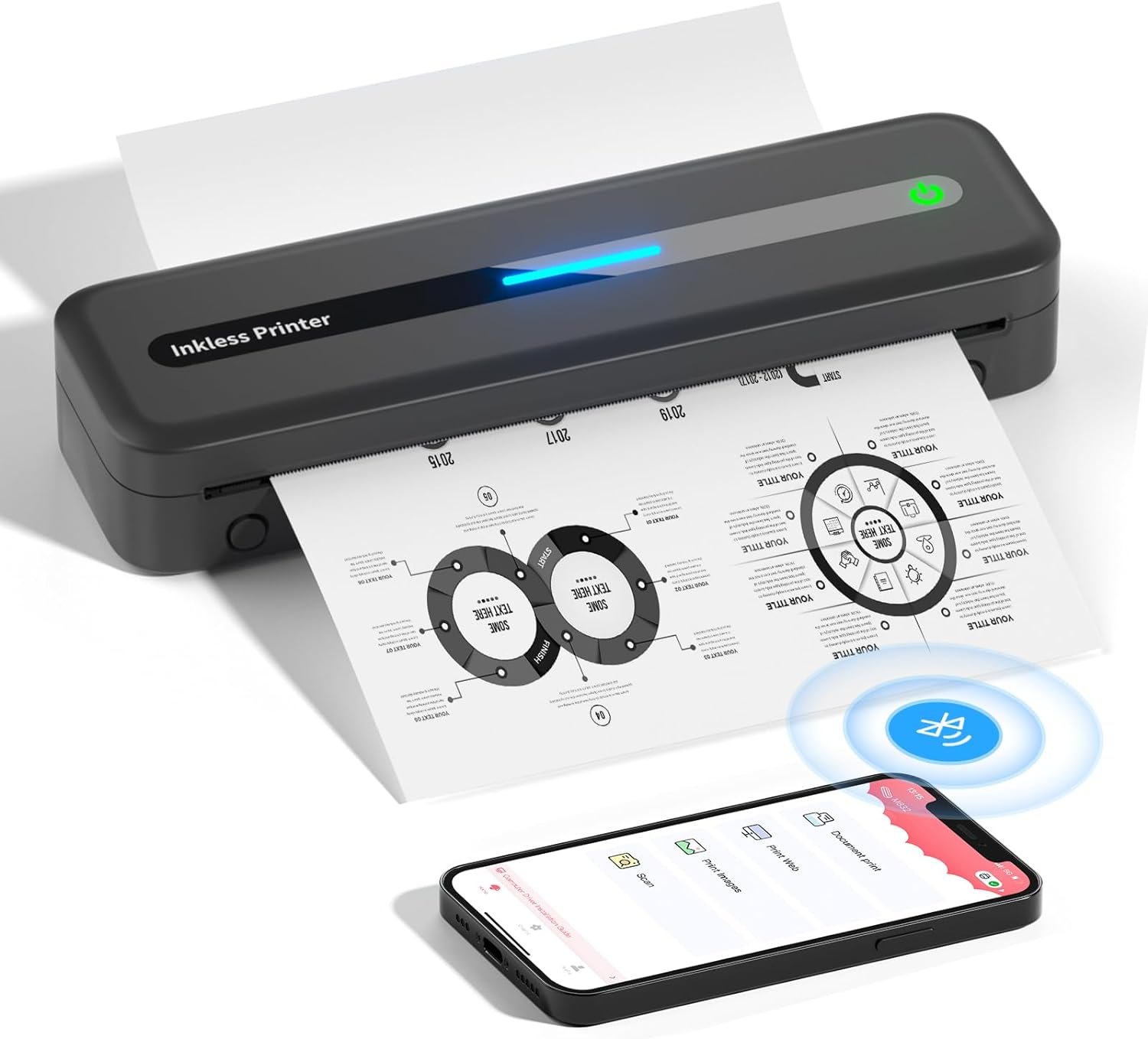
The Betife M832’s compact design and lightweight build make it an attractive option for users who prioritize portability. Weighing just 1.5 pounds, the printer is easy to carry in a backpack, purse, or briefcase, ensuring it can be used in various environments. Its dimensions of 12.2″ x 2.66″ x 1.6″ allow it to fit in tight spaces without compromising functionality. The integrated paper bin accommodates 50 sheets, reducing the need for frequent refills during extended use. The inclusion of a 2600mAh battery provides up to 300 pages of printing on a single charge, which is sufficient for short trips or remote work scenarios. However, users should note that the battery life may diminish with continuous use or in extreme temperatures. The printer’s minimalist black finish and streamlined design contribute to its durability, though it lacks robust protective features for harsh outdoor conditions. Overall, the M832’s portability and battery efficiency make it a strong contender for users who require a lightweight, mobile printing solution.

Compact Design for Travel and Field Use
The M832’s compact size is a key advantage for travelers and field workers who need to print documents without carrying bulky equipment. Its dimensions allow it to fit in standard backpack compartments or laptop bags, making it ideal for on-the-go use. The lightweight design reduces strain during transport, while the included soft pouch provides additional protection against scratches and minor impacts. For users who frequently move between locations, the printer’s portability ensures they can maintain productivity without access to a traditional desktop printer. However, the lack of a built-in power adapter means users must rely on a Type-C cable or portable power bank for charging, which may be inconvenient for extended fieldwork.
Battery Life and Power Efficiency
The M832’s 2600mAh battery offers up to 300 pages of printing on a single charge, which is adequate for short trips or low-volume tasks. This battery life is particularly beneficial for users who need to print documents in locations without immediate access to power sources. The printer’s power efficiency is further enhanced by its thermal printing technology, which requires less energy than inkjet or laser printers. However, the battery life may be affected by continuous use or exposure to extreme temperatures, which could limit its effectiveness in high-volume or outdoor environments. For users who require extended operation, it is recommended to carry a portable power bank to ensure uninterrupted printing.
Durability and Environmental Considerations
While the M832 is designed for portability, its durability is optimized for moderate use rather than heavy-duty industrial applications. The printer’s build quality is sufficient for office environments or occasional field use, but it may not withstand prolonged exposure to harsh conditions such as extreme heat, moisture, or physical shocks. The use of thermal paper, while cost-effective, also has limitations in terms of longevity and environmental impact. Users should be aware that thermal paper can degrade over time when exposed to light, heat, or humidity, which may affect the readability of printed documents. For applications requiring long-term document storage, alternative media types or additional protective measures may be necessary.
Print Quality and Resolution
The Betife M832’s thermal printing technology delivers sharp, high-contrast black-and-white prints with a resolution of 300 dpi. This level of detail is suitable for text documents, simple graphics, and basic images, though it may not meet the demands of professional photography or intricate design work. The printer’s ability to produce clear, legible text is particularly advantageous for business cards, receipts, and labels, where readability is critical. However, the absence of color printing capabilities restricts its use to monochrome applications. Users should also consider that thermal paper may exhibit slight fading over time, which could affect the longevity of printed materials. For applications requiring archival quality, the M832 may not be the optimal choice, but it remains a reliable option for everyday printing needs.

Sharp Text and Clear Graphics
The M832’s 300 dpi resolution ensures that text documents and simple graphics are printed with clarity and precision. This makes it well-suited for tasks such as printing contracts, invoices, and forms where legibility is essential. The printer’s thermal technology produces consistent inkless prints, eliminating the need for frequent ink refills or toner replacements. However, the lack of color printing capabilities means it is not ideal for creative or marketing materials that require vibrant visuals. Users who prioritize text clarity and basic graphics will find the M832 to be a dependable option, though those needing high-quality color output may need to consider alternative printers.
Limitations of Thermal Paper
While thermal paper is cost-effective and easy to use, it has certain limitations that users should be aware of. One notable drawback is its susceptibility to fading when exposed to heat, light, or humidity, which can reduce the readability of printed documents over time. Additionally, thermal paper may not be suitable for long-term archival storage, as it can degrade more quickly than traditional paper or synthetic media. For users who require documents to be stored for extended periods, the M832’s reliance on thermal paper may present a challenge. However, for short-term use cases such as receipts, labels, or temporary records, the printer’s performance remains reliable and efficient.
Connectivity and Compatibility
The Betife M832’s Bluetooth and USB connectivity options provide flexibility in how users can interact with the printer. The Bluetooth feature allows for wireless printing from smartphones, tablets, and laptops, eliminating the need for physical cables. However, it is important to note that the printer requires the Betife Phomemo app to establish a Bluetooth connection, as direct pairing through a device’s Bluetooth settings is not supported. This dependency on the app may be a minor inconvenience for users who prefer a more straightforward setup process. The USB port offers an alternative for users who prefer wired connections, ensuring compatibility with a wide range of devices. Overall, the M832’s connectivity options are practical for most users, though the app requirement may affect the ease of initial setup.

Bluetooth Pairing and App Dependency
To use the M832’s Bluetooth functionality, users must download and install the Betife Phomemo app, which acts as a bridge between the printer and mobile devices. This requirement ensures a stable and secure connection, but it may add an extra step to the setup process. The app is available for both iOS and Android platforms, making it accessible to a broad range of users. While the app itself is straightforward to use, some users may find the pairing process slightly more involved compared to printers that support direct Bluetooth pairing. For those who prioritize simplicity and minimal setup, the app dependency could be a consideration, though it is generally manageable for most users.
USB Compatibility and Wired Printing
In addition to Bluetooth, the M832 offers a USB port for wired printing, which is useful for users who prefer a direct connection or need to print from computers. This option is particularly beneficial for users who may not have access to Bluetooth or prefer the reliability of a wired connection. The USB port also allows for faster data transfer rates compared to Bluetooth, which can be advantageous when printing large documents. However, the lack of additional USB ports means users must manage their connectivity carefully if they need to connect multiple devices. Overall, the combination of Bluetooth and USB options provides a versatile solution for different printing scenarios.
Media Compatibility and Versatility
The Betife M832’s support for multiple paper sizes and thermal paper types makes it a versatile option for various printing needs. The printer accommodates 5 thermal paper sizes, including US Letter (8.5″ x 11″), A4, 4.33″, 3.14″, and 2.08″ widths, allowing users to choose the most appropriate size for their task. This flexibility is particularly useful for users who need to print different document types, such as receipts, labels, and forms. The printer’s ability to handle both roll and single-sheet thermal paper further enhances its adaptability, though users should be aware of the limitations of thermal paper in terms of durability and environmental impact. For applications requiring long-term document storage, the M832 may not be the optimal choice, but it remains a reliable option for everyday printing.

Support for Multiple Paper Sizes
The M832’s compatibility with 5 thermal paper sizes ensures that users can print documents in various formats without needing to switch between different printers. This versatility is especially beneficial for small businesses or individuals who handle a range of document types, from standard letters to smaller labels or receipts. The printer’s integrated paper bin accommodates up to 50 sheets, reducing the frequency of refills during extended use. However, users should be mindful of the paper size limitations, as the printer does not support non-thermal paper types. This restriction means that users must ensure they have the correct paper type on hand for each printing task.
Thermal Paper Types and Usage Scenarios
The M832’s reliance on thermal paper offers both advantages and limitations. Thermal paper is cost-effective and easy to use, making it ideal for short-term printing tasks such as receipts, labels, and forms. However, its susceptibility to fading and degradation over time means it is not suitable for long-term document storage. Users should also consider that thermal paper may not be compatible with all printers, as it requires specific thermal printing technology. For applications where document longevity is a priority, the M832 may not be the best option, but its performance for immediate use cases remains reliable and efficient.

Pros & Cons
Pros
- Inkless Thermal Printing: Eliminates the need for ink or toner, reducing long-term costs and maintenance.
- Portability and Lightweight Design: Weighing 1.5 pounds, the printer is easy to carry and suitable for travel and field work.
- Versatile Paper Compatibility: Supports 5 thermal paper sizes, including US Letter and A4, for diverse printing needs.
- Bluetooth and USB Connectivity: Offers flexible printing options for smartphones, tablets, and computers.
- Long Battery Life: 2600mAh battery provides up to 300 pages of printing on a single charge.
- Compact and User-Friendly: Streamlined design and included quick start guide simplify setup and operation.
- Suitable for Low-Volume Use: Ideal for small businesses, travelers, and users with minimal printing requirements.
- Durable Build Quality: Constructed to withstand moderate use in office and field environments.
Cons
- Limited Media Types: Only supports thermal paper, which may not be suitable for long-term document storage.
- No Color Printing: Restricts use to monochrome applications, limiting creative or marketing use.
- App Dependency for Bluetooth: Requires the Betife Phomemo app for pairing, adding an extra setup step.
- Single-Sided Printing: Does not support duplex printing, increasing paper usage for multi-page documents.
- Moderate Print Speed: 3 ppm may not meet the demands of high-volume office environments.
- No Additional USB Ports: Limited connectivity options for users with multiple devices.
- Environmental Sensitivity: Thermal paper may degrade over time when exposed to heat or humidity.
- No Warranty Details Provided: Limited warranty information may affect long-term support and service.
Final Verdict: Who This Printer Is Best For (and Who Should Skip It)
The Betife M832 thermal portable printer is best suited for users who prioritize portability, low-cost printing, and simplicity. Its inkless design, compact size, and Bluetooth connectivity make it an excellent choice for travelers, field workers, and small businesses with minimal printing needs. The printer’s ability to handle multiple paper sizes and its long battery life further enhance its appeal for on-the-go use. However, it is not ideal for users requiring high-volume printing, color output, or long-term document storage. The reliance on thermal paper and the lack of color printing capabilities limit its versatility in professional or creative environments. For those seeking a reliable, lightweight printer for occasional use, the M832 offers a practical solution. Conversely, users with demanding printing requirements or a need for archival-quality documents should consider alternative printers that support more robust media types and advanced printing technologies.

Frequently Asked Questions (FAQs)
What is the Betife M832 thermal printer best suited for?
The Betife M832 is ideal for users who need a lightweight, portable printer for on-the-go printing. It excels in scenarios such as travel, field work, and small business environments where low-volume, monochrome printing is required. Its inkless thermal technology and battery-powered design make it suitable for printing receipts, labels, and forms.
Does the Betife M832 support color printing?
No, the Betife M832 is a monochrome thermal printer and does not support color printing. It is designed for high-contrast black-and-white prints, making it suitable for text documents, forms, and labels but not for creative or marketing materials requiring color.
How long does the Betife M832’s battery last?
The M832’s 2600mAh battery provides up to 300 pages of printing on a single charge. This is sufficient for short trips or low-volume tasks, though users should carry a portable power bank for extended use or fieldwork.
Can the Betife M832 print on non-thermal paper?
No, the Betife M832 is specifically designed for thermal paper. It does not support non-thermal paper types, which means users must ensure they have the correct media on hand for each printing task.
What connectivity options are available for the Betife M832?
The M832 offers both Bluetooth and USB connectivity. Bluetooth requires the Betife Phomemo app for pairing, while USB provides a wired connection for compatibility with computers and other devices.
Is the Betife M832 suitable for high-volume printing?
The M832 is not ideal for high-volume printing due to its 3 ppm print speed and reliance on thermal paper. It is better suited for low-volume, occasional use rather than continuous, high-demand office environments.
What are the supported paper sizes for the Betife M832?
The M832 supports 5 thermal paper sizes: US Letter (8.5″ x 11″), A4, 4.33″, 3.14″, and 2.08″ widths. This versatility allows users to print documents in various formats without needing multiple printers.
What is the warranty coverage for the Betife M832?
The Betife M832 comes with a limited warranty, though specific details are not provided in the product documentation. Users should contact the manufacturer for warranty information and support.