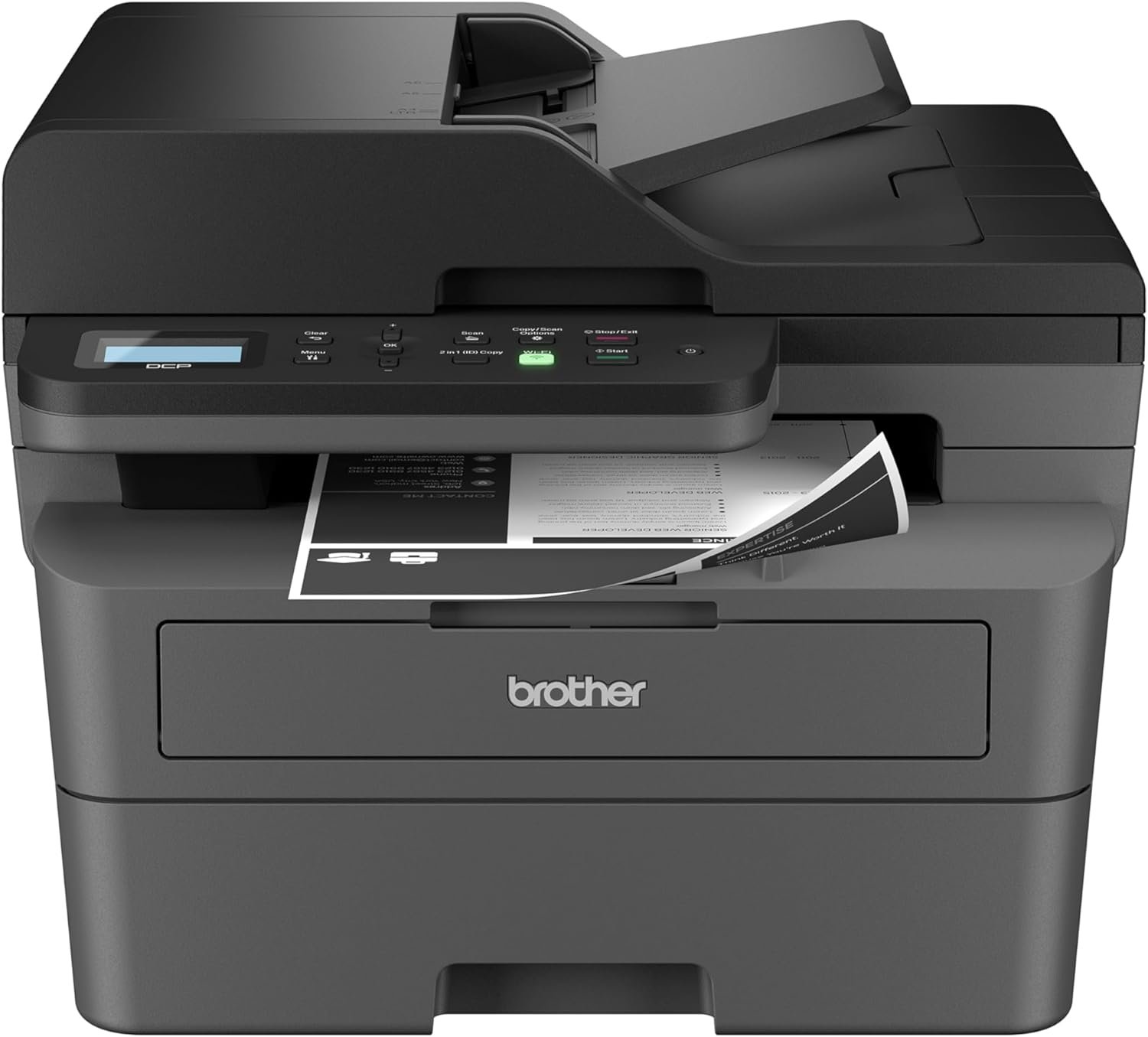
Brother DCP-L2640DW Monochrome Laser Printer Review 2026
The Importance of Choosing the Right Printer
In today’s fast-paced business and home environments, selecting the right printer can significantly impact productivity and efficiency. Whether managing a small office, handling academic projects, or managing personal documents, the right printer must balance speed, quality, and reliability. Monochrome laser printers like the Brother DCP-L2640DW are particularly suited for high-volume black-and-white printing, offering a cost-effective solution for businesses and individuals with frequent printing needs. These printers combine print, scan, and copy functions into a single device, reducing workspace clutter and streamlining workflows. However, the decision-making process involves evaluating factors such as print speed, media compatibility, connectivity options, and long-term maintenance costs. Understanding these specifications ensures that users select a printer that aligns with their specific workload demands and output expectations. This review provides an in-depth analysis of the Brother DCP-L2640DW, focusing on its technical capabilities, operational efficiency, and suitability for various usage scenarios. By examining its performance metrics, connectivity features, and design elements, this evaluation helps users determine whether this printer is the optimal choice for their needs.
Quick Overview
| Feature | Details |
|---|---|
| Printer Type | Monochrome Laser Printer |
| Supported Functions | Print, Scan, Copy |
| Print Resolution | 1200 x 1200 Dots Per Inch |
| Print Speed | Up to 36 pages per minute (black) |
| Media Sizes | Legal (8.5 x 14 inches), Envelopes, Paper (plain) |
| Connectivity Options | Dual-band wireless (2.4GHz / 5GHz), Ethernet, USB 2.0 |
| Auto Document Feeder | 50-page capacity |
| Paper Tray Capacity | 250-sheet maximum |
| Duplex Printing | Automatic |
| Eco-Friendly Features | Toner Save Mode, Automatic Duplex |
| Toner System | Brother Genuine TN830/830XL toner cartridges |
| Warranty | Limited warranty |
The Brother DCP-L2640DW is designed for small businesses and home offices requiring efficient monochrome printing. Its combination of high-speed printing, versatile connectivity, and eco-friendly features makes it a practical choice for users prioritizing productivity and sustainability. The compact design and multifunctionality simplify workflow management, while the included toner subscription service ensures continuous operation without supply interruptions.

Print Speed and Efficiency
The Brother DCP-L2640DW excels in delivering rapid black-and-white prints, with a maximum speed of 36 pages per minute (ppm) for single-sided printing. This performance aligns with industry benchmarks for monochrome laser printers, making it suitable for environments with moderate to high-volume printing needs. The printer’s ability to maintain consistent speed across different media types, including legal-sized paper and envelopes, ensures reliability in varied workloads. Additionally, its automatic duplex printing feature reduces paper consumption by up to 50%, contributing to both cost savings and environmental sustainability. For users requiring frequent document production, the printer’s efficiency in handling large print jobs without significant delays is a notable advantage. However, the default print speed may vary depending on the complexity of the document and the selected print settings, which could impact throughput for highly formatted or image-heavy pages.

High-Speed Printing Capabilities
The printer’s 36 ppm print speed is optimized for standard text documents, making it ideal for office environments where quick turnaround is essential. This performance is achieved through a high-speed laser print engine and a well-optimized paper handling system. The 250-sheet paper tray minimizes refilling frequency, allowing users to focus on tasks rather than maintenance. For users requiring even faster output, the printer’s ability to handle multi-page jobs efficiently is a key strength. However, the speed may decrease slightly when printing complex layouts or high-resolution graphics, as the printer prioritizes print quality over raw speed in such scenarios.
Document Handling and Duplex Printing
The 50-page auto document feeder (ADF) streamlines multi-page scanning and copying tasks, reducing manual intervention and improving workflow efficiency. This feature is particularly beneficial for users processing large volumes of documents, such as accountants, legal professionals, or administrative staff. The automatic duplex printing function further enhances productivity by printing on both sides of the paper, reducing paper waste and lowering long-term costs. The printer’s ability to handle a wide range of media types, including envelopes and legal-sized paper, ensures flexibility in document management. However, users should note that duplex printing may take slightly longer than single-sided printing, which could affect throughput for time-sensitive tasks.
Connectivity Options and Network Integration
The Brother DCP-L2640DW offers a range of connectivity options, including dual-band wireless (2.4GHz and 5GHz), Ethernet, and USB 2.0, ensuring compatibility with various devices and network environments. This versatility allows users to connect the printer to laptops, desktops, tablets, and smartphones, enabling seamless document sharing and remote printing. The built-in wireless capabilities are particularly advantageous for small businesses with multiple users accessing the printer from different locations. Additionally, the Brother Mobile Connect app enhances usability by allowing users to print, scan, and manage the printer from mobile devices, providing greater flexibility in managing print tasks. However, the printer’s reliance on a stable network connection for wireless operations may pose challenges in environments with limited or inconsistent Wi-Fi coverage.

Wireless and Ethernet Connectivity
The dual-band wireless feature supports both 2.4GHz and 5GHz frequencies, ensuring compatibility with a wide range of devices and minimizing interference from other network traffic. This is particularly beneficial in environments with multiple wireless devices, as it reduces the likelihood of connectivity issues. The Ethernet port provides a reliable wired connection for users prioritizing stability and speed, especially in larger office settings. While the USB 2.0 port is useful for direct printing from a single computer, it lacks the flexibility of wireless connectivity for multi-device environments. Users should consider their network infrastructure and device requirements when selecting the most suitable connectivity option.
Mobile App Integration
The Brother Mobile Connect app enhances the printer’s usability by enabling users to manage print jobs, scan documents, and monitor toner levels from their mobile devices. This feature is particularly valuable for remote workers or users who frequently need to print or scan documents on the go. The app also provides notifications for toner levels and maintenance tasks, ensuring that users remain informed about the printer’s status without needing to access the physical device. However, the app’s functionality is limited to basic management tasks, and advanced settings may require direct access to the printer’s control panel. Users should also note that the app requires a stable internet connection to function optimally.
Media Compatibility and Output Quality
The Brother DCP-L2640DW is designed to handle a variety of media types, including standard paper, envelopes, and legal-sized sheets, ensuring flexibility in document production. The printer’s ability to produce sharp, consistent text and graphics makes it suitable for both everyday office tasks and professional document creation. The 1200 x 1200 dots per inch (dpi) print resolution ensures high-quality output, even for detailed text and images. However, the printer’s output quality may vary slightly depending on the type of paper used, with thicker or textured media potentially affecting print clarity. For users requiring consistent high-quality output, the printer’s reliability in producing clear, legible text is a significant advantage.

Supported Media Types and Paper Handling
The printer supports a range of media sizes, including standard letter-sized paper (8.5 x 11 inches) and legal-sized paper (8.5 x 14 inches), as well as envelopes. This versatility allows users to print on different paper types without the need for additional accessories. The 250-sheet paper tray is designed for use with 20-lb. paper, which is standard for most office environments. However, users should be aware that the printer’s performance may be affected when using heavier or specialty media, as these may require adjustments to the paper feed mechanism. The inclusion of a dedicated envelope tray further enhances the printer’s adaptability to different printing needs.
Print Resolution and Text Clarity
With a print resolution of 1200 x 1200 dpi, the Brother DCP-L2640DW produces sharp, high-quality text and graphics, making it suitable for both everyday printing and professional document creation. The printer’s ability to maintain consistent resolution across different media types ensures that printed documents remain legible and visually appealing. However, the printer’s performance with high-resolution images or complex graphics may be limited, as it is optimized for text-based documents. Users requiring high-quality photo printing or detailed graphics should consider alternative printers with higher-resolution capabilities. The printer’s reliability in producing clear, crisp text is a key strength, particularly for office environments where readability is crucial.

Pros & Cons
Pros
- High-Speed Printing: The printer’s 36 ppm speed is ideal for environments requiring rapid document production, such as offices and small businesses.
- Versatile Connectivity: Dual-band wireless, Ethernet, and USB 2.0 options ensure compatibility with a wide range of devices and network environments.
- Eco-Friendly Features: Toner Save Mode and automatic duplex printing reduce toner consumption and paper waste, supporting sustainability efforts.
- User-Friendly Design: The compact footprint and multifunctionality simplify workspace management, while the Brother Mobile Connect app enhances mobility and convenience.
- Reliable Document Handling: The 50-page auto document feeder and 250-sheet paper tray streamline multi-page scanning and copying tasks, improving workflow efficiency.
- Cost-Effective Toner Management: The included toner subscription service ensures continuous operation without supply interruptions, reducing the risk of downtime.
- High-Quality Text Output: The 1200 x 1200 dpi resolution ensures sharp, legible text, making it suitable for professional and everyday printing needs.
Cons
- Limited Color Printing: As a monochrome printer, it is unsuitable for users requiring color output, such as graphic designers or marketing professionals.
- Subscription Dependency: The toner subscription service requires enrollment in a monthly plan, which may be a drawback for users preferring standalone toner cartridges.
- Paper Tray Limitations: The 250-sheet paper tray may not be sufficient for high-volume printing environments with frequent paper refills.
- Connectivity Constraints: The reliance on a stable network connection for wireless operations may pose challenges in environments with limited Wi-Fi coverage.
- Duplex Printing Trade-Offs: While automatic duplex printing reduces paper waste, it may slightly increase print time compared to single-sided printing.
- Media Compatibility Variability: The printer’s performance may vary when using non-standard media types, such as thick or textured paper, requiring adjustments to the paper feed mechanism.
Final Verdict: Who This Printer Is Best For (and Who Should Skip It)
The Brother DCP-L2640DW is an excellent choice for small businesses and home offices requiring efficient monochrome printing, scanning, and copying. Its high-speed printing capabilities, versatile connectivity options, and eco-friendly features make it a practical solution for environments prioritizing productivity and sustainability. The printer’s compact design and multifunctionality simplify workspace management, while the included toner subscription service ensures continuous operation without supply interruptions. However, this printer is not ideal for users requiring color output, as it lacks color printing capabilities. Additionally, users with high-volume printing needs may find the 250-sheet paper tray insufficient, necessitating frequent refills. The reliance on a stable network connection for wireless operations may also be a drawback in environments with limited Wi-Fi coverage. Overall, the Brother DCP-L2640DW is best suited for users prioritizing speed, efficiency, and cost-effective monochrome printing, while those requiring color output or higher-volume printing should consider alternative solutions.
Frequently Asked Questions (FAQs)
What is the maximum print speed of the Brother DCP-L2640DW?
The Brother DCP-L2640DW can print up to 36 pages per minute (ppm) for single-sided black-and-white printing. This speed is optimized for standard text documents and is suitable for environments with moderate to high-volume printing needs.
Does the Brother DCP-L2640DW support color printing?
No, the Brother DCP-L2640DW is a monochrome laser printer and does not support color printing. It is designed for black-and-white output, making it ideal for text-based documents and professional-grade black-and-white printing.
What connectivity options are available for the Brother DCP-L2640DW?
The Brother DCP-L2640DW offers dual-band wireless (2.4GHz / 5GHz), Ethernet, and USB 2.0 connectivity. These options ensure compatibility with a wide range of devices, including laptops, desktops, tablets, and smartphones, allowing seamless integration into various network environments.
Can the Brother DCP-L2640DW print on legal-sized paper?
Yes, the Brother DCP-L2640DW supports legal-sized paper (8.5 x 14 inches) in addition to standard letter-sized paper. This versatility allows users to handle different document formats without the need for additional accessories.
What are the eco-friendly features of the Brother DCP-L2640DW?
The Brother DCP-L2640DW includes Toner Save Mode to extend cartridge life and automatic duplex printing to reduce paper waste. These features contribute to energy efficiency and sustainability, aligning with eco-friendly printing practices.
Is the Brother DCP-L2640DW suitable for small businesses?
Yes, the Brother DCP-L2640DW is well-suited for small businesses due to its high-speed printing, multifunctionality, and compact design. It streamlines workflow management by combining print, scan, and copy functions into a single device, making it an efficient solution for office environments.
What is the paper tray capacity of the Brother DCP-L2640DW?
The Brother DCP-L2640DW features a 250-sheet paper tray, which is designed for use with 20-lb. paper. This capacity reduces the frequency of paper refills, making it suitable for environments with regular printing needs.
How does the Brother Mobile Connect app enhance printer usability?
The Brother Mobile Connect app allows users to print, scan, and manage the printer from their mobile devices. It also provides notifications for toner levels and maintenance tasks, enhancing convenience and mobility for users who need to manage print jobs on the go.