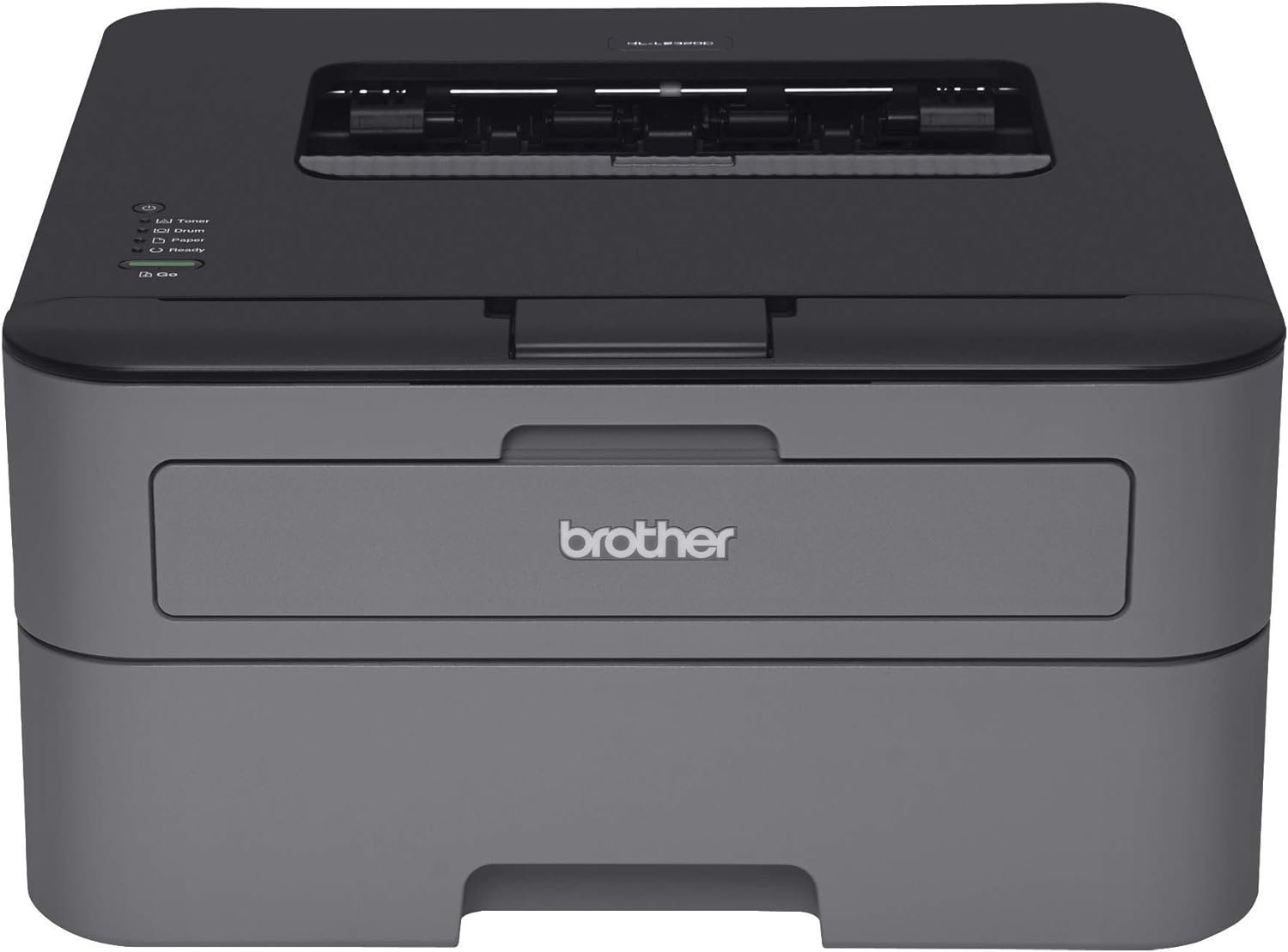
Brother HL-L2300D Monochrome Laser Printer Review: Performance and Features
The Importance of Selecting the Right Printer for Your Workflow
In today’s fast-paced business and home office environments, the choice of a printer can significantly impact productivity and operational efficiency. Whether you’re managing a small team, running a home office, or handling large-scale print jobs, the right printer must balance speed, reliability, and cost-effectiveness. Monochrome laser printers, such as the Brother HL-L2300D, are particularly suited for environments requiring high-volume black-and-white printing with minimal color usage. These printers are engineered to handle demanding workloads, from daily reports and invoices to bulk document reproduction. Their laser technology ensures sharp text output, while features like duplex printing and automatic paper handling reduce manual intervention and conserve resources. However, selecting the optimal printer involves evaluating factors such as print speed, media compatibility, connectivity options, and long-term maintenance costs. Understanding these elements allows users to align their printing needs with the capabilities of a specific model, ensuring that the printer supports both current and future workflow demands without compromising performance or reliability.
Quick Overview
| Feature | Details |
|---|---|
| Printer Type | Monochrome Laser Printer |
| Connectivity | USB 2.0 Interface |
| Print Technology | Laser |
| Print Speed | Up to 27 pages per minute (ppm) |
| Duplex Printing | Automatic Two-Sided |
| Paper Tray Capacity | 250-sheet input tray |
| Output Capacity | 100-sheet output tray |
| Media Compatibility | Plain paper up to 8.5 x 14 inches |
| Duty Cycle | 10,000 pages per month |
| Toner System | Toner cartridge with 700-page yield |
| Warranty | 1-year limited warranty with free phone support |
| Dimensions | 14″D x 14.2″W x 7.2″H |
| Weight | 15 pounds |
This Brother HL-L2300D monochrome laser printer is designed for environments requiring consistent, high-volume black-and-white printing. Its USB 2.0 interface ensures stable connectivity, while the automatic duplex feature reduces paper usage and enhances document organization. The 250-sheet input tray and 100-sheet output tray provide ample capacity for daily print tasks, making it suitable for small to mid-sized offices. The laser technology delivers sharp text output, ideal for reports, invoices, and forms. The printer’s duty cycle of 10,000 pages per month ensures it can handle demanding workloads without overheating or mechanical failure. The included toner cartridge provides a 700-page yield, reducing the frequency of toner replacements. The 1-year limited warranty with free phone support offers peace of mind for users concerned about long-term reliability. Overall, the Brother HL-L2300D is a practical choice for users prioritizing speed, efficiency, and cost-effective printing.

Print Speed and Duty Cycle: Balancing Performance with Workload Capacity
The Brother HL-L2300D’s print speed of up to 27 pages per minute (ppm) positions it as a mid-range monochrome laser printer suitable for environments with moderate to high-volume printing needs. This speed is particularly effective for standard A4-sized documents, ensuring that tasks such as invoice printing, report generation, and form reproduction are completed efficiently. The printer’s duty cycle of 10,000 pages per month further reinforces its capability to handle demanding workloads without compromising reliability. This specification indicates that the printer is designed for continuous use, making it ideal for small to mid-sized offices or home businesses that require consistent printing output.

Print Speed and Document Complexity
The printer’s maximum print speed of 27 ppm is achieved under ideal conditions, such as printing plain text documents without complex graphics or embedded fonts. For more intricate documents, such as spreadsheets with charts or forms with multiple fields, the actual print speed may vary slightly. The laser technology used in the HL-L2300D ensures that text remains crisp and legible, even when printing at higher speeds. The printer’s ability to maintain consistent output quality across different document types makes it a reliable choice for users who need to produce large volumes of text-based materials.
Duty Cycle and Long-Term Reliability
The 10,000-page monthly duty cycle is a critical factor in determining the printer’s suitability for high-volume environments. This specification indicates that the printer is engineered to handle continuous use without overheating or experiencing mechanical wear. The duty cycle is particularly relevant for users who print large quantities of documents, such as accountants, legal professionals, or administrative staff. The printer’s design incorporates cooling mechanisms and durable internal components to ensure it can operate reliably over extended periods. This makes the HL-L2300D a suitable option for users who require consistent performance without frequent maintenance or downtime.
Recommended Monthly Volume and Scalability
The manufacturer recommends a monthly print volume of 250 to 2,000 pages, which aligns with the printer’s duty cycle and ensures optimal performance. This range is suitable for small businesses, home offices, and departments with moderate printing needs. For users requiring higher print volumes, the HL-L2300D may not be the most suitable option, as it is designed for mid-range usage rather than industrial or high-volume printing environments. However, its reliability and consistent output quality make it a viable choice for users who need a balance between speed and durability.
Connectivity and Compatibility: Ensuring Seamless Integration with Your Workflow
The Brother HL-L2300D relies on a USB 2.0 interface for connectivity, which offers a stable and straightforward method for integrating the printer into a computing environment. This connection type is well-suited for users who prioritize simplicity and reliability over advanced networking features. The printer’s compatibility with Windows 10 is a notable consideration, as it requires users to uninstall existing drivers before upgrading from older operating systems. While this may introduce some setup complexity, the USB connection ensures a direct and efficient link between the printer and the computer, minimizing the risk of connectivity issues. For users who require wireless printing capabilities, the absence of Wi-Fi support may be a limitation, but the USB interface provides a dependable alternative for most office and home printing needs.

USB 2.0 Interface and Stability
The USB 2.0 interface provides a high-speed connection that ensures data transfer remains consistent and efficient. This is particularly beneficial for users who print large documents or batch files, as the printer can process data quickly without experiencing delays. The stability of the USB connection also reduces the likelihood of print job interruptions or errors, contributing to a smoother printing experience. The printer’s design minimizes the risk of connectivity issues, making it a reliable choice for users who rely on consistent performance.
Windows 10 Compatibility and Driver Management
The HL-L2300D’s compatibility with Windows 10 is a key consideration for users upgrading their operating systems. While the printer is designed to work with Windows 10, the manufacturer recommends uninstalling all existing drivers and software before the upgrade to prevent compatibility issues. This requirement may be inconvenient for users who frequently update their systems, but it ensures that the printer functions correctly with the latest operating system. The inclusion of an installation CD-ROM and downloadable drivers provides flexibility for users who need to manage their printer settings effectively.
Limitations of USB Connectivity
Although the USB 2.0 interface offers reliability, its lack of wireless capabilities may be a drawback for users who require mobility or remote printing options. The absence of Wi-Fi or Ethernet connectivity means that the printer must remain physically connected to a computer, limiting its flexibility in environments where users need to print from multiple devices or locations. However, the USB connection ensures a direct and secure link, which is ideal for users who prioritize simplicity and stability over advanced networking features.
Media Compatibility and Output Quality: Ensuring Versatility in Printing Needs
The Brother HL-L2300D is designed to work with plain paper, making it a practical choice for users who prioritize cost-effective printing. The printer supports media sizes up to 8.5 x 14 inches, which accommodates a wide range of document formats, including standard A4 and letter-sized paper. This versatility allows users to print both small and large documents without the need for specialized paper types. The printer’s ability to handle different paper sizes ensures that it can adapt to various printing requirements, from single-page reports to multi-page forms. However, the lack of support for specialty media, such as glossy or thermal paper, may limit its use in certain applications.

Paper Size Support and Flexibility
The printer’s compatibility with paper sizes up to 8.5 x 14 inches provides users with the flexibility to handle a variety of document formats. This is particularly beneficial for users who need to print both A4 and letter-sized documents, as the printer can accommodate both without requiring additional accessories or adjustments. The ability to print on different paper sizes enhances the printer’s versatility, making it suitable for a range of office and home printing tasks. The printer’s design ensures that paper feeds smoothly through the print engine, minimizing the risk of jams or misfeeds.
Output Quality and Text Clarity
The HL-L2300D’s laser technology ensures that printed text remains sharp and legible, even when printing at higher speeds. The printer’s maximum black-and-white print resolution of 2400 x 600 dpi contributes to the clarity of the output, making it suitable for documents that require precise text reproduction. This level of resolution is particularly beneficial for users who need to print reports, invoices, or forms with detailed information. The printer’s ability to maintain consistent output quality across different document types ensures that users receive reliable results every time.
Limitations in Media Support
While the HL-L2300D is designed for plain paper, its lack of support for specialty media such as glossy, thermal, or label paper may be a limitation for users with specific printing needs. This restriction means that the printer is not suitable for applications requiring high-quality photo printing or specialized label creation. However, for users who primarily print text-based documents, the printer’s focus on plain paper ensures cost-effective and efficient printing without the need for additional accessories or specialized media.
Maintenance and Consumables: Managing Long-Term Costs and Efficiency
The Brother HL-L2300D’s maintenance requirements and consumable costs are important factors to consider when evaluating its long-term value. The printer includes a starter toner cartridge with a 700-page yield, which reduces the frequency of toner replacements. However, users should be aware that toner cartridges may need to be replaced more frequently compared to higher-capacity options, which could impact long-term costs. The printer’s design also includes a DR-630 drum unit with a 12,000-page lifespan, which contributes to the overall cost-effectiveness of the printer over time. The included installation CD-ROM and downloadable drivers provide users with the necessary tools to manage the printer’s settings and ensure optimal performance.

Toner and Drum Unit Lifespan
The HL-L2300D’s toner cartridge is designed for a 700-page yield, which is suitable for users with moderate printing needs. However, for high-volume users, this yield may require more frequent toner replacements, which could increase long-term costs. The DR-630 drum unit, on the other hand, has a longer lifespan of 12,000 pages, which reduces the frequency of drum replacements and contributes to the printer’s overall cost-effectiveness. The combination of these consumables ensures that the printer remains functional for extended periods, minimizing the need for frequent maintenance or part replacements.
Consumable Costs and Replacement Frequency
The printer’s consumable costs are relatively low compared to higher-end laser printers, making it a cost-effective option for users who prioritize efficiency and affordability. The starter toner cartridge and DR-630 drum unit provide a balance between initial cost and long-term usability. However, users should be prepared for the possibility of higher replacement costs if they exceed the recommended monthly print volume. The printer’s design ensures that consumables are easy to replace, which simplifies maintenance and reduces downtime. The availability of downloadable drivers and installation tools further enhances the user experience by providing clear guidance on managing consumables.
Overall Cost-Effectiveness
The HL-L2300D’s maintenance and consumable costs are designed to be low, making it a practical choice for users who require reliable and affordable printing. The combination of a 700-page toner cartridge and a 12,000-page drum unit ensures that the printer remains functional for extended periods without requiring frequent part replacements. This contributes to the printer’s overall cost-effectiveness, particularly for users who prioritize efficiency and affordability. However, the printer’s performance may be limited for users with very high-volume printing needs, which could affect long-term cost management.

Pros & Cons
Pros
- High Print Speed: The HL-L2300D offers a maximum print speed of 27 ppm, making it suitable for environments with moderate to high-volume printing needs. This speed ensures that documents are processed efficiently, reducing wait times for print jobs.
- Automatic Duplex Printing: The printer’s automatic duplex feature reduces paper usage and enhances document organization, making it ideal for users who prioritize cost-effective and environmentally friendly printing.
- Stable USB Connectivity: The USB 2.0 interface provides a reliable and straightforward connection, ensuring that the printer operates smoothly without the complexities of wireless or network-based printing.
- Durable Design for High Workloads: With a 10,000-page monthly duty cycle, the printer is engineered to handle continuous use, making it a reliable choice for small to mid-sized offices.
- Cost-Effective Consumables: The included toner cartridge and drum unit provide a balance between initial cost and long-term usability, contributing to the printer’s affordability.
- User-Friendly Setup: The inclusion of an installation CD-ROM and downloadable drivers simplifies the setup process, ensuring that users can quickly integrate the printer into their workflow.
Cons
- Limited Media Support: The printer is designed for plain paper and does not support specialty media such as glossy or thermal paper, which may limit its use for certain applications.
- No Wi-Fi Connectivity: The absence of wireless printing capabilities means that the printer must remain physically connected to a computer, reducing its flexibility in environments requiring remote or mobile printing.
- USB-Only Interface: While the USB connection ensures stability, it may not be suitable for users who require advanced networking features or multiple device compatibility.
- Toner Replacement Frequency: The 700-page toner yield may require more frequent replacements for high-volume users, potentially increasing long-term costs.
- Windows 10 Compatibility Requirements: The need to uninstall existing drivers before upgrading to Windows 10 may introduce additional setup complexity for users who frequently update their systems.
Final Verdict: Who This Printer Is Best For (and Who Should Skip It)
The Brother HL-L2300D monochrome laser printer is best suited for users who require a reliable, cost-effective solution for moderate to high-volume black-and-white printing. Its 27 ppm print speed, automatic duplex feature, and 10,000-page monthly duty cycle make it an ideal choice for small businesses, home offices, and departments with consistent printing needs. The USB 2.0 interface ensures stable connectivity, while the included toner and drum units provide a balance between initial cost and long-term usability. However, the printer may not be the best fit for users who require wireless printing capabilities, advanced networking features, or support for specialty media. Additionally, users with very high-volume printing needs may find the 700-page toner yield and limited media support to be limiting factors. Overall, the HL-L2300D is a practical and efficient printer for users who prioritize reliability, affordability, and straightforward operation without the need for advanced connectivity options.
Frequently Asked Questions (FAQs)
Is the Brother HL-L2300D compatible with Windows 10?
The Brother HL-L2300D is compatible with Windows 10, but users must uninstall existing drivers and software before upgrading from Windows 7 or 8.1 to ensure proper functionality.
Does the Brother HL-L2300D support wireless printing?
No, the Brother HL-L2300D does not have Wi-Fi connectivity. It relies on a USB 2.0 interface for direct connection to a computer.
What is the maximum print speed of the Brother HL-L2300D?
The Brother HL-L2300D can print up to 27 pages per minute (ppm) for monochrome documents, making it suitable for moderate to high-volume printing.
How much toner does the Brother HL-L2300D include?
The printer comes with a starter toner cartridge that provides a 700-page yield, which is ideal for users with moderate printing needs.
Can the Brother HL-L2300D print on specialty media like glossy paper?
No, the Brother HL-L2300D is designed for plain paper and does not support specialty media such as glossy or thermal paper.
What is the duty cycle of the Brother HL-L2300D?
The Brother HL-L2300D has a 10,000-page monthly duty cycle, making it suitable for continuous use in small to mid-sized offices.
Does the Brother HL-L2300D have automatic duplex printing?
Yes, the Brother HL-L2300D features automatic duplex printing, which reduces paper usage and enhances document organization.
What is the warranty coverage for the Brother HL-L2300D?
The Brother HL-L2300D comes with a 1-year limited warranty that includes free phone support for the life of the machine.