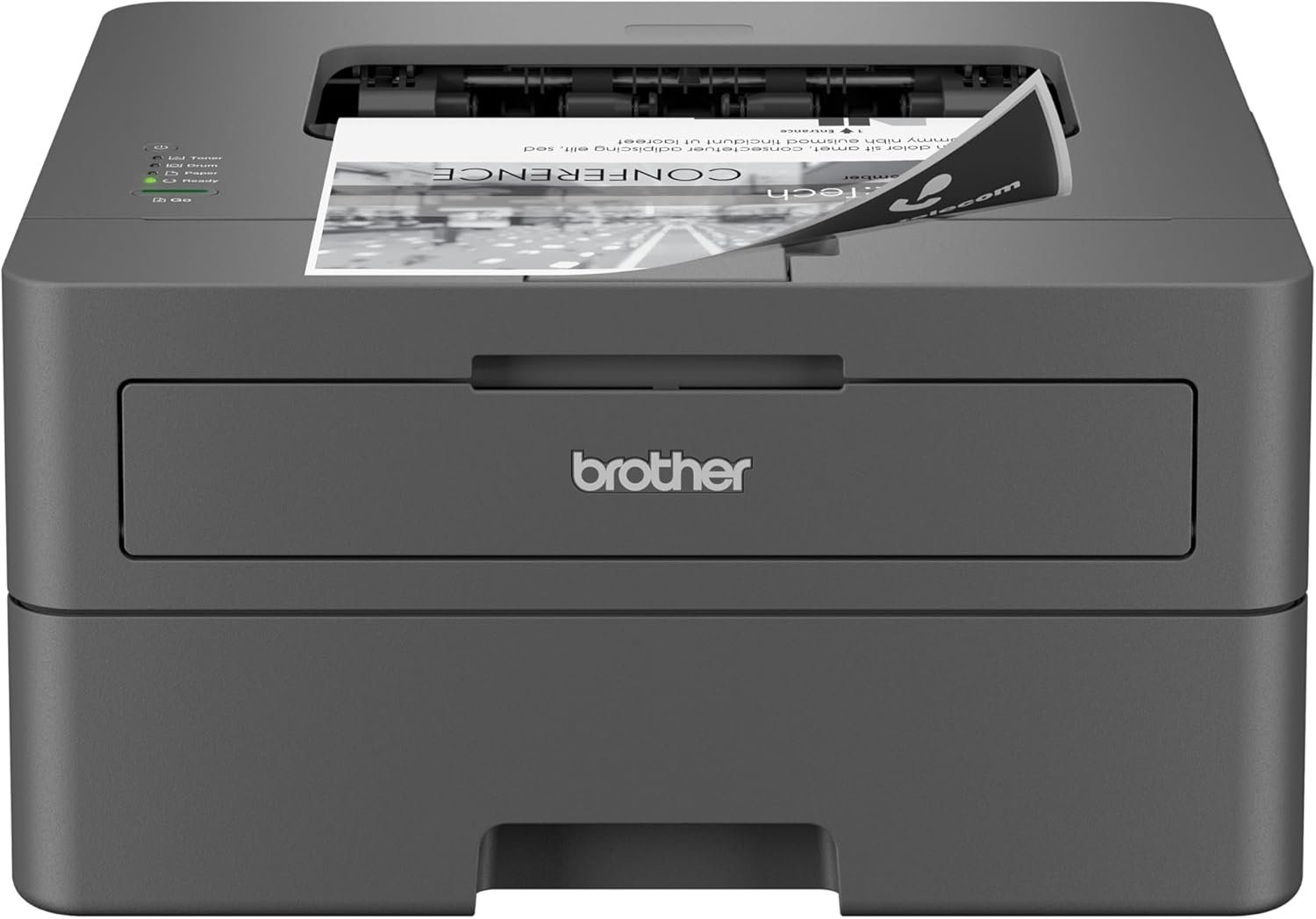
Brother HL-L2400D Monochrome Laser Printer: 32 ppm Print Speed and 250-Sheet Tray
The Importance of Choosing the Right Printer
Selecting the appropriate printer is a critical decision for individuals and businesses alike, as it directly impacts productivity, cost efficiency, and output quality. In environments ranging from home offices to small-scale commercial operations, the right printer can streamline workflows, reduce downtime, and ensure consistent results. Monochrome laser printers, such as the Brother HL-L2400D, are particularly popular for their speed, reliability, and cost-effectiveness in black-and-white printing. These printers are designed to handle high-volume tasks while maintaining clarity and precision, making them ideal for documents, reports, and forms. However, the choice of printer depends on several factors, including print speed, paper handling capabilities, connectivity options, and long-term maintenance requirements. For users prioritizing simplicity, affordability, and dependable performance, the Brother HL-L2400D offers a compelling solution. This review evaluates the printer’s specifications, features, and suitability for various use cases, helping buyers make an informed decision based on objective data and industry benchmarks.
Quick Overview
| Feature | Details |
|---|---|
| Printer Type | Monochrome Laser Printer |
| Printing Technology | Laser |
| Print Speed (Monochrome) | Up to 32 pages per minute |
| Print Resolution | 1200 x 1200 dots per inch |
| Supported Media Sizes | Legal (8.5 x 14 inches), Envelopes, Paper |
| Paper Tray Capacity | 250-sheet input tray |
| Connectivity | USB 2.0 interface |
| Duplex Printing | Automatic |
| Ink Type | Toner |
| Warranty | Limited |
| Dimensions | 14.2″D x 14″W x 7.2″H |
| Weight | 15.6 pounds |
The Brother HL-L2400D is engineered for users requiring straightforward, high-speed black-and-white printing. Its compact design, combined with a 250-sheet paper tray and automatic duplex printing, makes it suitable for home offices, small businesses, and environments with moderate print volumes. The USB 2.0 interface ensures direct connectivity to compatible devices, while the absence of wireless capabilities simplifies setup and reduces potential compatibility issues. This printer is best suited for tasks prioritizing speed and reliability over advanced features like scanning or networking.

Print Speed and Throughput Performance
The Brother HL-L2400D is designed to deliver consistent, high-speed output, with a maximum monochrome print speed of 32 pages per minute. This performance is achieved through its laser printing technology, which uses a toner-based imaging system to produce sharp, smudge-free text. The printer’s ability to maintain this speed is influenced by factors such as paper type, print density, and the condition of consumables like toner and drum units. While the stated speed is based on single-sided printing, real-world throughput may vary depending on the workload. For users requiring rapid turnaround times, such as those producing invoices, forms, or reports, this printer offers a reliable solution. However, it is important to note that the printer’s performance is optimized for standard paper and toner refill scenarios, which may impact efficiency in high-volume or specialized environments.

Monochrome Print Speed and Throughput
The HL-L2400D’s maximum print speed of 32 pages per minute is suitable for environments with moderate to high print demands. This speed is achieved through a combination of a high-speed laser print engine and a well-designed paper handling system. The printer’s performance is measured under standard conditions, which include single-sided printing and the use of 20-lb. paper. While the printer can handle continuous printing, its throughput may decrease when printing on specialty media such as envelopes or thicker paper. The 250-sheet input tray reduces the frequency of paper refills, contributing to a more streamlined workflow. However, users with very high print volumes may need to consider additional trays or a more robust printer model to maintain optimal throughput.
Impact of Consumables on Print Speed
The printer’s print speed is closely tied to the quality and condition of its consumables, including the toner cartridges and drum unit. Brother Genuine Toner, such as the TN830 standard or TN830XL high-yield options, is engineered to work optimally with the HL-L2400D, ensuring consistent print speed and output quality. Over time, as toner levels deplete or the drum unit wears, the printer’s performance may degrade, leading to slower print times and potential print quality issues. Regular maintenance, such as replacing the drum unit and using genuine toner, can help sustain the printer’s speed and reliability. Users should also be aware that the printer’s maximum speed is only achievable when using compatible consumables, as third-party alternatives may affect performance.
Paper Handling and Media Compatibility
The Brother HL-L2400D is equipped with a 250-sheet paper tray and a manual feed slot, allowing for flexible media handling. This design enables users to print on a variety of paper types, including standard letter-sized paper, legal-sized sheets, and envelopes. The manual feed slot provides an additional option for printing on specialty media, such as thick paper or labels, which may not fit in the main tray. The printer’s ability to handle different media types is supported by its compatibility with 20-lb. paper, which is the standard for most office environments. However, users requiring more extensive media versatility, such as printing on photo paper or transparencies, may find the HL-L2400D limited in this regard. The printer’s paper handling system is designed for simplicity and reliability, making it well-suited for environments where consistent, straightforward printing is the priority.

250-Sheet Paper Tray and Manual Feed Slot
The 250-sheet paper tray is a key feature of the HL-L2400D, reducing the need for frequent paper refills and improving workflow efficiency. This capacity is ideal for users who print multiple documents at once, as it minimizes interruptions during printing tasks. The tray is designed to accommodate 20-lb. paper, which is the standard for most office environments, ensuring compatibility with a wide range of paper types. The manual feed slot adds flexibility, allowing users to print on envelopes, labels, or other specialty media that may not fit in the main tray. However, the manual feed slot requires careful handling to avoid jams or misfeeds, which could impact productivity. For users with high-volume printing needs, the 250-sheet tray is a significant advantage, but those requiring more extensive media handling capabilities may need a printer with additional tray options.
Media Compatibility and Print Quality
The HL-L2400D is designed to work with standard office paper and envelopes, ensuring consistent print quality across these media types. Its compatibility with 20-lb. paper is a key consideration, as thinner or thicker paper may affect print performance. The printer’s ability to produce crisp, smudge-free prints is enhanced by the use of Brother Genuine Toner, which is engineered to work optimally with the HL-L2400D’s print engine. However, users printing on non-standard media, such as glossy paper or transparencies, may encounter print quality issues or feeding problems. The printer’s design prioritizes simplicity and reliability, making it well-suited for environments where consistent, straightforward printing is the primary requirement. For users with more specialized media needs, additional considerations may be necessary to ensure optimal performance.
Connectivity and Setup Requirements
The Brother HL-L2400D relies on a USB 2.0 interface for connectivity, which ensures direct and stable communication with compatible devices. This setup is ideal for users who prefer a straightforward, wired connection without the complexities of wireless networking. The printer does not support Wi-Fi or other wireless technologies, which simplifies the setup process and reduces potential compatibility issues. However, this limitation may be a drawback for users requiring remote access or mobile printing capabilities. The printer’s USB interface also means that users must have a compatible device, such as a Windows or Linux computer, to operate it effectively. While the absence of wireless features may limit its versatility, the HL-L2400D’s direct connectivity ensures a reliable and low-maintenance printing experience for users with specific connectivity needs.

USB 2.0 Interface and Compatibility
The HL-L2400D’s USB 2.0 interface provides a stable and high-speed connection to compatible devices, ensuring efficient data transfer and print job processing. This interface is well-suited for users who prioritize simplicity and reliability in their printing setup, as it eliminates the need for wireless networking or additional software. The printer is compatible with Windows and Linux operating systems, making it a versatile option for users with these platforms. However, its lack of Wi-Fi support means that it cannot be used with macOS or Chromebook devices, which may be a limitation for some users. The USB connection also requires a physical cable, which is not included with the printer, adding to the initial setup requirements. For users who value a straightforward, wired connection, this setup ensures consistent performance without the complexities of wireless connectivity.
Setup and Maintenance Considerations
Setting up the HL-L2400D is a straightforward process, as it only requires a USB cable to connect to a compatible device. The printer’s design emphasizes simplicity, with a user-friendly interface and minimal setup steps. However, users must ensure they have the correct USB cable and a compatible computer to operate the printer effectively. The absence of wireless capabilities also means that the printer cannot be used with macOS or Chromebook devices, which may limit its accessibility for certain users. Maintenance of the HL-L2400D involves regular toner refills and drum unit replacements, with Brother Genuine supplies recommended for optimal performance. While the printer’s maintenance requirements are relatively low compared to more complex models, users should be prepared to invest in genuine consumables to ensure long-term reliability and print quality.

Pros and Cons
Pros
- High-Speed Monochrome Printing: The HL-L2400D delivers up to 32 pages per minute, making it ideal for environments requiring rapid output.
- Compact Design: Its small footprint suits space-constrained workspaces, such as home offices or small businesses.
- Automatic Duplex Printing: Reduces paper waste and improves efficiency by printing on both sides of the paper.
- Robust Paper Handling: The 250-sheet tray and manual feed slot offer flexibility for various media types.
- Energy Efficiency: Meets ENERGY STAR standards, contributing to lower energy consumption.
- Genuine Toner Compatibility: Ensures consistent print quality and reliability when using Brother-approved supplies.
- Simple Setup: Direct USB connection simplifies installation without the need for complex networking.
- Durable Build: Constructed for reliable performance in moderate-volume environments.
Cons
- Limited Connectivity Options: The lack of Wi-Fi or Ethernet support restricts its use to wired, USB-connected devices.
- No Mac or Chromebook Compatibility: Users with Apple or Chromebook devices cannot utilize this printer.
- Manual Feed Slot Limitations: Requires careful handling for specialty media, increasing the risk of jams or misfeeds.
- Consumable Costs: While genuine toner ensures quality, it may be more expensive than third-party alternatives.
- Print Speed Variability: Performance may decrease with specialty media or low toner levels.
- No Scan or Fax Capabilities: As a single-function printer, it lacks advanced features like scanning or faxing.
- Limited Media Versatility: Not ideal for users requiring printing on non-standard media types.
Final Verdict: Who This Printer Is Best For (and Who Should Skip It)
The Brother HL-L2400D is an excellent choice for users prioritizing speed, reliability, and simplicity in monochrome printing. It is particularly well-suited for home offices, small businesses, and environments with moderate print volumes. The printer’s high-speed output, compact design, and automatic duplex printing make it ideal for tasks such as producing reports, invoices, and forms. Its compatibility with Brother Genuine Toner ensures consistent print quality and long-term reliability. However, the HL-L2400D is not the best option for users requiring advanced connectivity features, such as Wi-Fi or Ethernet support, or those who need to print on non-standard media types. Additionally, its lack of compatibility with macOS or Chromebook devices may limit its appeal for certain users. For those seeking a straightforward, cost-effective solution for black-and-white printing, the HL-L2400D remains a strong contender, but it is essential to consider its limitations when evaluating its suitability for specific use cases.

Frequently Asked Questions (FAQs)
Is the Brother HL-L2400D suitable for home office use?
Yes, the Brother HL-L2400D is well-suited for home offices. Its compact design, high-speed monochrome printing, and automatic duplex feature make it ideal for tasks such as producing reports, invoices, and forms. The USB connectivity ensures a straightforward setup, and the 250-sheet paper tray reduces the need for frequent refills.
Can the HL-L2400D print on envelopes?
Yes, the HL-L2400D includes a manual feed slot that allows users to print on envelopes and specialty media. However, care must be taken to avoid jams or misfeeds when using non-standard paper types.
Does the printer support wireless printing?
No, the Brother HL-L2400D does not support Wi-Fi or Ethernet connectivity. It relies on a USB 2.0 interface for direct connection to compatible devices, making it ideal for users who prefer a wired setup.
What are the print speed capabilities of the HL-L2400D?
The HL-L2400D can print up to 32 pages per minute in monochrome mode. This speed is achieved through its laser printing technology and is optimized for standard 20-lb. paper. Print speed may vary with specialty media or low toner levels.
Is the HL-L2400D compatible with macOS or Chromebook devices?
No, the Brother HL-L2400D is not compatible with macOS or Chromebook devices. It is designed for use with Windows and Linux operating systems, which may limit its accessibility for some users.
What consumables are recommended for optimal performance?
Brother recommends using Genuine Toner cartridges, such as the TN830 standard or TN830XL high-yield options, along with the DR830 drum unit. These supplies are engineered to ensure consistent print quality and reliability in the HL-L2400D.
How does the printer handle paper jams or misfeeds?
The HL-L2400D’s paper handling system is designed for simplicity and reliability, but users should exercise caution when loading specialty media. The manual feed slot requires careful handling to avoid jams or misfeeds, which could impact productivity.
What is the printer’s energy efficiency rating?
The Brother HL-L2400D meets ENERGY STAR standards, indicating it is energy-efficient and contributes to lower energy consumption. This makes it an environmentally friendly option for users seeking sustainable printing solutions.