Brother HL-L2400DWE Laser Printer Review: 30 ppm Monochrome Printing
The Importance of Choosing the Right Printer
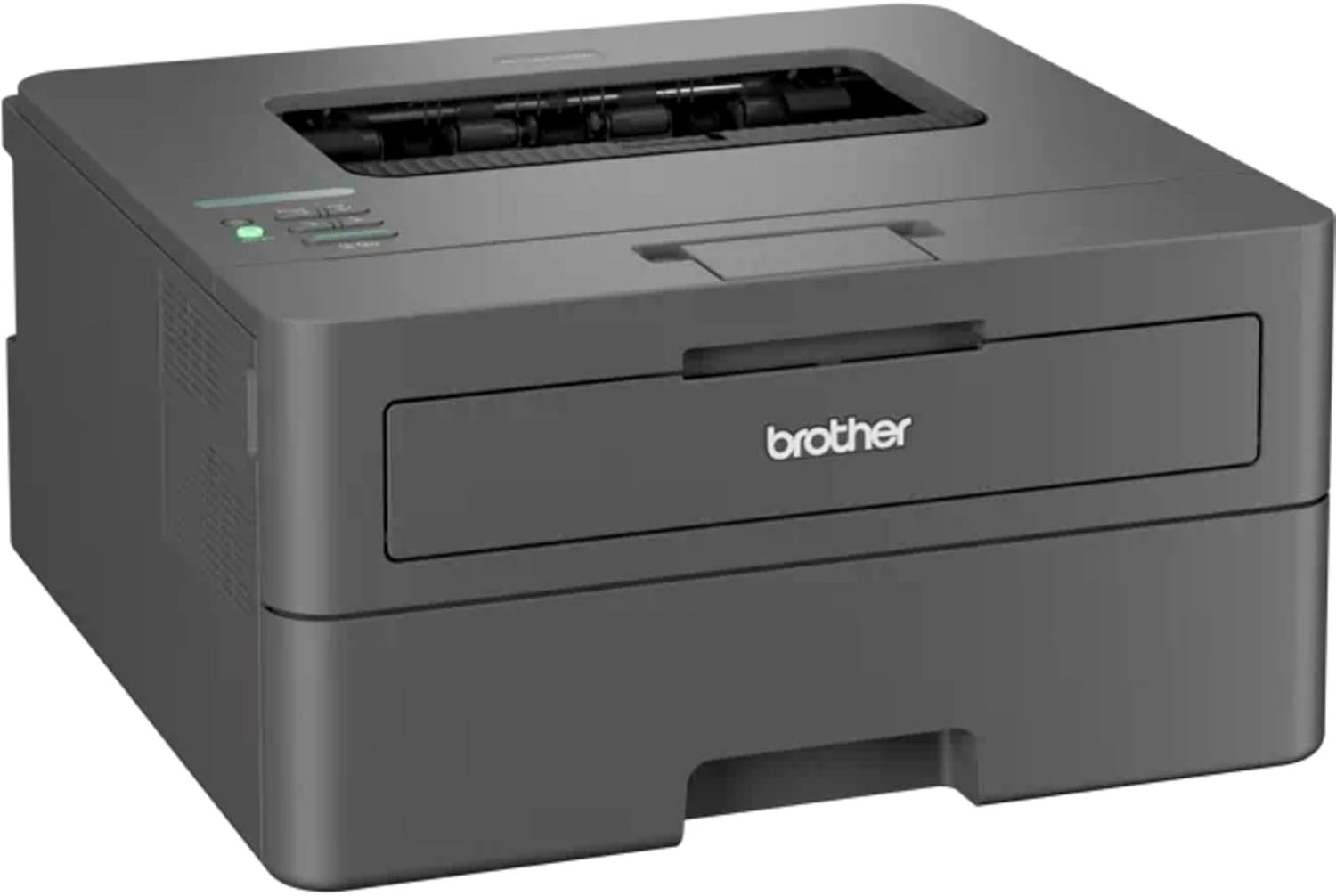
Selecting the appropriate printer can significantly impact productivity and efficiency in both home and office environments. With the increasing demand for high-quality, fast, and reliable printing solutions, understanding the key factors that influence printer performance is essential. Whether you’re managing a small business, working from home, or handling large print volumes, the right printer can streamline workflows and reduce downtime. Printers vary widely in technology, speed, and feature sets, making it crucial to evaluate how well they align with specific usage patterns. For instance, a monochrome laser printer like the Brother HL-L2400DWE offers a balance of speed, cost-effectiveness, and durability, making it a strong contender for environments with high black-and-white printing needs. However, the decision should also consider factors such as connectivity options, media compatibility, and long-term maintenance requirements. By analyzing these aspects, users can make informed choices that match their printing demands while ensuring optimal performance and reliability over time.
Quick Overview
| Feature | Details |
|---|---|
| Printer Type | Monochrome Laser Printer |
| Print Technology | Laser |
| Print Speed | Up to 30 pages per minute (ppm) |
| Print Resolution | 1200 x 1200 dots per inch (dpi) |
| Media Sizes | A4 |
| Connectivity | USB, Wi-Fi |
| Duplex Printing | Automatic |
| Paper Tray Capacity | 250 sheets |
| Toner System | Toner Cartridges |
| Power Consumption | 440 watts |
| Dimensions | 14.17 x 14.02 x 7.2 inches |
| Weight | 15.65 pounds |
The Brother HL-L2400DWE combines speed, resolution, and connectivity to suit environments requiring frequent black-and-white printing. Its automatic duplex feature reduces paper usage, while Wi-Fi and USB connectivity ensure flexibility in device integration. The 250-sheet tray accommodates high-volume tasks, making it ideal for office settings where efficiency is key.

Print Performance and Speed
The Brother HL-L2400DWE is engineered to deliver consistent print speeds that meet the demands of high-volume environments. With a maximum monochrome print speed of 30 ppm, this printer is well-suited for tasks such as document printing, invoice generation, and report creation. The 1200 x 1200 dpi resolution ensures sharp text and clean graphics, making it suitable for both administrative and professional use. The initial page print time of 8.5 seconds indicates a quick warm-up, which is beneficial for users who need to print frequently throughout the day. The printer’s ability to handle large print jobs without significant speed degradation is a key advantage for office settings where time is a critical factor.

Duty Cycle and Workload Capacity
The HL-L2400DWE is designed for environments with moderate to high print volumes. While specific duty cycle ratings are not explicitly listed in the product documentation, the printer’s power consumption of 440 watts suggests it is built to handle continuous operation without overheating. This makes it a reliable choice for businesses that require consistent printing throughout the day. The 250-sheet paper tray reduces the frequency of refills, which is particularly useful in high-volume scenarios. The printer’s ability to maintain consistent print speeds even during extended use further enhances its suitability for busy office environments.
Media Compatibility and Print Quality
The Brother HL-L2400DWE supports a range of media types, including standard A4 paper and envelopes, which expands its versatility for different printing tasks. The printer’s resolution of 1200 x 1200 dpi ensures that text is crisp and clear, making it ideal for documents that require high readability. While the printer is optimized for black-and-white printing, its ability to produce clean, professional-looking output makes it a strong contender for environments where color printing is not a priority. The automatic duplex printing feature further enhances print quality by reducing paper waste and ensuring consistent, double-sided output.
Connectivity and Integration
The HL-L2400DWE offers a combination of USB and Wi-Fi connectivity options, providing flexibility in how users integrate the printer into their workflow. The USB port allows for direct connection to computers, which is useful for users who prefer a wired setup or have limited Wi-Fi access. The Wi-Fi capability, however, is a significant advantage for modern workplaces where mobility and remote access are essential. By using the Brother Mobile Connect app, users can print from smartphones and tablets, making it easier to manage print tasks from anywhere. This feature is particularly beneficial for users who need to print on-the-go or share documents with colleagues without the need for physical access to a computer.

Mobile Printing and App Integration
The Brother Mobile Connect app enhances the HL-L2400DWE’s usability by enabling seamless mobile printing. Users can send print jobs from their iOS devices, which is particularly useful for professionals who frequently work on mobile devices. The app’s integration with the printer’s Wi-Fi connectivity ensures that print jobs are processed quickly and efficiently, reducing the time spent waiting for documents to print. While the app does not offer advanced customization options, it provides a straightforward interface for managing print tasks, making it accessible for users of all skill levels.
Network Compatibility and Setup
The HL-L2400DWE’s Wi-Fi connectivity simplifies network integration, allowing users to set up the printer without the need for additional hardware. The setup process is straightforward, with the printer’s built-in memory storage capacity of 128 GB providing space for print jobs and settings. This feature is particularly useful for users who need to manage print jobs remotely or ensure that the printer remains operational during power outages. The printer’s compatibility with a wide range of devices, including PCs, further enhances its appeal for users who work across multiple platforms.
Consumables and Maintenance
The Brother HL-L2400DWE uses toner cartridges as its primary consumable, which is a common choice for laser printers due to its cost-effectiveness and long-lasting performance. The printer’s design includes a built-in memory storage capacity of 128 GB, which helps manage print jobs and settings without the need for frequent cartridge replacements. While the product documentation does not specify the exact toner capacity, the printer’s ability to handle large print volumes suggests that the toner system is optimized for efficiency. The included toner cartridges provide a reliable starting point for users, ensuring that the printer is ready to use out of the box.
Toner Management and Replacement
Maintaining the HL-L2400DWE’s toner system requires regular monitoring of toner levels to avoid print interruptions. The printer’s built-in memory storage capacity allows for the storage of print jobs, which can be useful for users who need to manage multiple print tasks simultaneously. While the product documentation does not provide specific details on toner replacement procedures, the printer’s design suggests that toner cartridges are easy to replace, reducing downtime during maintenance. The absence of a dedicated toner refill option means that users must purchase new cartridges, which is a common practice for laser printers.
Environmental Considerations
The Brother HL-L2400DWE’s commitment to environmental responsibility is evident through its zero-waste policy for returned toner cartridges. By recycling empty supplies, the printer contributes to reducing environmental impact while supporting the rainforest through partnerships like Cool Earth. This feature is particularly appealing to environmentally conscious users who seek to minimize their carbon footprint. The printer’s energy-efficient design, with a power consumption of 440 watts, further enhances its appeal as a sustainable printing solution.

Pros & Cons
Pros
- High Print Speed: The HL-L2400DWE delivers up to 30 ppm, making it suitable for high-volume environments.
- Excellent Print Quality: The 1200 x 1200 dpi resolution ensures sharp, professional-looking output.
- Automatic Duplex Printing: Reduces paper waste and ensures consistent, double-sided printing.
- Dual Connectivity Options: USB and Wi-Fi provide flexibility in device integration.
- Mobile Printing Support: The Brother Mobile Connect app enables seamless printing from smartphones and tablets.
- Energy Efficiency: The printer’s power consumption of 440 watts is optimized for continuous use.
- Robust Build Quality: The durable design is well-suited for office environments with frequent use.
- Environmental Responsibility: The zero-waste policy and recycling program align with sustainable practices.
Cons
- Limited Color Printing: The printer is optimized for monochrome output, making it unsuitable for color printing tasks.
- No Built-in Fax Function: Users who require fax capabilities may need additional hardware.
- Toner Replacement Requirements: The absence of a refill option means users must purchase new cartridges regularly.
- No Built-in Scanner: While the printer includes a sheetfed scanner, it may not meet advanced scanning needs.
- Limited Software Features: The printer’s software does not offer advanced customization options for print settings.
Final Verdict: Who This Printer Is Best For (and Who Should Skip It)
The Brother HL-L2400DWE is an excellent choice for office environments that prioritize speed, reliability, and cost-effective monochrome printing. Its high print speed, excellent resolution, and automatic duplex feature make it ideal for tasks such as document printing, invoice generation, and report creation. The dual connectivity options and mobile printing support further enhance its usability in modern workplaces where mobility and remote access are essential. Additionally, the printer’s commitment to environmental responsibility through its zero-waste policy and recycling program appeals to users who value sustainability.
However, the HL-L2400DWE may not be the best fit for users who require color printing capabilities or advanced scanning functions. The absence of a built-in fax function and limited software features may also be drawbacks for users with specific needs. Additionally, the need to purchase new toner cartridges regularly could be a consideration for users seeking more cost-effective long-term solutions. Overall, the HL-L2400DWE is a strong contender for businesses and professionals who rely on high-quality, fast, and reliable monochrome printing without the need for color or advanced features.
Frequently Asked Questions (FAQs)
What is the maximum print speed of the Brother HL-L2400DWE?
The Brother HL-L2400DWE can print up to 30 pages per minute (ppm) in monochrome mode, making it suitable for high-volume printing tasks.
Does the HL-L2400DWE support wireless printing?
Yes, the HL-L2400DWE includes Wi-Fi connectivity, allowing users to print from devices such as smartphones and tablets using the Brother Mobile Connect app.
What print resolution does the HL-L2400DWE offer?
The printer delivers a print resolution of 1200 x 1200 dots per inch (dpi), ensuring sharp and clear text output for professional documents.
Can the HL-L2400DWE print on envelopes?
Yes, the printer supports printing on envelopes, expanding its versatility for various document types and packaging needs.
How does the HL-L2400DWE handle paper trays?
The printer features a 250-sheet paper tray, which is ideal for environments requiring frequent printing without frequent refills.
Is the HL-L2400DWE environmentally friendly?
The HL-L2400DWE is part of Brother’s zero-waste initiative, which includes recycling empty toner cartridges and supporting rainforest conservation through partnerships.
What connectivity options are available for the HL-L2400DWE?
The printer offers both USB and Wi-Fi connectivity, providing flexibility for users who prefer wired or wireless printing solutions.
Does the HL-L2400DWE have a built-in scanner?
The HL-L2400DWE includes a sheetfed scanner, which is suitable for basic scanning tasks but may not meet advanced scanning requirements.