Brother HL-L2405W Wireless Monochrome Laser Printer Review
Why Choosing the Right Printer Matters
In today’s fast-paced work environments, selecting the right printer can significantly impact productivity and workflow efficiency. Whether for home use, small office operations, or remote work setups, the right printer must balance speed, reliability, and cost-effectiveness. Monochrome laser printers like the Brother HL-L2405W are particularly popular for their ability to deliver high-quality black-and-white prints at a lower cost per page compared to color models. These printers are often chosen for tasks such as document printing, invoice generation, and report creation, where clarity and precision are critical. However, the decision-making process involves evaluating factors such as print speed, connectivity options, paper handling capabilities, and long-term maintenance costs. For users with moderate to high print volumes, the ability to handle large paper trays, support multiple device connections, and maintain consistent output quality becomes essential. Additionally, the printer’s energy efficiency, noise levels, and compatibility with mobile printing features can influence its suitability for different environments. Understanding these specifications and how they align with specific printing needs is crucial for making an informed purchase decision. This review provides an in-depth analysis of the Brother HL-L2405W, focusing on its technical capabilities, user experience, and performance metrics to help potential buyers evaluate its suitability for their specific workflows.
Quick Overview
| Feature | Details |
|---|---|
| Printer Type | Monochrome Laser Printer |
| Technology | Laser Printing |
| Supported Functions | |
| Print Resolution | 1200 x 1200 Dots Per Inch |
| Print Speed | Up to 30 pages per minute (one-sided) |
| Media Sizes | Legal (8.5 x 14 inches), Envelopes, Labels, Paper |
| Connectivity | USB 2.0, Wi-Fi (Dual-band 2.4GHz/5GHz) |
| Duty Cycle | Designed for high-volume office use |
| Toner System | Toner Cartridge (TN830, TN830XL) |
| Warranty | 1-year limited warranty |
| Duplex Printing | Manual (single-sided) |
| Memory | 64 MB |
| Dimensions | 14.2″D x 14″W x 7.2″H |
| Weight | 15.1 pounds |
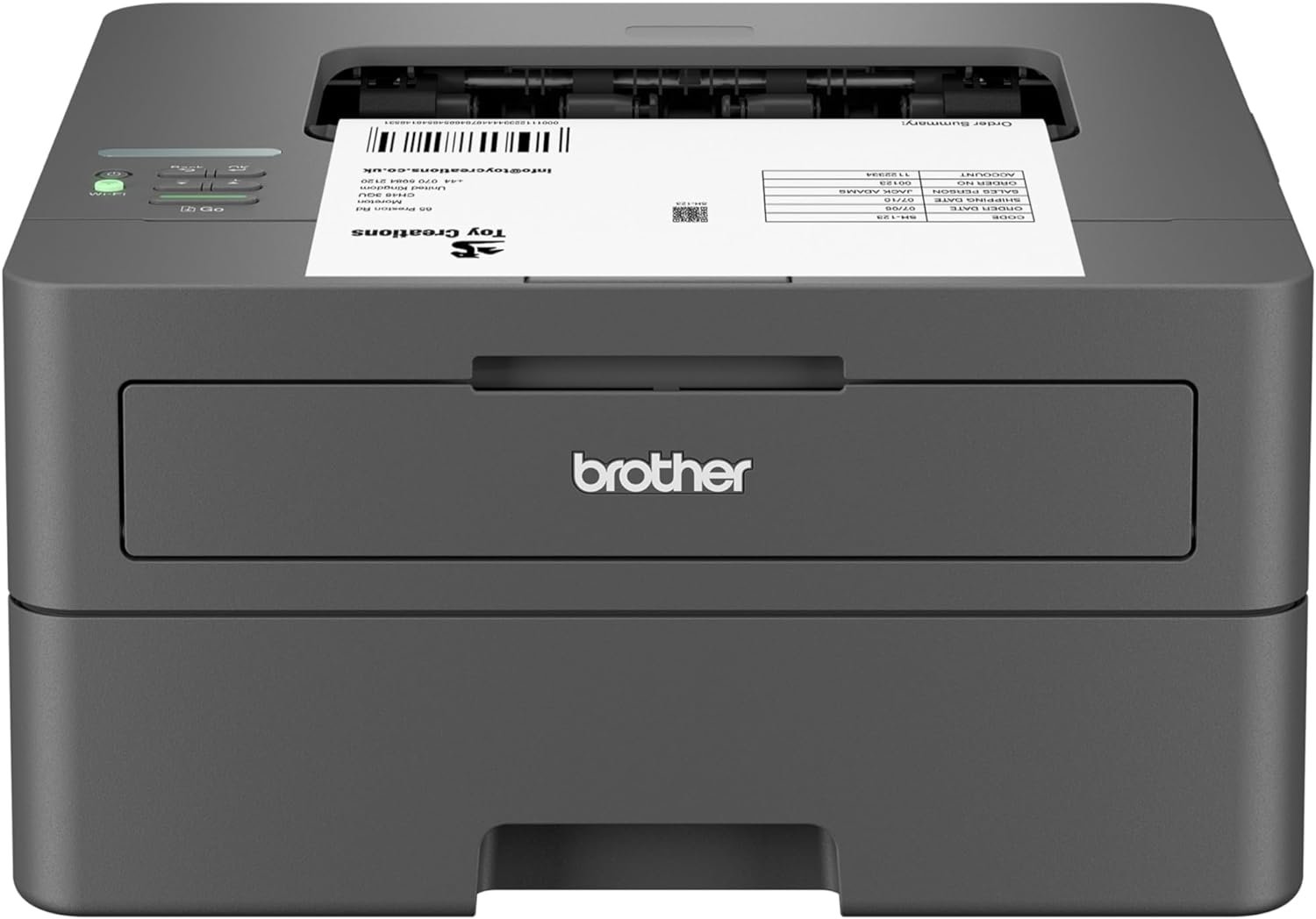
The Brother HL-L2405W is engineered for users who require reliable, high-speed black-and-white printing. Its dual-band wireless connectivity and USB interface offer flexibility for connecting to multiple devices, while the 250-sheet paper tray reduces the need for frequent refills. The printer’s laser technology ensures sharp, smudge-free prints, making it suitable for both home and small office environments. Its compact design allows for placement on desks or countertops, and the inclusion of Brother’s Refresh EZ Print Subscription Service provides a convenient toner management solution. These features collectively position the HL-L2405W as a cost-effective option for users prioritizing efficiency and ease of use.

Print Speed and Output Quality
The Brother HL-L2405W’s performance is defined by its ability to deliver high-speed printing while maintaining consistent output quality. With a maximum print speed of 30 pages per minute (one-sided), the printer is well-suited for environments with moderate to high print volumes. This speed is achieved through its laser printing technology, which uses a toner-based system to produce crisp, legible text and graphics. The printer’s resolution of 1200 x 1200 dots per inch ensures that documents retain clarity even when printed at higher speeds, making it ideal for tasks such as report generation, invoice printing, and data sheet creation. The toner system, specifically the Brother Genuine TN830 and TN830XL cartridges, is designed to provide consistent density and color uniformity, minimizing the risk of smudging or uneven print quality. However, the printer’s output quality is optimized for text-based documents rather than high-resolution graphics or photographs. Users who require high-quality image printing may need to consider a different model with enhanced resolution capabilities. The printer’s ability to handle large paper trays and support multiple media types, including envelopes and labels, further enhances its versatility for various printing needs.

High-Speed Printing for Productivity
The HL-L2405W’s 30 pages per minute print speed is a key factor in its appeal for users who prioritize efficiency. This speed is particularly beneficial for environments where large volumes of documents need to be printed quickly, such as small offices or remote workspaces. The printer’s laser technology ensures that each page is printed with precision, reducing the likelihood of errors or misfeeds. The initial page print time of 8.5 seconds allows for rapid start-up, which can be advantageous when users need to print documents on short notice. However, the printer’s speed is primarily optimized for one-sided printing, which means that users requiring double-sided output will need to manually flip pages. This limitation is offset by the printer’s ability to handle high-volume print jobs without significant degradation in performance. The printer’s duty cycle, which is designed for high-volume office use, ensures that it can sustain continuous printing without overheating or mechanical wear, making it a reliable choice for busy work environments.
Consistent Output Quality for Text Documents
The Brother HL-L2405W’s laser printing technology ensures that text documents remain sharp and legible, even when printed at high speeds. The 1200 x 1200 dots per inch resolution provides sufficient detail for most office tasks, such as printing reports, forms, and invoices. The toner system, which uses Brother Genuine TN830 and TN830XL cartridges, is engineered to produce uniform density across the page, minimizing the risk of streaking or uneven coverage. This consistency is particularly important for users who rely on printed documents for record-keeping or client communication. However, the printer’s output quality is not optimized for high-resolution graphics or photographs, as its laser technology is primarily designed for text-based printing. Users who require high-quality image printing may need to consider a different model with enhanced resolution capabilities. The printer’s ability to handle a variety of media types, including envelopes and labels, further expands its utility for different printing needs.
Connectivity and Mobile Printing Capabilities
The Brother HL-L2405W offers flexible connectivity options that cater to both local and remote printing needs. Its dual-band wireless functionality (2.4GHz/5GHz) allows users to connect to multiple devices simultaneously, making it an ideal choice for home offices or small business environments. The built-in Wi-Fi connectivity simplifies the process of printing from smartphones, tablets, and laptops, while the USB 2.0 interface provides a reliable local connection for users who prefer direct printing without network dependencies. The printer’s compatibility with the Brother Mobile Connect app enhances its usability by enabling remote management and mobile printing from almost anywhere. This app allows users to monitor toner levels, manage print jobs, and receive notifications about maintenance or supply status. However, the printer’s wireless capabilities are limited to standard Wi-Fi networks, which may not be sufficient for users requiring advanced network security features. Additionally, the printer’s reliance on the Brother Mobile Connect app for mobile printing means that users must ensure their devices are compatible with the app’s operating system requirements. For users who prioritize advanced connectivity options or require integration with enterprise-level network infrastructure, the HL-L2405W may not be the most suitable choice.

Dual-Band Wireless for Multiple Device Connectivity
The HL-L2405W’s dual-band wireless connectivity (2.4GHz/5GHz) provides users with the flexibility to connect to multiple devices simultaneously. This feature is particularly beneficial for users who work with several computers, tablets, or smartphones, as it allows for seamless printing without the need for additional hardware. The printer’s ability to support both Wi-Fi bands ensures that it can adapt to different network environments, including those with high interference or limited bandwidth. However, the printer’s wireless capabilities are not designed for advanced network configurations, such as those requiring enterprise-grade security protocols. Users who require enhanced security features, such as encrypted wireless connections or integration with corporate network systems, may need to consider alternative models with more robust connectivity options. The dual-band functionality also means that users must ensure their devices are compatible with both frequency bands to take full advantage of the printer’s connectivity capabilities.
Mobile Printing with the Brother Mobile Connect App
The Brother Mobile Connect app enhances the HL-L2405W’s usability by enabling remote printing and device management. This app allows users to print documents from their smartphones or tablets, monitor toner levels, and receive notifications about maintenance or supply status. The app’s integration with the printer’s wireless connectivity ensures that users can print from anywhere, provided they have an internet connection. However, the app’s functionality is limited to the printer’s built-in features, and users may need to rely on additional software for advanced printing tasks. The app’s compatibility with different operating systems may also affect its usability, as some users may encounter limitations based on their device’s specifications. For users who prioritize mobile printing capabilities and device management, the Brother Mobile Connect app provides a convenient solution, but it is essential to verify compatibility with the user’s specific devices and operating systems.
Paper Handling and Media Compatibility
The Brother HL-L2405W’s paper handling capabilities are designed to accommodate a variety of media types, including standard paper, envelopes, and labels. The 250-sheet paper tray reduces the frequency of refills, making it ideal for environments with high print volumes. The manual feed slot allows users to print on specialty media, such as envelopes and labels, without the need for additional trays or accessories. This feature is particularly useful for users who occasionally need to print on non-standard paper sizes or materials. The printer’s maximum media size of 8.5 x 14 inches ensures compatibility with legal-sized paper, which is commonly used for reports and invoices. However, the printer’s paper handling system is not optimized for high-volume, continuous printing of specialty media, which may require additional adjustments or manual intervention. The printer’s ability to handle a range of media types enhances its versatility, but users should be aware of the limitations in handling large volumes of non-standard paper.

250-Sheet Paper Tray for Efficient Printing
The HL-L2405W’s 250-sheet paper tray is a significant advantage for users who require frequent printing without the need for frequent refills. This capacity is particularly beneficial for small offices or home users who print multiple documents throughout the day. The tray’s design allows for easy loading and unloading of paper, reducing the time spent on routine maintenance tasks. However, the tray’s maximum capacity is based on using 20-lb. paper, which may not be suitable for all paper weights or types. Users who frequently print on heavier or specialty paper may need to adjust the tray settings or use the manual feed slot for optimal results. The tray’s size also means that users should ensure they have sufficient paper stock to avoid interruptions in printing workflows. Overall, the 250-sheet paper tray enhances the printer’s efficiency, but users should consider their specific paper usage patterns to determine if the tray size meets their needs.
Manual Feed Slot for Specialty Media
The HL-L2405W’s manual feed slot provides users with the flexibility to print on envelopes, labels, and other specialty media. This feature is particularly useful for users who occasionally need to print on non-standard paper sizes or materials, as it allows for precise control over the printing process. The manual feed slot ensures that specialty media is fed correctly into the printer, minimizing the risk of misfeeds or jams. However, the printer’s reliance on manual feeding for specialty media means that users must be cautious to avoid paper jams or misalignment issues. The manual feed slot is not designed for high-volume printing of specialty media, which may require additional adjustments or manual intervention. Users who frequently print on non-standard paper should consider the printer’s limitations and whether the manual feed slot is sufficient for their needs.

Pros and Cons
Pros
- High-Speed Printing: The HL-L2405W’s 30 pages per minute print speed is ideal for environments with moderate to high print volumes, ensuring quick document output without compromising quality.
- Dual-Band Wireless Connectivity: The printer’s support for both 2.4GHz and 5GHz Wi-Fi bands allows for flexible and stable connections to multiple devices, enhancing its usability in home and small office settings.
- Versatile Paper Handling: The 250-sheet paper tray and manual feed slot accommodate a wide range of media types, including standard paper, envelopes, and labels, making it suitable for various printing needs.
- Mobile Printing Capabilities: The Brother Mobile Connect app enables remote printing and device management, providing users with the convenience of printing from smartphones and tablets.
- Cost-Effective Toner System: The use of Brother Genuine TN830 and TN830XL toner cartridges ensures consistent print quality and long-term reliability, while the Refresh EZ Print Subscription Service offers a convenient toner management solution.
- Compact Design: The printer’s small footprint makes it suitable for placement on desks or countertops, optimizing space in both home and office environments.
Cons
- Limited Duplex Printing: The HL-L2405W only supports manual duplex printing, which requires users to flip pages manually, increasing the time needed for double-sided printing.
- No Automatic Duplex: The lack of an automatic duplex feature means users must handle the printing process manually, which may be inconvenient for those requiring frequent double-sided output.
- Reliance on Subscription Service: The Refresh EZ Print Subscription Service, while convenient, requires users to enroll in a monthly plan, which may not be suitable for those who prefer standalone toner management.
- Limited Media Compatibility: While the printer supports a range of media types, its paper handling system is not optimized for high-volume printing of specialty media, which may require manual adjustments.
- No Advanced Security Features: The printer’s wireless connectivity does not include enterprise-grade security protocols, which may be a concern for users requiring enhanced network security.
Final Verdict: Who This Printer Is Best For (and Who Should Skip It)
The Brother HL-L2405W is an excellent choice for users who prioritize high-speed printing, flexible connectivity, and cost-effective toner management. Its 30 pages per minute print speed and dual-band wireless capabilities make it ideal for home offices, small businesses, and remote work environments where quick document output is essential. The 250-sheet paper tray and manual feed slot provide versatility for printing on various media types, while the compact design ensures it fits well in limited spaces. The inclusion of the Brother Mobile Connect app enhances its usability by enabling remote printing and device management, making it a convenient option for users who need to print from multiple devices. However, the printer’s reliance on the Refresh EZ Print Subscription Service for toner management may be a drawback for users who prefer standalone toner solutions. Additionally, the lack of automatic duplex printing and limited advanced security features may make it unsuitable for users who require frequent double-sided printing or enhanced network security. Overall, the HL-L2405W is best suited for users who value efficiency, ease of use, and cost-effective printing, but it may not be the ideal choice for those with specific requirements for duplex printing or advanced connectivity features.

Frequently Asked Questions (FAQs)
What is the maximum print speed of the Brother HL-L2405W?
The Brother HL-L2405W can print up to 30 pages per minute (one-sided) using its laser printing technology. This speed is suitable for environments with moderate to high print volumes, ensuring quick document output without compromising quality.
Does the Brother HL-L2405W support wireless printing?
Yes, the HL-L2405W features dual-band wireless connectivity (2.4GHz/5GHz), allowing users to connect to multiple devices simultaneously. This makes it ideal for home offices and small businesses requiring flexible printing options.
What paper sizes does the Brother HL-L2405W support?
The HL-L2405W supports standard paper sizes up to 8.5 x 14 inches (legal size), as well as envelopes and labels through its manual feed slot. The 250-sheet paper tray accommodates a variety of media types for efficient printing.
Can the Brother HL-L2405W print on both sides of the paper?
The HL-L2405W supports manual duplex printing, which requires users to flip pages manually. It does not have an automatic duplex feature, so double-sided printing will need to be handled by the user.
What toner cartridges are compatible with the Brother HL-L2405W?
The HL-L2405W is compatible with Brother Genuine TN830, TN830XL, and TN830XL 2PK toner cartridges. These cartridges are designed to provide consistent print quality and long-term reliability.
Does the Brother HL-L2405W have a built-in warranty?
Yes, the HL-L2405W comes with a 1-year limited warranty and free online, call, or live chat support for the life of the printer. This ensures users have access to assistance for any issues that may arise.
Can I print from my mobile device using the Brother HL-L2405W?
Yes, the Brother Mobile Connect app allows users to print from smartphones and tablets. This app also enables remote management of the printer, making it convenient for users who need to print from anywhere.
What is the Refresh EZ Print Subscription Service?
The Refresh EZ Print Subscription Service is a monthly plan that provides users with a set number of pages for printing. This service offers a convenient toner management solution, though it requires enrollment and monthly billing.