Brother HL-L2480DW Laser Printer Review: Efficiency and Versatility for Small Workspaces
The Importance of Choosing the Right Printer for Modern Workspaces
In today’s fast-paced digital environment, the role of a printer extends far beyond simple document reproduction. Whether in a home office, small business, or remote work setup, the right printer can significantly enhance productivity by streamlining tasks such as printing, copying, and scanning. The demand for compact, efficient, and versatile printing solutions has never been higher, particularly for users who prioritize speed, reliability, and cost-effectiveness. A printer that delivers sharp output, seamless connectivity, and sustainable operation can become an indispensable tool in any workspace. When selecting a printer, factors such as print speed, media compatibility, connectivity options, and long-term maintenance costs must be carefully evaluated. The Brother HL-L2480DW Wireless Compact Monochrome Multi-Function Laser Printer emerges as a strong contender for users seeking a reliable, all-in-one solution that balances performance with practical design. By focusing on key buyer decision factors like print efficiency, connectivity, and sustainability, this review provides a comprehensive analysis of how the HL-L2480DW meets the needs of modern users while avoiding the pitfalls of less suitable alternatives.
Quick Overview
| Feature | Details |
|---|---|
| Printer Type | Monochrome Laser Printer |
| Supported Functions | Print, Scan, Copy |
| Print Resolution | 1200 x 1200 Dots Per Inch |
| Print Speed | Up to 36 pages per minute (one-sided) |
| Supported Media Sizes | Legal (8.5 x 14 inches), Envelopes, Labels |
| Connectivity Options | Dual-band Wi-Fi (2.4GHz/5GHz), Ethernet, USB 2.0 |
| Duty Cycle | 15,000 pages per month |
| Toner System | Toner Cartridge (TN830, TN830XL) |
| Warranty | 1-year limited warranty with free support |
| Energy Efficiency | ENERGY STAR® compliant, EPEAT® Silver rated |
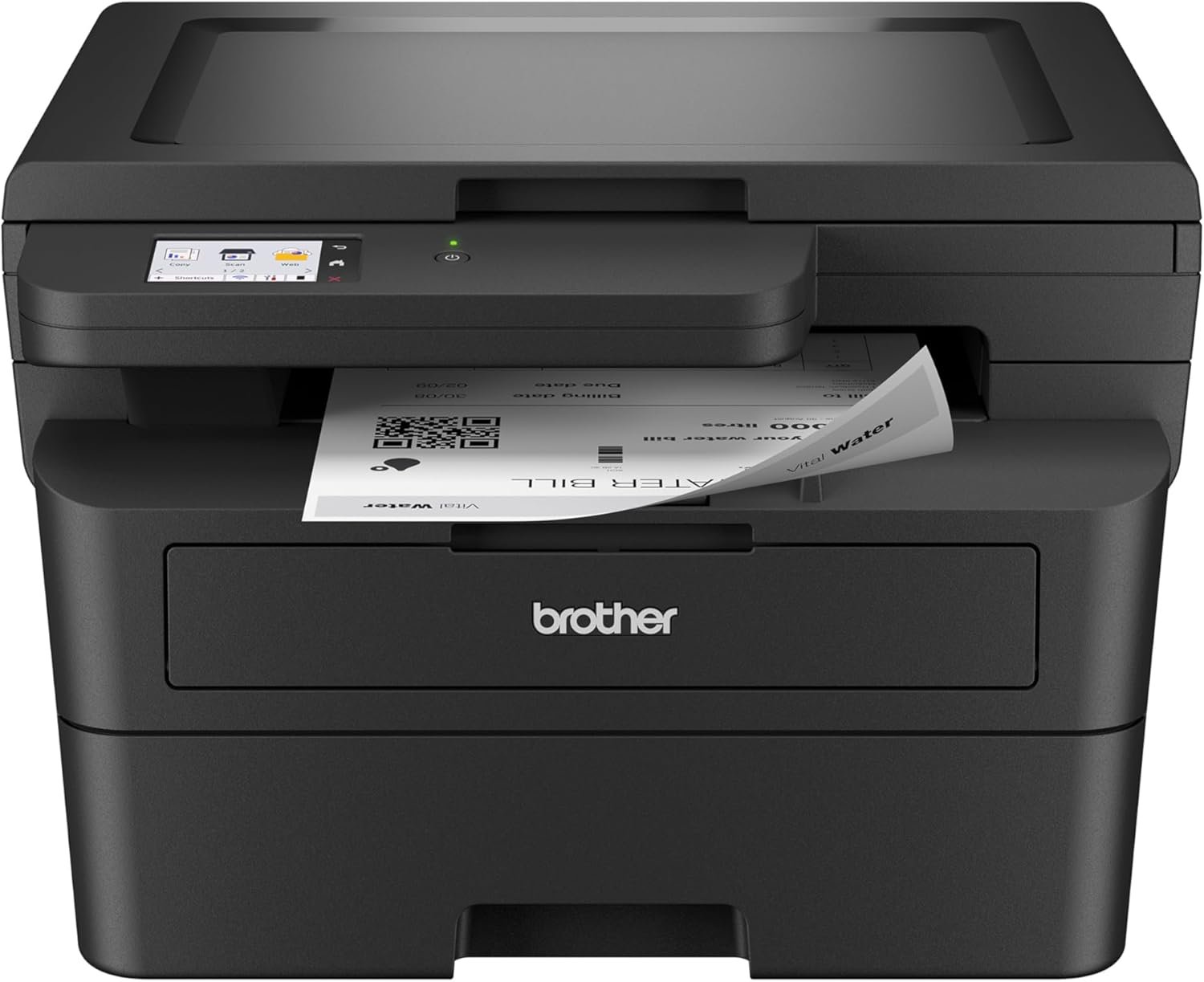
The Brother HL-L2480DW combines laser printing technology with a compact design to deliver high-quality monochrome output while supporting essential functions like scanning and copying. Its dual connectivity options and built-in touchscreen interface make it well-suited for environments requiring reliable, flexible printing solutions. The printer’s energy-efficient design and automatic duplex printing further enhance its appeal for users prioritizing sustainability and cost savings.

Print Speed and Efficiency: Meeting High-Volume Demands
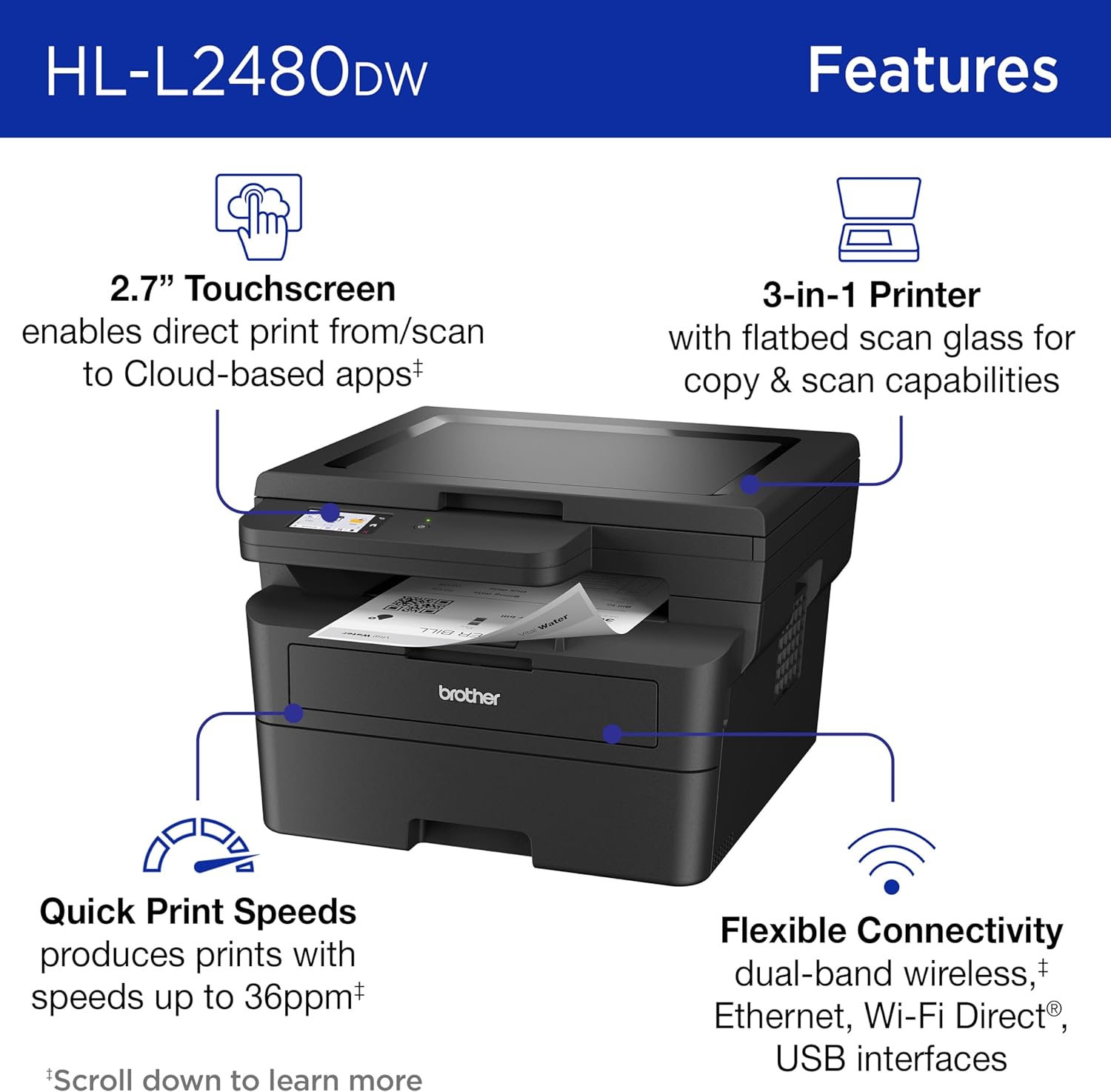
The Brother HL-L2480DW is engineered to handle demanding workloads with its high-speed printing capabilities. Designed for environments where efficiency is critical, the printer delivers print speeds of up to 36 pages per minute (ppm) for single-sided output, making it ideal for users who require quick turnaround times. This performance is supported by a 250-sheet paper tray, which minimizes the need for frequent refills and ensures consistent operation during high-volume tasks. The printer’s duty cycle of 15,000 pages per month further reinforces its suitability for moderate to heavy usage in small offices or home workspaces. For users who frequently handle large print jobs, such as payroll reports or client documentation, the HL-L2480DW’s speed and capacity provide a reliable foundation for maintaining productivity without compromising quality.

Dual Connectivity and Network-Ready Design
The HL-L2480DW’s connectivity options are a key factor in its versatility. Featuring dual-band wireless (2.4GHz/5GHz), Ethernet, and USB 2.0 interfaces, the printer offers flexibility for different user environments. The dual-band Wi-Fi ensures stable connections in areas with potential signal interference, while the Ethernet port provides a wired alternative for environments prioritizing network security or speed. The USB 2.0 interface remains a valuable option for users who prefer direct device-to-printer connections. This multi-faceted connectivity strategy caters to a wide range of scenarios, from home offices with limited network infrastructure to small businesses requiring seamless integration with existing IT systems.
Energy Efficiency and Sustainability
As part of its design philosophy, the Brother HL-L2480DW incorporates energy-saving features to reduce environmental impact and operational costs. Its ENERGY STAR® certification and EPEAT® Silver rating highlight its commitment to sustainability, making it an attractive option for environmentally conscious users. The printer’s automatic duplex printing function further contributes to sustainability by reducing paper waste, while the Toner Save Mode extends the lifespan of toner cartridges. These features align with modern workplace trends that prioritize eco-friendly practices without sacrificing performance, positioning the HL-L2480DW as a responsible choice for users who value both efficiency and sustainability.
Media Handling and Compatibility: Versatility for Diverse Tasks
The HL-L2480DW’s ability to handle a variety of media types enhances its appeal for users with diverse printing needs. The 250-sheet paper tray accommodates standard 20-lb. paper, while the manual feed slot allows for printing on envelopes, labels, and other specialty media. This flexibility is particularly valuable for users who frequently handle mixed document types, such as invoices, letters, and shipping labels. The printer’s support for legal-sized paper (8.5 x 14 inches) expands its utility for tasks requiring larger formats, such as legal documents or presentations. By offering a broad range of media compatibility, the HL-L2480DW ensures that users can meet their printing requirements without the need for additional equipment or specialized trays.

Flatbed Scanning and Copying Capabilities
In addition to printing, the HL-L2480DW’s flatbed scanning function provides a convenient solution for document management and archiving. The integrated 2.7-inch touchscreen interface simplifies navigation and allows users to scan documents directly to cloud-based platforms like Google Drive, Dropbox, and Evernote. This feature is particularly beneficial for users who need to digitize physical records or share scanned documents with remote collaborators. The printer’s copying function further enhances its value by enabling quick duplication of documents without the need for a separate copier. These capabilities make the HL-L2480DW a practical choice for users who require a multifunctional device that minimizes the need for multiple peripherals.
Mobile Integration and Cloud Connectivity
The HL-L2480DW’s mobile connectivity options expand its usability in modern work environments. The Brother Mobile Connect app allows users to print, scan, and manage their printer remotely from smartphones or tablets, providing convenience for users who are often on the go. This feature is especially useful for remote workers or small business owners who need to access printing capabilities from multiple locations. The printer’s compatibility with cloud-based services ensures seamless integration with digital workflows, enabling users to print and scan documents directly from their preferred platforms. These mobile and cloud capabilities position the HL-L2480DW as a forward-thinking solution for users who rely on digital tools to manage their printing needs.
Toner Management and Subscription Services: Long-Term Cost Considerations
The Brother HL-L2480DW’s toner management system is designed to balance performance with cost efficiency. The printer supports a range of toner cartridges, including the standard TN830, high-yield TN830XL, and twin-pack TN830XL2PK options, allowing users to choose based on their printing volume and budget. The inclusion of the Refresh EZ Print Subscription Service offers an alternative to traditional toner purchasing, providing users with a predictable cost structure and the convenience of automatic toner replenishment. While this subscription model may appeal to users who prioritize convenience and cost predictability, it is important to note that the service requires enrollment and may involve additional fees beyond the initial free trial period. For users who prefer a more traditional approach, the availability of genuine toner cartridges ensures continued reliability without the need for subscription commitments.

Subscription Model and Cost Predictability
The Refresh EZ Print Subscription Service introduces a new dimension to toner management by offering users a monthly cost structure that can help reduce long-term expenses. This model is particularly appealing for users who print a consistent volume of pages, as it may provide cost savings compared to purchasing individual toner cartridges. However, the subscription model also requires users to commit to a monthly plan, which may not be ideal for those with fluctuating printing needs. The subscription’s free trial period provides an opportunity to assess its value, but users should be aware that ongoing costs and potential overage fees may apply after the trial. This flexibility allows users to tailor their toner management strategy to their specific usage patterns and financial preferences.
Maintenance and Consumable Costs
The HL-L2480DW’s design minimizes the need for frequent maintenance, contributing to its appeal for users who prioritize low operational costs. The printer’s toner system is engineered to provide consistent output quality while extending the lifespan of consumables through features like the Toner Save Mode. This mode reduces toner usage without compromising print quality, making it an effective tool for users seeking to optimize their printing expenses. Additionally, the printer’s straightforward maintenance requirements, such as replacing the drum unit and toner cartridges, ensure that users can continue operating the device with minimal downtime. These factors collectively contribute to the HL-L2480DW’s reputation as a cost-effective solution for users who value reliability and long-term value.

Pros & Cons
Pros
- High Print Speed: The HL-L2480DW delivers up to 36 pages per minute, making it suitable for users with high-volume printing needs.
- Compact and Space-Efficient Design: Its streamlined footprint is ideal for small offices or home workspaces where desk space is limited.
- Versatile Connectivity Options: Dual-band Wi-Fi, Ethernet, and USB 2.0 interfaces provide flexibility for different network environments.
- Energy Efficiency: The ENERGY STAR® and EPEAT® certifications ensure the printer operates with minimal environmental impact.
- Automatic Duplex Printing: This feature reduces paper waste and supports sustainable printing practices.
- User-Friendly Touchscreen Interface: The 2.7-inch touchscreen simplifies navigation and enhances the user experience with intuitive controls.
- Mobile Integration: The Brother Mobile Connect app allows for remote printing and scanning, catering to users who rely on mobile devices.
- Cloud Compatibility: The printer’s ability to integrate with popular cloud services streamlines document management and sharing.
Cons
- Limited Color Printing Capabilities: As a monochrome printer, it is not suitable for users requiring color output.
- No Fax Functionality: The absence of a fax feature may be a drawback for users who need this capability.
- Subscription Dependency for Toner Management: The Refresh EZ Print Subscription Service requires enrollment and may involve additional costs.
- Manual Paper Handling for Specialty Media: While the manual feed slot provides flexibility, it requires users to manage paper loading manually.
- No Built-In Memory Card Slot: The lack of a memory card slot limits the printer’s ability to directly transfer files from portable storage devices.
Final Verdict: Who This Printer Is Best For (and Who Should Skip It)
The Brother HL-L2480DW is an excellent choice for users who prioritize speed, efficiency, and sustainability in their printing needs. Its high print speed, compact design, and versatile connectivity make it well-suited for small offices, home workspaces, and remote work environments. The printer’s energy-efficient features and automatic duplex printing align with the growing demand for eco-friendly solutions, while its touchscreen interface and mobile integration enhance user convenience. However, the HL-L2480DW is not ideal for users who require color printing, fax functionality, or advanced media handling capabilities. Those with high-volume commercial printing needs or a preference for traditional toner purchasing without subscription models may find the HL-L2480DW less suitable. Overall, the printer offers a reliable and cost-effective solution for users seeking a multifunctional, efficient, and sustainable printing option in 2026.
Frequently Asked Questions (FAQs)
What is the maximum print speed of the Brother HL-L2480DW?
The Brother HL-L2480DW delivers print speeds of up to 36 pages per minute (ppm) for single-sided printing, making it suitable for high-volume tasks in small offices or home workspaces.
Does the printer support wireless connectivity?
Yes, the HL-L2480DW offers dual-band wireless connectivity (2.4GHz/5GHz), allowing for stable and flexible network integration in various environments.
What media types can the HL-L2480DW handle?
The printer supports a range of media types, including standard 20-lb. paper, envelopes, labels, and legal-sized paper (8.5 x 14 inches).
Is the HL-L2480DW suitable for home use?
Yes, the HL-L2480DW’s compact design, high print speed, and energy-efficient features make it an excellent choice for home offices and remote work environments.
Can the printer be used with cloud-based services?
The HL-L2480DW is compatible with popular cloud services like Google Drive, Dropbox, and Evernote, enabling seamless integration with digital workflows.
What are the toner options for the HL-L2480DW?
The printer supports Brother Genuine TN830 (standard), TN830XL (high yield), and TN830XL2PK (twin-pack) toner cartridges, with the option to use the Refresh EZ Print Subscription Service for automatic toner replenishment.
Does the printer have a built-in fax function?
No, the HL-L2480DW does not include fax functionality, making it unsuitable for users requiring this feature.
How does the printer contribute to sustainability?
The HL-L2480DW is ENERGY STAR® compliant and EPEAT® Silver rated, with automatic duplex printing and Toner Save Mode helping reduce paper and toner waste.