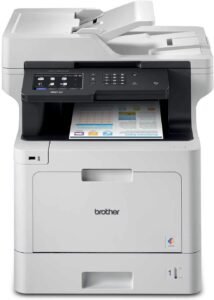
Brother MFC-L3720CDW Color Laser Printer Review | 2026

The Importance of Choosing the Right Printer
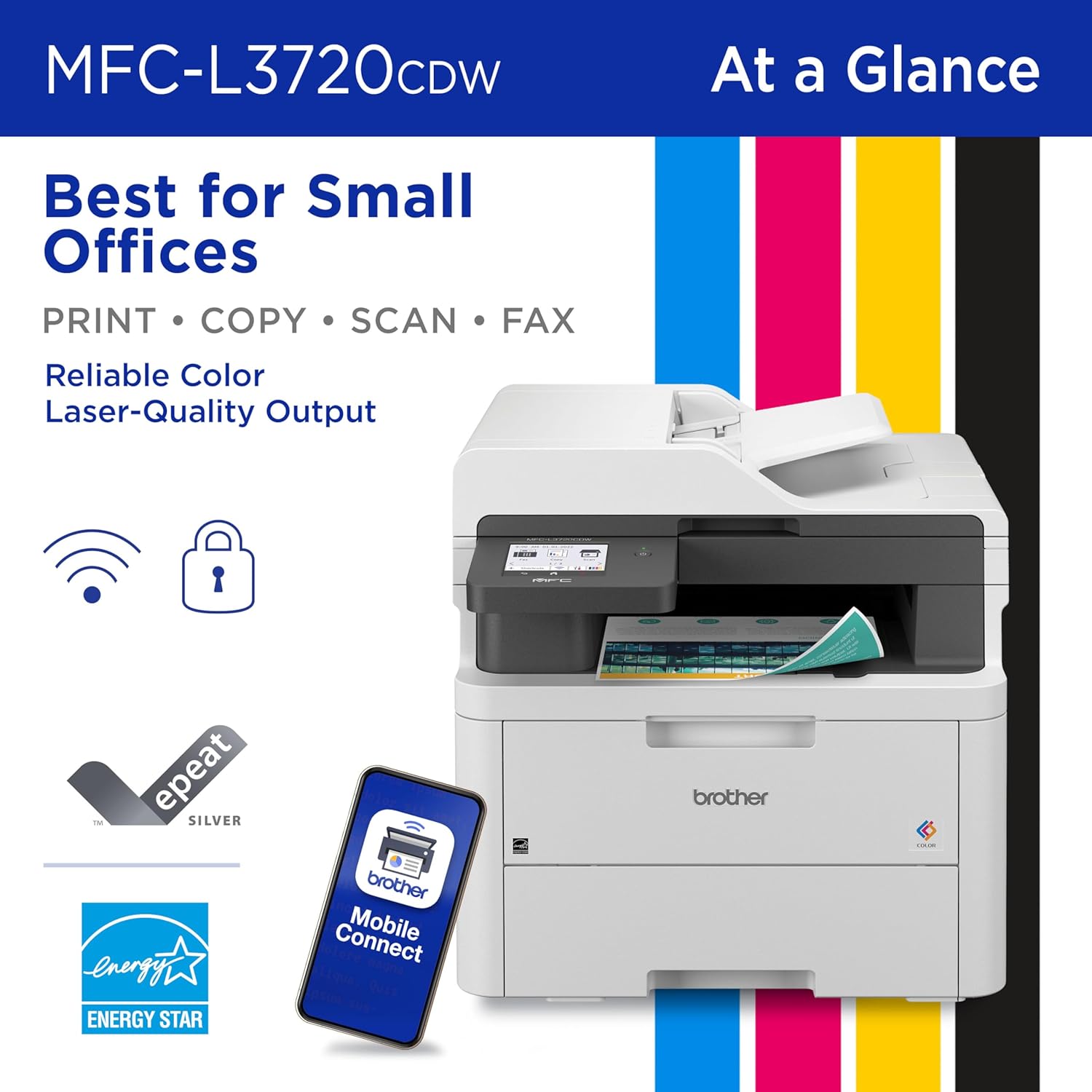
In today’s fast-paced work environments, the right printer can significantly impact productivity and operational efficiency. Whether you’re managing a small office, running a remote team, or handling administrative tasks, a printer that meets your specific needs is essential. The Brother MFC-L3720CDW wireless color laser printer is designed to address the demands of professional environments by offering a balance of speed, reliability, and multifunctionality. Its capabilities extend beyond basic printing, incorporating scanning, copying, and faxing to streamline workflows. For users who require consistent output quality, fast processing, and seamless integration with digital tools, this printer presents a compelling solution. Understanding the technical specifications and feature set of the MFC-L3720CDW is crucial for determining its suitability for different use cases, from document management to creative workflows. By evaluating factors such as print resolution, connectivity options, and media compatibility, potential buyers can make informed decisions that align with their operational requirements. This review provides an in-depth analysis of the Brother MFC-L3720CDW, focusing on its technical capabilities, performance metrics, and real-world applicability for various user profiles.
Quick Overview
| Feature | Details |
|---|---|
| Printer Type | Wireless color laser printer |
| Supported Functions | Print, scan, copy, fax |
| Print Resolution | 2400 x 600 dpi (color), 1200 x 1200 dpi (black and white) |
| Print Speed | Up to 19 pages per minute (ppm) |
| Media Sizes | 4 x 6 inches, 8.5 x 11 inches, 8.5 x 14 inches |
| Connectivity | USB 2.0, Wi-Fi (dual-band), Wi-Fi Direct |
| Duty Cycle | 15,000 pages per month |
| Toner System | Toner-based, with compatible cartridges |
| Warranty | 1-year limited warranty |
The Brother MFC-L3720CDW combines robust printing capabilities with versatile connectivity options, making it suitable for environments that require frequent document handling and digital integration. Its laser technology ensures consistent output quality, while the wireless features enable seamless device compatibility. The printer’s ability to handle multiple functions in a single unit reduces the need for additional hardware, enhancing operational efficiency. These specifications make the MFC-L3720CDW a viable option for small businesses and professional users seeking a reliable, multifunctional printer.

Print Quality and Resolution
The Brother MFC-L3720CDW delivers high-quality color printing through its laser technology, which ensures sharp text and accurate color reproduction. This makes it particularly suitable for environments that require professional-grade documents, such as business reports, marketing materials, and presentations. The printer’s resolution of 2400 x 600 dpi for color prints and 1200 x 1200 dpi for black-and-white prints provides a balance between detail and efficiency, reducing the need for excessive print passes. For users who prioritize clarity and color accuracy, the MFC-L3720CDW offers a reliable solution that meets standard office printing requirements.

Color Accuracy and Detail
The MFC-L3720CDW’s color printing capability is optimized for producing vibrant and accurate color output. This is particularly beneficial for users who frequently print marketing materials, brochures, or graphics that require precise color representation. The printer’s laser technology ensures consistent color density across pages, minimizing variations that could occur with lower-resolution printing methods. While it may not match the tonal range of high-end photo printers, it provides sufficient detail for most professional and office use cases.
Text Clarity and Sharpness
For text-heavy documents such as reports, spreadsheets, and correspondence, the MFC-L3720CDW delivers crisp, legible output. Its black-and-white resolution of 1200 x 1200 dpi ensures that even small fonts remain readable without sacrificing clarity. This makes it an ideal choice for users who require clean, professional-looking documents without the need for additional post-processing. The printer’s ability to maintain consistent text quality across pages enhances its reliability for daily office use.
Print Speed and Throughput
The Brother MFC-L3720CDW is engineered for efficiency, with a print speed of up to 19 pages per minute (ppm) for both color and monochrome printing. This speed is well-suited for environments with moderate to high printing demands, such as small offices and professional workspaces. The printer’s ability to handle multiple tasks simultaneously, including scanning and copying, further enhances its productivity in busy settings. Its performance metrics are aligned with industry standards, making it a competitive option for users who prioritize fast output without compromising quality.

Handling High-Volume Workloads
For users who require consistent printing of large volumes, the MFC-L3720CDW’s duty cycle of 15,000 pages per month ensures reliable operation under sustained use. This makes it a suitable choice for small businesses or departments that frequently produce printed materials. The printer’s design allows for efficient processing of multiple print jobs, reducing downtime and maintaining workflow continuity. Its performance is optimized for environments where regular, high-volume printing is necessary without overextending the hardware.
Dual-Functionality and Task Management
The MFC-L3720CDW’s integration of printing, scanning, and copying functions allows for streamlined document management. Its ability to handle multi-page tasks, such as copying or scanning multiple sheets, reduces the need for manual intervention. The printer’s automated duplex printing feature further enhances efficiency by minimizing paper usage. These capabilities make the MFC-L3720CDW a versatile tool for users who require a multifunctional device that can adapt to various printing and scanning needs.
Connectivity and Network Capabilities
The Brother MFC-L3720CDW offers a range of connectivity options, including USB 2.0, Wi-Fi (dual-band), and Wi-Fi Direct. These features enable seamless integration with various devices and networks, making it suitable for environments that require flexible and secure printing solutions. The printer’s wireless capabilities allow users to print from mobile devices and cloud-based platforms, enhancing its usability in modern workspaces. Its network-ready design ensures compatibility with existing IT infrastructure, reducing the need for additional hardware or configuration.

Wireless Printing and Mobile Access
The MFC-L3720CDW’s Wi-Fi Direct functionality allows for direct printing from mobile devices without the need for a central network. This is particularly useful for users who frequently print from smartphones or tablets. The printer’s compatibility with cloud-based services such as Google Drive, Dropbox, and OneNote further expands its utility for remote and hybrid work environments. These features make the MFC-L3720CDW an attractive option for users who prioritize convenience and flexibility in their printing workflows.
Security and Network Integration
The printer’s network capabilities are complemented by advanced security features that protect sensitive data. Its ability to establish secure connections to devices and networks ensures that printed documents remain confidential. The MFC-L3720CDW’s integration with enterprise security protocols aligns with the needs of small businesses and professional users who require robust data protection. These security measures enhance the printer’s reliability for environments where confidentiality is a priority.
Media Handling and Compatibility
The Brother MFC-L3720CDW is designed to handle a variety of media types, including standard paper, cardstock, envelopes, and glossy photo paper. Its 250-sheet input tray accommodates different paper sizes, making it suitable for diverse printing needs. The printer’s compatibility with labels and specialty media further expands its versatility for users who require customized printing solutions. These features ensure that the MFC-L3720CDW can adapt to various document types without compromising print quality or efficiency.

Support for Specialty Media
The MFC-L3720CDW’s ability to handle specialty media such as labels and envelopes enhances its usability for users with specific printing requirements. This is particularly beneficial for businesses that need to produce branded materials or customized documents. The printer’s compatibility with glossy photo paper makes it a viable option for users who occasionally require high-quality color prints. These features demonstrate the printer’s adaptability to different printing scenarios, expanding its appeal to a wider range of users.
Paper Handling and Tray Adjustments
The MFC-L3720CDW’s 250-sheet capacity paper tray allows for efficient paper handling, reducing the frequency of refills and minimizing downtime. Its ability to adjust for letter or legal size paper ensures compatibility with various document formats. This flexibility is essential for users who frequently handle different paper sizes, such as legal documents or multi-page reports. The printer’s design ensures smooth paper feeding, reducing the risk of jams and enhancing overall reliability.
Security and Data Protection
The Brother MFC-L3720CDW incorporates advanced security features to safeguard sensitive documents and ensure secure data transmission. These features include encryption for network communications and access controls to prevent unauthorized printing. The printer’s ability to create secure connections to devices and networks makes it a suitable choice for environments where data confidentiality is a priority. These security measures align with the needs of small businesses and professional users who require reliable protection for their printed materials.
Encryption and Access Controls
The MFC-L3720CDW’s built-in encryption capabilities protect data transmitted over wireless networks, reducing the risk of interception or unauthorized access. This is particularly important for users who print confidential documents or sensitive information. The printer’s access controls allow administrators to manage user permissions, ensuring that only authorized individuals can initiate print jobs. These features enhance the printer’s reliability for environments where data security is a critical concern.
Secure Printing and Document Management
The MFC-L3720CDW’s secure printing features enable users to manage document access and ensure that printed materials are only released to authorized recipients. This is particularly useful for businesses that handle sensitive or confidential information. The printer’s integration with enterprise security protocols further strengthens its ability to protect data throughout the printing process. These security measures make the MFC-L3720CDW a trustworthy option for users who prioritize data protection in their printing workflows.
Pros & Cons
Pros
- High Print Speed: The MFC-L3720CDW’s 19 pages per minute (ppm) print speed ensures efficient document production, making it suitable for environments with moderate to high printing demands.
- Color Laser Technology: The printer’s laser technology provides consistent, high-quality color output, ideal for professional documents and marketing materials.
- Versatile Connectivity: The dual-band Wi-Fi and Wi-Fi Direct options allow for flexible printing from multiple devices, enhancing usability in modern workspaces.
- Auto-Duplex Printing: The automatic duplex feature reduces paper usage and minimizes the need for manual intervention, improving overall efficiency.
- Cloud Integration: Compatibility with cloud-based services such as Google Drive and Dropbox enhances the printer’s utility for remote and hybrid work environments.
- Robust Security Features: The built-in encryption and access controls protect sensitive data, making it a reliable choice for businesses that handle confidential information.
- Eco-Friendly Features: The MFC-L3720CDW includes energy-saving modes and automatic duplex printing, aligning with sustainability goals for small offices.
Cons
- Subscription Dependency: The printer requires enrollment in a monthly subscription service for toner replenishment, which may be a drawback for users who prefer standalone printing solutions.
- Limited Media Compatibility: While the printer supports a variety of media types, its compatibility with specialty papers and labels may be limited compared to more specialized printers.
- No Mobile Printing Without App: The MFC-L3720CDW’s mobile printing capabilities require the use of a dedicated app, which may be an inconvenience for users who prefer direct printing from devices.
- Smaller Paper Tray Capacity: The 250-sheet input tray, while adequate for many use cases, may be insufficient for high-volume printing environments that require larger capacity.
- Setup Complexity: The printer’s network configuration and subscription setup may require additional steps, which could be a barrier for less technically inclined users.
Final Verdict: Who This Printer Is Best For (and Who Should Skip It)
The Brother MFC-L3720CDW is best suited for small offices, professional users, and businesses that require a reliable, multifunctional printer with wireless capabilities. Its high print speed, color laser technology, and cloud integration make it an excellent choice for environments where efficiency and versatility are essential. The printer’s security features and eco-friendly options further enhance its appeal for users who prioritize data protection and sustainability. However, the MFC-L3720CDW may not be ideal for users who prefer standalone printing solutions without subscription dependencies, require extensive mobile printing capabilities without an app, or need a printer with a larger paper tray capacity for high-volume printing. Its limitations in media compatibility and setup complexity may also make it less suitable for users with specific or specialized printing needs.
Frequently Asked Questions (FAQs)
What print speeds does the Brother MFC-L3720CDW offer?
The Brother MFC-L3720CDW provides print speeds of up to 19 pages per minute (ppm) for both color and monochrome printing. This speed is suitable for environments with moderate to high printing demands, ensuring efficient document production.
Can the MFC-L3720CDW handle specialty media like labels and envelopes?
Yes, the MFC-L3720CDW is compatible with a variety of media types, including cardstock, envelopes, and labels. Its ability to handle specialty media expands its versatility for different printing needs.
What connectivity options does the MFC-L3720CDW support?
The MFC-L3720CDW offers wireless connectivity through dual-band Wi-Fi and Wi-Fi Direct, along with a USB 2.0 interface. These options allow for flexible printing from multiple devices and integration with cloud-based services.
Is the MFC-L3720CDW suitable for small offices?
Yes, the MFC-L3720CDW is well-suited for small offices due to its multifunctional capabilities, including printing, scanning, copying, and faxing. Its efficient print speed and wireless connectivity enhance productivity in professional environments.
What security features does the MFC-L3720CDW include?
The MFC-L3720CDW includes advanced security features such as encryption for network communications and access controls to prevent unauthorized printing. These measures help protect sensitive documents and ensure secure data transmission.
Does the MFC-L3720CDW require a subscription for toner replenishment?
Yes, the MFC-L3720CDW requires enrollment in a monthly subscription service for toner replenishment. This subscription model is designed to streamline toner management but may be a consideration for users who prefer standalone printing solutions.
Can the MFC-L3720CDW print from mobile devices?
The MFC-L3720CDW supports mobile printing through its dedicated app, which allows users to print from smartphones and tablets. However, direct mobile printing without the app is not supported, requiring the use of the Brother Mobile Connect application.
What is the maximum paper capacity of the MFC-L3720CDW?
The MFC-L3720CDW features a 250-sheet input tray, which is suitable for most office environments. While adequate for many use cases, it may be insufficient for high-volume printing scenarios requiring larger capacity.