Brother QL-800 Thermal Label Printer Review: Speed, Dual-Color Printing, and Versatile Label Solutions
The Importance of Choosing the Right Label Printer for Business Operations
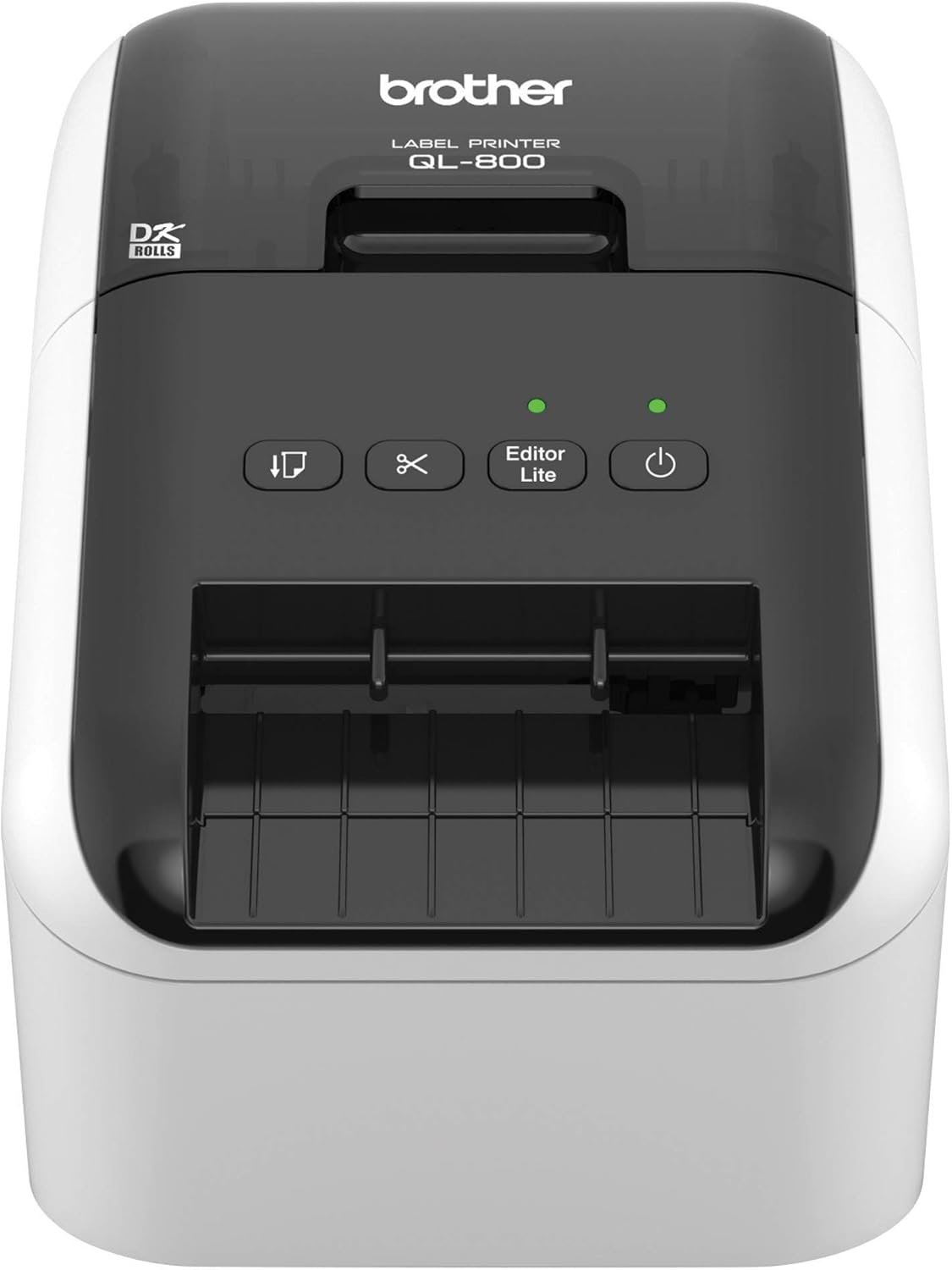
In today’s fast-paced business environment, the efficiency of labeling processes can significantly impact productivity and operational accuracy. Whether managing shipping labels, name badges, or organizational materials, the right label printer must balance speed, precision, and versatility to meet diverse needs. Small businesses and office environments often require solutions that adapt to high-volume demands while maintaining consistent output quality. The Brother QL-800 thermal label printer addresses these challenges by combining high-speed printing, dual-color capabilities, and seamless integration with common software tools. Its design prioritizes reliability and ease of use, making it a compelling option for users seeking to streamline labeling tasks. However, selecting the optimal printer depends on factors such as print volume, media compatibility, and system requirements. This review evaluates the Brother QL-800’s technical specifications, performance benchmarks, and user-centric features to determine its suitability for various business applications.
Quick Overview
| Feature | Details |
|---|---|
| Printer Type | Thermal label printer |
| Printing Technology | Direct thermal |
| Print Speed | 93 labels per minute (monochrome) |
| Print Resolution | 300 dpi |
| Color Options | Black and red |
| Connectivity | USB |
| Media Compatibility | Brother DK pre-sized labels, continuous-length tapes up to 3 feet |
| Auto-Cutter | Built-in for precise label finishing |
| Software Compatibility | Windows, Mac, Microsoft Word, Excel, Outlook |
| Warranty | Two-year limited warranty |
| Dimensions | 4.9″D x 8.4″W x 5.6″H |
| Weight | 2.5 pounds |
The Brother QL-800 is engineered for users requiring rapid, high-quality label production. Its thermal printing technology eliminates the need for ink or toner, reducing maintenance costs and ensuring consistent output. The dual-color printing capability enhances visual distinction, making it ideal for branding and labeling applications. With seamless integration into existing workflows and support for a variety of media types, the printer caters to small businesses and office environments seeking efficient, reliable labeling solutions.

High-Speed Printing for Volume Demands
The Brother QL-800’s primary advantage lies in its ability to handle high-volume labeling tasks with exceptional speed. At 93 labels per minute, the printer is designed to meet the demands of businesses requiring frequent label production, such as shipping operations, inventory management, and event logistics. This performance level is achieved through advanced thermal printing technology, which ensures consistent output without compromising resolution. The 300 dpi print resolution maintains clarity and detail, making the printer suitable for both text-based labels and graphics. For users prioritizing throughput, the QL-800’s speed is a significant benefit, particularly in environments where time-sensitive labeling is critical.
Thermal Printing Efficiency
Thermal label printing technology is a key differentiator for the QL-800. Unlike inkjet or laser printers, direct thermal printing uses heat to create images on label media, eliminating the need for ink or toner. This method reduces maintenance requirements and ensures long-term reliability, as there are no replaceable ink cartridges to manage. The printer’s thermal engine is optimized for consistent performance, even with continuous-length tapes, which are ideal for custom banners and signage. While thermal printing may not be suitable for applications requiring permanent outdoor exposure, it is highly effective for indoor use and short-term labeling needs.
Media Compatibility and Flexibility
The QL-800 supports a range of media types, including Brother Genuine DK pre-sized labels and continuous-length tapes up to 3 feet in length. This flexibility allows users to adapt the printer to various applications, from standard shipping labels to custom signage. The built-in auto-cutter ensures precise, clean cuts for professional-looking labels, reducing the risk of misalignment or incomplete prints. However, the reliance on Brother Genuine DK labels means users must ensure they have access to compatible media, as using non-genuine supplies may affect print quality and void warranty coverage. This limitation is a consideration for users who prefer alternative label options.
Duty Cycle and Workload Capacity
The QL-800 is designed for environments with moderate to high print volumes, with a duty cycle that supports continuous operation without overheating. The printer’s thermal engine and cooling system are engineered to maintain performance during extended use, making it suitable for businesses with daily labeling requirements. However, users should avoid overloading the printer with excessive media or operating it beyond its recommended capacity, as this could impact longevity. The two-year limited warranty provides reassurance for users expecting consistent performance over time.
Dual-Color Printing for Enhanced Branding and Visibility
The QL-800’s dual-color printing capability sets it apart from standard monochrome label printers, offering users the ability to create eye-catching labels with black and red ink. This feature is particularly advantageous for businesses aiming to enhance branding visibility, such as creating attention-grabbing name badges, promotional materials, or shipping labels with distinctive color coding. The printer’s ability to produce vivid red and black prints ensures that labels stand out in visual environments, improving recognition and professionalism. However, the dual-color functionality is limited to specific label media types, which may restrict its use in certain applications.
Color Accuracy and Application Suitability
The QL-800’s dual-color printing technology relies on thermal imaging to produce red and black prints, ensuring consistent color accuracy across label media. This capability is ideal for applications requiring visual distinction, such as inventory tracking, where color-coded labels can improve efficiency. However, the printer’s color output is not suitable for high-precision graphic work, as thermal printing may not replicate the depth and detail of inkjet or laser printing. Users should consider the printer’s color limitations when selecting applications that require detailed imagery or photographic quality.
Branding and Marketing Applications
For small businesses and marketing teams, the QL-800’s dual-color printing offers a cost-effective way to enhance branding and visibility. The ability to create striking black and red labels can elevate the professionalism of materials such as event signage, product packaging, and promotional collateral. However, the printer’s reliance on Brother Genuine DK labels means users must ensure they have access to compatible media for optimal results. This limitation may be a drawback for users who prefer alternative label options or require more customization in their media choices.
Software Integration and Workflow Optimization
The QL-800’s seamless integration with Microsoft Word, Excel, and Outlook simplifies the labeling process by allowing users to print directly from their existing documents. This feature reduces the need for additional software installation, streamlining workflow for businesses that rely on these applications. The built-in Plug & Label technology further enhances usability by enabling instant printing without complex setup procedures. However, users who require advanced design capabilities or specialized label templates may find the printer’s software integration limited, as it does not support third-party design tools beyond basic document printing.
Versatile Applications for Diverse Labeling Needs
The QL-800’s versatility extends beyond its printing speed and color options, making it suitable for a wide range of labeling applications. From shipping labels and postage to file folders and name badges, the printer’s adaptability ensures it can meet the needs of various business environments. The support for continuous-length tapes allows for the creation of custom banners and signage, expanding the printer’s utility beyond standard label production. This flexibility is particularly valuable for users who require a single device to handle multiple labeling tasks without the need for additional equipment.
Shipping and Logistics Applications
In logistics and shipping operations, the QL-800’s high-speed printing and dual-color capabilities make it an ideal choice for generating accurate, high-visibility shipping labels. The ability to produce labels with black and red ink ensures that critical information, such as tracking numbers and destination details, stands out against standard white or light-colored backgrounds. The built-in auto-cutter ensures precise label finishing, reducing the risk of errors during high-volume printing. However, users in this sector should consider the printer’s media limitations, as continuous-length tapes may not be suitable for all shipping label formats.
Office and Administrative Use
For office environments, the QL-800 offers a reliable solution for creating name badges, file folders, and internal labeling. The printer’s compatibility with Microsoft Office applications simplifies the creation of standardized labels, reducing the time required for manual formatting. The support for Brother Genuine DK labels ensures consistent print quality, which is essential for maintaining a professional appearance in administrative tasks. However, users who require more advanced customization options or specialized label designs may find the printer’s capabilities limited, as it does not support complex design templates beyond basic document printing.
Custom Signage and Banners
The QL-800’s ability to handle continuous-length tapes up to 3 feet in length makes it a valuable tool for creating custom banners and signage. This feature is particularly useful for businesses that require large-format labels for events, promotions, or facility signage. The printer’s dual-color printing capability allows for the creation of visually appealing banners with contrasting colors, enhancing their impact in visual environments. However, users should be aware that the printer’s thermal printing technology may not be suitable for outdoor use, as exposure to sunlight or extreme temperatures can degrade the print quality over time.
Pros & Cons
Pros
- High-Speed Printing: The QL-800’s 93 labels per minute capability ensures efficient handling of high-volume labeling tasks, making it ideal for businesses with frequent label production needs.
- Dual-Color Printing: The ability to print in black and red enhances the visual appeal of labels, making them more noticeable and suitable for branding applications.
- Seamless Integration: Compatibility with Microsoft Word, Excel, and Outlook allows for direct printing from existing documents, streamlining workflow without additional software requirements.
- Built-In Auto-Cutter: The auto-cutter ensures precise, clean cuts for professional-looking labels, reducing the risk of misalignment or incomplete prints.
- Versatile Media Support: The printer’s compatibility with both pre-sized labels and continuous-length tapes provides flexibility for various labeling applications, from standard labels to custom banners.
- Reliable Thermal Technology: Direct thermal printing eliminates the need for ink or toner, reducing maintenance costs and ensuring consistent output over time.
Cons
- Media Dependency: The printer requires Brother Genuine DK labels for optimal performance, limiting flexibility for users who prefer alternative media options.
- Color Limitations: While dual-color printing is a significant advantage, the thermal technology may not replicate the depth and detail of inkjet or laser printing for complex graphics or photographic quality.
- Software Constraints: The printer’s integration with Microsoft Office applications is limited to basic document printing, which may not meet the needs of users requiring advanced design capabilities.
- Environmental Sensitivity: Continuous-length tapes and thermal printing may be less suitable for outdoor or high-temperature environments, as exposure can degrade print quality over time.
- Warranty Coverage: The two-year limited warranty provides basic coverage but may not fully address long-term reliability concerns for users with extensive labeling needs.
Final Verdict: Who This Printer Is Best For (and Who Should Skip It)
The Brother QL-800 is best suited for small businesses, office environments, and logistics operations that require efficient, high-speed label production with dual-color capabilities. Its versatility in handling both pre-sized labels and continuous-length tapes makes it ideal for applications such as shipping labels, name badges, and custom signage. The seamless integration with Microsoft Office applications and built-in auto-cutter further enhance its appeal for users prioritizing workflow efficiency. However, the printer may not be the best choice for users requiring advanced design customization, high-precision graphic printing, or long-term outdoor use. The reliance on Brother Genuine DK labels and thermal printing limitations should also be considered for users who need alternative media options or more durable print solutions. Overall, the QL-800 is a reliable, cost-effective solution for businesses with standard labeling needs, but its suitability depends on specific operational requirements and media preferences.
Frequently Asked Questions (FAQs)
What are the key advantages of the Brother QL-800 label printer?
The Brother QL-800 offers high-speed printing at 93 labels per minute, dual-color (black and red) printing for enhanced branding, and seamless integration with Microsoft Office applications. Its built-in auto-cutter ensures precise label finishing, and it supports both pre-sized Brother DK labels and continuous-length tapes for versatile labeling needs.
Can the Brother QL-800 print in color?
Yes, the QL-800 supports dual-color printing using black and red ink. This feature allows for eye-catching labels suitable for branding, signage, and promotional materials, though it is not suitable for high-precision graphic work.
What types of media does the QL-800 support?
The printer is compatible with Brother Genuine DK pre-sized labels and continuous-length tapes up to 3 feet in length. This versatility enables use for shipping labels, name badges, file folders, and custom banners.
Is the Brother QL-800 suitable for outdoor use?
The QL-800’s thermal printing technology is best suited for indoor environments. Continuous-length tapes and thermal prints may degrade in high-temperature or outdoor conditions, making it less ideal for long-term outdoor use.
What software is required to use the QL-800?
The QL-800 integrates seamlessly with Microsoft Word, Excel, and Outlook for direct printing. It also includes the Brother P-touch editor software for label design. No additional software installation is required for basic document printing.
How does the QL-800 handle label cutting?
The printer features a built-in auto-cutter that ensures precise, clean cuts for professional-looking labels. This mechanism reduces the risk of misalignment or incomplete prints, especially when using continuous-length tapes.
What is the warranty coverage for the QL-800?
The Brother QL-800 comes with a two-year limited warranty and access to Brother’s exchange service. This coverage provides basic assurance for long-term reliability and performance.
Can the QL-800 be used for custom banner printing?
Yes, the QL-800 supports continuous-length tapes up to 3 feet in length, making it suitable for creating custom banners and signage. The dual-color printing capability enhances the visual impact of these labels in various environments.