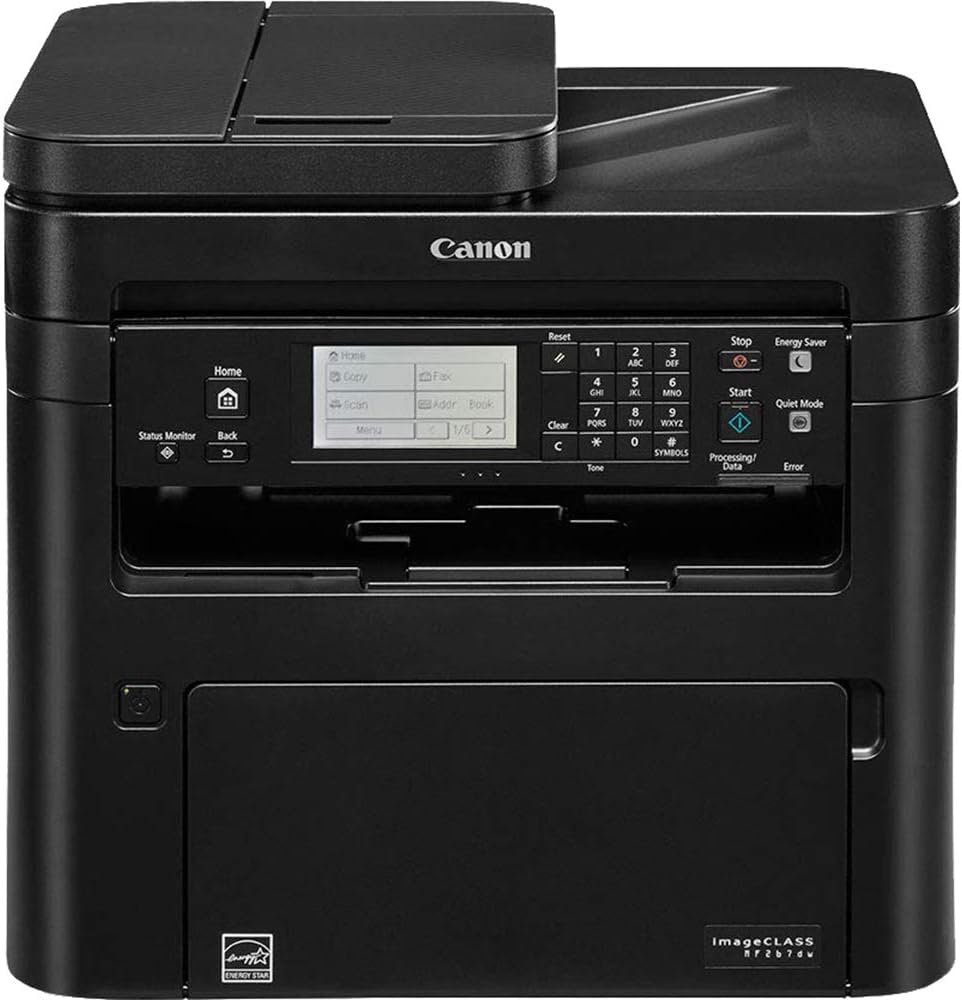
imageCLASS MF267dw: Monochrome Laser Printer for Office Efficiency and Connectivity
The Importance of Choosing the Right Printer
In today’s fast-paced business environment, selecting the right printer can significantly impact productivity and operational efficiency. Whether managing a small office, a remote team, or a growing business, the right printer must balance speed, reliability, and multifunctionality. Printers serve as critical tools for document creation, sharing, and archiving, with performance metrics such as print speed, resolution, connectivity, and maintenance requirements directly influencing workflow efficiency. For organizations that rely on high-volume printing, the ability to handle large workloads without frequent downtime or consumable replacement is essential. Conversely, for smaller teams or mobile professionals, compact design, wireless connectivity, and mobile compatibility often take precedence. Understanding these factors—along with print quality expectations, media compatibility, and long-term cost considerations—enables businesses to make informed decisions that align with their specific needs. This review evaluates the Canon imageCLASS MF267dw, a monochrome laser printer designed for small and medium-sized businesses, to determine how it meets the demands of modern office environments.
Quick Overview
| Feature | Details |
|---|---|
| Printer Type | Monochrome Laser Printer |
| Print Technology | Laser |
| Supported Functions | Print, Scan, Copy, Fax |
| Print Speed | Up to 30 pages per minute (black and white) |
| Print Resolution | 1200 dpi (black and white) |
| Media Sizes | 8.5 x 5.5, 8.5 x 11, 8.5 x 14, 7.25 x 10.5, 4.8 x 9.5, 3.37 x 9, 4.3 x 8.6, 3 x 5 |
| Connectivity | Wireless (Wi-Fi Direct), Ethernet, USB |
| Duty Cycle | 12,000 pages per month |
| Toner System | High Yield Toner (1,700 page yield) |
| Paper Capacity | 250 sheets in standard cassette, 1 sheet in multipurpose tray |
| Warranty | Limited warranty |
The imageCLASS MF267dw is designed for office environments requiring reliable, high-speed monochrome printing. Its combination of wireless connectivity, automatic duplex printing, and support for mobile printing protocols like Apple AirPrint and Google Cloud Print makes it suitable for teams that prioritize flexibility and integration with modern workflows. The printer’s large LCD touchscreen and multifunction capabilities further enhance its appeal for small to mid-sized businesses looking to streamline document management.
Print Speed and Throughput
The imageCLASS MF267dw’s print speed of up to 30 pages per minute (ppm) positions it as a high-performance option for environments with moderate to heavy printing demands. This speed is particularly beneficial for tasks such as generating reports, invoices, or internal memos, where quick output is critical. The printer’s ability to deliver the first page in approximately 5 seconds ensures minimal wait time, which is essential for maintaining workflow efficiency. For businesses that process large volumes of documents daily, the 12,000 pages per month duty cycle provides a clear indication of its capacity to handle sustained workloads without overheating or mechanical failure. However, it’s important to note that this duty cycle assumes optimal operating conditions, and performance may vary based on environmental factors and usage patterns.
Maximum Print Speed and Initial Page Time
The MF267dw’s maximum print speed of 30 ppm is achieved through its advanced laser print engine, which uses a high-speed fuser and precision toner application to ensure consistent output. The 5-second first page time is a result of the printer’s optimized firmware and efficient toner delivery system, allowing users to quickly resume tasks after initiating a print job. While this speed is competitive with similar models, it’s important to consider that the actual print speed may decrease as the print queue grows or when printing complex documents with multiple pages. The printer’s ability to maintain high speeds across different paper sizes and media types further enhances its versatility for office use.
Duty Cycle and Workload Capacity
The 12,000 pages per month duty cycle is a key specification that indicates the printer’s suitability for environments with consistent printing demands. This rating is based on standard operating conditions and assumes the use of high-yield toner cartridges, which reduce the frequency of consumable replacements. For businesses that print 100–200 pages per day, the MF267dw is well-suited to handle monthly volumes without requiring frequent maintenance. However, for organizations with significantly higher printing needs, such as those printing over 200 pages per day, the printer may require additional hardware or a more robust model to avoid potential performance degradation or mechanical strain.
Initial Page Time and Warm-Up Efficiency
The MF267dw’s 5-second initial page time is a result of its efficient print engine and preheated fuser system, which minimizes the time required to reach optimal operating temperature. This feature is particularly advantageous for users who frequently initiate print jobs, as it reduces the waiting period between tasks. The printer’s ability to maintain this speed across different media types, including standard letter and legal sizes, ensures consistent performance regardless of the document being printed. However, users should be aware that initial page times may increase slightly when printing complex or high-resolution documents, as the printer may need to adjust its internal settings to ensure print quality.
Connectivity and Mobile Integration
The imageCLASS MF267dw’s connectivity options are a standout feature, offering a range of wireless and wired solutions to accommodate diverse user needs. The printer supports Wi-Fi Direct, allowing mobile devices to connect without a router, which is ideal for users who need to print from smartphones or tablets on the go. Additionally, its compatibility with Apple AirPrint, Canon PRINT Business, Mopria Print Service, and Google Cloud Print ensures seamless integration with popular mobile and cloud-based printing platforms. These features make the MF267dw particularly appealing for small businesses and remote teams that rely on mobile workflows. The inclusion of Ethernet and USB ports provides flexibility for users who prefer wired connections or need to integrate the printer into a larger network infrastructure.
Wireless Connectivity and Wi-Fi Direct
The MF267dw’s Wi-Fi Direct capability enables direct printing from mobile devices without the need for a router, which is particularly useful in environments where network infrastructure is limited or unreliable. This feature allows users to print from smartphones, tablets, or laptops by simply connecting to the printer’s Wi-Fi network, eliminating the need for additional setup or configuration. However, the range and stability of the Wi-Fi Direct connection may vary depending on environmental factors, and users should be aware that this feature is best suited for short-range, one-time print jobs rather than continuous, high-volume printing.
Compatibility with Mobile Printing Protocols
The printer’s support for Apple AirPrint, Canon PRINT Business, Mopria Print Service, and Google Cloud Print ensures compatibility with a wide range of mobile and cloud-based printing applications. This versatility allows users to print from various devices and platforms, reducing the need for multiple printers or specialized software. For businesses that rely on mobile employees or remote workers, these features enhance collaboration and productivity by enabling seamless document sharing and printing. However, the effectiveness of these protocols may depend on the specific applications and operating systems being used, and some advanced features may require additional configuration or subscription services.
Ethernet and USB Connectivity Options
The MF267dw’s Ethernet and USB ports provide users with wired connectivity options for environments that prioritize stability or require integration with existing network infrastructures. Ethernet connectivity is ideal for businesses that need to connect the printer to a local network, allowing multiple users to access the printer simultaneously. The USB port offers a straightforward solution for users who prefer direct, plug-and-play connectivity or need to print from older devices that do not support wireless protocols. While these wired options are reliable, they may not offer the same level of flexibility as wireless connectivity, particularly for users who frequently move between locations or work remotely.
Print Quality and Resolution
The imageCLASS MF267dw’s print quality is primarily determined by its 1200 dpi resolution, which ensures sharp text and clear graphics for monochrome printing. This resolution is suitable for most office documents, including reports, invoices, and forms, where clarity and legibility are essential. The printer’s ability to produce consistent output across different paper sizes and media types further enhances its reliability for daily use. However, for users who require extremely high-resolution prints, such as those in graphic design or photography, the MF267dw may not meet the necessary standards. The printer’s focus on speed and efficiency makes it well-suited for environments where text-based documents are the primary requirement.
Text and Graphics Clarity
The MF267dw’s 1200 dpi resolution provides sufficient detail for most office printing needs, ensuring that text remains crisp and readable even when printed on standard paper. This level of resolution is particularly beneficial for printing reports, spreadsheets, and internal communications, where clarity is critical for effective communication. The printer’s ability to maintain consistent toner density across different page sizes further enhances its reliability for daily use. However, users who require higher resolution for specialized applications, such as engineering drawings or detailed charts, may find the MF267dw’s output to be less than ideal.
Media Compatibility and Output Consistency
The printer’s support for a wide range of paper sizes, including standard letter, legal, and various custom sizes, ensures that it can accommodate different document formats. The ability to print on plain paper, as well as other media types, makes the MF267dw versatile for various office tasks. However, the printer’s output consistency may vary slightly depending on the type of paper used, with thicker or textured media potentially affecting print quality. For businesses that require precise output on specific paper types, additional testing or calibration may be necessary to ensure optimal results.
Pros & Cons
Pros
- High-Speed Printing: The MF267dw’s 30 ppm print speed ensures quick output for high-volume environments, reducing wait times for users.
- Wireless and Mobile Compatibility: Support for Wi-Fi Direct, Apple AirPrint, and Google Cloud Print makes it ideal for remote and mobile workflows.
- Automatic Duplex Printing: The built-in duplex feature reduces paper usage and enhances document organization without manual intervention.
- Large LCD Touchscreen: The 6-line LCD interface provides intuitive navigation, simplifying setup and daily use.
- High-Yield Toner Option: The 1,700 page yield toner cartridge minimizes the frequency of consumable replacements, reducing maintenance costs.
- Robust Connectivity Options: Ethernet and USB ports offer reliable wired connectivity for environments that prioritize network stability.
- Multifunctionality: The printer’s ability to scan, copy, and fax makes it a versatile solution for small to mid-sized businesses.
- Durable Design: The printer’s 12,000 pages per month duty cycle indicates it can handle sustained printing demands without mechanical strain.
Cons
- Limited Color Capabilities: As a monochrome laser printer, it lacks the ability to produce color prints, which may be a drawback for businesses requiring colored documents.
- No Built-In Scan-to-Cloud Features: While the printer supports scanning, it does not include direct cloud integration, requiring additional software or configuration.
- Moderate Media Compatibility: Although it supports various paper sizes, the printer may not produce optimal results on specialty media types without calibration.
- Dependent on Network Stability: The wireless features, including Wi-Fi Direct, rely on stable network conditions, which may not be ideal for all environments.
- Higher Power Consumption: The 1080W power consumption is relatively high, which may impact energy costs for businesses with extensive printing needs.
- Limited Mobile App Integration: While the printer supports popular mobile printing protocols, advanced features may require additional setup or subscriptions.
Final Verdict: Who This Printer Is Best For (and Who Should Skip It)
The Canon imageCLASS MF267dw is best suited for small to mid-sized businesses that require a reliable, high-speed monochrome printer with wireless and mobile compatibility. Its 30 ppm print speed, automatic duplex printing, and support for multiple printing protocols make it an ideal choice for offices that prioritize efficiency and flexibility. The printer’s large LCD touchscreen and multifunction capabilities further enhance its appeal for users who need to manage document workflows without frequent manual intervention. However, businesses with higher color printing needs, those requiring advanced scan-to-cloud features, or those operating in environments with unstable network conditions may find the MF267dw to be less than ideal. For organizations that primarily print text-based documents and value speed and ease of use, the MF26,7dw offers a cost-effective and efficient solution for daily operations.
Frequently Asked Questions (FAQs)
What is the maximum print speed of the Canon imageCLASS MF267dw?
The Canon imageCLASS MF267dw can print up to 30 pages per minute (ppm) in black and white, making it suitable for high-volume office environments. This speed is achieved through its advanced laser print engine and optimized firmware.
Does the imageCLASS MF267dw support wireless printing?
Yes, the imageCLASS MF267dw supports wireless printing via Wi-Fi Direct, allowing users to print from mobile devices without a router. It also includes Ethernet and USB ports for wired connectivity.
What media sizes does the printer support?
The imageCLASS MF267dw supports a range of media sizes, including standard letter, legal, and various custom sizes up to 8.5 x 14 inches. This flexibility ensures compatibility with different document formats.
How does the printer handle duplex printing?
The imageCLASS MF267dw features automatic duplex printing, which allows the printer to print on both sides of the paper without manual intervention, reducing paper usage and enhancing document organization.
What is the print resolution of the imageCLASS MF267dw?
The printer offers a print resolution of 1200 dpi, which ensures sharp text and clear graphics for monochrome printing. This resolution is suitable for most office documents, including reports and spreadsheets.
Can the printer handle mobile printing from smartphones and tablets?
Yes, the imageCLASS MF267dw supports mobile printing through protocols like Apple AirPrint, Canon PRINT Business, Mopria Print Service, and Google Cloud Print, enabling seamless printing from mobile devices.
What is the duty cycle of the imageCLASS MF267dw?
The imageCLASS MF267dw has a duty cycle of 12,000 pages per month, indicating its ability to handle sustained printing demands under standard operating conditions. This makes it suitable for environments with consistent printing needs.
What connectivity options are available for the printer?
The imageCLASS MF267dw offers Ethernet, USB, and Wi-Fi Direct connectivity options, providing flexibility for users who prefer wired connections or need to integrate the printer into a larger network infrastructure.