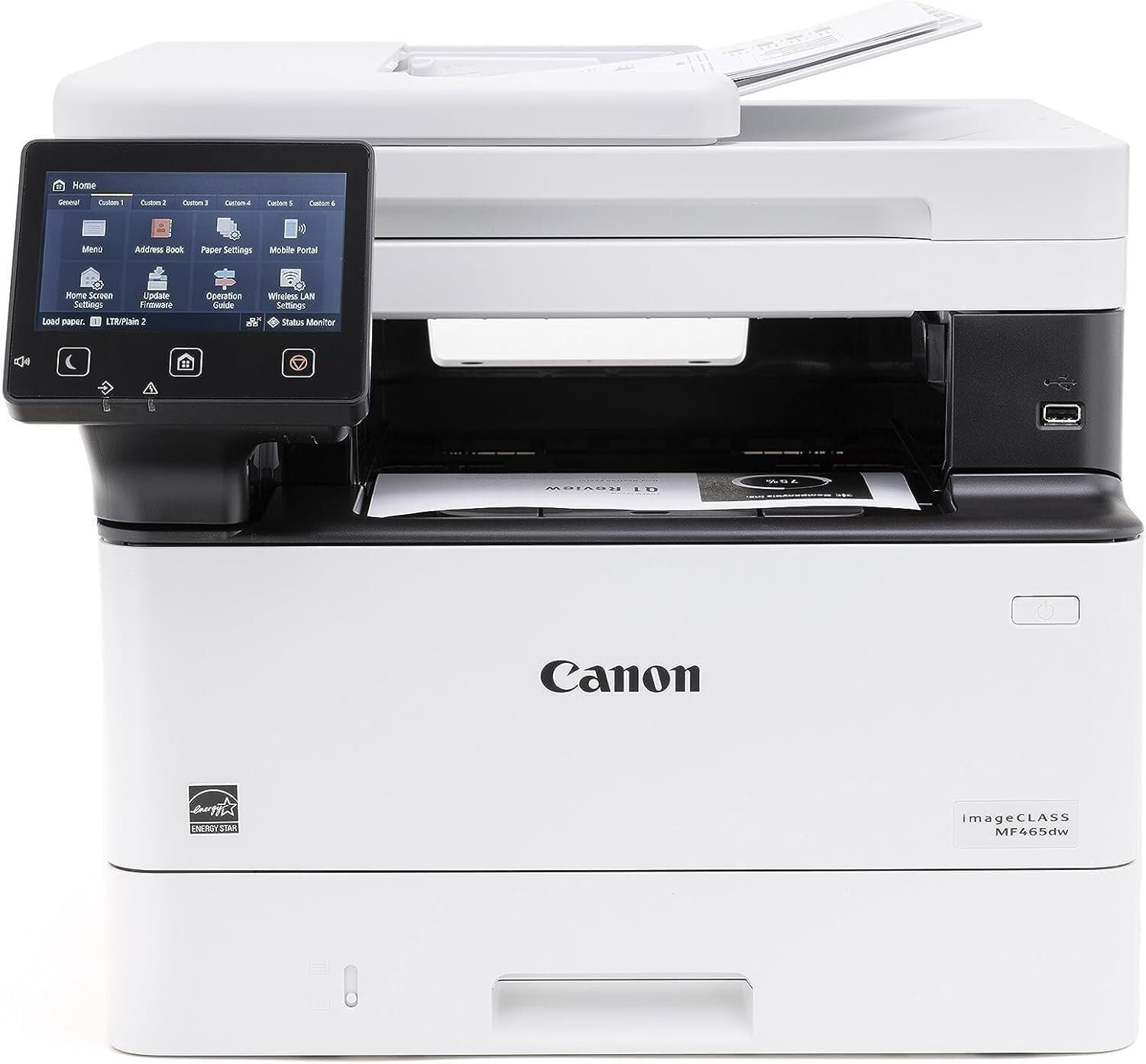
Canon imageCLASS MF465dw Monochrome Laser Printer: 42 PPM, Wireless, Duplex, Business-Ready
The Importance of Choosing the Right Printer for Modern Workflows
In today’s fast-paced business environments, the efficiency and reliability of printing technology can significantly impact productivity. Whether managing high-volume office tasks, handling document workflows, or supporting remote collaboration, the right printer can streamline operations while minimizing downtime. For organizations requiring consistent output quality, rapid processing, and multifunctional capabilities, selecting a printer that aligns with specific workload demands is critical. Monochrome laser printers, in particular, are favored for their speed, cost-effectiveness, and durability in environments where black-and-white documents dominate. The Canon imageCLASS MF465dw represents a compelling option for businesses seeking a versatile, high-performance device that balances speed, connectivity, and environmental considerations. Its design caters to users who prioritize reliability, scalability, and seamless integration into existing workflows, making it a strong contender for office settings with moderate to high print volumes. By evaluating its technical specifications, functional capabilities, and real-world suitability, this review provides a comprehensive assessment of the Canon imageCLASS MF465dw’s ability to meet modern printing needs.
Quick Overview
| Feature | Details |
|---|---|
| Printer Type | Monochrome Laser Printer |
| Supported Functions | Print, Scan, Copy, Fax |
| Print Speed | Up to 42 pages per minute (A4) |
| Print Resolution | 1,200 x 1,200 dpi (black and white) |
| Media Sizes | 3″ x 5″ to 8.5″ x 14″ |
| Connectivity | Wireless, Gigabit Ethernet, USB |
| Auto Duplex | Yes, with 2-sided printing |
| Paper Capacity | Up to 900 sheets (expandable) |
| Toner System | Compatible with Canon toner cartridges |
| Warranty | 90-day limited warranty |
| Duty Cycle | 12,000 pages per month |
| Environmental Features | Energy-efficient design, automatic duplex |
The Canon imageCLASS MF465dw is designed for office environments requiring high-speed monochrome printing, scanning, and copying. Its combination of wireless connectivity, expandable paper handling, and energy-efficient operation makes it suitable for small to medium-sized businesses. The auto-duplex feature reduces paper waste, while the 42 PPM print speed ensures efficient handling of large print jobs. The device’s compatibility with Canon toner cartridges and its 90-day warranty further enhance its appeal for businesses prioritizing cost-effective, reliable printing solutions.

Print Speed and Volume Capacity
The Canon imageCLASS MF465dw is engineered to deliver exceptional print speed and volume capacity, making it ideal for environments with high print demands. With a maximum print speed of 42 pages per minute (A4), the printer is capable of handling large document workflows without significant delays. This performance is supported by a duty cycle of 12,000 pages per month, ensuring the device can sustain continuous operation in busy office settings. The printer’s ability to process monochrome documents at such a rate is particularly advantageous for businesses that rely heavily on black-and-white reports, invoices, and forms. The 42 PPM speed is achieved through a combination of a high-speed laser print engine and optimized paper handling mechanisms, which minimize processing time and reduce the risk of paper jams. For users requiring rapid output, this printer’s speed is a key differentiator, especially when compared to slower monochrome laser models.
High-Speed Print Engine
The printer’s laser print engine is designed to maximize throughput while maintaining consistent output quality. The 42 PPM print speed is achieved through a combination of a high-capacity toner cartridge and a precision-controlled fusing system that ensures even toner distribution. This results in sharp, clear text and reliable print quality across a wide range of document types. The printer’s ability to handle high-volume tasks without compromising speed is further enhanced by its efficient paper transport system, which minimizes downtime and reduces the need for frequent maintenance. For businesses with large print runs, the printer’s speed and reliability make it a practical choice for maintaining productivity.
Expandable Paper Handling
The Canon imageCLASS MF465dw features an expandable paper capacity of up to 900 sheets, which can be further increased with an optional paper feeder. This design reduces the frequency of paper refills, minimizing interruptions during critical print jobs. The printer’s ability to manage large volumes of paper is particularly beneficial in environments where continuous printing is required, such as accounting departments or customer service centers. The built-in paper tray and optional feeder work in tandem to ensure a steady supply of media, supporting uninterrupted operation during peak workloads. This expandable capacity is a significant advantage for businesses looking to reduce manual intervention and maintain a consistent printing workflow.
Connectivity and Network Integration
The Canon imageCLASS MF465dw offers a range of connectivity options that enhance its versatility in modern office environments. The printer supports wireless connectivity via Wi-Fi, allowing users to print from mobile devices without the need for physical cables. Additionally, the device includes a built-in access point mode, which enables direct connections to mobile devices without relying on an external router. This feature is particularly useful for users who need to print from smartphones or tablets in locations where network access is limited. The printer also supports Gigabit Ethernet and USB connectivity, providing flexible options for integrating the device into existing network infrastructures. These connectivity options ensure that the Canon imageCLASS MF465dw can adapt to a variety of office setups, from small workgroups to larger enterprises with complex network requirements.
Wireless Printing and Mobile Compatibility
The wireless printing capabilities of the Canon imageCLASS MF46,5dw are designed to support seamless integration with mobile devices and cloud-based workflows. The built-in Wi-Fi functionality allows users to print from smartphones, tablets, and laptops without the need for additional hardware. This is particularly beneficial for remote workers or teams that rely on mobile access to print critical documents. The printer’s access point mode further enhances mobility by enabling direct connections to mobile devices, eliminating the need for a traditional router. These features make the Canon imageCLASS MF465dw a practical choice for businesses that prioritize flexibility and remote accessibility in their printing operations.
Network and USB Integration
For users who prefer wired connections, the Canon imageCLASS MF465dw supports Gigabit Ethernet and USB connectivity, ensuring reliable performance in both local and networked environments. The Gigabit Ethernet interface allows for high-speed data transfer, which is essential for printing large files or managing print queues efficiently. The USB port provides a straightforward way to connect the printer to a computer, making it an ideal option for users who need direct access to print tasks. These connectivity options ensure that the printer can be seamlessly integrated into a variety of office setups, from standalone workstations to complex network environments.
Print Quality and Output Consistency
The Canon imageCLASS MF465dw delivers consistent print quality that meets the demands of business environments requiring clear, professional-grade output. The printer’s monochrome laser technology ensures sharp, high-contrast text and reliable reproduction of documents. With a print resolution of 1,200 x 1,200 dpi, the device produces crisp text and clean, uniform lines, making it suitable for a wide range of applications, including reports, invoices, and forms. The printer’s ability to maintain consistent output quality over time is supported by its durable print engine and precision toner distribution system, which minimize the risk of smudging or toner clumping. For businesses that rely on accurate and legible printouts, the Canon imageCLASS MF465dw’s print quality is a significant advantage.
High-Resolution Monochrome Output
The printer’s 1,200 x 1,200 dpi resolution ensures that text and graphics are rendered with high clarity and detail. This level of resolution is particularly beneficial for documents that require precise formatting, such as financial statements, legal forms, and technical reports. The printer’s ability to maintain consistent resolution across different media types further enhances its versatility, allowing users to print on a variety of paper stocks without compromising output quality. The high-resolution output is achieved through a combination of a high-precision laser print engine and a finely tuned fusing system that ensures even toner distribution.
Reliable Output Consistency
The Canon imageCLASS MF465dw is designed to deliver reliable output consistency over extended periods of use. Its durable print engine and high-quality toner cartridges contribute to long-term performance, minimizing the risk of mechanical failures or print quality degradation. The printer’s ability to maintain consistent output is further enhanced by its advanced paper handling system, which reduces the likelihood of paper jams or misfeeds. These features make the Canon imageCLASS MF465dw a dependable choice for businesses that require consistent, high-quality printing in demanding environments.
Pros & Cons
Pros
- High-Speed Printing: The 42 PPM print speed ensures efficient handling of large print jobs, making it ideal for high-volume office environments.
- Auto-Duplex Functionality: The automatic duplex printing feature reduces paper waste and lowers operating costs, aligning with environmental sustainability goals.
- Expandable Paper Handling: The 900-sheet paper capacity, combined with an optional feeder, minimizes refills and interruptions during critical print tasks.
- Versatile Connectivity Options: The printer supports wireless, Gigabit Ethernet, and USB connectivity, providing flexibility for different office setups and mobile access.
- Energy-Efficient Design: The printer’s energy-efficient operation helps reduce electricity costs and supports eco-friendly business practices.
- Durable Print Engine: The robust construction and high-quality components ensure long-term reliability, reducing the need for frequent maintenance.
Cons
- Limited Color Capabilities: As a monochrome printer, it lacks color printing and scanning features, which may be a drawback for users requiring color output.
- No Included Toner Cartridges: The printer does not come with toner cartridges, requiring users to purchase them separately, which may increase initial costs.
- Fixed Paper Tray Design: While the expandable capacity is a benefit, the fixed paper tray may limit flexibility compared to models with multiple trays.
- No Built-In Color Scanner: The absence of a color scanner may necessitate additional hardware for users who require color scanning capabilities.
- Dependent on Toner Quality: Print quality is contingent on the use of compatible Canon toner cartridges, which may affect output consistency if lower-quality alternatives are used.
Final Verdict: Who This Printer Is Best For (and Who Should Skip It)
The Canon imageCLASS MF465dw is best suited for small to medium-sized businesses that require a reliable, high-speed monochrome printer for document workflows. Its 42 PPM print speed, auto-duplex functionality, and expandable paper handling make it an excellent choice for environments with high-volume printing needs, such as accounting departments, customer service centers, and administrative offices. The printer’s versatile connectivity options and energy-efficient design further enhance its appeal for businesses prioritizing cost-effectiveness and environmental sustainability. However, users who require color printing, scanning, or advanced multimedia capabilities may find the Canon imageCLASS MF465dw less suitable. Its lack of color features and limited scanning options may necessitate additional hardware for users with more complex printing requirements. For businesses that can leverage its monochrome capabilities and prioritize speed and reliability, the Canon imageCLASS MF465dw offers a strong value proposition in the 2026 market.
Frequently Asked Questions (FAQs)
What is the maximum print speed of the Canon imageCLASS MF465dw?
The Canon imageCLASS MF465dw can print up to 42 pages per minute (A4) in monochrome, making it suitable for high-volume office environments.
Does the Canon imageCLASS MF465dw support wireless printing?
Yes, the printer includes built-in Wi-Fi functionality for wireless printing, allowing users to print from mobile devices without additional hardware.
Can the Canon imageCLASS MF465dw handle large print jobs?
The printer’s expandable paper capacity of up to 900 sheets, along with an optional feeder, ensures it can manage large print jobs without frequent refills.
What connectivity options are available for the Canon imageCLASS MF465dw?
The printer supports wireless printing, Gigabit Ethernet, and USB connectivity, offering flexibility for different office setups and mobile access.
Is the Canon imageCLASS MF465dw suitable for small businesses?
Yes, the printer’s high-speed printing, auto-duplex functionality, and energy-efficient design make it an ideal choice for small to medium-sized businesses.
What is the print resolution of the Canon imageCLASS MF465dw?
The printer delivers a print resolution of 1,200 x 1,200 dpi, ensuring sharp, clear text and consistent output quality for business documents.
Does the Canon imageCLASS MF465dw include toner cartridges?
No, the printer does not include toner cartridges. Users must purchase compatible Canon toner cartridges separately for operation.
Can the Canon imageCLASS MF465dw scan color documents?
The printer’s scanner is limited to monochrome scanning, making it unsuitable for color document scanning without additional hardware.