Canon imageCLASS MF753Cdw: High-Speed Color Laser Printer Review
The Importance of Choosing the Right Printer
In today’s fast-paced business environment, selecting the right printer can significantly impact productivity and operational efficiency. Whether managing a small office or a medium-sized enterprise, the capabilities of a printer extend beyond mere document reproduction. Modern printers must balance speed, reliability, and versatility to meet diverse printing needs. From generating high-quality reports to handling large volumes of documents, the performance of a printer can directly influence workflow efficiency. For businesses that require frequent color output, high-speed printing, and multifunctional capabilities, the choice of printer technology and features becomes critical. Laser printers, in particular, offer a combination of speed, durability, and cost-effectiveness for office environments. However, the right printer must also align with specific requirements such as media compatibility, connectivity options, and maintenance considerations. This review examines the Canon imageCLASS MF753Cdw, a laser printer designed for small and medium-sized businesses, to evaluate its suitability for various printing scenarios. By analyzing its technical specifications, user features, and performance benchmarks, this guide aims to help potential buyers make an informed decision based on their specific operational needs.
Quick Overview
| Feature | Details |
|---|---|
| Printer Type | Color Laser Printer |
| Supported Functions | Print, Scan, Copy, Fax |
| Print Speed | Up to 35 pages per minute (color and black/white) |
| Print Resolution | 1200 x 1200 dpi (color), 600 x 600 dpi (black/white) |
| Media Sizes | Standard Cassette: 3.9″ x 5.8″ to 8.5″ x 14″; Multipurpose Tray: 3″ x 5″ to 8.5″ x 14″ |
| Connectivity Options | Ethernet, USB, Wireless |
| Duty Cycle | Designed for high-volume office use |
| Toner System | Canon Genuine Toner 069 / 069 High Capacity |
| Warranty | 3-Year Limited Warranty |
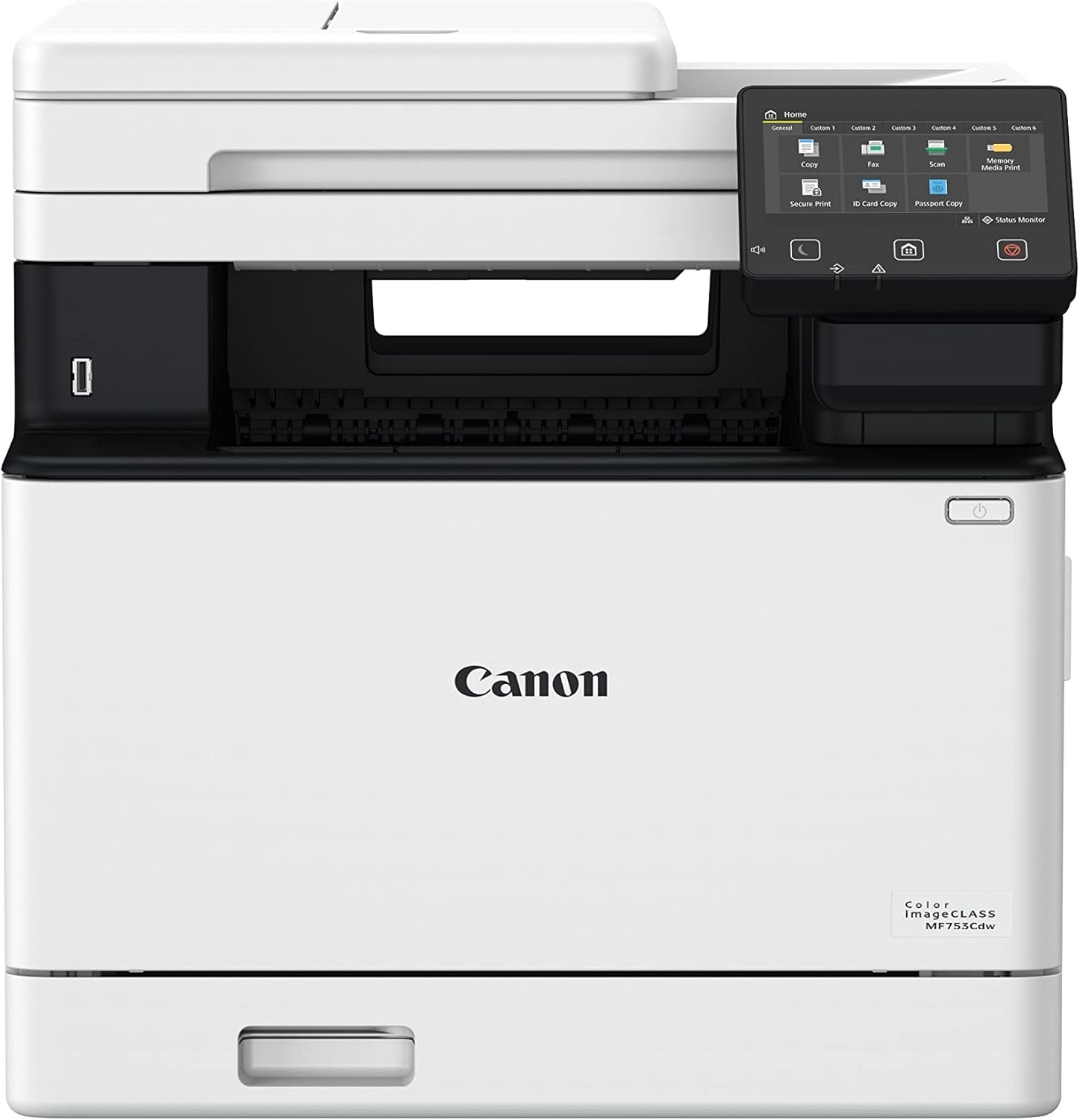
The Canon imageCLASS MF753Cdw is a multifunctional laser printer tailored for small and medium-sized businesses. Its combination of high-speed printing, color output, and integrated scanning and fax capabilities makes it suitable for environments requiring frequent document processing. The printer’s ability to handle a variety of media sizes and its energy-efficient design further enhance its appeal for office use. The 5″ color touchscreen interface simplifies navigation, while the built-in auto document feeder streamlines scanning tasks. These features collectively position the MF753Cdw as a versatile solution for businesses prioritizing efficiency and productivity.

Print Quality and Resolution
The Canon imageCLASS MF753Cdw delivers consistent print quality through its advanced laser printing technology. The printer’s maximum color print resolution of 1200 x 1200 dpi ensures sharp and detailed output, making it suitable for documents that require high visual clarity. This resolution is particularly beneficial for reports, presentations, and marketing materials where color accuracy and image fidelity are critical. The black-and-white print resolution of 600 x 600 dpi maintains readability and clarity for text-heavy documents, such as invoices, contracts, and spreadsheets. The printer’s ability to produce high-quality color prints is further enhanced by its use of Canon Genuine Toner 069, which ensures consistent toner distribution and vibrant color reproduction. For businesses that frequently print graphics or photos, the MF753Cdw’s resolution capabilities provide a reliable solution for maintaining professional output standards.

Color Accuracy and Text Clarity
The MF753Cdw’s color printing capabilities are optimized for both text and graphics. The printer’s toner system and resolution settings allow for precise color reproduction, ensuring that colors remain consistent across different print jobs. This is particularly important for businesses that require accurate color representation in marketing materials or presentations. The printer’s text clarity is maintained through its 600 x 600 dpi black-and-white resolution, which ensures sharp and legible text even when printed on standard paper. The combination of high-resolution output and reliable toner distribution makes the MF753Cdw a suitable choice for environments where document readability is a priority. However, users should note that the printer’s performance may vary slightly depending on the type of paper used and the complexity of the print job.
Media Compatibility and Output Consistency
The MF753Cdw supports a wide range of media sizes, including standard letter-sized paper and larger formats up to 8.5 x 14 inches. This versatility allows the printer to handle various document types, from standard office reports to larger presentations. The printer’s ability to maintain output consistency across different media sizes is crucial for businesses that require uniform print quality. The use of Canon Genuine Toner 069 ensures that toner adhesion is consistent, reducing the risk of smudging or uneven color distribution. Additionally, the printer’s design allows for easy media loading and unloading, which can help streamline the printing process for users who frequently handle different paper sizes. Overall, the MF753Cdw’s media compatibility and output consistency make it a reliable choice for businesses with diverse printing needs.
Print Speed and Throughput
The Canon imageCLASS MF753Cdw is designed for high-speed printing, with a maximum print speed of 35 pages per minute for both color and black/white documents. This speed is ideal for environments that require rapid document processing, such as busy offices or departments with high print volumes. The printer’s ability to handle both color and black/white printing at the same speed makes it a versatile option for businesses that need to produce a variety of documents efficiently. The initial page print time of 7 seconds ensures that the printer can quickly start processing print jobs, minimizing delays in document output. For users who frequently print large volumes, the MF753Cdw’s speed capabilities can help reduce wait times and improve overall workflow efficiency. However, it is important to note that the printer’s performance may be affected by factors such as the complexity of the print job and the type of media used.

Handling High-Volume Workloads
The MF753Cdw is built to handle high-volume printing tasks, with a duty cycle designed for continuous use in office environments. The printer’s robust construction and reliable toner system ensure that it can operate efficiently even during peak printing periods. The standard 250-sheet cassette and 50-sheet multipurpose tray provide ample paper capacity, reducing the need for frequent refills. The optional expansion cassette PF-K1 allows for an additional 500 sheets, making it suitable for businesses with higher paper requirements. The printer’s energy-efficient design also helps reduce operational costs over time, which is beneficial for businesses that require long-term reliability. However, users should be aware that the printer’s performance may vary depending on the specific workload and the frequency of use, which could impact its overall efficiency in high-volume settings.
Connectivity and Network Capabilities
The Canon imageCLASS MF753Cdw offers multiple connectivity options, including Ethernet, USB, and wireless capabilities, making it suitable for a variety of network environments. The printer’s Ethernet connection allows for seamless integration into existing office networks, enabling users to print from multiple devices simultaneously. The wireless functionality provides additional flexibility, allowing users to print from smartphones or tablets without the need for physical connections. The printer’s compatibility with Canon PRINT Business software enhances its usability for mobile users, as it allows for remote printing and management. The inclusion of a 5″ color touchscreen interface further simplifies navigation and management of print settings, making it easier for users to adjust configurations and monitor print jobs. These connectivity features collectively contribute to the printer’s versatility, making it a suitable choice for businesses that require flexible and reliable printing solutions.
Maintenance and Consumables
The Canon imageCLASS MF753Cdw is designed with maintenance in mind, offering features that minimize the need for frequent interventions. The printer’s toner system uses Canon Genuine Toner 069, which is known for its long-lasting performance and consistent output. The high-capacity toner options reduce the frequency of toner replacements, helping to minimize downtime and maintenance efforts. The printer’s automatic duplex printing function further contributes to operational efficiency by reducing paper usage and lowering printing costs over time. The inclusion of an automatic document feeder simplifies scanning tasks, reducing the need for manual handling of documents. However, users should be aware that the printer’s performance may be affected by the type of toner used, as non-genuine toners may not provide the same level of reliability and print quality. The printer’s energy-efficient design also helps reduce long-term operational costs, making it a cost-effective solution for businesses that require consistent printing performance.

Consumable Management and Replacement
The MF753Cdw’s consumable management system is designed to minimize disruptions to printing operations. The printer’s toner system allows for easy toner replacement, with the included starter and standard yield cartridges providing a balance between cost and longevity. The printer’s ability to handle high-capacity toner options reduces the frequency of replacements, which is beneficial for businesses that require continuous printing. The automatic duplex printing function also helps reduce paper consumption, further lowering the cost of consumables over time. However, users should be aware that the printer’s performance may vary depending on the specific toner used, as non-genuine ton,ers may not provide the same level of reliability and print quality. The printer’s design also includes features that simplify the toner replacement process, ensuring that users can quickly resume printing with minimal disruption.
Reliability and Longevity
The Canon imageCLASS MF753Cdw is built to provide reliable performance over an extended period, with a 3-year limited warranty that reflects its expected longevity. The printer’s robust construction and durable components ensure that it can handle the demands of a busy office environment without frequent breakdowns. The printer’s energy-efficient design also contributes to its longevity by reducing the risk of overheating and mechanical wear. The inclusion of an automatic document feeder and a high-capacity toner system further enhances the printer’s reliability by minimizing the need for manual interventions. However, users should be aware that the printer’s performance may be affected by factors such as the frequency of use and the type of media used, which could impact its overall reliability over time. The printer’s warranty coverage provides additional assurance for businesses that require long-term support and maintenance.

Pros & Cons
Pros
- High-Speed Printing: The MF753Cdw’s maximum print speed of 35 pages per minute is ideal for businesses that require rapid document processing. This speed ensures that print jobs are completed quickly, reducing delays in workflow.
- Color and Black-and-White Printing: The printer’s ability to produce high-quality color and black-and-white prints makes it suitable for a wide range of document types, from reports to marketing materials.
- Versatile Connectivity Options: The MF753Cdw offers Ethernet, USB, and wireless connectivity, allowing for seamless integration into various network environments and enabling users to print from multiple devices.
- Energy Efficiency: The printer’s energy-efficient design helps reduce operational costs over time, making it a cost-effective solution for businesses that require long-term reliability.
- User-Friendly Interface: The 5″ color touchscreen interface simplifies navigation and management of print settings, making it easier for users to adjust configurations and monitor print jobs.
- Automatic Duplex Printing: The printer’s automatic duplex function reduces paper usage and lowers printing costs over time, contributing to a more sustainable printing environment.
- High-Capacity Toner Options: The availability of high-capacity toner cartridges minimizes the frequency of replacements, reducing downtime and maintenance efforts.
- Robust Construction: The printer’s durable build ensures reliable performance in high-volume office environments, minimizing the risk of mechanical failures.
Cons
- Toner Replacement Frequency: While the high-capacity toner options reduce replacement frequency, the printer still requires regular toner refills, which can be a consideration for businesses with very high print volumes.
- Size and Space Requirements: The MF753Cdw’s dimensions of 18.2″D x 16.8″W x 17″H may pose a challenge for businesses with limited office space, as it requires a dedicated area for installation.
- Media Compatibility Limitations: Although the printer supports a range of media sizes, it may not be suitable for specialized paper types that require specific printing conditions.
- Initial Setup Complexity: The printer’s setup process, while user-friendly, may require some time for users to configure network settings and adjust print preferences, which could be a barrier for less technically inclined users.
- Limited Mobile App Integration: While the printer is compatible with Canon PRINT Business, the integration with mobile devices may not be as seamless as with other printers, potentially affecting user experience for mobile users.
- Warranty Coverage: The 3-year limited warranty provides basic support, but users may need to seek additional services for extended coverage, which could be a consideration for businesses requiring extended support.
Final Verdict: Who This Printer Is Best For (and Who Should Skip It)
The Canon imageCLASS MF753Cdw is an excellent choice for small and medium-sized businesses that require a reliable, high-speed laser printer with multifunctional capabilities. Its combination of color and black-and-white printing, versatile connectivity options, and user-friendly interface makes it suitable for environments where document processing is a critical part of daily operations. The printer’s ability to handle a variety of media sizes and its energy-efficient design further enhance its appeal for office use. The automatic duplex printing function and high-capacity toner options contribute to cost savings and operational efficiency, making it a cost-effective solution for businesses with moderate to high print volumes.
However, the MF753Cdw may not be the best choice for businesses with extremely high print volumes or those that require specialized paper types. The printer’s size and space requirements could also be a drawback for businesses with limited office space. Additionally, users who prioritize seamless mobile integration or extended warranty coverage may find the MF753Cdw less suitable. Overall, the Canon imageCLASS MF753Cdw is well-suited for businesses that value speed, reliability, and multifunctionality, but it may not meet the needs of users with more specific or demanding printing requirements.

Frequently Asked Questions (FAQs)
What is the maximum print speed of the Canon imageCLASS MF753Cdw?
The Canon imageCLASS MF753Cdw can print up to 35 pages per minute for both color and black-and-white documents, making it suitable for high-volume office environments.
Does the Canon imageCLASS MF753Cdw support color printing?
Yes, the printer is capable of producing high-quality color prints with a resolution of 1200 x 1200 dpi, ideal for reports, presentations, and marketing materials.
What connectivity options are available for the Canon imageCLASS MF753Cdw?
The printer offers Ethernet, USB, and wireless connectivity, allowing seamless integration into various network environments and enabling printing from multiple devices.
How does the Canon imageCLASS MF753Cdw handle paper input and output?
The printer features a 250-sheet standard cassette, a 50-sheet multipurpose tray, and an automatic document feeder, providing flexibility for different media sizes and document handling needs.
What is the print resolution of the Canon imageCLASS MF753Cdw?
The printer offers a maximum color print resolution of 1200 x 1200 dpi and a black-and-white print resolution of 600 x 600 dpi, ensuring sharp and detailed output.
Is the Canon imageCLASS MF753Cdw energy-efficient?
Yes, the printer is designed with energy-efficient features that help reduce operational costs over time, making it a cost-effective solution for businesses.
What toner system does the Canon imageCLASS MF753Cdw use?
The printer uses Canon Genuine Toner 069 and high-capacity toner options, ensuring consistent and reliable print quality with minimal maintenance.
What is the warranty coverage for the Canon imageCLASS MF753Cdw?
The printer comes with a 3-year limited warranty, providing basic support and assurance for long-term reliability and performance.