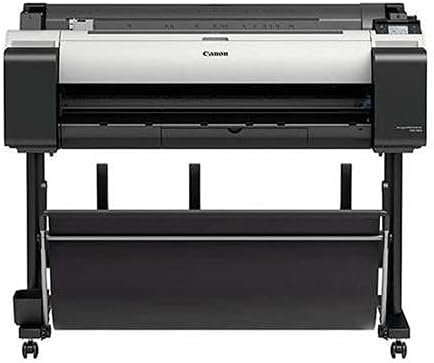
Canon imagePROGRAF TM-300 36-inch Inkjet Printer Plotter Review
The Importance of Choosing the Right Printer
In today’s fast-paced business environment, selecting the right printer is critical for maintaining productivity and meeting operational demands. Whether you’re a graphic designer, architectural firm, or construction company, the right printer can streamline workflows, reduce errors, and ensure consistent output quality. The Canon imagePROGRAF TM-300 36-inch 5-Color Inkjet Printer Plotter is designed to meet the needs of professionals requiring high-resolution, large-format printing. Its combination of advanced inkjet technology, integrated scanning, and connectivity options makes it a compelling choice for environments where precision and efficiency are paramount. However, the decision to invest in such a specialized printer requires careful evaluation of factors like print quality, speed, media compatibility, and long-term maintenance. This review provides an in-depth analysis of the TM-300’s capabilities, helping users determine whether it aligns with their specific needs. By focusing on objective specifications, supported media types, and industry benchmarks, this guide ensures readers can make informed decisions without relying on subjective experiences or promotional claims.
Quick Overview
| Feature | Details |
|---|---|
| Printer Type | 36-inch 5-color pigment inkjet plotter |
| Print Technology | Aqueous inkjet with LUCIA TD pigment inks |
| Supported Functions | Print, scan, copy, file sharing, network printing |
| Print Resolution | Up to 2400 x 1200 dpi (max) |
| Media Sizes | 8”–36” cut sheets, 8”–36” roll feed (59’ max) |
| Connectivity | Wi-Fi, Ethernet, USB 2.0/3.0, direct USB thumb drive |
| Duty Cycle | 144 D-sized prints per hour (uncoated media) |
| Ink System | 5-color sub-ink tank with 130 ml or 300 ml tanks |
| Warranty | 1-year on-site warranty |
| Included Software | SmartWorks MFP, Direct Print Plus, PosterArtist Lite |
The TM-300’s integration of printing, scanning, and file management functions into a single system makes it ideal for environments requiring high-volume, high-quality output. Its support for a wide range of media types and connectivity options ensures flexibility, while the sub-ink tank system reduces frequent maintenance. These features collectively position the TM-300 as a robust solution for commercial and industrial applications where reliability and precision are non-negotiable.

Print Quality and Resolution
The Canon imagePROGRAF TM-300 delivers exceptional print quality through its advanced pigment ink system and high-resolution print engine. The 5-color LUCIA TD inks are engineered to produce sharp text and fine lines on both inkjet and non-inkjet paper, with the ability to withstand outdoor conditions when paired with weather-resistant media. This makes the TM-300 particularly suitable for applications such as architectural blueprints, engineering drawings, and outdoor signage. The printer’s maximum print resolution of 2400 x 1200 dpi ensures that even intricate details are rendered with precision, meeting the stringent requirements of professional workflows.

High-Resolution Output
The TM-300’s ability to produce 2400 x 1200 dpi output is a standout feature for users demanding high-quality prints. This resolution is achieved through Canon’s L-COA processor, which optimizes ink layout for consistent sharpness and color accuracy. The printer’s 15,360-nozzle PF-06 print head further enhances detail by laying down 5 picoliter ink droplets with ±0.10% line accuracy. This precision is particularly valuable for applications like technical drawings and photographs, where minute variations can impact the final output. The combination of high-resolution printing and pigment inks ensures that prints retain their clarity and vibrancy over time, even when exposed to environmental factors.
Color Accuracy and Detail
The TM-300’s color accuracy is bolstered by its sub-ink tank system and advanced color management tools. The LUCIA TD inks provide a wide color gamut, allowing for accurate reproduction of both subtle gradients and bold colors. The printer’s support for 1200 dpi optical resolution and 9600 dpi interpolated resolution ensures that scans and prints maintain their quality across different media types. This is particularly important for users working with CAD files or GIS data, where precise color representation is critical. The inclusion of tools like SmartWorks MFP and Direct Print Plus further enhances color consistency by enabling detailed adjustments to white point, black point, and sharpening settings.
Print Speed and Workload Capacity
The TM-300’s print speed is designed to meet the demands of high-volume environments, with the ability to produce up to 144 D-sized prints per hour on uncoated media. This speed is achieved through Canon’s L-COA processor and the PF-06 print head, which work in tandem to optimize ink ejection and carriage movement. The printer’s support for roll feed media, with a maximum length of 59 feet, ensures that large projects can be completed without frequent manual intervention. This makes the TM-300 well-suited for applications such as map production, poster printing, and large-scale architectural plans.

Handling Large Print Jobs
The TM-300’s sub-ink tank system and continuous ink supply reduce downtime during long print jobs, ensuring that the printer can operate efficiently without frequent maintenance. The ability to replace empty ink tanks on-the-fly further enhances productivity, as users can continue printing without interrupting workflows. Additionally, the printer’s support for roll feed media allows for seamless printing of large-format documents, eliminating the need to manually load and unload cut sheets. This feature is particularly beneficial for users requiring high-volume output, such as graphic designers and construction companies.
Duty Cycle and Reliability
The TM-300 is designed for heavy-duty use, with a duty cycle of 144 D-sized prints per hour on uncoated media. This capacity ensures that the printer can handle demanding workloads without compromising performance. The printer’s quiet operation, with a noise level of 44 dB (A) during operation, makes it suitable for office environments where noise levels need to be minimized. Its reliability is further supported by the 1-year on-site warranty, which provides peace of mind for users requiring consistent uptime.
Connectivity and Integration
The TM-300’s connectivity options are tailored to support both local and networked environments, ensuring seamless integration into existing workflows. The printer includes Wi-Fi compatibility, allowing users to transfer technical drawing files and print remotely without the need for a dedicated router. This feature is particularly useful for field operations or remote teams requiring quick access to printing capabilities. The inclusion of Ethernet and USB 2.0/3.0 ports further enhances its versatility, enabling direct printing from external devices or networked systems.

Networked Printing and File Management
The TM-300’s ability to function as part of a networked environment is a significant advantage for businesses with multiple users or locations. The Device Management Console software allows administrators to monitor and manage multiple printers from a central location, streamlining maintenance and resource allocation. This capability is especially valuable for organizations requiring centralized control over large-format printing operations. The printer’s support for file sharing and scan-to-copy functionality further enhances its utility, enabling users to quickly archive and distribute documents.
Compatibility with Software Tools
The TM-300’s integration with Canon’s SmartWorks MFP software and Direct Print Plus ensures that users can leverage advanced features for efficient printing and scanning. The included PosterArtist Lite software simplifies the creation of large-format posters, while the AutoCAD® Optimized Printer Driver enhances compatibility with CAD software. These tools collectively reduce the learning curve for new users and improve overall productivity by minimizing manual adjustments and streamlining workflows.
Pros & Cons
Pros
- Exceptional Print Quality: The TM-300’s 5-color LUCIA TD pigment inks and 2400 x 1200 dpi resolution ensure sharp, detailed prints suitable for professional applications.
- Versatile Connectivity: Wi-Fi, Ethernet, and USB 2.0/3.0 ports provide flexibility for both local and networked printing environments.
- Integrated Scanning and File Management: The Z36 scanner and SmartWorks MFP software enable efficient scanning, copying, and file sharing.
- Sub-Ink Tank System: The ability to use nearly all ink in a tank reduces waste and minimizes the need for frequent maintenance.
- Quiet Operation: The TM-300’s noise level of 44 dB (A) makes it suitable for office environments with noise restrictions.
- Robust Software Suite: Tools like Direct Print Plus and PosterArtist Lite enhance productivity and streamline complex printing tasks.
Cons
- Large Footprint: While the TM-300’s compact design is suitable for small offices, its size may pose challenges in space-constrained environments.
- Ink Costs: The sub-ink tank system, while reducing waste, may lead to higher long-term costs compared to traditional inkjet systems.
- Setup Complexity: Integrating the TM-300 into a networked environment may require technical expertise, particularly for advanced features like the Device Management Console.
- Limited Duplex Printing: The TM-300 only supports simplex printing, which may be a drawback for users requiring double-sided output.
- Media Compatibility Constraints: While the printer supports a wide range of media, certain specialty papers or films may require specific calibration or adjustments.
Final Verdict: Who This Printer Is Best For (and Who Should Skip It)
The Canon imagePROGRAF TM-300 36-inch 5-Color Inkjet Printer Plotter is an excellent choice for professionals in fields requiring high-resolution, large-format printing. Its combination of exceptional print quality, versatile connectivity, and integrated scanning capabilities makes it ideal for architectural firms, engineering offices, and construction companies. The sub-ink tank system and quiet operation further enhance its appeal for environments where reliability and efficiency are critical. However, the TM-300 may not be the best fit for users with limited space, those prioritizing duplex printing, or those seeking a more cost-effective solution for smaller print volumes. For businesses requiring consistent, high-quality output and the ability to manage large-format projects, the TM-300 is a strong contender. Conversely, home users or small businesses with minimal printing needs may find more suitable alternatives in smaller, less expensive models.
Frequently Asked Questions (FAQs)
What print resolution does the Canon imagePROGRAF TM-300 offer?
The TM-300 provides a maximum print resolution of 2400 x 1200 dpi, ensuring sharp detail and color accuracy for professional applications. This resolution is achieved through its 15,360-nozzle PF-06 print head and L-COA processor, which optimizes ink layout for consistent output quality.
Can the TM-300 handle large-format media like banners or posters?
Yes, the TM-300 supports a wide range of media, including roll feed banners, glossy photo paper, and weather-resistant materials. Its maximum roll feed length of 59 feet allows for seamless printing of large projects without manual intervention.
How does the TM-300’s connectivity options benefit users?
The TM-300 includes Wi-Fi, Ethernet, and USB 2.0/3.0 ports, enabling flexible printing in both local and networked environments. Wi-Fi compatibility allows remote printing without a dedicated router, while Ethernet and USB ports support direct connections for faster data transfer.
What are the key advantages of the sub-ink tank system?
The sub-ink tank system allows nearly all ink in a tank to be used before replacement, reducing waste and minimizing maintenance downtime. Users can also replace empty tanks on-the-fly during long print jobs, ensuring continuous operation without interruptions.
Is the TM-300 suitable for office environments?
The TM-300’s quiet operation, with a noise level of 44 dB (A), makes it suitable for office environments where noise levels need to be minimized. Its compact footprint and integrated scanning capabilities also enhance its utility in shared workspaces.
What software tools are included with the TM-300?
The TM-300 comes with SmartWorks MFP for efficient scanning and file management, Direct Print Plus for batch printing and job monitoring, and PosterArtist Lite for creating large-format posters. These tools streamline workflows and improve productivity for professional users.
What media types are compatible with the TM-300?
The TM-300 supports a wide range of media, including coated papers, glossy photo paper, water-resistant banners, and specialty films. Its compatibility with both cut sheets and roll feed media ensures flexibility for various printing needs.
How does the TM-300 handle large print jobs?
The TM-300’s sub-ink tank system and roll feed capability allow for continuous printing of large projects without frequent maintenance. Its 144 D-sized prints per hour speed ensures efficient processing of high-volume jobs, reducing downtime and improving productivity.