Canon MAXIFY MB2120 Printer Review: Print Quality, Speed, and Office Suitability

The Importance of Selecting the Right Printer for Your Workflow
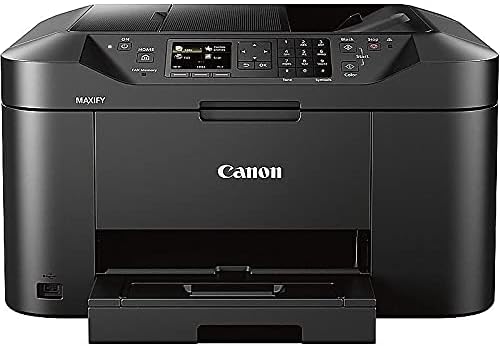
In today’s fast-paced business environment, the efficiency of your printing solution can significantly impact productivity. Whether you’re managing a small home office, handling daily administrative tasks, or supporting a remote team, the right printer can streamline operations and reduce downtime. The Canon MAXIFY MB2120 Wireless Color Photo Printer with Scanner, Copier, and Fax is designed to meet the needs of home-based businesses with 1-4 users. Its ability to deliver crisp, colorful prints quickly and reliably makes it a strong contender for users prioritizing speed, versatility, and cost-effectiveness. However, the decision to invest in this printer should be based on a thorough evaluation of your specific requirements, including print volume, media compatibility, connectivity needs, and long-term maintenance considerations. This review provides an objective analysis of the MB2120’s performance metrics, technical specifications, and user experience factors to help you determine if it aligns with your operational goals.
Quick Overview
| Feature | Details |
|---|---|
| Printer Type | Wireless Color Photo Printer |
| Printing Technology | Inkjet with Dual Resistant High Density (DRHD) Inks |
| Supported Functions | Print, Scan, Copy, Fax |
| Print Resolution | 4800 x 1200 dpi (Color), 4800 x 1200 dpi (Black & White) |
| Print Speed | 19.0 ipm (B&W)/13.0 ipm (Color) |
| Media Sizes | 5 x 7 inches to 8.5 x 14 inches |
| Connectivity | Wi-Fi, USB 2.0 |
| Duty Cycle | 20,000 pages |
| Ink System | High-yield ink tanks |
| Warranty | Full coverage with 100% U.S.-based support |
| Dimensions | 18.1″D x 18.3″W x 10.3″H |
| Weight | 23.2 pounds |
The Canon MAXIFY MB2120 combines multifunctionality with a robust duty cycle, making it suitable for moderate to high-volume environments. Its inkjet technology and advanced DRHD inks ensure high-quality output, while the built-in Wi-Fi and USB connectivity provide flexible access for users across different devices. The printer’s design balances performance with user-friendly features, though its suitability depends on specific workload demands and media requirements.
Print Quality and Ink Technology

Color Accuracy and Text Clarity
The MB2120 utilizes Canon’s Dual Resistant High Density (DRHD) ink system to produce sharp, smudge-resistant text and vibrant color output. This technology enhances the longevity of printed materials by resisting highlighter marks and smudging, which is particularly beneficial for documents requiring frequent annotations or high-traffic environments. The printer’s maximum print resolution of 4800 x 1200 dpi ensures fine detail in both color and black-and-white prints, making it suitable for professional-grade work such as brochures, reports, and marketing materials. However, the inkjet system may not match the toner-based precision of laser printers for highly detailed graphics or large-format prints.
Media Compatibility and Output Consistency
The MB2120 supports a range of media types, including standard paper, photo paper, and specialty sheets up to 8.5 x 14 inches. Its ability to handle different paper weights and finishes provides flexibility for users with varied printing needs. The printer’s automatic duplexing feature ensures efficient use of paper, though the quality of double-sided prints may vary slightly depending on the media type. For users prioritizing photo quality, the DRHD inks offer a competitive edge, though they may require more frequent maintenance compared to toner-based systems.
Print Speed and Workload Capacity

Performance Metrics and Duty Cycle
The MB2120’s print speeds of 19.0 ipm (B&W) and 13.0 ipm (Color) are competitive for a multifunction printer in its class, though they may lag behind laser printers for high-volume tasks. The 20,000-page duty cycle indicates it is designed for moderate to heavy use, making it suitable for small offices or home-based businesses with consistent printing demands. However, users requiring faster throughput for large print jobs may find the MB2120’s speed limitations restrictive, particularly when handling complex color documents or high-resolution images.
Handling High-Volume Workloads
The printer’s 250-sheet paper cassette and automatic duplexing capabilities help manage high-volume printing efficiently. The included ink tanks provide a high page yield, reducing the frequency of refills. However, the MB2120’s inkjet system may require more frequent maintenance to prevent clogs, especially when switching between different media types or print modes. For users with unpredictable workloads, the printer’s reliability and ease of maintenance are critical factors in determining its long-term viability.
Connectivity and User Experience

Wireless and USB Integration
The MB2120’s built-in Wi-Fi and compatibility with the Canon PRINT app enable seamless printing from mobile devices and cloud services. This feature is particularly advantageous for users who need to print documents on the go or share files across multiple devices. The USB 2.0 port provides a reliable alternative for direct printing, though it lacks the flexibility of wireless connectivity for remote access. The printer’s intuitive touch interface simplifies navigation, though some users may find the app’s functionality limited compared to more advanced mobile printing solutions.
Setup and Maintenance Requirements
The MB2120’s setup process is straightforward, with the included setup CD-ROM and online support resources. However, the printer’s reliance on ink tanks rather than toner cartridges may require more frequent maintenance, such as cleaning printheads or replacing ink components. The 250-sheet paper cassette and automatic duplexing reduce manual intervention, but users should be prepared for occasional maintenance tasks to ensure consistent performance.

Pros & Cons
Pros
- High-Quality Color Output: The DRHD ink system ensures vibrant, smudge-resistant prints ideal for marketing materials and professional documents.
- Robust Duty Cycle: The 20,000-page capacity makes it suitable for moderate to high-volume environments.
- Wireless and USB Connectivity: Built-in Wi-Fi and USB 2.0 ports provide flexible printing options for multiple devices.
- Automatic Duplexing: Reduces paper usage and enhances efficiency for double-sided printing.
- User-Friendly Interface: The touch screen and Canon PRINT app simplify navigation and remote printing.
- Large Paper Cassette: The 250-sheet capacity minimizes the need for frequent paper refills.
- Built-In Scanning and Copying: Integrated functions reduce the need for additional devices, saving space and cost.
- U.S.-Based Support: Full warranty coverage with dedicated customer service for troubleshooting.
Cons
- Slower Print Speeds: Color print speeds of 13.0 ipm may lag behind laser printers for high-volume tasks.
- Ink Maintenance Requirements: The inkjet system may need more frequent cleaning or printhead maintenance.
- Limited Mobile App Features: The Canon PRINT app has fewer advanced settings compared to competitors.
- Higher Maintenance Costs: Ink refills and printhead replacements may be more expensive than toner-based systems.
- Media Compatibility Constraints: While the printer supports a range of media, specialty papers may require specific settings for optimal results.
- No Built-In Ethernet: The lack of a wired network connection may limit security or remote management capabilities.
Final Verdict: Who This Printer Is Best For (and Who Should Skip It)
The Canon MAXIFY MB2120 is an excellent choice for small businesses and home offices with moderate to high printing needs, particularly those requiring high-quality color output and multifunctionality. Its DRHD ink system, wireless connectivity, and robust duty cycle make it well-suited for tasks such as creating marketing materials, printing reports, and handling routine administrative documents. The printer’s automatic duplexing and large paper cassette also enhance efficiency for users prioritizing cost-effective printing.
However, the MB2120 may not be ideal for users requiring faster print speeds for high-volume tasks, such as large-scale document production or complex graphics. Its inkjet system, while capable, may require more maintenance than toner-based alternatives, and the lack of Ethernet connectivity could be a drawback for users needing advanced network security features. Additionally, those seeking more advanced mobile app functionality or lower long-term maintenance costs may find better value in laser printers or alternative inkjet models with more robust support ecosystems.

Frequently Asked Questions (FAQs)
What print resolution does the Canon MAXIFY MB2120 offer?
The Canon MAXIFY MB2120 delivers a maximum print resolution of 4800 x 1200 dpi for both color and black-and-white prints, ensuring sharp text and vibrant color output for professional documents and photos.
How does the Dual Resistant High Density (DRHD) ink system improve print quality?
The DRHD ink system enhances print longevity by making text smudge-resistant and highlighter-resistant, which is ideal for documents requiring frequent annotations or high-traffic environments.
What is the maximum print speed of the Canon MAXIFY MB2120?
The MB2120 can print up to 19.0 pages per minute in black-and-white mode and 13.0 pages per minute in color mode, making it suitable for moderate to high-volume office environments.
Can the Canon MAXIFY MB2120 handle large print jobs?
The printer’s 20,000-page duty cycle and 250-sheet paper cassette make it suitable for handling moderate to high-volume print jobs, though its inkjet system may require more frequent maintenance for large-scale tasks.
What connectivity options are available for the Canon MAXIFY MB2120?
The MB2120 supports wireless printing via built-in Wi-Fi and USB 2.0 connectivity, allowing users to print from mobile devices and computers with ease.
Is the Canon MAXIFY MB2120 suitable for home offices?
Yes, the MB2120 is designed for home-based businesses with 1-4 users, offering a balance of print quality, speed, and multifunctionality for everyday office tasks.
What maintenance is required for the Canon MAXIFY MB2120?
The printer may require occasional printhead cleaning or ink tank replacement to maintain optimal performance, though its design minimizes the need for frequent manual intervention.
What is the warranty coverage for the Canon MAXIFY MB2120?
The MB2120 comes with a full warranty and 100% U.S.-based customer support, ensuring reliable assistance for troubleshooting and maintenance.