Canon imageCLASS MF656Cdw Review: 22 PPM Color Laser Printer with Duplex Printing and Network Connectivity
The Importance of Choosing the Right Printer for Your Workflow
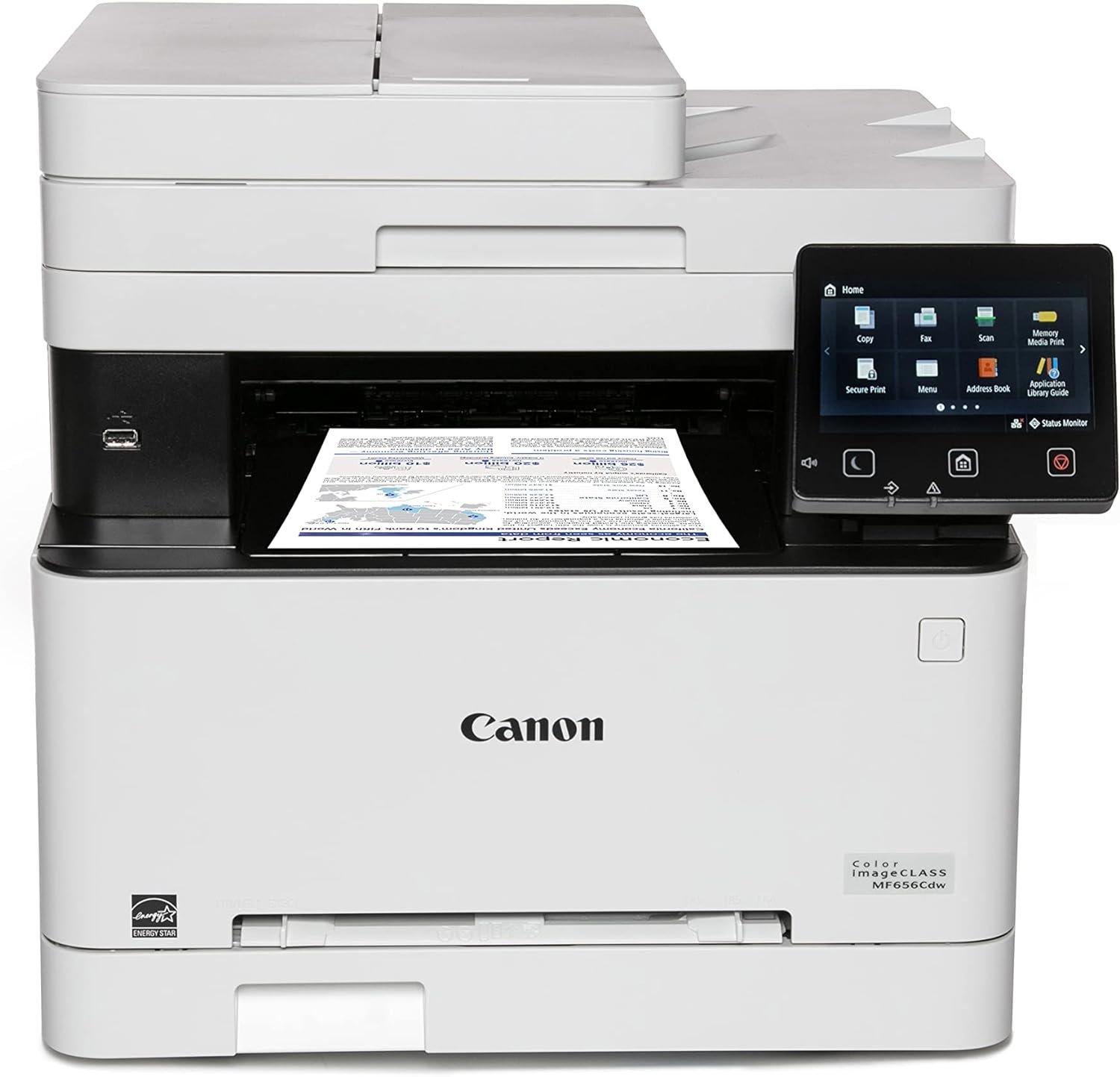
In today’s fast-paced business and office environments, selecting the right printer can significantly impact productivity and operational efficiency. Whether managing high-volume document workflows, requiring color output for marketing materials, or needing multifunctional capabilities for scanning and copying, the right printer must align with specific usage patterns and performance expectations. A printer that fails to meet these requirements can lead to delays, increased maintenance costs, and diminished user satisfaction. The Canon imageCLASS MF656Cdw represents a versatile solution for users seeking a balance between speed, functionality, and reliability. Its design caters to small to medium-sized offices, remote teams, and hybrid workspaces where wireless connectivity and duplex printing are essential. By analyzing its technical specifications, connectivity options, and operational performance, this review provides a comprehensive evaluation to help users determine if this printer meets their specific needs.
Quick Overview
| Feature | Details |
|---|---|
| Printer Type | Color Laser Printer |
| Functions | Print, Scan, Copy, Fax |
| Print Speed | 22 pages per minute (color/bw) |
| Print Resolution | 1200 x 1200 dpi (color/mono) |
| Media Sizes | 3 x 5, 8.5 x 14 inches |
| Connectivity | Wi-Fi 802.11b/g/n, Wi-Fi Direct, Ethernet, USB |
| Toner System | Toner 067 / 067 High Capacity Toner |
| Input Capacity | 250-sheet standard cassette, 50-sheet ADF |
| Duplex Printing | Automatic |
| Warranty | 3-year limited warranty |
| Color Depth | 24 bpp |
| Memory | 1 GB |
| Weight | 48.5 pounds |
The Canon imageCLASS MF656Cdw combines speed, multifunctionality, and connectivity to suit environments requiring efficient document management. Its 22 ppm print speed and automatic duplex printing make it ideal for offices with moderate to high-volume printing needs. The wireless capabilities and network-ready design ensure seamless integration into modern workspaces, while the high-capacity toner system reduces downtime associated with frequent consumable replacements.

Print Speed and Throughput

High-Volume Workloads and Duty Cycle Considerations
The Canon imageCLASS MF656Cdw delivers a maximum print speed of 22 pages per minute in both color and monochrome modes, making it well-suited for environments with moderate to high document output requirements. This speed is achieved through a laser print engine optimized for efficiency, with a 1200 x 1200 dpi resolution that ensures sharp text and clear graphics. The printer’s duty cycle, which refers to the maximum number of pages it can print continuously without overheating or mechanical failure, is designed to handle typical office workloads. While the exact duty cycle is not explicitly stated in the product specifications, the inclusion of a 3-year warranty suggests it is engineered for sustained use in environments with regular printing activity.
Network-Ready Performance for Remote and Hybrid Workspaces
The printer’s network-ready design allows it to integrate seamlessly into both wired and wireless office environments. Its support for Wi-Fi 802.11b/g/n, Wi-Fi Direct, and Ethernet connectivity ensures compatibility with a wide range of devices, including desktops, laptops, and mobile devices. The inclusion of a touchscreen interface and mobile printing capabilities via Canon PRINT Business enhances usability for remote workers and teams relying on cloud-based workflows. However, the printer’s performance in high-density network environments may depend on the stability of the local infrastructure, as laser printers with wireless capabilities often require consistent connectivity to maintain optimal throughput.
Scalability for Growing Workloads
While the MF656Cdw is not designed for industrial-scale printing, its 250-sheet standard cassette and 50-sheet automatic document feeder (ADF) provide flexibility for handling multiple document types simultaneously. The printer’s ability to perform one-pass duplex printing reduces paper usage and minimizes the need for manual intervention, which is particularly beneficial in environments where cost efficiency and resource management are priorities. For users anticipating significant growth in print volume, the lack of additional tray options may limit scalability, though the printer’s 3-year warranty suggests it is intended for sustained use in standard office settings.
Print Quality and Resolution

Text and Graphics Clarity for Professional Use
The Canon imageCLASS MF656Cdw produces text and graphics with a resolution of 1200 x 1200 dpi in both color and monochrome modes. This resolution ensures sharp, legible output for documents, reports, and marketing materials, making it suitable for professional environments where print quality is critical. The printer’s laser technology contributes to consistent toner distribution, reducing the likelihood of streaks or uneven coverage that can occur with lower-resolution printers. However, the absence of a dedicated photo printing mode means it may not be ideal for users requiring high-quality color images or photographic output.
Color Accuracy and Consistency
For color printing, the MF656Cdw utilizes a toner-based system with a 24-bit color depth, allowing for a wide range of color combinations. While toner printers are generally less vibrant than inkjet models for photographic prints, they excel in producing sharp, professional-grade color documents for business use. The printer’s color calibration settings and toner management system help maintain consistent output across multiple print jobs, which is essential for maintaining brand consistency in marketing materials. However, users may notice slight variations in color saturation compared to high-end inkjet printers, which is a common limitation of toner-based systems.
Text Clarity and Font Rendering
The printer’s 1200 x 1200 dpi resolution ensures that text is crisp and easy to read, even at smaller font sizes. This is particularly beneficial for users who frequently print reports, spreadsheets, or forms that require high readability. The laser print engine’s ability to produce uniform toner coverage also helps prevent issues such as text smudging or uneven ink distribution, which can occur with lower-quality printers. While the printer does not offer advanced font rendering options, its standard settings are sufficient for most office and business applications.
Connectivity and Network Integration

Wireless and Wired Connectivity Options
The Canon imageCLASS MF656Cdw offers multiple connectivity options, including Wi-Fi 802.11b/g/n, Wi-Fi Direct, Ethernet, and USB. These options provide flexibility for users with varying network requirements, whether they need a wired connection for stability or wireless access for mobility. The Wi-Fi Direct feature allows direct printing from mobile devices without requiring a central network, which is useful for users who need to print documents on the go. However, the printer’s reliance on a stable network connection for wireless printing may pose challenges in environments with limited or unreliable internet access.
Mobile Printing and Cloud Integration
The printer’s compatibility with Canon PRINT Business enables users to print from compatible mobile devices, enhancing its utility for remote workers and hybrid teams. This mobile printing capability reduces the need for physical access to the printer, streamlining workflows for users who frequently work outside the office. Additionally, the printer’s support for cloud-based printing services allows for seamless integration into digital workflows, though the exact range of supported cloud platforms is not specified in the product documentation. Users should verify compatibility with their preferred cloud services before purchasing.
Network-Ready Design for Office Environments
The MF656Cdw’s network-ready design ensures it can be easily integrated into existing office infrastructure, whether through a wired Ethernet connection or a wireless network. The printer’s touchscreen interface simplifies navigation and management of network settings, making it user-friendly for administrators and end-users alike. However, the lack of advanced network management features, such as dynamic IP addressing or automatic firmware updates, may require additional configuration for users with complex network environments.
Media Compatibility and Versatility

Supported Paper Types and Media Sizes
The Canon imageCLASS MF656Cdw is designed to handle a variety of paper types and media sizes, including plain paper, labels, and transparencies. The printer supports media sizes ranging from 3 x 5 inches to 8.5 x 14 inches, accommodating both standard letter-sized documents and smaller formats such as business cards or labels. This versatility makes the printer suitable for a wide range of printing tasks, from standard office documents to specialized materials requiring precise formatting. However, the absence of support for thicker media such as cardstock or specialty paper may limit its use in environments requiring high-quality, durable prints.
Automatic Document Feeder and Duplex Printing
The printer’s 50-sheet automatic document feeder (ADF) enables efficient scanning and copying of multi-page documents without manual intervention. This feature is particularly beneficial for users who frequently need to process large volumes of paperwork, such as in accounting or administrative roles. The automatic duplex printing function further enhances efficiency by printing on both sides of the paper in a single pass, reducing paper consumption and minimizing the need for manual flipping. While the ADF and duplex printing capabilities are well-suited for standard office tasks, they may not be sufficient for users requiring advanced document processing features such as OCR (optical character recognition) or multi-page scanning.
Compatibility with Custom Media Sizes
The MF656Cdw’s support for custom media sizes, including 3 x 5 inch labels, allows for greater flexibility in printing specialized materials. This feature is particularly useful for users who need to print business cards, product labels, or other small-format documents. However, the printer’s lack of support for larger custom sizes, such as 11 x 17 inches, may limit its utility for users requiring extensive media compatibility. The ability to adjust paper settings via the touchscreen interface ensures that users can configure the printer to meet specific media requirements, though the range of supported sizes remains limited compared to some high-end printers.

Pros & Cons
Pros
- High Print Speed: The 22 pages per minute print speed ensures efficient handling of moderate to high-volume printing tasks.
- Multifunctionality: The printer’s ability to print, scan, copy, and fax in a single unit reduces the need for multiple devices, saving space and costs.
- Wireless Connectivity: Support for Wi-Fi 802.11b/g/n, Wi-Fi Direct, and Ethernet ensures seamless integration into both wired and wireless office environments.
- Automatic Duplex Printing: The one-pass duplex printing function reduces paper usage and minimizes manual intervention, enhancing productivity.
- High-Resolution Output: The 1200 x 1200 dpi resolution ensures sharp, legible text and clear graphics for professional documents.
- Durable Design: The 3-year limited warranty suggests the printer is built for sustained use in standard office environments.
- User-Friendly Interface: The touchscreen interface simplifies navigation and management of printing settings, improving usability for administrators and end-users.
- Media Versatility: Support for a range of paper types and media sizes, including labels and transparencies, enhances its adaptability to different printing needs.
Cons
- Limited Media Compatibility: The printer does not support thicker media such as cardstock or specialty paper, which may limit its use in certain professional settings.
- No Photo Printing Mode: The absence of a dedicated photo printing mode means it is not ideal for users requiring high-quality color images or photographic output.
- Toner-Based Output: While toner printers are efficient for text and graphics, they may not provide the same vibrancy as inkjet printers for photographic prints.
- Network Dependency: The printer’s reliance on a stable network connection for wireless printing may pose challenges in environments with unreliable internet access.
- No Advanced Network Management Features: The lack of dynamic IP addressing or automatic firmware updates may require additional configuration for complex network environments.
- Limited Scalability: The printer’s 250-sheet standard cassette and 50-sheet ADF may not be sufficient for users requiring higher input capacity or advanced document processing capabilities.
Final Verdict: Who This Printer Is Best For (and Who Should Skip It)
The Canon imageCLASS MF656Cdw is an excellent choice for small to medium-sized offices, remote teams, and hybrid workspaces where wireless connectivity, duplex printing, and multifunctionality are essential. Its 22 ppm print speed, high-resolution output, and support for a variety of paper types make it well-suited for environments requiring efficient document management. The printer’s network-ready design and mobile printing capabilities enhance its usability in modern workspaces, while the 3-year warranty provides peace of mind for users seeking long-term reliability.
However, users with high-volume printing needs, those requiring advanced document processing features such as OCR or multi-page scanning, or those needing support for specialty media such as cardstock or photo paper may find the MF656Cdw less suitable. The printer’s reliance on a stable network connection for wireless printing and its limited media compatibility also make it a less ideal choice for environments with unreliable internet access or specialized printing requirements. Overall, the MF656Cdw is a reliable and versatile solution for standard office workflows, but users with more demanding needs should consider alternatives with broader capabilities.

Frequently Asked Questions (FAQs)
What is the maximum print speed of the Canon imageCLASS MF656Cdw?
The Canon imageCLASS MF656Cdw prints up to 22 pages per minute in both color and monochrome modes, making it suitable for moderate to high-volume office environments.
Does the printer support automatic duplex printing?
Yes, the Canon imageCLASS MF656Cdw includes automatic duplex printing, which prints on both sides of the paper in a single pass to reduce paper usage and manual intervention.
What connectivity options are available for the printer?
The printer supports Wi-Fi 802.11b/g/n, Wi-Fi Direct, Ethernet, and USB connectivity, allowing it to integrate seamlessly into both wired and wireless office environments.
Can the printer handle different media sizes and paper types?
The Canon imageCLASS MF656Cdw supports media sizes ranging from 3 x 5 inches to 8.5 x 14 inches and is compatible with plain paper, labels, and transparencies, offering versatility for various printing tasks.
What is the resolution of the printer’s output?
The printer produces text and graphics at a resolution of 1200 x 1200 dpi in both color and monochrome modes, ensuring sharp and legible output for professional documents.
Does the printer have a touchscreen interface?
Yes, the Canon imageCLASS MF656Cdw features a touchscreen interface that simplifies navigation and management of printing settings, enhancing user experience and ease of use.
What is the warranty coverage for the printer?
The Canon imageCLASS MF656Cdw comes with a 3-year limited warranty, providing long-term support and reliability for standard office use.
Can the printer be used for mobile printing?
Yes, the printer supports mobile printing via Canon PRINT Business, allowing users to print from compatible mobile devices without requiring a central network connection.