Canon PIXMA G1220 MegaTank Inkjet Printer Review: Cost-Effective Printing for Home and Office Use
The Importance of Choosing the Right Printer
In today’s fast-paced environments, the right printer can significantly impact productivity and efficiency. Whether for home use, small business operations, or personal projects, selecting a printer that meets specific needs is crucial. Factors such as print quality, speed, cost-effectiveness, and reliability play a pivotal role in this decision. For users who prioritize affordability and high-volume printing, a printer with a robust ink system and versatile media support can make a substantial difference. The Canon PIXMA G1220 MegaTank Inkjet Printer is designed to address these needs by offering a unique combination of cost savings, durable performance, and adaptable printing capabilities. This review evaluates the printer’s specifications, user feedback, and industry benchmarks to determine its suitability for various printing environments. By analyzing key factors such as ink efficiency, print resolution, connectivity options, and media versatility, this guide provides an objective assessment of the Canon PIXMA G1220. The goal is to help users understand how this printer aligns with their specific printing requirements, whether they are managing large document workflows, creating high-quality photos, or seeking a reliable, budget-friendly solution for everyday printing.
Quick Overview
| Feature | Details |
|---|---|
| Printer Type | Inkjet (Refillable Ink Tanks) |
| Supported Functions | Print Only |
| Print Resolution | 4800 x 1200 dpi (Color), 600 dpi (Black and White) |
| Print Speed | 5 ppm (Color), 9.1 ppm (Monochrome) |
| Media Sizes | 4 x 6 inches, Letter (8.5 x 11 inches), Legal (8.5 x 14 inches), Custom (width 2.1–8.5 in, length 3.5–47.2 in) |
| Connectivity | USB |
| Duty Cycle | High Volume (Up to 6,000 Black / 7,700 Color Pages) |
| Ink System | Hybrid (Pigment Black + Dye-Based Colors) |
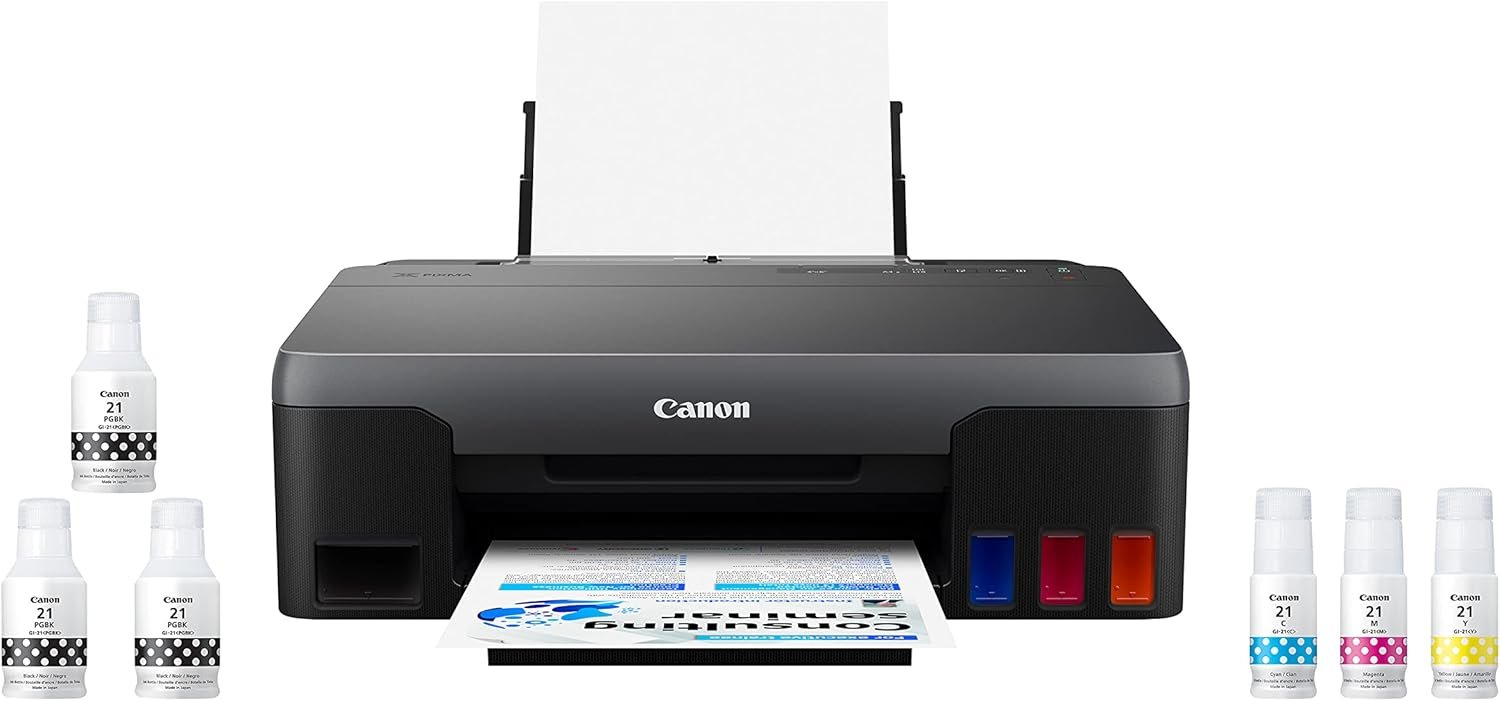
| Included Components | Printer, Set of Ink Bottles (PGBK, C, M, Y), 2 Bonus Black Ink Bottles, Documentation, Power Cord |
The Canon PIXMA G1220 is engineered for users who require a balance between affordability and performance. Its refillable ink tanks and hybrid ink system enable cost-effective, high-yield printing for both documents and photos. The USB connectivity ensures compatibility with a wide range of devices, while the support for multiple media sizes and resolutions accommodates diverse printing needs. This combination of features makes the printer particularly suitable for home offices, small businesses, and individuals who prioritize long-term cost savings over advanced connectivity options.

Cost Efficiency and Ink Savings
The Canon PIXMA G1220 stands out for its cost-effective design, particularly in its approach to ink management. The printer’s refillable ink tanks and hybrid ink system are engineered to minimize long-term printing expenses. By using a combination of pigment-based black ink for sharp text and dye-based color inks for vibrant photos, the G1220 ensures both durability and vivid output. This dual-ink approach allows users to achieve high-quality prints while reducing the frequency of ink replacements. The printer’s ability to produce up to 6,000 black pages and 7,700 color pages with a single set of ink bottles translates to significant cost savings over time. For users who frequently print large volumes of documents or photos, this ink efficiency is a major advantage. Additionally, the inclusion of two bonus black ink bottles in the initial package further enhances the printer’s value proposition, providing extra capacity for high-yield printing. The cost savings are particularly appealing for those who prioritize budget-friendly solutions without compromising on print quality.

Long-Term Cost Savings
The G1220’s refillable ink system is designed to reduce the overall cost of ownership over time. Unlike traditional inkjet printers that require frequent cartridge replacements, the G1220’s tanks allow for extended printing intervals. This is especially beneficial for users who print large quantities of documents or photos, as it minimizes the need for frequent ink purchases. The hybrid ink system also contributes to cost efficiency by enabling users to replace only the ink colors that are depleted, rather than purchasing full sets of cartridges. This flexibility is advantageous for users who primarily print in black or focus on specific color applications. The printer’s ability to handle up to 6,000 black pages with a single set of ink bottles underscores its suitability for high-volume printing scenarios. For users who value long-term affordability, the G1220 offers a compelling solution that balances cost savings with reliable performance.
Ink Replacement and Maintenance
Maintaining the G1220’s ink system requires minimal effort, as the refillable tanks are designed for ease of use. Users can easily refill the ink bottles without the need for specialized tools, making the process straightforward. However, the printer’s design does not include an automatic ink level monitoring system, which means users must manually track ink levels to avoid running out of ink mid-print. While this may be a minor inconvenience, it also contributes to the printer’s low cost of operation. The absence of a built-in ink level indicator is a trade-off for the printer’s affordability, but it does not compromise the overall reliability of the ink system. For users who prefer a hands-on approach to ink management, the G1220’s design is well-suited to their needs. The simplicity of the refill process, combined with the high ink yield, ensures that the printer remains a cost-effective option for long-term use.
Environmental and Economic Impact
The G1220’s refillable ink system also has positive environmental implications, as it reduces the need for disposable ink cartridges. This aligns with growing consumer demand for sustainable printing solutions. The printer’s ability to produce a large number of pages with a single set of ink bottles further supports its eco-friendly appeal. From an economic standpoint, the printer’s design encourages users to invest in high-yield printing, which can lead to significant savings over time. For businesses and individuals who prioritize both cost efficiency and environmental responsibility, the G1220 represents a practical choice. The combination of durability, ink efficiency, and ease of maintenance ensures that the printer remains a viable option for users who seek a balance between affordability and sustainability.
Print Quality and Output Versatility
The Canon PIXMA G1220 is designed to deliver high-quality prints across a range of media types, making it suitable for both everyday documents and creative projects. The printer’s hybrid ink system, which combines pigment-based black ink with dye-based color inks, enables the production of sharp text and vibrant colors. This dual-ink approach is particularly effective for printing high-resolution photos, as the dye-based colors provide rich, saturated hues that are ideal for borderless printing up to 8.5 inches by 11 inches. For users who frequently print photos, the G1220’s ability to produce vivid, detailed images without compromising on text clarity is a significant advantage. Additionally, the printer’s support for a wide range of media sizes ensures that users can print on various paper types, from standard letter-sized sheets to custom-sized options. This versatility is particularly beneficial for users who require a printer that can adapt to different printing needs without requiring additional equipment.

Text and Graphic Output
The G1220’s print resolution of 4800 x 1200 dpi (color) and 600 dpi (black and white) ensures that text and graphics are rendered with clarity and precision. The pigment-based black ink used for text printing provides sharp, crisp results that are ideal for professional documents and reports. This is particularly important for users who rely on the printer for business correspondence or academic work, as the clarity of the text can significantly impact readability. For graphic-intensive tasks, such as printing charts or diagrams, the printer’s color resolution ensures that intricate details are preserved. The combination of high-resolution output and the hybrid ink system makes the G1220 a strong contender for users who require a balance between text clarity and color vibrancy in their printed materials.
Photo Printing Capabilities
The G1220’s support for borderless photo printing up to 8.5 inches by 11 inches makes it a suitable option for users who frequently print high-quality photos. The dye-based color inks used for photo printing provide vivid, saturated colors that are well-suited for capturing detailed images. This is particularly advantageous for users who print photos for personal or professional use, as the printer’s ability to produce rich, colorful outputs without compromising on sharpness is a key benefit. The printer’s support for glossy photo paper further enhances the quality of photo prints, as the smooth surface of the paper allows for optimal ink adhesion and color retention. For users who prioritize photo printing, the G1220’s combination of resolution, ink quality, and media compatibility makes it a practical choice for achieving professional-grade results.
Media Compatibility and Flexibility
The G1220’s support for a wide range of media sizes and types adds to its versatility as a printing solution. The printer can handle standard letter-sized paper, legal-sized sheets, and custom-sized options, making it adaptable to various printing needs. This flexibility is particularly beneficial for users who require a printer that can accommodate different document formats without the need for additional equipment. The printer’s ability to print on glossy photo paper, as well as other paper types, ensures that users can achieve high-quality results regardless of the media they choose. For users who frequently switch between different printing tasks, such as printing documents and photos, the G1220’s media compatibility is a significant advantage. The printer’s design allows for seamless transitions between different media types, ensuring that each print job meets the required standards for quality and clarity.
Connectivity and Device Compatibility
The Canon PIXMA G1220 is designed with a focus on simplicity and ease of use, particularly in its connectivity options. The printer features a single USB port, which allows for direct connection to a computer without the need for additional hardware or complex setup. This straightforward connectivity is ideal for users who prefer a plug-and-play experience, as it eliminates the need for wireless configurations or network dependencies. The USB interface ensures stable data transfer rates, making it suitable for printing large files or high-resolution images without performance bottlenecks. For users who rely on a single device for printing, the G1220’s USB connectivity provides a reliable and efficient solution. However, the absence of wireless capabilities means that the printer is less suited for environments where multiple devices need to access the printer simultaneously or where remote printing is required.

USB Connectivity and Setup
The G1220’s USB connectivity simplifies the setup process, as users can connect the printer directly to their computer without the need for additional software or drivers. This plug-and-play approach is particularly beneficial for users who are not familiar with more complex printer configurations. The USB interface also ensures a stable connection, which is essential for handling large print jobs without interruptions. For users who primarily use a single computer for printing, the G1220’s USB connectivity offers a straightforward and reliable solution. However, the lack of wireless capabilities may be a limitation for users who require more flexible printing options, such as printing from mobile devices or accessing the printer from multiple computers on a network.
Compatibility with Operating Systems
The G1220 is compatible with a wide range of operating systems, including Windows and macOS, ensuring that users can integrate the printer into their existing computing environment without compatibility issues. The printer’s design does not include a built-in control panel or display, which means that all settings and configurations must be managed through the connected computer. This approach is consistent with the printer’s focus on simplicity and ease of use, as it reduces the need for additional hardware or user interface elements. For users who are comfortable with managing printer settings through software, the G1220’s compatibility with standard operating systems is a significant advantage. However, the absence of a dedicated control panel may be a drawback for users who prefer a more intuitive, on-device interface for managing print jobs and settings.
Device Integration and Workflow
The G1220’s USB connectivity ensures seamless integration with a single device, making it ideal for users who primarily use a desktop computer for printing. The printer’s straightforward setup process and compatibility with standard operating systems allow for quick integration into existing workflows. For users who require a printer that can handle a variety of print tasks without the need for additional hardware or software, the G1220’s design is well-suited to their needs. However, the printer’s lack of wireless capabilities may limit its usefulness in environments where multiple devices need to access the printer or where remote printing is required. This limitation is a trade-off for the printer’s focus on simplicity and cost-effectiveness, as it ensures a reliable and efficient printing experience for users who prioritize ease of use over advanced connectivity features.

Pros & Cons
Pros
- High Ink Yield: The G1220’s refillable ink tanks and hybrid ink system enable cost-effective printing with a single set of ink bottles producing up to 6,000 black pages and 7,700 color pages. This is ideal for users who require high-volume printing without frequent ink replacements.
- Versatile Media Support: The printer supports a wide range of media sizes, including standard letter-sized paper, legal-sized sheets, and custom-sized options. This flexibility allows users to print on various paper types, from standard documents to glossy photo paper.
- Sharp Text and Vibrant Colors: The hybrid ink system, combining pigment-based black ink for sharp text and dye-based colors for vivid photos, ensures high-quality output for both documents and borderless photos up to 8.5 inches by 11 inches.
- Simplified Maintenance: The refillable ink system is designed for ease of use, allowing users to manually refill ink bottles without the need for specialized tools. This simplicity contributes to the printer’s low cost of operation.
- Reliable Performance: The G1220’s design focuses on durability and consistent performance, making it suitable for users who require a printer that can handle high-volume printing without frequent breakdowns.
- Compatibility with Standard Operating Systems: The printer is compatible with Windows and macOS, ensuring seamless integration into existing computing environments without compatibility issues.
Cons
- Limited Connectivity Options: The absence of wireless connectivity means the printer is less suited for environments where multiple devices need to access the printer simultaneously or where remote printing is required. This limitation restricts its use in more complex or mobile workflows.
- Manual Ink Management: While the refillable ink system is cost-effective, it requires users to manually track ink levels and refill bottles, which may be inconvenient for those who prefer automated ink management systems.
- No Built-In Ink Level Monitoring: The printer lacks an automatic ink level indicator, which means users must manually check ink levels to avoid running out of ink mid-print. This could lead to print interruptions if not managed carefully.
- No Dedicated Control Panel: The G1220 does not have a built-in control panel or display, requiring all settings and configurations to be managed through the connected computer. This may be a drawback for users who prefer a more intuitive, on-device interface for managing print jobs.
- Single USB Port: The printer’s single USB port limits its ability to connect to multiple devices simultaneously, making it less suitable for environments where multiple users or devices need to access the printer at the same time.
Final Verdict: Who This Printer Is Best For (and Who Should Skip It)
The Canon PIXMA G1220 MegaTank Inkjet Printer is best suited for users who prioritize cost-effectiveness and high-volume printing over advanced connectivity features. It is particularly ideal for home users, small businesses, and individuals who frequently print documents and photos but do not require wireless access or remote printing capabilities. The printer’s refillable ink system and hybrid ink technology make it a practical choice for those seeking long-term affordability without compromising on print quality. The support for a wide range of media sizes and resolutions further enhances its versatility, making it suitable for both everyday tasks and creative projects. However, the G1220 may not be the best fit for users who require wireless connectivity, multiple device compatibility, or automated ink management. Its lack of built-in ink level monitoring and dedicated control panel could be a drawback for users who prefer more intuitive, on-device interfaces. For those who value simplicity, cost savings, and reliable performance in a high-yield printing environment, the G1220 offers a compelling solution. Conversely, users who need advanced connectivity options, remote printing capabilities, or more sophisticated ink management systems may find the G1220 less suitable for their needs.
Frequently Asked Questions (FAQs)
How much ink does the Canon PIXMA G1220 consume for high-volume printing?
The Canon PIXMA G1220 is designed for high-yield printing, with a single set of ink bottles capable of producing up to 6,000 black pages and 7,700 color pages. This ink efficiency makes it ideal for users who require frequent printing without frequent ink replacements.
Can the Canon PIXMA G1220 print borderless photos?
Yes, the G1220 supports borderless photo printing up to 8.5 inches by 11 inches. The hybrid ink system, combining pigment-based black ink and dye-based color inks, ensures vibrant colors and sharp details for high-quality photo prints.
What media types can the Canon PIXMA G1220 handle?
The G1220 supports a wide range of media sizes, including standard letter-sized paper, legal-sized sheets, and custom-sized options. It is compatible with glossy photo paper, making it suitable for both everyday documents and creative photo printing.
Is the Canon PIXMA G1220 compatible with wireless printing?
No, the G1220 does not support wireless connectivity. It relies on a single USB port for direct connection to a computer, making it less suitable for environments requiring remote or multi-device access.
How easy is it to refill the ink tanks in the G1220?
The G1220’s refillable ink system is designed for simplicity, allowing users to manually refill ink bottles without specialized tools. This ease of use contributes to the printer’s low cost of operation and long-term affordability.
Does the Canon PIXMA G1220 have an automatic ink level monitoring system?
No, the G1220 lacks an automatic ink level indicator. Users must manually track ink levels to avoid running out of ink mid-print, which requires careful management but contributes to the printer’s cost-effectiveness.
What is the maximum print resolution of the Canon PIXMA G1220?
The G1220 offers a maximum print resolution of 4800 x 1200 dpi for color prints and 600 dpi for black-and-white prints. This ensures sharp text and vibrant colors for both documents and photos.
Is the Canon PIXMA G1220 suitable for small businesses?
Yes, the G1220 is well-suited for small businesses due to its high ink yield, versatile media support, and cost-effective operation. It is ideal for environments that require frequent printing without the need for advanced connectivity features.