Canon PIXMA G5020 Wireless MegaTank Printer Review: High-Volume Printing for Home and Office
The Importance of Choosing the Right Printer for Your Workflow
In today’s fast-paced environments, selecting the right printer can significantly impact productivity and efficiency. Whether for home use, small business operations, or large-scale document management, the capabilities of a printer directly influence output quality, speed, and long-term cost-effectiveness. High-volume printing demands reliable performance, low maintenance, and cost-efficient consumables, making it critical to align printer specifications with specific usage patterns. For users requiring consistent output for both text and graphics, a printer that balances speed, resolution, and media versatility is essential. The Canon PIXMA G5020 Wireless MegaTank Single Function Printer is designed to meet these needs by offering a combination of high page yield, auto duplex printing, and wireless connectivity. This review evaluates its suitability for various environments, focusing on key factors such as print volume capacity, ink efficiency, connectivity options, and media compatibility. By analyzing technical specifications and user-centric features, this guide helps users determine whether the PIXMA G5020 aligns with their printing requirements in 2026.
Quick Overview
| Feature | Details |
|---|---|
| Printer Type | Inkjet Printer |
| Printing Technology | Pigment-based Black, Dye-based Color |
| Supported Functions | Print Only |
| Print Resolution | 4800 x 1200 dpi (color), 4800 x 1200 dpi (black-white) |
| Print Speed | 6.8 ppm (color), 13 ppm (monochrome) |
| Media Sizes | 3.5” x 3.5”, 4” x 4”, 4” x 6”, 5” x 5”, 5” x 7”, 7” x 10”, 8” x 10”, Letter, Legal, U.S. #10 Envelopes |
| Connectivity | Wireless, USB |
| Duty Cycle | Up to 6,000 black text pages or 7,700 color pages per ink set |
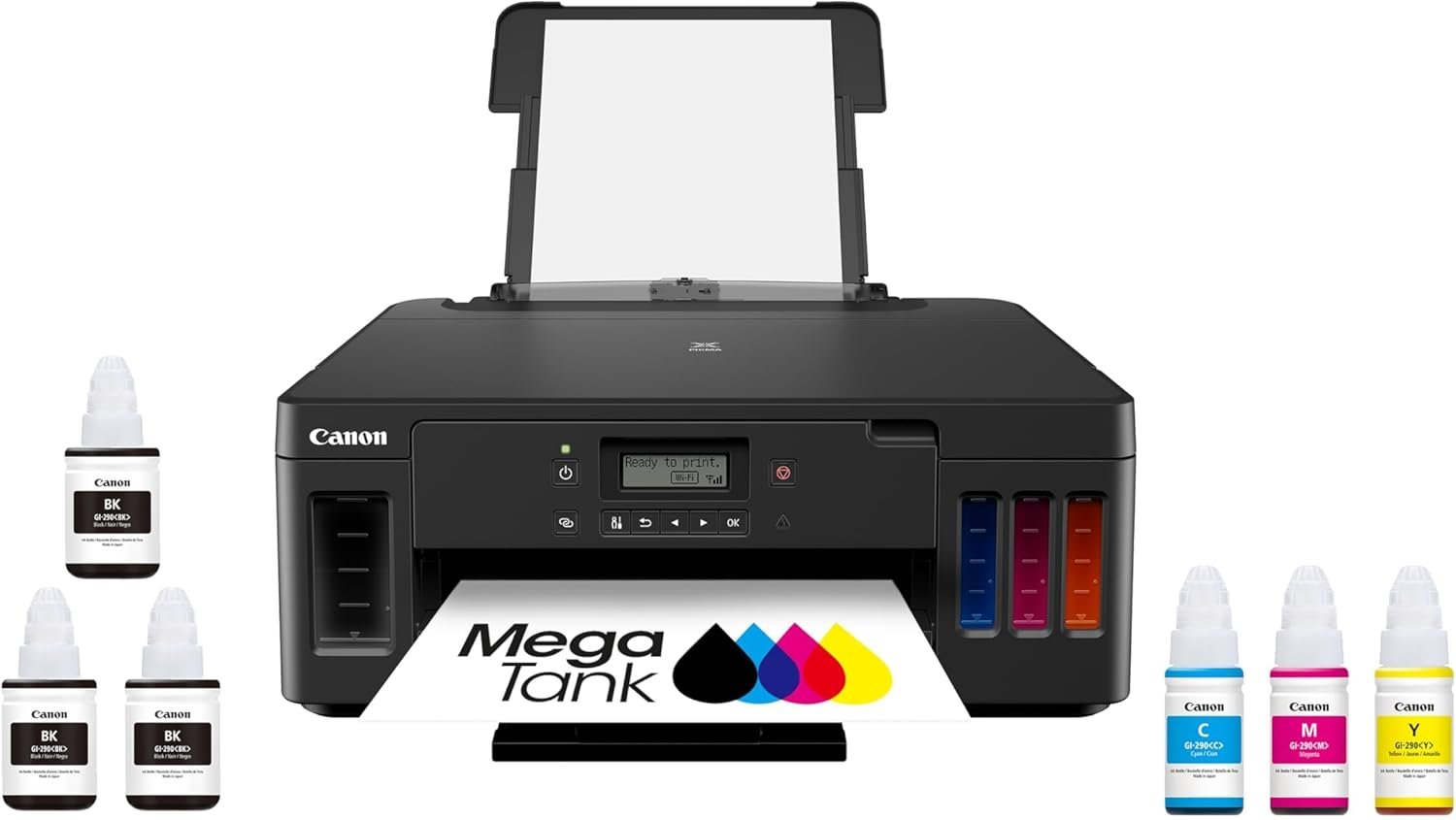
| Ink System | Refillable MegaTank with 4-color ink bottles |
| Warranty | Limited warranty |
The Canon PIXMA G5020 is tailored for users requiring high-volume printing with minimal maintenance. Its refillable ink system and large paper capacity make it ideal for environments where frequent printing is necessary. The combination of wireless connectivity and USB compatibility ensures flexibility in device integration, while the auto duplex feature reduces paper usage. These specifications position the PIXMA G5020 as a practical choice for home offices and small businesses prioritizing cost-effective, high-capacity printing.

High-Volume Printing and Duty Cycle Capacity
The Canon PIXMA G5020 is engineered to handle demanding printing workloads, making it a strong contender for users with high-volume needs. Its duty cycle specifications indicate a robust capacity to sustain continuous printing without performance degradation. The printer’s ability to produce up to 6,000 black text pages or 7,700 color pages per ink set ensures that users can manage large print jobs without frequent refills. This is particularly advantageous for businesses or households that require regular output of reports, invoices, or multi-page documents. The printer’s design also supports a maximum input sheet capacity of 250 sheets, reducing the need for frequent paper reloading. For users who prioritize longevity and minimal downtime, the PIXMA G5020’s duty cycle and page yield make it a practical choice for environments where consistent printing is essential.

Page Yield and Ink Efficiency
The PIXMA G5020’s page yield of up to 6,000 black text pages or 7,700 color pages per ink set is a significant factor in its cost-effectiveness. This high yield is achieved through its MegaTank ink system, which uses refillable ink bottles instead of traditional cartridges. Compared to standard ink cartridges, the MegaTank system provides over 30 times the ink volume, reducing the frequency of refills and lowering long-term operating costs. The included full set of ink bottles, along with two additional bonus black bottles, further enhances its value proposition. For users who print large volumes of text or color documents, this ink efficiency ensures that the printer can sustain high output without requiring frequent consumable replacements.
Paper Capacity and Workflow Optimization
The printer’s 350-sheet plain paper capacity is another key feature that supports high-volume printing. This capacity allows users to load a substantial amount of paper at once, minimizing interruptions during print jobs. The combination of a large paper tray and auto duplex printing reduces the need for manual intervention, streamlining workflows for users who process multiple print tasks simultaneously. The auto duplex feature also contributes to paper conservation by printing on both sides of the sheet, which is beneficial for users aiming to reduce material costs. These design elements make the PIXMA G5020 well-suited for environments where efficiency and uninterrupted printing are critical.
Connectivity and Device Compatibility
The Canon PIXMA G5020 offers versatile connectivity options that enhance its usability across different devices and environments. Its wireless capabilities enable seamless printing from smartphones, tablets, and computers without the need for physical connections. The printer also includes a USB port for direct printing, which is useful for users who prefer wired connections or have limited wireless access. This dual connectivity approach ensures that the printer can integrate into various workflows, whether for home use or small business operations. Additionally, the printer’s compatibility with a wide range of media sizes and paper types allows it to adapt to different printing needs, from standard letter-sized documents to larger photo prints. These connectivity and compatibility features make the PIXMA G5020 a flexible choice for users seeking a printer that can evolve with their printing requirements.

Wireless Printing and Mobile Integration
The wireless functionality of the PIXMA G5020 is a standout feature for users who rely on mobile devices for printing. By supporting wireless connectivity, the printer eliminates the need for cables, making it easier to print from smartphones and tablets. This is particularly beneficial for users who frequently work on the go or require quick access to print functions without the hassle of physical connections. The printer’s ability to connect to multiple devices ensures that users can manage print jobs from various sources, enhancing convenience and productivity. For environments where mobility and flexibility are key, the wireless capabilities of the PIXMA G5020 provide a significant advantage.
USB Port and Direct Printing
In addition to wireless connectivity, the PIXMA G5020 includes a USB port that allows for direct printing from computers. This feature is useful for users who prefer a wired connection for faster data transfer or have devices that do not support wireless printing. The USB port also ensures compatibility with older systems that may not have wireless capabilities, making the printer a versatile option for a wide range of users. The ability to print directly from a computer without relying on intermediary apps or networks enhances the printer’s usability in both home and office settings. These connectivity options collectively contribute to the PIXMA G5020’s adaptability to different printing environments.
Print Quality and Resolution Capabilities
The Canon PIXMA G5020 delivers high-quality print output, making it suitable for a variety of applications ranging from text documents to photo prints. The printer’s resolution capabilities are designed to meet the demands of both everyday use and more specialized printing needs. With a maximum print resolution of 4800 x 1200 dpi for both color and black-and-white prints, the PIXMA G5020 ensures sharp, detailed output that is ideal for professional and personal use. This level of resolution is particularly beneficial for users who require clear and precise prints, such as photographers or businesses that need high-quality marketing materials. The printer’s ability to produce vivid color pages and crisp text makes it a reliable choice for users prioritizing print quality.

Color and Monochrome Print Performance
The PIXMA G5020’s performance in both color and monochrome printing is a key factor in its overall suitability. For color printing, the printer’s 4800 x 1200 dpi resolution ensures that images and graphics are rendered with high clarity and vibrancy. This is particularly advantageous for users who print photos or marketing materials that require detailed color reproduction. In monochrome printing, the printer maintains a high level of precision, producing sharp text and clear line art that is ideal for documents and reports. The combination of these capabilities makes the PIXMA G5020 a versatile option for users who require consistent print quality across different types of content.
Auto Duplex and Paper Handling
The auto duplex feature of the PIXMA G5020 enhances its print quality and efficiency by automatically printing on both sides of the paper. This not only reduces paper usage but also ensures that documents are printed neatly and without manual intervention. The printer’s ability to handle various paper types, including standard letter-sized paper and envelopes, further contributes to its versatility. The combination of high-resolution printing and auto duplex functionality makes the PIXMA G5020 a practical choice for users who need reliable and efficient print output.

Pros & Cons
Pros
- High Page Yield: The PIXMA G5020’s ability to print up to 6,000 black text pages or 7,700 color pages per ink set ensures long-term cost savings for high-volume users.
- Refillable Ink System: The MegaTank ink system reduces the frequency of consumable replacements, making it more economical for frequent printing.
- Wireless Connectivity: The printer’s wireless capabilities allow for seamless printing from mobile devices, enhancing convenience and flexibility.
- Auto Duplex Printing: The auto duplex feature minimizes paper usage and ensures efficient document printing without manual intervention.
- Versatile Media Compatibility: Support for a wide range of paper sizes and types, including envelopes and photo paper, makes it adaptable to various printing needs.
- Robust Duty Cycle: The printer’s capacity to handle continuous printing without performance degradation is ideal for environments requiring consistent output.
- User-Friendly Design: The intuitive interface and included setup materials simplify the onboarding process for new users.
Cons
- Limited Media Sizes: While the printer supports a variety of paper sizes, it lacks compatibility with larger formats such as A3, which may be a drawback for users requiring such options.
- No Fax Functionality: The absence of a fax feature limits its utility in environments where fax transmission is necessary.
- Slower Monochrome Speed: The monochrome print speed of 13 ppm is lower compared to some laser printers, which may affect efficiency for high-volume text printing.
- Dependent on Ink Refills: The reliance on refillable ink bottles requires users to manage ink supply and refill processes, which may be inconvenient for some.
- Limited Warranty Coverage: The limited warranty may not provide sufficient support for users who require extended service or replacement parts.
Final Verdict: Who This Printer Is Best For (and Who Should Skip It)
The Canon PIXMA G5020 is best suited for users who require high-volume printing with minimal maintenance and cost-effective consumables. Its refillable ink system, large paper capacity, and wireless connectivity make it an ideal choice for home offices and small businesses that prioritize efficiency and long-term savings. The auto duplex feature and high-resolution output further enhance its appeal for users who need reliable, high-quality prints for both documents and photos. However, the printer may not be suitable for users who require specialized features such as A3 printing, fax capabilities, or faster monochrome printing. Additionally, those who prefer laser printers for high-speed text output or need extended warranty coverage may find the PIXMA G5020 less appropriate. Overall, the PIXMA G5020 is a practical and cost-effective solution for users with standard printing needs in 2026.

Frequently Asked Questions (FAQs)
What is the page yield of the Canon PIXMA G5020?
The Canon PIXMA G5020 offers a high page yield of up to 6,000 black text pages or 7,700 vivid color pages per full ink set. This makes it suitable for users with high-volume printing needs, reducing the frequency of ink refills.
Can the PIXMA G5020 print on both sides of the paper?
Yes, the PIXMA G5020 features auto duplex printing, which automatically prints on both sides of the paper. This reduces paper usage and ensures efficient document printing without manual intervention.
What connectivity options does the PIXMA G5020 support?
The PIXMA G5020 supports both wireless connectivity and a USB port. This allows users to print from smartphones, tablets, and computers without the need for physical cables, enhancing flexibility and convenience.
Is the PIXMA G5020 suitable for photo printing?
Yes, the PIXMA G5020 is capable of producing vivid color pages, making it suitable for photo printing. Its 4800 x 1200 dpi resolution ensures sharp and detailed output for both text and images.
What media sizes does the PIXMA G5020 support?
The PIXMA G5020 supports a variety of media sizes, including standard letter-sized paper, legal paper, U.S. #10 envelopes, and various photo paper sizes. This versatility makes it adaptable to different printing needs.
How does the ink system of the PIXMA G5020 work?
The PIXMA G5020 uses a refillable MegaTank ink system, which allows users to refill ink bottles instead of replacing cartridges. This system provides a cost-effective solution for high-volume printing by reducing the need for frequent consumable replacements.
What is the warranty coverage for the PIXMA G5020?
The PIXMA G5020 comes with a limited warranty, which provides basic coverage for defects or malfunctions. Users should review the warranty details for specific terms and conditions.
Can the PIXMA G5020 be used for business printing?
Yes, the PIXMA G5020 is well-suited for small business environments due to its high page yield, wireless connectivity, and auto duplex printing. These features make it a practical choice for managing regular print jobs efficiently.