Brother MFC-J1010DW Wireless Color Inkjet All-in-One Printer Review
The Importance of Choosing the Right Printer
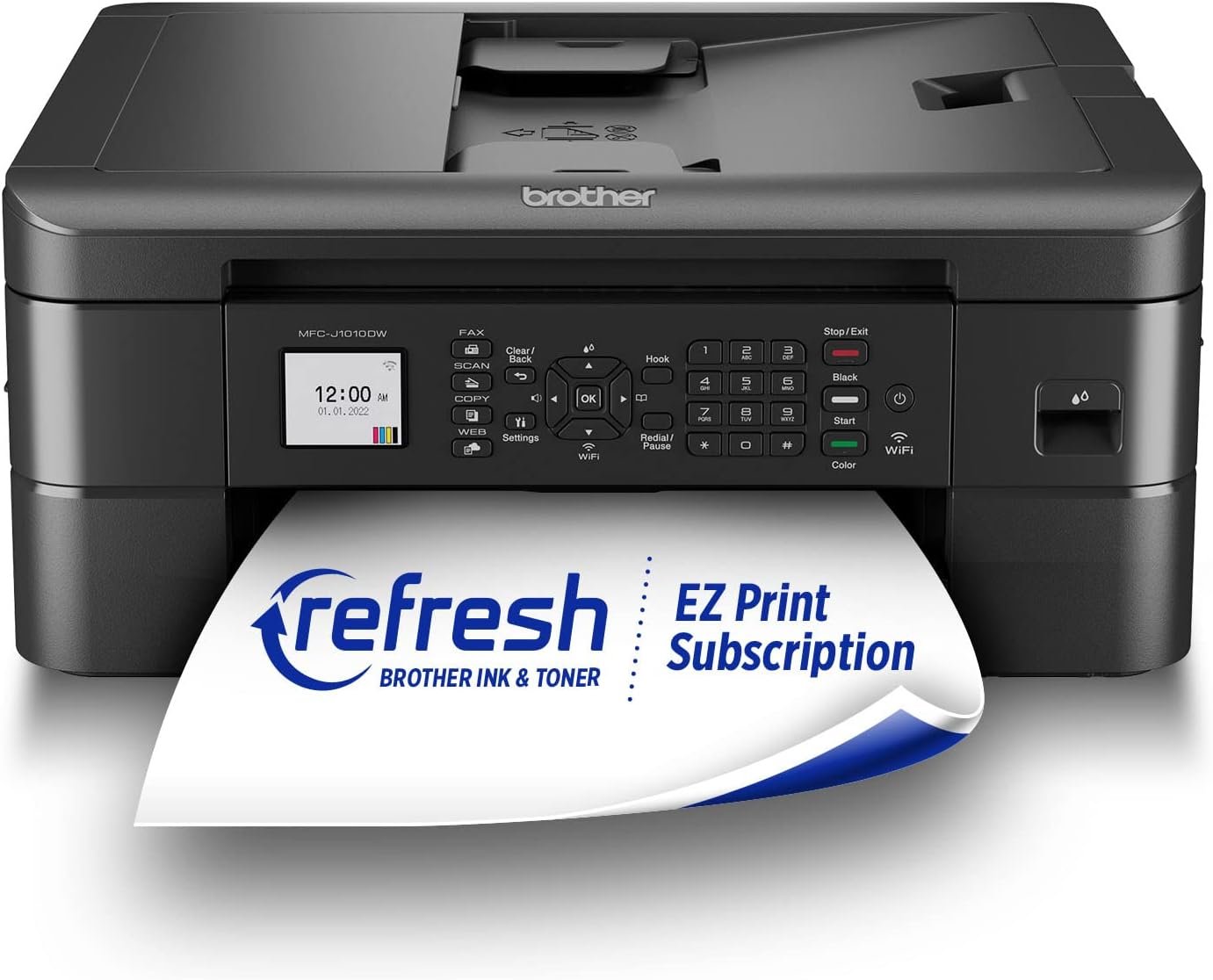
In today’s fast-paced digital environment, selecting the right printer is critical for maintaining productivity across home offices, small businesses, and remote workspaces. Whether you need to produce high-quality documents, manage print workflows, or integrate smart features, the right printer can streamline tasks and reduce operational friction. For users who prioritize compact design, reliable connectivity, and multifunctionality, the Brother MFC-J1010DW Wireless Color Inkjet All-in-One Printer offers a compelling balance of performance and affordability. This printer is engineered to meet the demands of everyday printing while incorporating modern technologies like wireless connectivity, cloud integration, and smart ink management. Its ability to handle text, graphics, and photos with precision makes it suitable for both personal and professional use. However, understanding its technical capabilities, limitations, and ideal use cases is essential for making an informed decision. This review provides an in-depth analysis of the MFC-J1010DW’s features, performance benchmarks, and real-world applicability, helping users determine if it aligns with their specific printing needs.
Quick Overview
| Feature | Details |
|---|---|
| Printer Type | Wireless Color Inkjet All-in-One Printer |
| Supported Functions | Print, Copy, Scan, Fax |
| Print Speed | Up to 17 ppm black, 9.5 ppm color |
| Print Resolution | 6000 x 1200 dpi (color, Windows), 3600 x 1200 dpi (color, Mac), 6000 dpi (black and white) |
| Media Sizes | 8.5 x 11, 8.5 x 14 inches |
| Connectivity Options | Wi-Fi, Wi-Fi Direct, USB 2.0 |
| Duplex Printing | Automatic |
| Automatic Document Feeder | 20-page |
| Ink System | Four-color inkjet cartridges |
| Display | 1.8″ color touchscreen |
| Smart Features | Alexa integration, cloud printing |
| Warranty | Limited warranty |
The Brother MFC-J1010DW combines compact design with robust functionality, making it ideal for users who need a versatile printer for home or small office environments. Its wireless connectivity and cloud-ready features simplify printing from multiple devices, while the automatic duplex printing reduces paper usage. The 1.8″ color display enhances usability, allowing users to navigate settings and monitor ink levels efficiently. These specifications collectively position the printer as a practical choice for individuals and small teams requiring reliable, multifunctional printing without excessive complexity.

Print Performance and Speed

Print Speed and Efficiency
The Brother MFC-J1010DW is designed to deliver efficient printing performance, with a maximum black print speed of 17 pages per minute (ppm) and a color print speed of 9.5 ppm. These speeds are suitable for typical home or small office workloads, where users may need to print documents, reports, or spreadsheets without significant delays. The printer’s ability to handle both monochrome and color printing makes it versatile for a range of tasks, from text-heavy reports to presentations with visual elements. While these speeds may not rival high-volume commercial printers, they are adequate for users who prioritize quick turnaround times for everyday printing needs.
Print Resolution and Quality
Print quality is a critical factor for users who require sharp text and detailed graphics. The MFC-J1010DW supports a maximum color print resolution of 6000 x 1200 dpi on Windows and 3600 x 1200 dpi on Mac, with a black-and-white resolution of 6000 dpi. These resolutions ensure that printed materials maintain clarity and precision, making the printer suitable for both professional and personal use. The printer’s inkjet technology allows for smooth gradients and fine details, which are particularly beneficial for photos and graphics. However, users should be aware that print quality may vary depending on the type of paper used and the complexity of the document being printed.
Paper Handling and Duplex Printing
The printer’s automatic duplex printing feature helps reduce paper consumption by printing on both sides of a sheet. This functionality is ideal for users who need to produce documents with minimal environmental impact or who have limited paper storage space. The 20-page automatic document feeder (ADF) simplifies scanning and copying tasks, allowing users to process multiple pages quickly without manual intervention. The ADF is particularly useful for tasks such as scanning multi-page documents or copying large volumes of paper. However, the printer’s paper handling capabilities are optimized for standard-sized paper, and users may need to adjust settings for specialized media types.
Connectivity and Smart Features

Wireless and Cloud Integration
The Brother MFC-J1010DW offers multiple connectivity options, including built-in Wi-Fi, Wi-Fi Direct, and USB 2.0, providing flexibility for users with different device preferences. The wireless capabilities allow for seamless printing from smartphones, tablets, and laptops without the need for physical cables. Additionally, the printer supports cloud printing through services like Google Cloud Print and Dropbox, enabling users to print documents directly from the cloud. This feature is particularly beneficial for remote workers or those who frequently access files stored online. However, the effectiveness of cloud printing may depend on the stability of the user’s internet connection and the availability of compatible services.
Mobile and App Integration
The printer’s compatibility with the Brother Mobile Connect App enhances its usability for mobile users. This app allows users to manage print jobs, scan documents, and monitor ink levels directly from their devices. The app’s intuitive interface simplifies navigation, making it easy for users to access settings and adjust print preferences. Additionally, the printer’s integration with Alexa enables smart ink management, providing users with notifications about ink levels and the option to reorder supplies automatically. While these features improve convenience, they require a stable internet connection and may not be as robust as dedicated mobile printing solutions.
Display and User Interface
The 1.8″ color touchscreen display on the MFC-J1010DW offers a user-friendly interface for managing the printer’s functions. The display provides clear visual feedback, allowing users to monitor print jobs, adjust settings, and access status information without the need for additional devices. The touchscreen is particularly useful for users who prefer a direct, visual method of interaction. However, the relatively small screen size may make it challenging to navigate complex settings or view detailed information, especially for users with limited experience with printer interfaces.

Pros and Cons
Pros
- Compact and Space-Saving Design: The MFC-J1010DW’s compact footprint makes it ideal for small offices or home environments where space is limited.
- Fast Print Speeds: With a maximum black print speed of 17 ppm, the printer is efficient for everyday printing tasks.
- Wireless and Cloud Connectivity: The built-in Wi-Fi and cloud printing support provide flexibility for users who need to print from multiple devices.
- Automatic Duplex Printing: The printer’s automatic two-sided printing reduces paper usage and helps lower printing costs.
- User-Friendly Display: The 1.8″ color touchscreen simplifies navigation and status monitoring.
- Smart Ink Management: Integration with Alexa allows for convenient ink level notifications and reordering.
- Versatile Paper Handling: The 20-page ADF and adjustable paper tray accommodate a range of paper sizes and types.
- All-in-One Functionality: The printer’s ability to print, copy, scan, and fax reduces the need for multiple devices.
Cons
- Limited High-Volume Capacity: The printer is not designed for heavy-duty, high-volume printing, making it less suitable for commercial environments.
- Ink Cartridge Replacement Frequency: The printer’s ink system may require frequent refills, which can increase long-term costs.
- Dependence on Connectivity: The wireless and cloud features rely on a stable internet connection, which may not always be available.
- Screen Size Limitations: The 1.8″ display, while functional, may not be sufficient for users who need detailed interface controls.
- Compatibility Constraints: While the printer supports a range of devices, some advanced features may be limited by software compatibility.
- No Built-In Scanner for Large Documents: The ADF is suitable for standard-sized paper, but it may not handle very large or irregularly shaped documents efficiently.
Final Verdict: Who This Printer Is Best For (and Who Should Skip It)
The Brother MFC-J1010DW is an excellent choice for users who require a compact, multifunctional printer for home or small office environments. Its wireless connectivity, cloud printing capabilities, and automatic duplex printing make it ideal for individuals who need to print documents, scan files, and manage ink levels efficiently. The printer’s user-friendly display and Alexa integration further enhance its appeal for users who value convenience and smart features. However, it is not well-suited for high-volume commercial printing or environments where large document handling is required. Users who prioritize speed, versatility, and ease of use will find the MFC-J1010DW to be a reliable and practical solution. Conversely, businesses or individuals with heavy printing needs, or those who require advanced paper handling capabilities, may find the printer’s limitations to be a drawback. Overall, the MFC-J1010DW is a well-rounded printer that balances performance and affordability for its target audience.

Frequently Asked Questions (FAQs)
What is the maximum print speed of the Brother MFC-J1010DW?
The Brother MFC-J1010DW offers a maximum print speed of 17 pages per minute (ppm) for black prints and 9.5 ppm for color prints. These speeds are suitable for everyday home or small office use but may not meet the demands of high-volume commercial printing.
Does the Brother MFC-J1010DW support duplex printing?
Yes, the MFC-J1010DW includes automatic duplex printing, which prints on both sides of a sheet to reduce paper usage and lower printing costs. This feature is ideal for users who need to produce documents with minimal environmental impact.
Can the Brother MFC-J1010DW connect to cloud services?
The printer supports cloud printing through services like Google Cloud Print and Dropbox, allowing users to print documents directly from the cloud. This feature is particularly useful for remote workers or those who frequently access files stored online.
How does the Brother MFC-J1010DW integrate with Alexa?
The printer’s Alexa integration provides users with ink level notifications and the option to reorder supplies automatically. This smart feature enhances convenience for users who manage printing tasks remotely.
What is the paper handling capacity of the Brother MFC-J1010DW?
The MFC-J1010DW features a 150-sheet adjustable paper tray and a 20-page automatic document feeder (ADF). These components allow for efficient handling of standard-sized paper, though the printer may not accommodate very large or irregularly shaped documents.
Is the Brother MFC-J1010DW suitable for small business use?
The printer is well-suited for small businesses and home offices due to its compact design, multifunctionality, and wireless connectivity. Its ability to handle a range of print tasks makes it a practical choice for environments with moderate printing demands.
What are the connectivity options for the Brother MFC-J1010DW?
The printer offers built-in Wi-Fi, Wi-Fi Direct, and USB 2.0 connectivity options. These features provide flexibility for users who need to print from multiple devices, including smartphones, tablets, and laptops.
Can the Brother MFC-J1010DW handle photo printing?
The printer’s high-resolution print capabilities, including up to 6000 x 1200 dpi for color prints, make it suitable for producing high-quality photos and graphics. Users should ensure they use appropriate paper types for optimal results.