HP OfficeJet Pro 9135e Review: Office-Ready Color Printing with AI and Wireless Connectivity
The Importance of Choosing the Right Printer for Modern Workflows
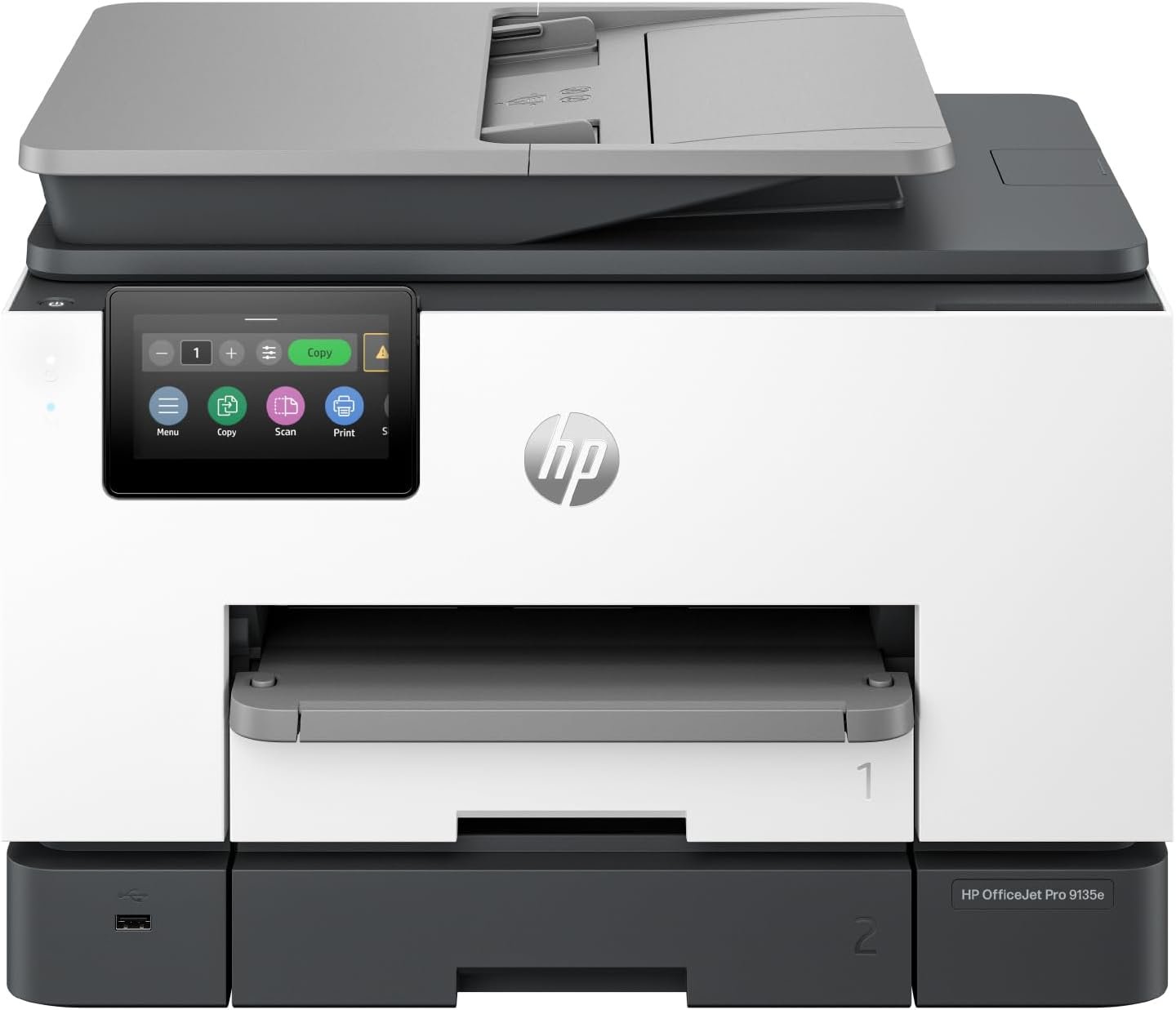
In today’s fast-paced work environments, a reliable printer is more than a peripheral—it’s a critical productivity tool. Whether managing daily office tasks or handling high-volume print jobs, the right printer can streamline operations, reduce downtime, and ensure consistent output quality. For businesses requiring color printing, scanning, and copying capabilities, the HP OfficeJet Pro 9135e stands out as a multifunctional solution. This printer balances speed, connectivity, and intelligent features to meet the demands of modern offices. Its ability to handle professional documents, automate workflows, and integrate with digital systems makes it a strong contender for organizations seeking efficiency without compromising on performance. Understanding the technical specifications, media compatibility, and operational capabilities of the HP OfficeJet Pro 9135e is essential for evaluating its suitability for specific use cases, from small teams to larger enterprises. This review provides an in-depth analysis of its features, performance benchmarks, and real-world applicability to help users make informed decisions.
Quick Overview
| Feature | Details |
|---|---|
| Printer Type | Wireless All-in-One Color Inkjet Printer |
| Print Technology | HP Thermal Inkjet |
| Supported Functions | Print, Scan, Copy, Fax |
| Print Resolution | Up to 4800 x 1200 dpi (color), 1200 x 1200 dpi (black and white) |
| Print Speed | 20 ppm color, 25 ppm black |
| Media Sizes | 8.5 x 11, 8.27 x 11.7, 8.5 x 14, 7.16 x 10.12 inches |
| Connectivity | Ethernet, USB, Wireless (dual-band Wi-Fi) |
| Duty Cycle | 120,000 pages per month |
| Ink System | HP Ink with 4-color cartridge system |
| Warranty | One-year limited hardware warranty |
| Additional Features | AI-enabled workflow optimization, HP Wolf Pro Security |
The HP OfficeJet Pro 9135e is designed for office environments requiring high-quality color printing, automated document handling, and secure connectivity. Its combination of speed, resolution, and multifunctionality makes it a versatile option for teams needing reliable output without sacrificing efficiency.

Print Speed and Efficiency: Meeting Workload Demands
The HP OfficeJet Pro 9135e is engineered to handle demanding office workflows with its high-speed printing capabilities. The printer delivers color prints at up to 20 pages per minute (ppm) and black prints at 25 ppm, ensuring quick turnaround for reports, presentations, and marketing materials. These speeds are particularly beneficial for environments with high-volume print requirements, such as marketing departments or administrative offices. The printer’s duty cycle of 120,000 pages per month indicates its ability to sustain continuous use without overheating or mechanical wear, making it suitable for busy workdays. The AI-enabled print engine further enhances efficiency by automatically adjusting print settings based on document type, reducing wasted pages and optimizing ink usage. This adaptability is crucial for users aiming to balance speed with resource management.

High-Speed Output for Time-Sensitive Tasks
The 20 ppm color print speed allows users to complete tasks such as producing brochures, flyers, and presentations in a fraction of the time required by slower printers. For example, a 50-page color document would take approximately 2.5 minutes to print, which is ideal for meeting tight deadlines. The printer’s ability to handle complex layouts and maintain consistent quality at high speeds is a significant advantage for professionals who rely on quick, accurate outputs.
Black-and-White Efficiency for Cost Management
The 25 ppm black print speed ensures efficient handling of text-heavy documents, such as reports and spreadsheets. This speed is particularly beneficial for offices prioritizing cost-effective printing, as it minimizes the use of color ink while maintaining readability. The printer’s black-and-white resolution of 1200 x 1200 dpi ensures sharp text output, which is essential for professional documents.
Duty Cycle and Long-Term Reliability
The 120,000 pages per month duty cycle indicates the printer is built for sustained use in environments with frequent print jobs. This specification is important for users concerned about printer longevity and performance under heavy workloads. The thermal inkjet technology used in the HP OfficeJet Pro 9135e is known for its durability and consistent output, making it a reliable choice for offices requiring continuous printing.
Connectivity and Integration: Seamless Workflow Automation
The HP OfficeJet Pro 9135e offers a range of connectivity options to ensure seamless integration with existing digital infrastructure. Its dual-band Wi-Fi technology provides stable, high-speed wireless printing, reducing the risk of connection interruptions during critical tasks. The printer also supports Ethernet and USB connections, offering flexibility for users who prefer wired connectivity or need to integrate the device into a networked environment. These connectivity features are essential for offices aiming to streamline workflows and reduce manual intervention.

Dual-Band Wi-Fi for Reliable Wireless Printing
The dual-band Wi-Fi capability allows the printer to operate on both 2.4 GHz and 5 GHz frequencies, minimizing interference from other wireless devices. This is particularly beneficial in environments with multiple connected devices, such as corporate offices or shared workspaces. The automatic connection and issue-resolution features of the Wi-Fi system ensure that users can maintain consistent printing without technical disruptions.
Ethernet and USB for Stable Network Integration
For users requiring a more stable connection, the Ethernet port provides a wired alternative that ensures consistent performance. The USB port allows for direct printing from laptops or desktops, making it convenient for users who prefer physical connections. These options are ideal for organizations with strict network security protocols or those requiring direct device integration.
AI-Enabled Workflow Optimization
The AI-enabled features of the HP OfficeJet Pro 9135e enhance connectivity by automatically adapting to user workflows. For instance, the printer can recognize document types and adjust print settings accordingly, reducing the need for manual configuration. This automation is particularly valuable for users managing complex print jobs or integrating the printer into larger office systems.
Print Quality and Media Compatibility: Ensuring Professional Results
The HP OfficeJet Pro 9135e is designed to deliver high-quality color output, making it suitable for professional documents, marketing materials, and creative projects. Its print resolution of up to 4800 x 1200 dpi (color) and 1200 x 1200 dpi (black and white) ensures sharp, detailed images and text. The printer’s support for various media sizes and types, including plain paper and specialty sheets, further enhances its versatility for different printing needs.

High-Resolution Color Printing for Creative and Marketing Use
The 4800 x 1200 dpi color resolution is ideal for producing high-quality images, graphics, and designs. This level of detail is particularly beneficial for marketing teams creating brochures, flyers, and presentations that require vibrant, accurate color reproduction. The printer’s ability to maintain consistent color output across multiple pages ensures that professional documents remain visually appealing and polished.
Black-and-White Text Clarity for Document Accuracy
The 1200 x 1200 dpi black-and-white resolution ensures crisp, legible text for reports, spreadsheets, and other document types. This level of detail is crucial for maintaining the professionalism of printed materials, especially when dealing with complex data or intricate formatting.
Media Compatibility for Versatile Printing Needs
The printer supports a variety of media sizes, including standard letter, legal, and oversized formats, accommodating different printing requirements. This flexibility is particularly useful for offices that need to handle a wide range of document types, from small reports to large presentations. The compatibility with plain paper and specialty sheets further enhances its utility for diverse printing tasks.

Pros & Cons
Pros
- High-Speed Color Printing: The 20 ppm color print speed ensures quick turnaround for marketing and design tasks.
- AI-Enabled Workflow Optimization: Automatically adjusts print settings to reduce wasted pages and improve efficiency.
- Dual-Band Wi-Fi Connectivity: Provides stable, high-speed wireless printing with automatic connection troubleshooting.
- Dual-Sided Printing and Auto Document Feeder: Enhances productivity by automating duplex printing and document handling.
- Secure Network Integration: HP Wolf Pro Security protects against cyber threats and malware.
- Versatile Media Compatibility: Supports multiple paper sizes and types, including legal and oversized formats.
- Durable Thermal Inkjet Technology: Ensures consistent output and long-term reliability under heavy use.
- User-Friendly HP App: Simplifies print, scan, copy, and fax functions from mobile devices.
Cons
- Ink Cartridge Replacement Frequency: The 4-color ink system may require frequent cartridge replacements, increasing maintenance efforts.
- Limited Mobile App Customization: The HP app offers basic functionality without advanced settings for power users.
- Noise During High-Speed Printing: The printer may generate audible noise during continuous operation, which could be disruptive in quiet environments.
- Initial Setup Complexity: Configuring the dual-band Wi-Fi and AI features may require technical expertise for some users.
- Dependence on HP Ink Supplies: The printer is optimized for HP ink, which may limit compatibility with third-party alternatives.
Final Verdict: Who This Printer Is Best For (and Who Should Skip It)
The HP OfficeJet Pro 9135e is an excellent choice for offices requiring high-quality color printing, automated document handling, and secure connectivity. Its high-speed output, AI-enabled features, and versatile media compatibility make it ideal for marketing departments, administrative teams, and small businesses with moderate to high print volumes. The dual-band Wi-Fi and Ethernet connectivity ensure reliable performance in environments with multiple devices or strict network security requirements. However, users with minimal printing needs, those prioritizing low maintenance, or those seeking a quieter operation may find the printer less suitable. The reliance on HP ink and the potential for frequent cartridge replacements could also be drawbacks for organizations looking to minimize ongoing costs. Overall, the HP OfficeJet Pro 9135e is a strong contender for offices seeking a balance between speed, quality, and multifunctionality in a single device.

Frequently Asked Questions (FAQs)
What is the maximum print speed of the HP OfficeJet Pro 9135e?
The HP OfficeJet Pro 9135e can print up to 20 pages per minute in color and 25 pages per minute in black, making it suitable for high-volume office environments.
Does the HP OfficeJet Pro 9135e support wireless printing?
Yes, the printer includes dual-band Wi-Fi for reliable wireless connectivity, with automatic connection troubleshooting to ensure seamless printing.
What media sizes does the HP OfficeJet Pro 9135e support?
The printer supports various media sizes including standard letter, legal, and oversized formats, accommodating a wide range of printing needs.
How does the AI feature enhance printing efficiency?
The AI-enabled print engine automatically adjusts settings to reduce wasted pages and optimize ink usage, improving overall workflow efficiency.
What security features does the HP OfficeJet Pro 9135e offer?
The printer includes HP Wolf Pro Security, which provides customizable tools to protect against cyber threats and malware, ensuring network safety.
Can the HP OfficeJet Pro 9135e handle duplex printing?
Yes, the printer features automatic duplex printing, which helps reduce paper usage and streamline document handling in office settings.
What is the duty cycle of the HP OfficeJet Pro 9135e?
The printer is rated for 120,000 pages per month, indicating its ability to handle continuous use in busy office environments.
Is the HP OfficeJet Pro 9135e suitable for small businesses?
Yes, its combination of high-speed printing, multifunctionality, and secure connectivity makes it an ideal choice for small businesses with moderate to high print volumes.