Epson EcoTank ET-2850L Review: High-Speed, Low-Cost Color Printing for Home and Office
The Importance of Choosing the Right Printer
In today’s fast-paced digital world, the right printer can significantly impact productivity, whether for home use, small business operations, or personal projects. A reliable printer must balance speed, cost-effectiveness, and print quality to meet diverse user needs. From generating professional documents to creating vibrant photos, the ability to produce consistent, high-quality output is critical. Printers also play a vital role in managing workflow, especially when handling large volumes or integrating with digital workflows. For users prioritizing affordability, ease of use, and long-term cost savings, a printer that minimizes recurring expenses while maintaining performance is essential. The Epson EcoTank ET-2850L represents a solution designed to address these needs, offering a cartridge-free ink system, wireless connectivity, and advanced features that cater to both casual and moderate-use environments. Understanding how these specifications align with real-world applications helps users determine if this printer is a suitable fit for their specific requirements.
Quick Overview
| Feature | Details |
|---|---|
| Printer Type | Inkjet All-in-One Printer |
| Supported Functions | Print, Scan, Copy |
| Print Resolution | Up to 1200X2400 dpi |
| Print Speed | Up to 10.5 pages per minute (PPM) |
| Media Sizes | Legal (8.5 x 14 inches) |
| Connectivity | Wi-Fi |
| Duty Cycle | Recommended for moderate-volume use |
| Ink System | Refillable ink tank technology |
| Warranty | Limited warranty |
The Epson EcoTank ET-2850L combines a high-capacity ink system with wireless connectivity, making it ideal for users who prioritize cost-effective, low-maintenance printing. Its ability to handle color printing, scanning, and copying in a single unit reduces the need for multiple devices, enhancing convenience for home and small office environments.
Print Quality and Resolution
High-Resolution Output for Professional and Personal Use
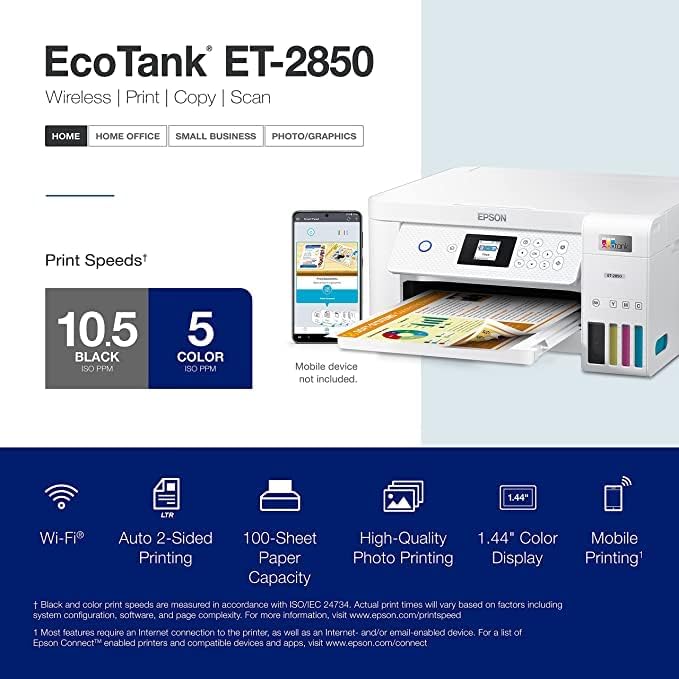
The Epson EcoTank ET-2850L delivers print outputs with a maximum resolution of 1200X2400 dpi, ensuring sharp text and detailed graphics. This resolution is well-suited for both everyday documents and more demanding tasks like photo printing or graphic design. The printer’s ability to maintain consistent color accuracy and tonal depth is critical for users who require reliable output for professional or personal projects. The high-resolution output reduces the need for manual adjustments or post-processing, streamlining workflows for users who prioritize efficiency.
Color Accuracy and Versatility
The printer’s color printing capabilities are enhanced by its advanced inkjet technology, which allows for precise color reproduction across a wide range of media types. While the device supports standard paper sizes, its ability to handle color-intensive tasks makes it a viable option for users who need vibrant, accurate color outputs. However, the printer’s color management features are limited to standard profiles, which may require additional calibration for specialized applications.
Text Clarity and Grayscale Performance
The ET-2850L excels in producing clear, legible text with its high-resolution print engine. The printer’s grayscale output is equally impressive, with consistent density and minimal banding, making it suitable for tasks like creating reports or invoices. The combination of high-resolution settings and a reliable ink system ensures that text remains sharp and readable, even when printed at higher volumes.
Connectivity and Compatibility
Wireless Integration for Modern Workflows
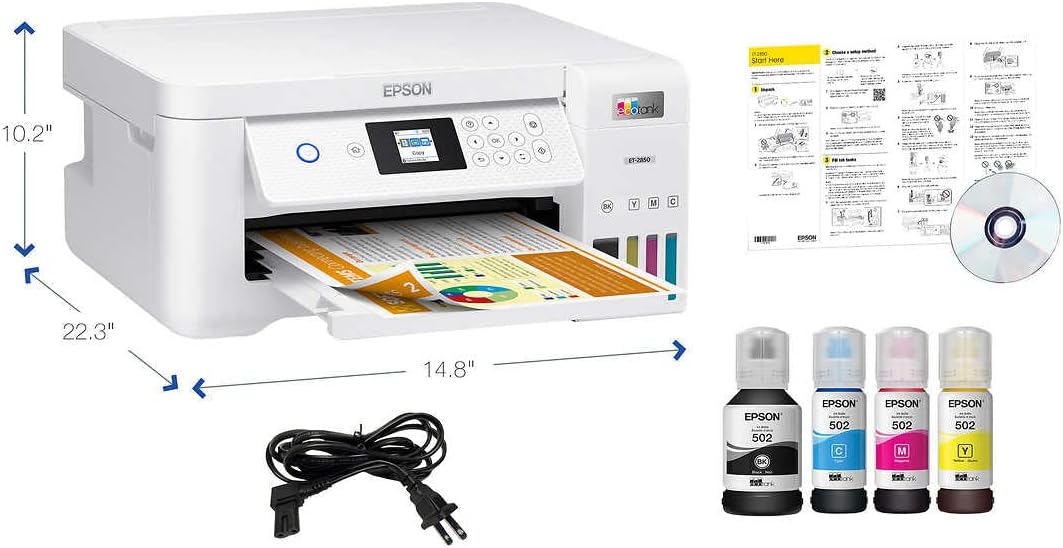
The Epson EcoTank ET-2850L’s Wi-Fi connectivity simplifies integration with modern digital environments, allowing users to print from smartphones, tablets, and computers without the need for physical cables. This feature is particularly beneficial for users who prioritize mobility and convenience, as it eliminates the need for additional hardware or complex setup processes. The printer’s wireless capabilities also support seamless integration with cloud-based services, enabling users to print documents directly from online platforms.
Compatibility with Multiple Devices and Operating Systems
The printer’s compatibility with a wide range of devices, including PCs and mobile devices, ensures that users can access its features across different platforms. However, the lack of support for newer operating systems or mobile apps may limit its appeal for users who require the latest connectivity options. The device’s reliance on standard Wi-Fi protocols ensures broad compatibility but may require additional configuration for advanced network setups.
Remote Management and User Interface
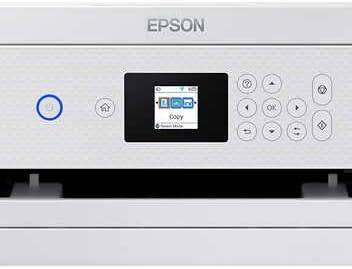
The ET-2850L’s user interface includes a 1.44-inch color display, which provides clear feedback on print jobs, ink levels, and system status. While the interface is functional, its limited size may make it less intuitive for users who prefer larger screens or more detailed controls. The printer’s remote management capabilities allow for basic monitoring and adjustments, but advanced customization options are limited, which may affect its appeal for power users.
Ink System and Cost Efficiency

Refillable Ink Tanks for Long-Term Savings
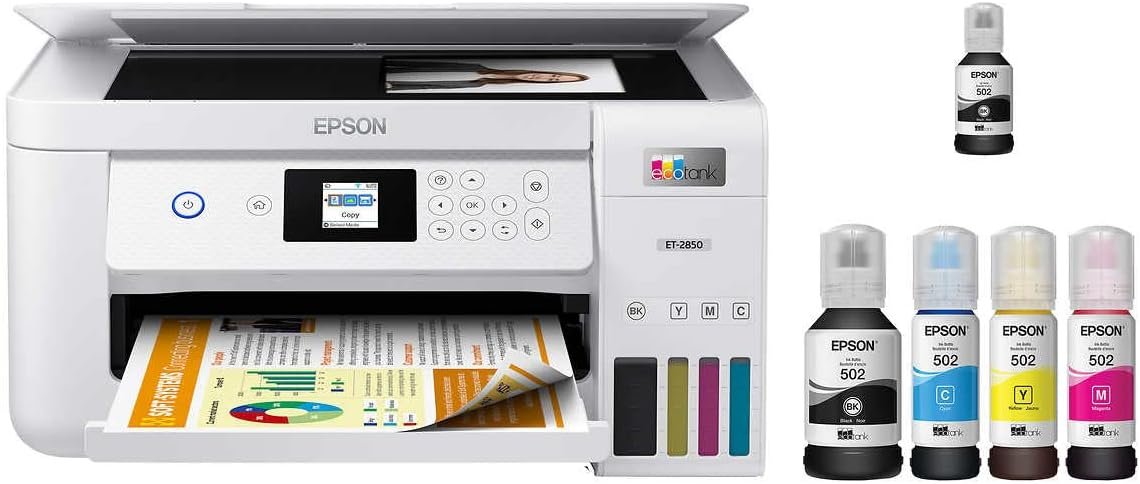
The EcoTank ET-2850L’s cartridge-free ink system reduces long-term printing costs by eliminating the need for frequent ink cartridge replacements. The inclusion of a bonus black ink bottle and a printer cable further enhances its cost-effectiveness, as users can refill the tanks without purchasing additional accessories. This design is particularly advantageous for users who prioritize affordability and sustainability, as it minimizes waste and reduces the environmental impact of printing.
Maintenance and Refill Process
While the refillable ink system offers cost savings, the maintenance process requires users to manually refill the tanks, which may be less convenient for those who prefer automated systems. The printer’s design allows for easy access to the ink tanks, but the process may take additional time compared to traditional inkjet printers. Users should also be aware that improper refilling could lead to clogging or inconsistent print quality, which may require additional troubleshooting.
Ink Efficiency and Print Volume
The printer’s ink efficiency is optimized for moderate-volume use, making it suitable for households or small offices with regular printing needs. However, the device is not designed for high-volume commercial printing, where dedicated inkjet systems with larger ink reservoirs may be more appropriate. The limited ink capacity, while cost-effective for everyday use, may not meet the demands of users who require continuous printing without frequent refills.
Durability and Duty Cycle
Recommended Volume for Moderate Use
The Epson EcoTank ET-285,0L is designed for moderate-volume use, with a recommended duty cycle that aligns with typical home or small office printing needs. Its build quality and component design ensure reliable operation under these conditions, but it may not be suitable for high-volume environments where continuous printing is required. Users who anticipate frequent, heavy use should consider alternative printers with higher-duty cycles and more robust construction.
Component Reliability and Longevity
The printer’s components, including the print head and internal mechanisms, are engineered for durability, with a focus on minimizing wear and tear during regular use. However, the lack of a dedicated maintenance mode or advanced diagnostic tools may limit its ability to handle complex issues that arise over time. The printer’s warranty provides basic coverage, but extended support may require additional service agreements.
Environmental and Operational Stability
The ET-2850L’s operational stability is influenced by its design for standard office environments, with a focus on temperature and humidity control. While it performs well under typical conditions, extreme environmental factors may affect print quality or system reliability. Users in regions with fluctuating temperatures or high humidity should consider additional protective measures to ensure optimal performance.
Media Handling and Versatility
Support for Standard and Legal-Sized Paper
The printer’s ability to handle legal-sized paper (8.5 x 14 inches) expands its versatility for users who require larger document formats. This feature is particularly useful for legal, financial, or creative applications that demand more space for content. However, the printer’s media handling capabilities are limited to standard paper types, which may not meet the needs of users who require specialized media like photo paper or specialty stock.
Compatibility with Different Paper Types
The ET-2850L supports a range of paper types, including plain paper, which is ideal for everyday printing tasks. While the printer can handle basic media variations, its ability to manage more specialized paper types is limited. Users who require high-quality photo prints or detailed graphics may need to invest in additional media or adjust print settings to achieve optimal results.
Tray and Input Capacity
The printer’s single tray design allows for a maximum input capacity of 150 sheets, which is sufficient for moderate-volume use. However, the lack of additional trays may limit its efficiency for users who need to print large batches without frequent refills. The input capacity is well-suited for home or small office environments but may not meet the demands of high-volume commercial printing operations.
Pros & Cons
Pros
- High-Resolution Output: The 1200X2400 dpi print resolution ensures sharp text and detailed graphics, suitable for both everyday use and more demanding tasks.
- Wireless Connectivity: Wi-Fi integration simplifies printing from multiple devices, enhancing convenience for users who prioritize mobility.
- Refillable Ink System: The cartridge-free design reduces long-term costs and minimizes environmental impact through reduced waste.
- All-in-One Functionality: Combines printing, scanning, and copying in a single unit, reducing the need for multiple devices.
- User-Friendly Interface: The 1.44-inch color display provides clear feedback on print status and system settings, improving usability.
- Compatibility with Standard Devices: Supports a wide range of computers and mobile devices, ensuring broad accessibility.
- Durable Build Quality: Engineered for reliable operation under moderate-volume use conditions.
- Cost-Effective for Home Use: The initial setup and ongoing ink costs make it a budget-friendly option for households.
Cons
- Limited Media Support: The printer is optimized for standard paper types and may not handle specialized media effectively.
- Manual Ink Refilling Required: Users must manually refill ink tanks, which may be less convenient than automated systems.
- Not Suitable for High-Volume Use: The recommended duty cycle is designed for moderate use, making it less ideal for commercial environments.
- Limited Advanced Connectivity Options: The reliance on standard Wi-Fi may require additional configuration for advanced network setups.
- Smaller Display Size: The 1.44-inch color display may be less intuitive for users who prefer larger screens or more detailed controls.
- No Dedicated Maintenance Mode: The lack of advanced diagnostic tools may limit its ability to handle complex issues over time.
Final Verdict: Who This Printer Is Best For (and Who Should Skip It)
The Epson EcoTank ET-2850L is best suited for home users and small office environments where moderate printing needs are met. Its high-resolution output, wireless connectivity, and cost-effective ink system make it an attractive option for those who prioritize affordability and convenience. The printer’s all-in-one functionality and user-friendly interface further enhance its appeal for casual and semi-professional users. However, the ET-2850L is not ideal for high-volume commercial printing operations, where dedicated inkjet systems with larger ink reservoirs and more robust components are typically required. Users who require specialized media handling, advanced connectivity options, or extended maintenance capabilities should consider alternative printers that better align with their specific needs. Overall, the ET-2850L represents a practical solution for users seeking a reliable, low-maintenance printer that balances performance and cost-efficiency in a home or small office setting.
Frequently Asked Questions (FAQs)
What is the print resolution of the Epson EcoTank ET-2850L?
The Epson EcoTank ET-2850L offers a maximum print resolution of 1200X2400 dpi, ensuring sharp text and detailed graphics for both everyday documents and more demanding tasks.
Does the Epson EcoTank ET-2850L support wireless printing?
Yes, the printer features Wi-Fi connectivity, allowing users to print from smartphones, tablets, and computers without the need for physical cables.
How does the ink system work on the Epson EcoTank ET-2850L?
The printer uses a refillable ink tank system, eliminating the need for frequent cartridge replacements. Users can refill the tanks with compatible ink to reduce long-term costs.
What media sizes does the Epson EcoTank ET-2850L support?
The printer is designed to handle standard paper sizes, including legal-sized paper (8.5 x 14 inches), making it versatile for various document formats.
Is the Epson EcoTank ET-2850L suitable for high-volume printing?
The printer is optimized for moderate-volume use and may not be suitable for high-volume commercial printing. Its recommended duty cycle aligns with typical home or small office needs.
What connectivity options are available for the Epson EcoTank ET-2850L?
The printer supports Wi-Fi connectivity, enabling seamless integration with computers and mobile devices. It does not include USB or Ethernet ports for wired connections.
How does the Epson EcoTank ET-2850L handle color printing?
The printer’s color printing capabilities are enhanced by its advanced inkjet technology, which allows for precise color reproduction across a wide range of media types.
What is the warranty coverage for the Epson EcoTank ET-2850L?
The printer comes with a limited warranty, which covers basic functionality and components. Extended support may require additional service agreements.