Epson EcoTank ET-3850 Review: Inkjet Printer for Home and Office Use
The Importance of Choosing the Right Printer
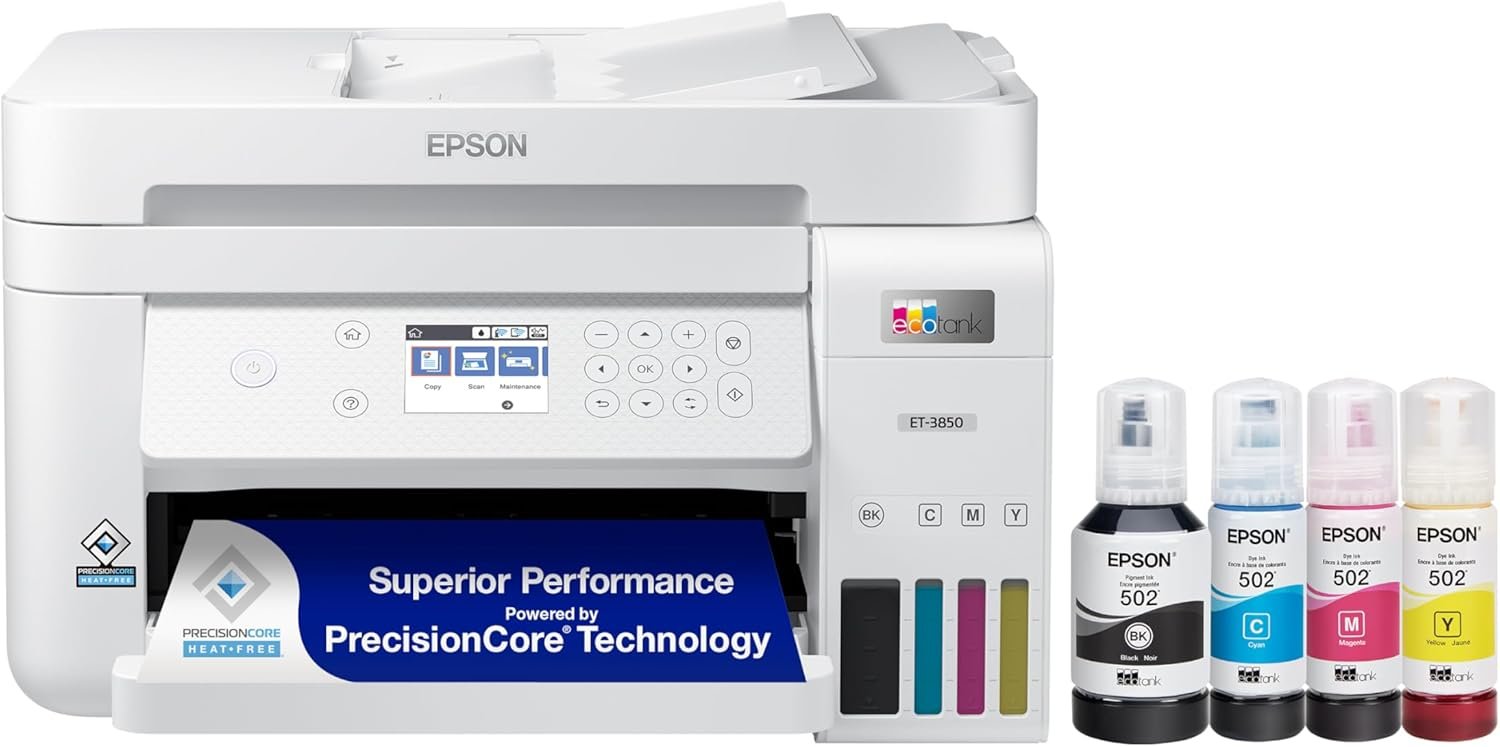
Selecting the appropriate printer is critical for maintaining productivity in both home and office environments. Modern printing needs range from simple document duplication to high-quality photo printing, requiring devices that balance speed, reliability, and cost-effectiveness. The Epson EcoTank ET-3850 represents a significant advancement in inkjet technology, offering a cartridge-free design that reduces long-term printing costs. Its integration of printing, scanning, and copying functions makes it an attractive option for users seeking multifunctionality. However, the decision to adopt this printer should consider factors such as print volume, media compatibility, and maintenance requirements. For individuals or businesses with high print demands, the ET-3850’s refillable ink system and automatic duplex printing capabilities may provide substantial value. Conversely, users prioritizing ultra-fast color printing or advanced networking features might find alternative models more suitable. Understanding these trade-offs is essential for aligning printer specifications with specific operational needs.
Quick Overview
| Feature | Details |
|---|---|
| Printer Type | Inkjet All-in-One Supertank |
| Print Technology | Refillable ink tanks (CMYK) |
| Print Resolution | 1200 x 2400 dpi (color), 1200 x 2400 dpi (black) |
| Print Speed | 15.5 ppm black, 8.5 ppm color |
| Media Sizes | 3.5″ x 5″ to 8.5″ x 14″, A4, A6 |
| Connectivity | USB, Wi-Fi, Ethernet, Epson Connect |
| Functions | Print, Scan, Copy, Email Print, Mobile Printing |
| Duty Cycle | 200 pages/month (average) |
| Ink System | Refillable 502 Black and color bottles |
| Warranty | Limited warranty with 2-year spare parts availability |
The EcoTank ET-3850 combines high-capacity ink tanks with a multifunctional design, making it ideal for users who require consistent performance without frequent ink replacements. Its support for various media sizes and resolutions ensures compatibility with both standard documents and high-quality photos. The integrated Ethernet port and mobile printing capabilities enhance its versatility for home and office environments. However, the reliance on genuine ink and the need for regular maintenance may influence its suitability for certain workflows.

Print Quality and Resolution Capabilities
The EcoTank ET-3850 delivers high-resolution output through its 1200 x 2400 dpi color and monochrome printing capabilities. This resolution ensures crisp text and detailed graphics, making it suitable for both everyday documents and photographic prints. The printer’s ability to maintain consistent color accuracy across different media types, including glossy photo paper and envelopes, is a notable advantage for users requiring high-quality output. However, the use of non-genuine ink may impact color consistency and longevity, as Epson recommends using its proprietary ink to ensure optimal performance. For users prioritizing photographic quality, the ET-3850’s resolution and color management features provide a strong foundation, though advanced photo printers may offer superior detail in specialized applications.

Color Accuracy and Media Compatibility
The ET-3850’s CMYK ink system supports a wide range of media types, including standard paper, glossy photo paper, and envelopes. Its ability to handle different paper weights and finishes allows for flexibility in print tasks, from business documents to creative projects. The printer’s color calibration tools and support for Epson’s proprietary ink ensure that color reproduction remains consistent across print jobs. However, users printing on specialty media, such as metallic or textured paper, may need to adjust print settings to achieve optimal results. The included ink bottles are designed for general use, but for specialized applications, additional media types or third-party ink may be required.
Text Clarity and Monochrome Performance
The printer’s 1200 x 2400 dpi monochrome resolution ensures sharp, legible text for documents and reports. Its automatic duplex printing feature further enhances text clarity by reducing the need for manual page flipping. For users requiring high-speed text printing, the ET-3850’s 15.5 ppm black printing speed is competitive with many standard office printers. However, the lack of advanced text optimization features, such as variable-width fonts or enhanced OCR capabilities, may limit its suitability for specialized document workflows. The printer’s performance in monochrome tasks is well-suited for everyday use, though users with complex formatting needs may find it less versatile than dedicated laser printers.
Connectivity and Mobile Printing Options
The EcoTank ET-3850 offers a range of connectivity options, including USB, Wi-Fi, and Ethernet, ensuring compatibility with various devices and networks. Its support for Epson Connect and mobile printing services like the Epson Smart Panel App, Epson Email Print, and Mopria Print Service enhances its usability for remote and mobile users. The printer’s ability to connect to multiple devices simultaneously makes it suitable for small offices or home environments with multiple users. However, the reliance on an internet connection for certain features, such as voice-activated printing, may pose challenges for users in areas with limited connectivity. The inclusion of an Ethernet port provides a reliable alternative for users requiring stable, wired connections.

Wireless and Cloud Integration
The ET-3850’s Wi-Fi and cloud printing capabilities allow users to print from smartphones, tablets, and computers without physical connections. Its integration with Epson Scan to Cloud and other cloud-based services simplifies document management for users who frequently work with digital files. The printer’s support for Apple AirPrint, Android Printing, and Fire OS Printing further broadens its compatibility with different operating systems. However, the need for an active internet connection to access these features may be a drawback for users in environments with restricted network access. The printer’s cloud integration is well-suited for users prioritizing convenience, though those requiring offline printing may need to rely on USB or Ethernet connections.
Voice-Activated and Smart Device Compatibility
The ET-3850’s voice-activated printing feature, accessible through an Epson Connect account, allows users to print tasks using voice commands. This functionality is particularly useful for users with mobility impairments or those seeking hands-free printing in busy environments. The printer’s compatibility with smart devices, including smartphones and tablets, enhances its accessibility for remote workers. However, the requirement for an internet connection and an Epson Connect account may limit its usability for users without these resources. The voice-activated feature adds convenience but is not essential for most standard printing tasks.
Maintenance and Ink System Considerations
The EcoTank ET-3850’s refillable ink system reduces long-term printing costs by eliminating the need for frequent cartridge replacements. The included 502 Black and color bottles provide a substantial ink capacity, suitable for moderate print volumes. However, the printer’s reliance on genuine Epson ink may impact cost-effectiveness for users seeking third-party alternatives. The need to refill ink tanks periodically requires users to manage ink levels and maintain proper storage conditions to prevent clogging. While the printer’s maintenance requirements are relatively low compared to traditional cartridge systems, the necessity to use genuine ink could influence its appeal for budget-conscious users.

Refillability and Longevity
The ET-3850’s refillable design allows users to replenish ink tanks as needed, reducing waste and long-term expenses. The included bottles are designed for general use, but users may need to purchase replacement bottles for extended printing. The printer’s ability to handle frequent refills without compromising print quality is a significant advantage, though infrequent use may lead to ink degradation over time. The longevity of the printer’s components is influenced by proper maintenance, including regular cleaning and proper storage of refillable ink. Users who prioritize sustainability and cost savings may find the refillable system particularly appealing.
Ink Compatibility and Third-Party Options
Epson recommends using genuine ink to ensure optimal performance and print quality, as non-genuine ink may cause issues such as clogging or inconsistent color output. While third-party ink options are available, their compatibility with the ET-3850’s print engine and media handling capabilities may vary. Users seeking cost savings may need to weigh the potential risks of using non-genuine ink against the benefits of reduced expenses. The printer’s design allows for flexibility in ink choices, though the use of non-genuine products may void certain warranty protections. For users prioritizing reliability and print quality, the recommendation to use genuine ink remains a key consideration.

Pros & Cons
Pros
- High print speed: The ET-3850’s 15.5 ppm black printing and 8.5 ppm color printing capabilities make it efficient for document and photo printing.
- Refillable ink system: The large-capacity ink tanks reduce long-term costs and minimize the need for frequent replacements.
- Multifunctionality: The printer’s integration of printing, scanning, and copying functions provides a comprehensive solution for home and office use.
- Media versatility: Support for various paper sizes and types, including glossy photo paper and envelopes, enhances its adaptability to different print tasks.
- Mobile printing options: Connectivity features like the Epson Smart Panel App and Mopria Print Service improve accessibility for remote users.
- Automatic duplex printing: The built-in duplex function reduces paper usage and enhances document organization.
- High-resolution output: The 1200 x 2400 dpi color and monochrome resolution ensures sharp text and detailed graphics.
- Robust connectivity: USB, Wi-Fi, and Ethernet ports provide flexibility in network and device integration.
Cons
- Genuine ink requirement: The need to use Epson’s proprietary ink may limit cost savings for users seeking third-party alternatives.
- Limited color resolution: While the printer offers high-resolution output, its color resolution may not match specialized photo printers for advanced graphic work.
- Connectivity dependencies: Some features, such as voice-activated printing, require an active internet connection, which may be a drawback for offline users.
- Ink management complexity: Refilling ink tanks requires careful attention to prevent clogging and ensure consistent print quality.
- Niche media limitations: The printer’s support for specialty media may be limited compared to dedicated photo or industrial printers.
- Maintenance requirements: Regular cleaning and proper storage of refillable ink are necessary to maintain optimal performance over time.
Final Verdict: Who This Printer Is Best For (and Who Should Skip It)
The Epson EcoTank ET-3850 is best suited for users who prioritize cost-effective, multifunctional printing for home or small office environments. Its refillable ink system, high print speed, and support for various media types make it an excellent choice for everyday document printing and basic photo tasks. The printer’s mobile printing capabilities and automatic duplex function further enhance its appeal for users seeking convenience and efficiency. However, users with high-volume printing needs, advanced photo requirements, or a preference for laser printers may find the ET-3850 less suitable. Additionally, those seeking to minimize long-term costs by using third-party ink may need to consider alternative models. Overall, the ET-3850 offers a balanced solution for users who value reliability and versatility without requiring specialized printing capabilities.
Frequently Asked Questions (FAQs)
How does the EcoTank ET-3850 handle color printing?
The EcoTank ET-3850 uses a CMYK ink system with 1200 x 2400 dpi color resolution, providing consistent color output for documents and photos. Epson recommends using genuine ink to ensure optimal color accuracy and longevity, though third-party options may be used with potential variations in performance.
What connectivity options are available for the ET-3850?
The printer supports USB, Wi-Fi, and Ethernet connections, along with cloud-based services like Epson Connect. Mobile printing options include the Epson Smart Panel App, Mopria Print Service, and compatibility with Apple AirPrint, Android Printing, and Fire OS Printing.
Can I use third-party ink with the EcoTank ET-3850?
Epson recommends using genuine ink to maintain print quality and warranty coverage. While third-party ink may be used, it could affect color consistency and potentially void certain warranty protections, depending on the manufacturer’s policies.
How does the printer’s duplex printing function work?
The ET-3850 features automatic duplex printing, which prints on both sides of the paper without manual intervention. This reduces paper usage and enhances document organization, though it requires proper paper alignment and tray configuration for optimal results.
What are the limitations of the ET-3850’s color resolution?
The printer’s color resolution of 1200 x 2400 dpi is suitable for most standard printing tasks, but it may not match the advanced color accuracy of specialized photo printers. Users requiring ultra-high-resolution graphics may need to consider dedicated printing solutions.
Is the EcoTank ET-3850 suitable for high-volume printing?
The ET-3850 is designed for moderate print volumes, with a recommended average of 200 pages per month. While its refillable ink system supports extended use, users with extremely high-volume printing needs may benefit from more robust industrial or commercial printers.
How does the printer’s maintenance system work?
The ET-3850 requires regular cleaning and proper storage of refillable ink to prevent clogging and maintain print quality. Users should avoid infrequent use, which may lead to ink degradation, and follow Epson’s guidelines for optimal maintenance.
What media types can the ET-3850 handle?
The printer supports a variety of media types, including standard paper, glossy photo paper, and envelopes. It accommodates paper sizes from 3.5″ x 5″ to 8.5″ x 14″, making it versatile for different printing needs.