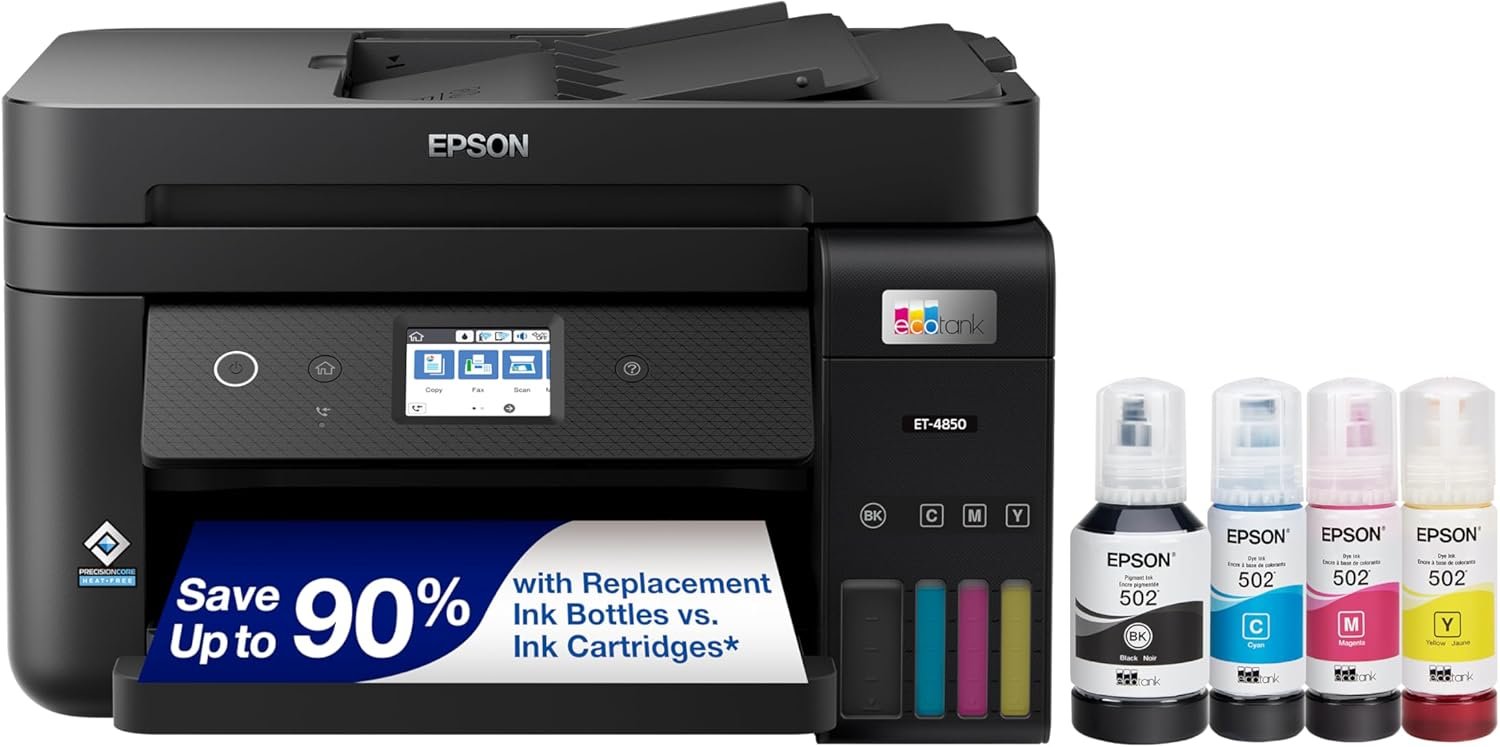
Epson EcoTank ET-4850 Review: All-in-One Inkjet Printer with Supertank Technology
The Importance of Choosing the Right Printer for Your Workflow
In today’s fast-paced business environment, selecting the right printer can significantly impact productivity and operational efficiency. Whether you’re managing a small office, handling large-volume print jobs, or requiring high-quality output for professional documents, the right printer must balance performance, cost-effectiveness, and reliability. Printers serve as critical tools for communication, record-keeping, and client-facing materials, making their capabilities and limitations directly tied to workflow efficiency. For office environments, a printer must handle tasks like document printing, scanning, copying, and faxing while maintaining consistent quality and minimizing downtime. Additionally, factors such as print speed, connectivity options, and consumable costs play a pivotal role in long-term operational expenses. The Epson EcoTank ET-4850 represents a modern solution designed to address these challenges, offering a cartridge-free ink system, multifunctionality, and advanced connectivity. This review evaluates how the ET-4850 aligns with the needs of office users, focusing on its technical specifications, performance characteristics, and suitability for various printing environments. By analyzing its capabilities in terms of print quality, speed, connectivity, and cost efficiency, this guide helps users determine whether the ET-4850 is the optimal choice for their specific requirements.
Quick Overview
| Feature | Details |
|---|---|
| Printer Type | All-in-One Inkjet Printer |
| Print Technology | Refillable Ink Tank System |
| Supported Functions | Print, Scan, Copy, Fax |
| Print Resolution | 1200 dpi (Black), 4800 x 1200 dpi (Color) |
| Print Speed | 15.5 ppm (Monochrome), 8.5 ppm (Color) |
| Media Sizes | 3.5″ x 5″ to 8.5″ x 14″ |
| Connectivity | Ethernet, Wi-Fi |
| Duty Cycle | 10,000 pages per month |
| Ink System | Refillable Pigment-Based Tanks |
| Warranty | Limited Warranty |
The Epson EcoTank ET-4850 is designed for office environments requiring multifunctionality and cost-effective printing. Its refillable ink system, combined with high-resolution printing capabilities, makes it suitable for both routine document tasks and professional-grade output. The printer’s connectivity options and media compatibility further enhance its versatility, making it a strong contender for businesses seeking a reliable, all-in-one solution.

Print Quality and Output Precision
The Epson EcoTank ET-4850 leverages PrecisionCore Heat-Free print technology to deliver sharp, consistent output across text and graphics. This system uses pigment-based inks that resist fading and smudging, making it ideal for documents requiring long-term archival quality. The printer’s resolution specifications—1200 dpi for black text and 4800 x 1200 dpi for color—ensure that both professional reports and high-quality images are rendered with clarity. The pigment black ink, in particular, produces deep, rich tones that are well-suited for business correspondence and marketing materials. Additionally, the printer’s ability to handle a wide range of media types, including glossy photo paper and envelopes, allows users to produce output tailored to specific needs. However, the reliance on pigment-based inks may limit its effectiveness for certain specialized applications, such as high-volume label printing or industrial-grade documentation.

Text Clarity and Font Rendering
The ET-4850’s text output is characterized by its crisp, legible fonts and minimal ink bleeding. The 1200 dpi black resolution ensures that even small text elements, such as footnotes or table details, remain clear and easy to read. This is particularly beneficial for users who frequently print legal documents, spreadsheets, or technical manuals. The printer’s ability to maintain consistent ink saturation across multiple pages also reduces the risk of tonal variations, ensuring uniformity in printed materials. However, users who require extremely high-resolution text, such as those preparing documents for publication or academic research, may find the ET-4850’s output slightly less refined compared to laser printers with higher optical resolution.
Color Accuracy and Graphic Output
For color printing, the ET-4850’s 4800 x 1200 dpi resolution allows for detailed, vibrant images and graphics. The pigment-based ink system provides excellent color retention, making it suitable for marketing collateral, brochures, and visual presentations. The printer’s ability to handle a wide range of media types, including glossy photo paper, enhances its versatility for creative applications. However, users who require highly saturated or gradient-heavy color output, such as those in graphic design or photography, may find the ET-4850’s color gamut and tonal range limited compared to dedicated photo printers with specialized color management systems.
Print Speed and Workload Capacity
The Epson EcoTank ET-4850 is engineered for efficiency, with print speeds of 15.5 ppm for monochrome and 8.5 ppm for color. These speeds are competitive with mid-range office printers and sufficient for handling routine document printing in a small to medium-sized office. The printer’s duty cycle of 10,000 pages per month indicates that it is designed for moderate to high-volume environments, making it suitable for businesses with regular printing needs. However, users who require ultra-fast printing for large batches of documents, such as those in high-volume commercial printing, may find the ET-4850’s speed slightly slower compared to dedicated laser printers or high-speed inkjet models.

Monochrome vs. Color Performance
The ET-4850’s monochrome printing speed of 15.5 ppm is optimized for text-heavy tasks, such as reports, invoices, and forms. This speed is sufficient for most office workflows, though it may lag behind laser printers that can achieve speeds of 20 ppm or higher for similar tasks. For color printing, the 8.5 ppm speed is adequate for producing high-quality images and graphics, but users who frequently print large color documents, such as presentations or marketing materials, may experience longer wait times. The printer’s ability to handle multiple print jobs simultaneously through its network connectivity also helps mitigate delays, though it may not match the throughput of dedicated color printers.
Handling High-Volume Workloads
The ET-4850’s 250-sheet paper tray and auto-duplex printing feature are well-suited for managing high-volume print jobs. The auto-duplex function automatically saves paper by printing on both sides, reducing material costs and environmental impact. The printer’s ability to process multiple pages in a single pass also enhances productivity, though users who require extensive document binding or specialized finishing options may need to rely on additional hardware. The printer’s 12-watt power consumption is relatively efficient, making it a suitable choice for office environments where energy usage is a concern.
Connectivity and Network Integration
The Epson EcoTank ET-4850 offers robust connectivity options, including Ethernet and Wi-Fi, allowing seamless integration into both wired and wireless office networks. These features enable users to print from multiple devices, including smartphones, tablets, and computers, without the need for physical proximity. The printer’s support for Epson Connect technology further enhances its versatility, enabling remote printing and voice-activated commands through compatible apps. However, the reliance on an internet connection for certain features, such as cloud printing and mobile app integration, may pose challenges for users in areas with unstable connectivity. Additionally, the printer’s Ethernet port provides a reliable alternative for environments where wireless networks are not available or preferred.

Mobile and Cloud Printing Capabilities
The ET-4850’s compatibility with Epson Connect allows users to print from mobile devices and cloud storage platforms, streamlining document management for remote workers. This feature is particularly beneficial for businesses with a hybrid workforce, as it reduces the need for physical access to the printer. However, the requirement for an Epson Connect account and internet access may complicate the setup process for users unfamiliar with cloud-based printing solutions. The printer’s integration with the Epson Smart Panel app also provides a user-friendly interface for managing print jobs, monitoring ink levels, and adjusting settings, though some users may find the app’s interface less intuitive compared to competitors’ mobile apps.
Network Stability and Compatibility
The ET-4850’s Ethernet and Wi-Fi connectivity options ensure stable performance in office environments, though the printer’s compatibility with third-party devices may vary. The printer’s support for a range of operating systems and devices makes it suitable for most modern office setups, though users with specialized software or legacy systems may encounter compatibility issues. The printer’s ability to function as a network-ready device also allows for centralized print management, though this requires additional configuration and may not be ideal for small businesses without IT support.

Pros and Cons
Pros
- Refillable Ink Tanks Reduce Long-Term Costs: The ET-4850’s cartridge-free design eliminates the need for frequent ink cartridge replacements, significantly lowering ongoing printing expenses. This is particularly beneficial for businesses printing large volumes, as the high-capacity ink tanks provide extended usage between refills.
- High-Resolution Printing for Professional Documents: The printer’s 1200 dpi black resolution and 4800 x 1200 dpi color output ensure that text and graphics are rendered with exceptional clarity, making it suitable for both routine office tasks and high-quality print jobs.
- Multifunctionality for Office Workflows: The ET-4850’s integrated scanning, copying, and faxing capabilities streamline office operations, reducing the need for multiple standalone devices and saving physical space.
- Energy Efficiency and Environmental Benefits: The printer’s 12-watt power consumption and auto-duplex printing feature contribute to lower energy usage and reduced paper waste, aligning with sustainability goals for modern offices.
- Robust Connectivity for Networked Environments: The Ethernet and Wi-Fi capabilities, along with Epson Connect integration, enable seamless printing from multiple devices and remote locations, enhancing flexibility in modern work environments.
Cons
- Color Printing Speed May Lag Behind Competitors: While the ET-4850’s color resolution is excellent, its 8.5 ppm print speed for color documents may be slower compared to dedicated color printers, which could impact productivity for users requiring frequent color output.
- Limited Specialized Media Compatibility: The printer’s support for a wide range of media types is a strength, but its ability to handle highly specialized applications, such as industrial labels or high-gloss photo paper, may be limited compared to niche printers designed for specific media types.
- Dependence on Internet for Advanced Features: Certain features, such as cloud printing and mobile app integration, require a stable internet connection, which may pose challenges in environments with unreliable connectivity.
- Setup Complexity for Cloud-Based Features: While the Epson Smart Panel app simplifies some management tasks, the setup process for Epson Connect and cloud-based printing may be less intuitive for users unfamiliar with these technologies.
- Print Speed for High-Volume Tasks May Be Insufficient: The 15.5 ppm monochrome speed is adequate for most office tasks, but users with extremely high-volume printing needs may find it slower than dedicated laser printers or high-speed inkjet models.
Final Verdict: Who This Printer Is Best For (and Who Should Skip It)
The Epson EcoTank ET-4850 is an excellent choice for small to medium-sized offices requiring a multifunctional printer with cost-effective printing and reliable performance. Its refillable ink system, high-resolution output, and network connectivity make it well-suited for environments where print volume is moderate to high, and cost savings are a priority. The printer’s ability to handle a variety of media types and its integration with modern office workflows further enhance its appeal. However, the ET-4850 may not be the best fit for users who require ultra-fast color printing, specialized media handling, or advanced cloud-based features without a stable internet connection. Businesses with extremely high-volume printing needs or those requiring dedicated color output for graphic design or photography may find more specialized printers better suited to their requirements. Overall, the ET-4850 is a strong contender for office users seeking a balance between cost, performance, and versatility in a single all-in-one device.
Frequently Asked Questions (FAQs)
What are the key features of the Epson EcoTank ET-4850?
The Epson EcoTank ET-4850 is an all-in-one printer that combines printing, scanning, copying, and faxing capabilities. It uses refillable ink tanks with pigment-based inks to provide high-quality output and reduce long-term printing costs. The printer supports high-resolution printing (up to 4800 x 1200 dpi) and includes features like auto-duplex printing, an auto document feeder, and Ethernet/Wi-Fi connectivity for networked environments.
How does the refillable ink system work on the ET-4850?
The ET-4850 uses high-capacity, refillable ink tanks that eliminate the need for frequent ink cartridge replacements. Users can refill the tanks with genuine Epson ink, which provides extended printing between refills. This system is designed to reduce ongoing printing costs and minimize the environmental impact of ink waste.
What print speeds can the ET-4850 achieve?
The Epson EcoTank ET-4850 prints black text at a speed of 15.5 pages per minute (ppm) and color documents at 8.5 ppm. These speeds are suitable for most office environments, though they may lag behind dedicated laser printers for high-volume color printing tasks.
Can the ET-4850 handle different types of print media?
Yes, the ET-4850 supports a wide range of media types, including plain paper, envelopes, and glossy photo paper. Its ability to handle various media sizes (from 3.5″ x 5″ to 8.5″ x 14″) makes it versatile for different printing needs, though specialized applications may require additional equipment.
What connectivity options are available on the ET-4850?
The printer offers Ethernet and Wi-Fi connectivity, allowing it to integrate into both wired and wireless office networks. It also supports Epson Connect technology, enabling mobile and cloud-based printing through compatible apps and devices.
Is the ET-4850 suitable for high-volume printing?
The ET-4850 is designed for moderate to high-volume printing with a duty cycle of 10,000 pages per month. Its 250-sheet paper tray and auto-duplex printing feature help manage large print jobs efficiently, though it may not match the throughput of dedicated high-speed printers for extremely high-volume tasks.
What are the environmental benefits of using the ET-4850?
The ET-4850’s auto-duplex printing feature reduces paper usage by printing on both sides automatically, lowering material costs and environmental impact. Its energy-efficient design (12-watt power consumption) and refillable ink system also contribute to sustainability efforts in office environments.
What are the limitations of the ET-4850?
The ET-4850 may not be ideal for users requiring ultra-fast color printing or specialized media handling. Its reliance on internet connectivity for advanced features like cloud printing could be a drawback in areas with unstable networks. Additionally, its color print speed may lag behind dedicated color printers for high-volume tasks.