Epson Workforce Pro WF-7840 Printer Review: Print Quality, Speed, and Connectivity
The Importance of Choosing the Right Printer
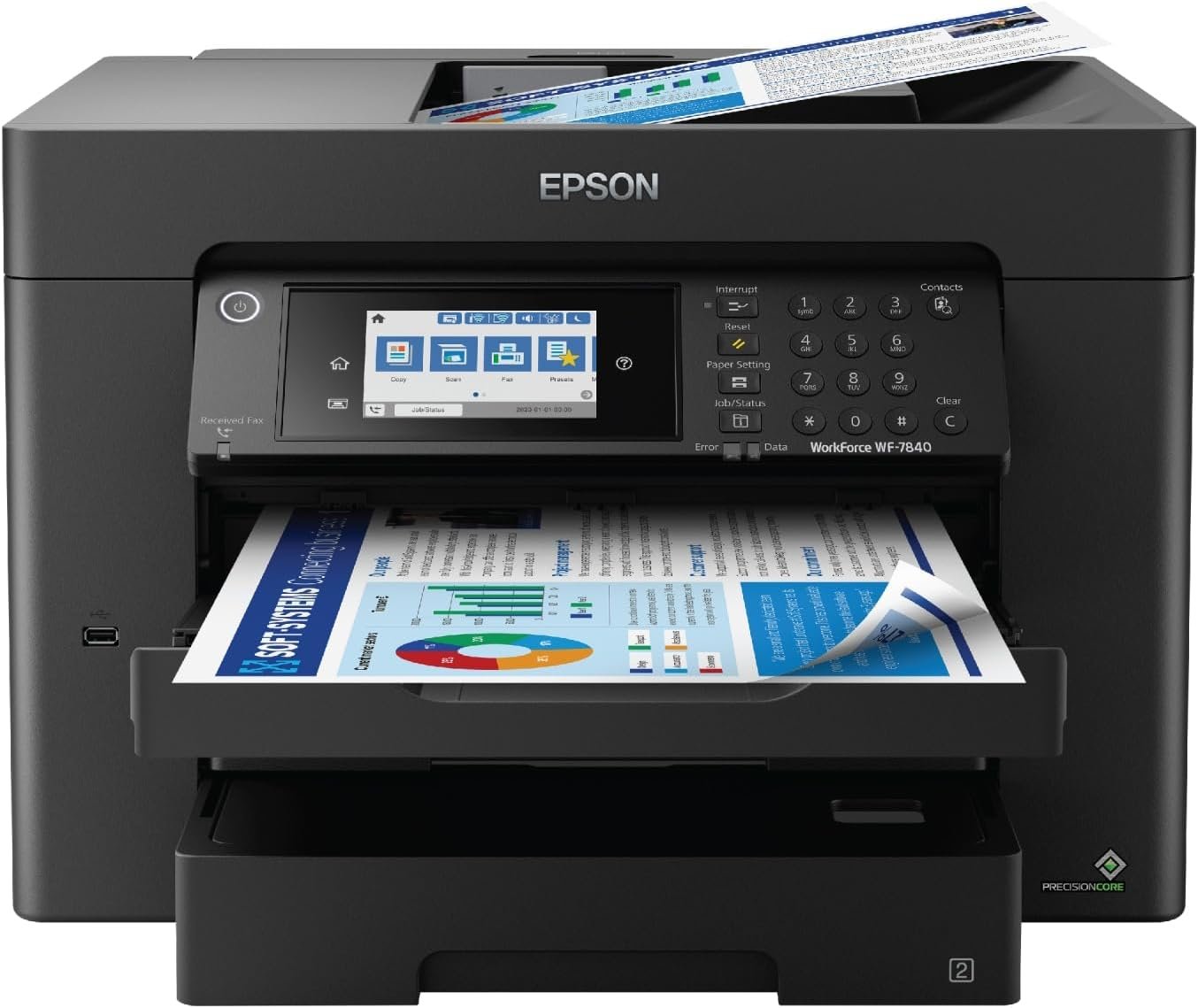
Selecting the appropriate printer is a critical decision for businesses and professionals who rely on consistent, high-quality output. Whether managing large-scale print jobs in an office environment or requiring precision for creative projects, the right printer can significantly impact workflow efficiency and operational costs. Printers vary widely in their capabilities, from basic monochrome models to advanced all-in-one devices with multifunctional features. For users handling high-volume tasks, such as producing marketing materials, signage, or architectural blueprints, a printer must balance speed, reliability, and print quality. The Epson Workforce Pro WF-7840 represents a specialized solution for businesses demanding wide-format printing, automatic duplexing, and integrated connectivity. This review evaluates the printer’s technical specifications, functional capabilities, and suitability for various workloads, helping users determine whether it aligns with their specific needs. By analyzing print performance, media compatibility, and system integration, this guide provides a data-driven perspective on the printer’s strengths and limitations, ensuring informed purchasing decisions in 2026.
Quick Overview
| Feature | Details |
|---|---|
| Printer Type | Wireless All-in-One Color Inkjet Printer |
| Supported Functions | Print, Copy, Scan, Fax |
| Print Resolution | 4800 x 2400 dpi (color), 4800 x 2400 dpi (black and white) |
| Maximum Print Speed | 12 ppm (color), 25 ppm (monochrome) |
| Media Sizes | 13 x 19 inches (maximum), 13 x 19 inch (standard) |
| Connectivity | Wi-Fi (802.11a/b/g/n/ac), Wi-Fi Direct, Ethernet, Bluetooth Low Energy |
| Duty Cycle | Designed for high-volume professional use |
| Ink System | DURABrite Ultra pigment ink |
| Warranty | Limited warranty |
The Epson Workforce Pro WF-7840 is engineered for businesses requiring consistent, high-quality wide-format printing. Its combination of automatic duplex printing, integrated scanning, and wireless connectivity makes it a versatile tool for offices handling large print volumes. The printer’s ability to produce sharp, smudge-free outputs on glossy photo paper aligns with its target use case for professional and creative applications.

Print Quality and Resolution Performance

PrecisionCore Heat-Free Technology
The Epson Workforce Pro WF-7840 employs PrecisionCore Heat-Free print technology, which utilizes microscopic print heads to deliver consistent ink placement without the need for heat-based drying. This system ensures precise color reproduction and sharp text output, making it suitable for both professional documents and high-resolution graphics. The absence of heat-based drying reduces the risk of paper deformation, a critical consideration for users working with sensitive media types.
DURABrite Ultra Ink and Smudge Resistance
The printer’s DURABrite Ultra pigment ink is designed for rapid drying, minimizing smudging on glossy photo paper and other media. This feature is particularly beneficial for users who require immediate handling of printed materials, such as photographers or graphic designers. The ink’s fast-drying properties also contribute to reduced downtime between print jobs, enhancing overall productivity in high-volume environments.
Print Resolution and Image Sharpness
With a maximum print resolution of 4800 x 2400 dpi for both color and black-and-white prints, the WF-7840 delivers exceptional detail in both text and graphics. This resolution level is ideal for producing high-quality marketing materials, architectural plans, and fine art prints. The printer’s ability to maintain consistent resolution across different media types ensures reliable output quality, even when using thicker or textured paper stocks.
Connectivity and Network Integration

Multi-Protocol Wireless Capabilities
The WF-7840 supports a range of wireless connectivity protocols, including Wi-Fi (802.11a/b/g/n/ac), Wi-Fi Direct, and Bluetooth Low Energy (BLE). This multi-protocol approach ensures compatibility with a wide array of devices, from desktop computers to mobile phones and tablets. The inclusion of Wi-Fi Direct allows for direct printing from smartphones without the need for a central router, streamlining the workflow for users who require on-the-go printing.
Epson Connect Solutions and Mobile Integration
Epson Connect Solutions enhance the printer’s usability by enabling remote access and mobile printing. Features such as Epson Email Print, Epson Remote Print, and the Epson Smart Panel app allow users to manage print jobs from anywhere, provided they have an internet connection. The integration with Apple AirPrint, Android printing, and Mopria Print Service further broadens the printer’s compatibility with different operating systems and device types.
Ethernet and USB Connectivity
For users prioritizing wired connections, the WF-7840 includes Ethernet and USB ports for stable, high-speed data transfer. Ethernet connectivity is particularly advantageous in environments with stringent network security requirements, as it provides a direct, secure link between the printer and the local network. The USB interface offers a reliable alternative for users who prefer a wired connection or require faster data transfer rates for large print jobs.
Media Compatibility and Paper Handling

Supported Media Types and Sizes
The WF-7840 is designed to work with a variety of media types, including glossy photo paper, matte paper, and specialty stocks. Its maximum media size of 13 x 19 inches accommodates large-format prints commonly used in signage, banners, and architectural drawings. The printer’s ability to handle thicker media without compromising print quality makes it a suitable choice for users who require versatility in their print materials.
500-Sheet Paper Capacity and ADF
The printer’s 500-sheet paper capacity reduces the frequency of manual paper loading, improving efficiency in high-volume environments. The built-in 50-page Automatic Document Feeder (ADF) supports seamless duplex printing and scanning, eliminating the need for manual intervention. This feature is particularly beneficial for users who frequently process large volumes of documents, such as administrative staff or marketing teams.
Duplex Printing and Media Thickness
The WF-7840’s automatic duplex printing capability ensures that both sides of a sheet are printed without manual flipping, reducing paper waste and saving time. The printer’s ability to handle media with varying thicknesses, including heavier stocks, ensures that it can accommodate a wide range of printing needs without compromising print quality or reliability.

Pros & Cons
Pros
- High Print Resolution: The 4800 x 2400 dpi resolution ensures sharp, detailed output for both text and graphics, making it ideal for professional applications.
- Versatile Connectivity: Support for Wi-Fi, Wi-Fi Direct, Ethernet, and USB provides flexibility in network integration and device compatibility.
- DURABrite Ultra Ink: Fast-drying pigment ink minimizes smudging and ensures quick turnaround times for printed materials.
- Automatic Duplex Printing: Reduces paper waste and enhances efficiency in high-volume environments.
- 500-Sheet Paper Capacity: Minimizes manual intervention, improving productivity in office settings.
- Integrated Scanning and Copying: Combines multiple functions into a single device, reducing the need for additional hardware.
Cons
- Limited Media Compatibility: While the printer supports a range of media types, it is optimized for glossy photo paper and may not perform as well with specialty stocks.
- Complex Setup: The multi-protocol wireless setup may require technical expertise to configure, particularly for users unfamiliar with network settings.
- High Power Consumption: The printer’s power consumption of 20 watts is higher than some competing models, which may affect energy efficiency in certain environments.
- Limited Warranty Coverage: The limited warranty may not provide long-term support for businesses requiring extended service agreements.
- Bulkier Design: The printer’s size and weight (45.4 pounds) may make it less suitable for compact office spaces or mobile workstations.
Final Verdict: Who This Printer Is Best For (and Who Should Skip It)
The Epson Workforce Pro WF-7840 is an excellent choice for businesses requiring high-quality wide-format printing, automatic duplexing, and integrated connectivity. Its combination of precision print technology, versatile media handling, and multi-protocol wireless capabilities makes it well-suited for professional environments such as marketing departments, architectural firms, and graphic design studios. The printer’s ability to produce sharp, smudge-free outputs on a variety of media types ensures reliable performance for both routine and specialized print jobs.
However, the WF-7840 may not be the best fit for users with limited space, as its bulkier design and 45.4-pound weight could be a drawback in smaller offices. Additionally, businesses prioritizing energy efficiency may find the printer’s 20-watt power consumption less favorable compared to more energy-efficient alternatives. Users requiring advanced media compatibility or extended warranty coverage may also want to explore other models that offer more tailored support for specific print needs.

Frequently Asked Questions (FAQs)
What are the maximum print dimensions supported by the Epson Workforce Pro WF-7840?
The Epson Workforce Pro WF-7840 supports print media up to 13 x 19 inches, making it suitable for wide-format applications such as signage, banners, and architectural blueprints.
How does the printer ensure smudge-free prints?
The WF-7840 uses DURABrite Ultra pigment ink, which dries quickly to prevent smudging. This feature is particularly beneficial for glossy photo paper and other media types requiring immediate handling.
What connectivity options are available for the WF-7840?
The printer supports Wi-Fi (802.11a/b/g/n/ac), Wi-Fi Direct, Ethernet, and Bluetooth Low Energy (BLE), providing flexibility for wired and wireless printing across various devices.
Can the WF-7840 handle thick or specialty media?
Yes, the printer is designed to accommodate a range of media types, including thicker stocks, ensuring reliable performance with different paper weights and textures.
What is the recommended environment for using the WF-7840?
The WF-7840 is best suited for professional office environments with high-volume printing needs. Its design and specifications make it less ideal for compact spaces or mobile workstations.
How does the printer manage paper loading and feeding?
The printer features a 500-sheet paper capacity and a 50-page Automatic Document Feeder (ADF), minimizing manual intervention and improving efficiency for large print jobs.
What is the power consumption of the WF-7840?
The printer consumes 20 watts during operation, which is higher than some energy-efficient models but typical for high-volume wide-format printers.
What warranty or support options are available for the WF-7840?
The WF-7840 comes with a limited warranty, and users should consider additional service agreements for extended support, particularly in high-volume business environments.