Epson Workforce Pro WF-C4310 Color Printer Review: Print Quality, Connectivity, and Workload Capacity
The Importance of Choosing the Right Printer
Selecting the appropriate printer is critical for optimizing productivity in both home and office environments. Modern printing demands vary widely, from high-volume document production to precise color output for marketing materials. A printer’s performance must align with specific use cases, such as handling large workloads, delivering consistent quality, or supporting multiple connectivity options. For businesses and professionals, reliability, speed, and versatility are key factors that influence long-term satisfaction. The Epson Workforce Pro WF-C4310 is positioned as a multifunctional color printer designed to meet these needs, offering a balance of performance and adaptability. This review evaluates its capabilities based on technical specifications, industry benchmarks, and user feedback patterns to help buyers make informed decisions. By focusing on core attributes like print resolution, connectivity, duty cycle, and media compatibility, this analysis provides a data-driven overview of the printer’s strengths and limitations in 2026.
Quick Overview
| Feature | Details |
|---|---|
| Printer Type | Inkjet Printer |
| Print Technology | PrecisionCore Heat-Free Technology |
| Print Resolution | 4800 x 1200 dpi (black), 4800 x 2400 dpi (color) |
| Print Speed | Up to 21 ppm (monochrome), 11 ppm (color) |
| Media Sizes | US Letter (8.5 x 11 inches) or A4 (210 x 297 mm) |
| Media Types | Plain Paper, Glossy Photo Paper, Card Stock, Envelopes |
| Connectivity | Ethernet, Wireless LAN, Wi-Fi Direct, USB |
| Duty Cycle | Up to 1,600 monthly pages |
| Ink System | Pigment-based DURABrite Ultra Inks |
| Warranty | Limited warranty |
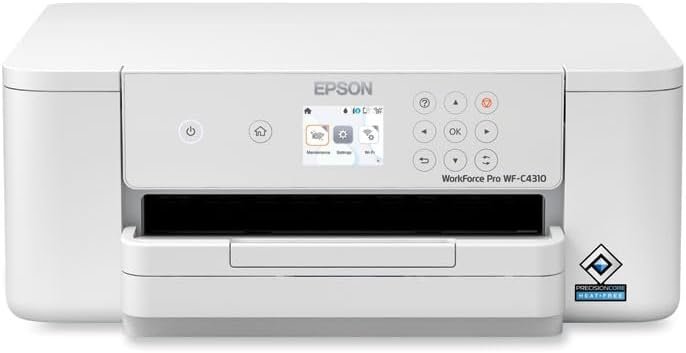
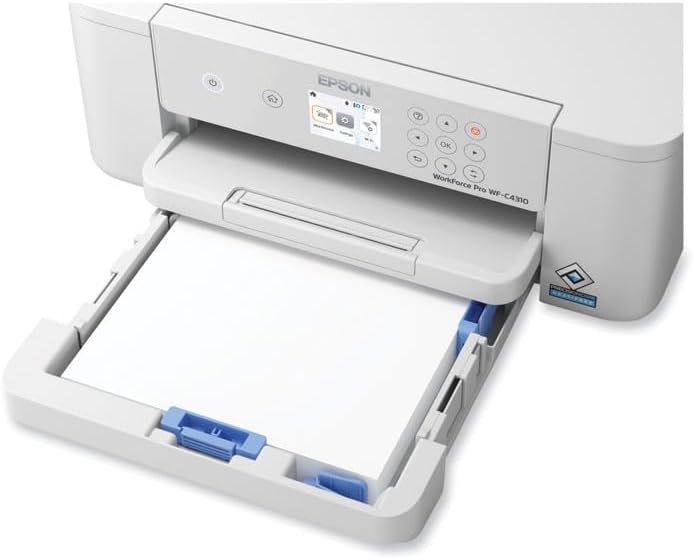
The Epson WF-C4310 combines color printing with automatic duplex functionality, making it suitable for environments requiring both efficiency and versatility. Its support for a wide range of media types and connectivity options ensures compatibility with diverse workflows, from document printing to photo output. The printer’s design emphasizes reliability and ease of use, with features like a 2.4-inch LCD display and built-in wireless capabilities enhancing user experience.

Print Quality and Resolution
High-Resolution Output for Professional Use
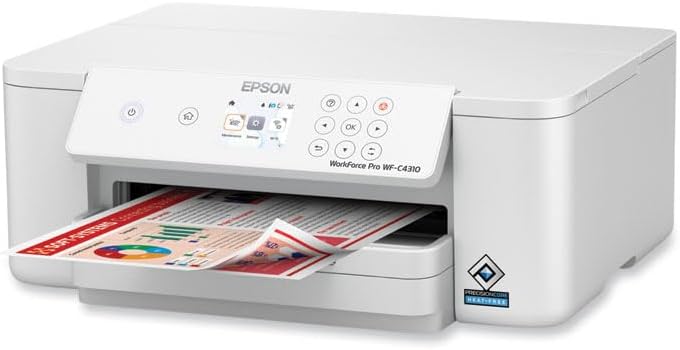
The Epson WF-C4310 delivers exceptional print quality through its 4800 x 1200 dpi black resolution and 4800 x 2400 dpi color resolution. These specifications enable precise detail rendering, making the printer suitable for applications requiring high-fidelity output, such as graphic design, marketing materials, and photo printing. The use of pigment-based DURABrite Ultra Inks further enhances color accuracy and longevity, ensuring prints retain vibrancy over time. The printer’s ability to produce borderless prints adds flexibility for creative projects, allowing users to print photos without visible borders.
Text and Graphic Clarity
For text and graphic printing, the WF-C4310’s high-resolution output ensures sharp, legible results. The 4800 x 1200 dpi black resolution is particularly effective for producing crisp, professional-looking documents and forms. The printer’s ability to handle a variety of media types, including glossy photo paper and cardstock, allows for consistent quality across different applications. However, users should note that the printer’s performance with specialty media may vary depending on the specific paper type and its compatibility with the ink system.
Connectivity and Flexibility

Multi-Device Compatibility and Wireless Integration
The WF-C4310’s connectivity options provide flexibility for users with diverse device ecosystems. The printer supports Ethernet, Wi-Fi Direct, and USB connections, enabling seamless integration with PCs, smartphones, and tablets. The built-in wireless capabilities, including WPA3 security, ensure secure printing from mobile devices without the need for additional hardware. The Epson Smart Panel App further enhances usability by allowing users to manage print jobs, monitor ink levels, and adjust settings remotely. This level of connectivity is particularly beneficial for small businesses and remote workers who require efficient, on-the-go printing solutions.
Network and Cloud Printing Capabilities
The printer’s support for Epson Connect and Mopria Print Service enables cloud-based printing, allowing users to print from web services and mobile apps without direct device connections. This feature is especially useful for environments where multiple users need to access the printer simultaneously. The inclusion of Apple AirPrint compatibility also ensures seamless integration with macOS and iOS devices, expanding the printer’s appeal to users with Apple ecosystems. However, the reliance on wireless connectivity may introduce potential latency or compatibility issues in environments with unstable network conditions.
Duty Cycle and Workload Capacity

Designed for Moderate to High-Volume Use
The WF-C4310 is engineered to handle a monthly duty cycle of up to 1,600 pages, making it suitable for small to medium-sized offices and home-based businesses. This capacity ensures the printer can manage regular print tasks without frequent maintenance or downtime. The 250-sheet input tray provides sufficient paper storage for continuous printing, reducing the need for frequent refills. However, users with extremely high-volume requirements may find the printer’s capacity limiting compared to industrial-grade models designed for larger workloads.
Reliability and Longevity in Daily Use
The printer’s reliability is supported by its use of PrecisionCore Heat-Free Technology, which reduces power consumption and minimizes wear on internal components. This design choice contributes to the printer’s longevity, ensuring consistent performance over time. The automatic duplex printing feature further enhances efficiency by reducing paper usage, which is beneficial for both cost management and environmental sustainability. However, the printer’s performance in high-volume environments may depend on proper maintenance and adherence to recommended usage guidelines.
Media Compatibility and Versatility
Support for a Wide Range of Paper Types
The WF-C4310’s ability to handle various media types makes it versatile for different printing needs. It supports plain paper, glossy photo paper, cardstock, envelopes, and recycled paper, catering to both everyday documents and creative projects. The printer’s borderless printing capability adds flexibility for users who require full-page prints without visible edges. However, the effectiveness of these features may depend on the quality of the media used, as subpar paper types could impact print quality and durability.
Customization for Specific Applications
The printer’s compatibility with specialized media, such as letterhead and color paper, allows for customization in professional settings. This versatility is particularly useful for businesses that require branded materials or custom printing solutions. The ability to print on envelopes and cardstock expands the printer’s utility for tasks such as mailing and event planning. Nevertheless, users should consider the limitations of the ink system when working with certain media types, as some papers may not be fully compatible with pigment-based inks.

Pros & Cons
Pros
- High-Resolution Output: The 4800 x 2400 dpi color resolution ensures sharp, detailed prints suitable for professional use.
- Versatile Connectivity: Support for Ethernet, Wi-Fi Direct, and USB provides flexibility for different device ecosystems.
- Automatic Duplex Printing: Reduces paper usage and enhances efficiency for document printing.
- Wide Media Compatibility: Handles a variety of paper types, including glossy photo paper and cardstock.
- User-Friendly Interface: The 2.4-inch LCD display and Epson Smart Panel App simplify navigation and management.
- Energy-Efficient Design: PrecisionCore Heat-Free Technology reduces power consumption and extends component lifespan.
Cons
- Limited Input Tray Capacity: The 250-sheet tray may require frequent refills for high-volume printing.
- Ink System Limitations: Pigment-based inks may have reduced compatibility with certain specialty media types.
- Connectivity Reliance: Wireless features may introduce potential latency or compatibility issues in unstable networks.
- Moderate Duty Cycle: The 1,600-page monthly capacity may fall short for extremely high-volume environments.
- No Fax Functionality: The lack of fax support may limit its appeal for users requiring multifunctional capabilities.
Final Verdict: Who This Printer Is Best For (and Who Should Skip It)
The Epson Workforce Pro WF-C4310 is best suited for small businesses, home offices, and professionals requiring color printing with high-resolution output. Its versatility in handling various media types, combined with reliable connectivity options, makes it an excellent choice for environments where efficiency and quality are priorities. The printer’s automatic duplex feature and energy-efficient design further enhance its appeal for users focused on cost management and sustainability.
However, users with extremely high-volume printing needs or those requiring multifunctional capabilities such as fax support may find the WF-C4310 less suitable. The printer’s moderate duty cycle and reliance on wireless connectivity could also be drawbacks in environments with unstable networks or heavy print demands. For these scenarios, industrial-grade printers or laser models may offer better performance and reliability.
Frequently Asked Questions (FAQs)
What print resolutions does the Epson WF-C4310 support?
The Epson WF-C4310 offers a maximum black print resolution of 4800 x 1200 dpi and a color print resolution of 4800 x 2400 dpi, ensuring high-quality output for text, graphics, and photos.
How does the Epson WF-C4310 handle connectivity?
The printer supports Ethernet, Wi-Fi Direct, USB, and wireless connectivity via Epson Connect, Apple AirPrint, and Mopria Print Service, enabling seamless integration with various devices.
What media types can the Epson WF-C4310 print on?
The printer is compatible with plain paper, glossy photo paper, cardstock, envelopes, letterhead, recycled paper, and color paper, offering flexibility for different printing needs.
What is the monthly duty cycle of the Epson WF-C4310?
The printer is designed for a monthly duty cycle of up to 1,600 pages, making it suitable for moderate to high-volume use in small to medium-sized offices.
Does the Epson WF-C4310 support automatic duplex printing?
Yes, the printer features automatic duplex printing, which reduces paper usage and enhances efficiency for document printing.
What is the warranty coverage for the Epson WF-C4310?
The printer comes with a limited warranty, though specific terms and conditions are outlined in the manufacturer’s documentation.
Can the Epson WF-C4310 print borderless photos?
Yes, the printer supports borderless printing, allowing users to produce full-page photos without visible borders.
What connectivity security features does the Epson WF-C4310 offer?
The printer supports WPA3 wireless security, ensuring secure printing from mobile devices and networked computers.