Epson Workforce Pro WF-4830 Printer Review: Print Quality, Speed, and Connectivity
The Importance of Choosing the Right Printer
In today’s fast-paced business and home environments, selecting the right printer is critical for productivity and efficiency. Whether you’re managing a small office, running a remote team, or handling personal printing tasks, the performance of your printer directly impacts workflow and output quality. A printer that meets your specific needs—whether it’s high-speed document printing, professional photo output, or seamless connectivity—can significantly enhance your operational efficiency. However, with a wide range of options available, understanding key factors such as print quality, speed, connectivity, and maintenance requirements is essential. This review evaluates the Epson Workforce Pro WF-4830, focusing on its capabilities to meet diverse printing demands. By analyzing technical specifications, supported media types, and user expectations, this guide provides a data-driven assessment to help users determine if this printer aligns with their specific needs.
Quick Overview
| Feature | Details |
|---|---|
| Printer Type | Wireless Inkjet All-in-One |
| Supported Functions | Print, Scan, Copy, Fax |
| Print Resolution | 4800 x 2400 dpi (color), 4800 dpi (black and white) |
| Print Speed | 25 pages per minute (black), 12 pages per minute (color) |
| Media Sizes | 8.5 x 14 inches (legal), 8.5 x 11 inches, 4.3 x 6 inches |
| Connectivity | Wi-Fi, Wi-Fi Direct, Bluetooth Low Energy, Ethernet |
| Duty Cycle | Recommended for moderate to high-volume use |
| Ink System | DURABrite Ultra ink with 4-color cartridges |
| Warranty | Limited warranty |
| Additional Features | Auto duplex printing, 50-page ADF, 4.3″ touchscreen |
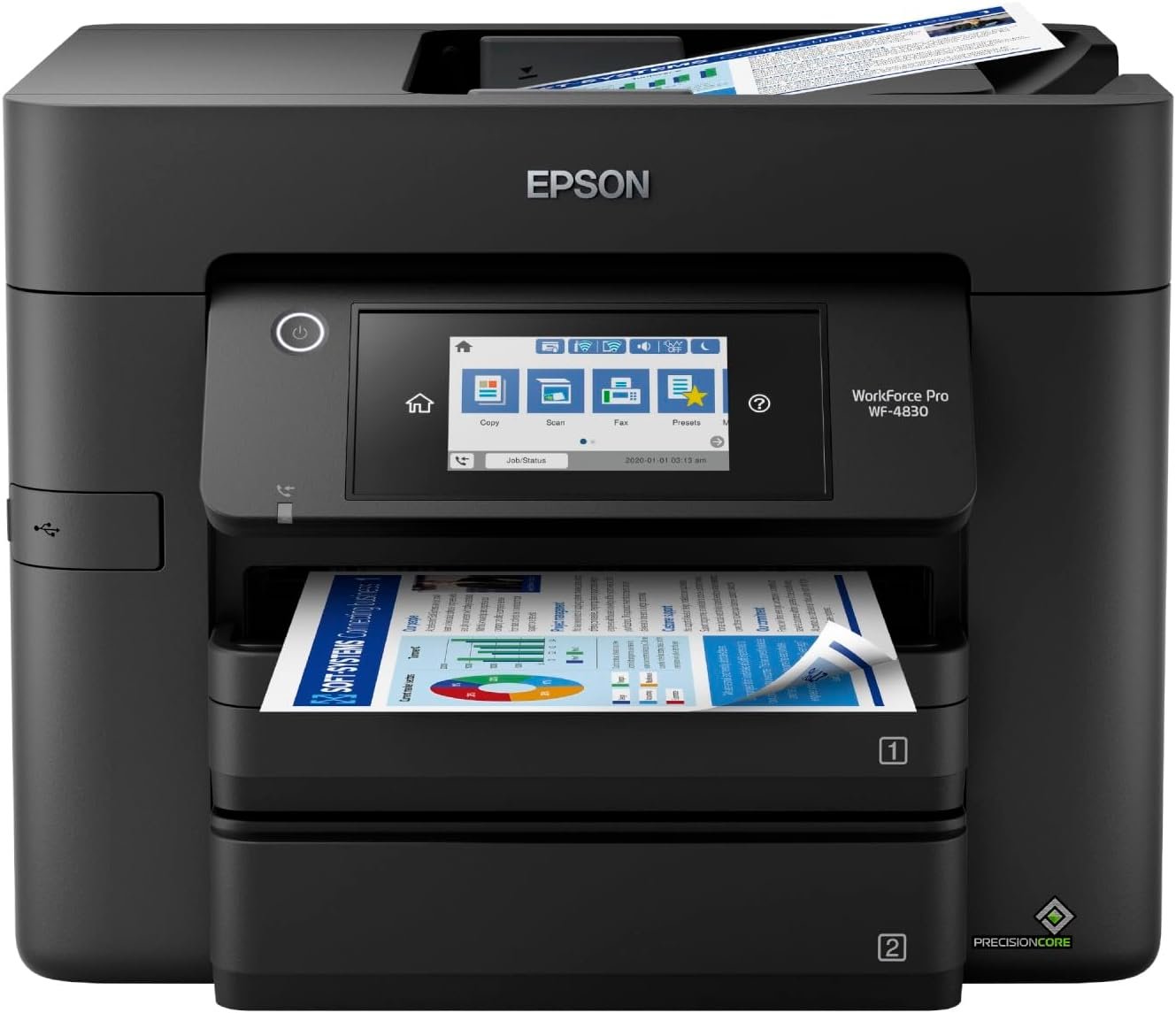
The Epson Workforce Pro WF-4830 is designed for users requiring versatile printing capabilities. Its combination of high-resolution output, multi-functionality, and connectivity options makes it suitable for both office and home environments. The printer’s ability to handle large print jobs and support wireless printing enhances its utility for remote work and collaborative tasks.

Print Quality and Resolution
The Epson Workforce Pro WF-4830 delivers high-quality print outputs through its advanced inkjet technology and precise resolution settings. The printer supports a maximum color print resolution of 4800 x 2400 dpi, which ensures sharp and detailed images, making it ideal for photo printing and graphic design applications. For text and documents, the maximum black and white print resolution of 4800 dpi guarantees crisp, clear text that is easy to read. These resolution specifications are critical for users who prioritize print quality, as they directly affect the clarity and professionalism of printed materials.
The printer’s ability to produce frame-ready photos in various sizes, including 3-1/2″ x 5″, 4″ x 6″, 5″ x 7″, and 8″ x 10″, further enhances its versatility. This feature is particularly beneficial for users who frequently print photos or need to prepare images for presentations. The supported media sizes, including legal (8.5 x 14 inches), provide flexibility for different document formats. However, the printer’s maximum media size is limited to 8.5 x 14 inches, which may not accommodate larger formats required by some professional users.
The DURABrite Ultra ink system contributes to the printer’s high print quality by ensuring quick drying and minimal smudging. This is particularly advantageous for users who need to print documents quickly without worrying about ink bleeding. The ink’s durability also supports long-term use, making it suitable for environments with frequent printing demands. However, the ink’s cost and consumption rate should be considered for users with high-volume printing needs, as these factors can influence overall operational expenses.

Connectivity and Network Integration
The Epson Workforce Pro WF-4830 offers multiple connectivity options, including Wi-Fi, Wi-Fi Direct, Bluetooth Low Energy, and Ethernet, providing flexibility for different network environments. This multi-protocol approach ensures that users can connect the printer to their devices seamlessly, whether they are using a smartphone, tablet, or computer. The inclusion of Wi-Fi Direct allows for direct printing without the need for a router, which is useful in scenarios where network connectivity is limited or unreliable.
The printer’s compatibility with Amazon Alexa and other smart home devices enhances its integration into modern workspaces. Voice-activated printing capabilities can streamline workflows for users who manage multiple tasks simultaneously. This feature is particularly beneficial for remote workers and those who prefer hands-free operation. However, the reliance on voice commands may pose challenges for users who are not familiar with smart home technologies or have accessibility needs that require alternative input methods.
The printer’s Ethernet connectivity provides a stable and secure connection for users who prioritize network reliability. This is especially important in office environments where multiple devices are connected to the same network. The Bluetooth Low Energy feature allows for wireless printing from mobile devices without draining battery power, making it convenient for users who need to print on the go. However, the limited range of Bluetooth connectivity may affect performance in larger spaces where the printer is not within close proximity to the device.

Print Speed and Workload Capacity
The Epson Workforce Pro WF-4830 is designed to handle a variety of print tasks efficiently, with print speeds of up to 25 pages per minute in black and 12 pages per minute in color. These speeds are suitable for moderate to high-volume printing, making the printer ideal for office environments where large print jobs are common. The printer’s duty cycle, which indicates its recommended workload capacity, is aligned with its performance specifications, ensuring that it can sustain continuous use without compromising print quality or reliability.
The auto duplex printing feature significantly reduces paper usage and enhances productivity by printing on both sides of the paper automatically. This is particularly beneficial for users who need to print large volumes of documents without manually flipping pages. The 50-page automatic document feeder (ADF) further streamlines the printing process by allowing users to scan or copy multiple pages at once, reducing the time required for batch processing tasks.
The printer’s 500-sheet paper capacity ensures that users have a sufficient supply of paper for extended periods of use. This reduces the frequency of paper refills, which is advantageous for users who require uninterrupted printing. However, the paper tray’s capacity may not be sufficient for very high-volume environments, where additional trays or external storage solutions may be necessary. The printer’s ability to handle large print jobs efficiently makes it a suitable choice for businesses and individuals with demanding printing requirements.

Maintenance and Consumable Considerations
The Epson Workforce Pro WF-4830’s maintenance requirements are designed to minimize user intervention while ensuring optimal performance. The printer includes a 4.3″ color touchscreen that provides intuitive navigation and access to various functions, such as print settings, maintenance routines, and status updates. This interface simplifies the management of the printer’s operations, making it user-friendly for both technical and non-technical users.
The DURABrite Ultra ink cartridges are engineered for longevity and reliability, with features such as quick-drying ink and minimal smudging. These attributes contribute to the printer’s overall efficiency, as they reduce the need for frequent maintenance and reprints. However, the cost of ink and the consumption rate should be considered for users with high-volume printing needs, as these factors can influence long-term operational expenses. The printer’s warranty and support coverage provide additional reassurance for users who may encounter issues with the ink system or other components.
The printer’s design includes a 128 MB memory storage capacity, which allows for the temporary storage of print jobs and settings. This feature is beneficial for users who need to manage multiple print tasks simultaneously. However, the limited memory capacity may not be sufficient for users who require extensive data storage for complex print jobs. The printer’s overall maintenance requirements are relatively low, making it a suitable choice for users who prefer minimal upkeep and reliable performance.

Pros & Cons
Pros
- High Print Quality: The 4800 x 2400 dpi color resolution ensures sharp and detailed outputs, ideal for photos and graphics.
- Versatile Connectivity: Multiple connectivity options, including Wi-Fi, Wi-Fi Direct, Bluetooth, and Ethernet, provide flexibility for different network environments.
- Auto Duplex Printing: Reduces paper usage and enhances productivity by automatically printing on both sides of the paper.
- 50-Page ADF: Streamlines batch processing tasks by allowing users to scan or copy multiple pages at once.
- Voice-Activated Features: Compatibility with Amazon Alexa enables hands-free printing, suitable for remote work environments.
- Quick-Drying Ink: DURABrite Ultra ink minimizes smudging and ensures rapid drying, ideal for quick print jobs.
- User-Friendly Interface: The 4.3″ touchscreen provides intuitive navigation and access to various functions.
- Large Paper Capacity: A 500-sheet paper tray reduces the frequency of paper refills, enhancing productivity.
Cons
- Ink Cost and Consumption: The DURABrite Ultra ink cartridges may be costly for high-volume printing, affecting long-term expenses.
- Limited Media Size: The maximum media size of 8.5 x 14 inches may not accommodate larger formats required by some professional users.
- Connectivity Range Limitations: Bluetooth Low Energy has a limited range, which may affect performance in larger spaces.
- Moderate Print Speed: While suitable for moderate to high-volume use, the color print speed of 12 pages per minute may be slower compared to some laser printers.
- Limited Memory Storage: The 128 MB memory capacity may not be sufficient for complex print jobs requiring extensive data storage.
Final Verdict: Who This Printer Is Best For (and Who Should Skip It)
The Epson Workforce Pro WF-4830 is best suited for users who require a versatile, high-quality printer for both office and home environments. Its combination of high-resolution output, multi-functionality, and connectivity options makes it ideal for businesses and individuals who need to handle a variety of printing tasks. The printer’s auto duplex printing, 50-page ADF, and voice-activated features enhance productivity and convenience, particularly for remote workers and those managing multiple tasks.
However, users with very high-volume printing needs may find the Epson Workforce Pro WF-4830 less suitable due to its ink cost and consumption rate. Additionally, the limited media size and connectivity range may pose challenges for users who require larger formats or extended network coverage. The printer’s moderate color print speed may also be a drawback for users prioritizing faster color output. Overall, the Epson Workforce Pro WF-4830 is a reliable choice for those seeking a balance between quality, versatility, and ease of use, but it may not be the best fit for specialized or high-volume printing environments.
Frequently Asked Questions (FAQs)
What print resolution does the Epson Workforce Pro WF-4830 offer?
The Epson Workforce Pro WF-4830 provides a maximum color print resolution of 4800 x 2400 dpi, ensuring sharp and detailed outputs for photos and graphics. For black and white printing, it offers a resolution of 4800 dpi, ideal for clear text and documents.
How does the Epson Workforce Pro WF-4830 handle connectivity?
The printer supports multiple connectivity options including Wi-Fi, Wi-Fi Direct, Bluetooth Low Energy, and Ethernet. This allows for flexible network integration, suitable for both home and office environments.
What are the print speeds for the Epson Workforce Pro WF-4830?
The printer can print up to 25 pages per minute in black and 12 pages per minute in color. These speeds are suitable for moderate to high-volume printing tasks, making it efficient for office use.
Can the Epson Workforce Pro WF-4830 handle large print jobs?
Yes, the printer features a 50-page automatic document feeder (ADF) and a 500-sheet paper capacity, which allows for efficient handling of large print jobs and batch processing tasks.
What media sizes does the Epson Workforce Pro WF-4830 support?
The printer supports media sizes up to 8.5 x 14 inches (legal), including standard sizes like 8.5 x 11 inches and 4.3 x 6 inches, providing flexibility for various document formats.
Is the Epson Workforce Pro WF-4830 suitable for remote printing?
Yes, the printer’s wireless connectivity options, including Wi-Fi Direct and compatibility with Amazon Alexa, make it suitable for remote printing. Voice-activated commands further enhance convenience for remote users.
What maintenance is required for the Epson Workforce Pro WF-4830?
The printer requires minimal maintenance due to its quick-drying DURABrite Ultra ink and user-friendly touchscreen interface. Regular cleaning of the print head and checking ink levels are recommended to maintain optimal performance.
What are the limitations of the Epson Workforce Pro WF-4830?
The printer has a limited media size of 8.5 x 14 inches and a moderate color print speed of 12 pages per minute. The ink cost and consumption rate may also be a consideration for high-volume printing environments.