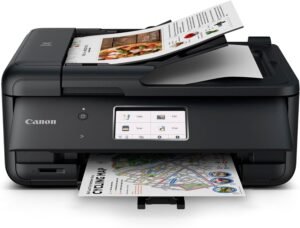
Epson XP-8700 Wireless All-in-One Printer Review: Performance, Features, and Use Cases
The Importance of Choosing the Right Printer for Your Needs
Selecting the appropriate printer is a critical decision that impacts productivity, cost efficiency, and output quality across home, office, and mobile environments. Whether you require high-speed document printing, professional-grade photo production, or multifunctional device integration, the right printer must align with specific workload demands, media compatibility requirements, and connectivity needs. Modern printing environments often involve diverse tasks—from generating crisp text documents to capturing vivid photographic prints—each requiring distinct technical capabilities. For instance, home users may prioritize ease of use and affordability, while small businesses demand reliable, high-volume printing with minimal maintenance. The Epson XP-8700 represents a versatile solution designed to address these varied needs by combining advanced inkjet technology with a comprehensive feature set. Its ability to handle both everyday printing and specialty media, coupled with wireless connectivity, positions it as a potential candidate for users seeking a balance between performance and convenience. However, understanding its technical specifications, media compatibility, and operational limitations is essential to determine whether it meets the specific requirements of different printing scenarios.
Quick Overview
| Feature | Details |
|---|---|
| Printer Type | Wireless All-in-One Inkjet Printer |
| Printing Technology | 6-Color Claria Inkjet System |
| Supported Functions | Print, Scan, Copy, Mobile Printing |
| Print Resolution | Up to 5760 x 1440 dpi |
| Print Speed | Up to 10.5 ipm (text) / 6.0 ipm (photo) |
| Maximum Media Size | 8.5 x 11 inches |
| Supported Media Types | Premium Photo Paper, Standard Paper, Glossy Media |
| Connectivity Options | Wi-Fi, Mobile App Compatibility |
| Duty Cycle | Designed for Moderate-Volume Use |
| Ink System | 6-Color Claria Ink Cartridges |
| Included Components | Printer, 6-Color Ink Cartridge |
The Epson XP-8700’s combination of high-resolution printing, wireless connectivity, and support for specialty media makes it suitable for users who require both everyday productivity and occasional photo printing. Its design emphasizes ease of use while maintaining the precision needed for professional-quality outputs.

Print Quality and Media Compatibility

High-Resolution Output for Text and Graphics
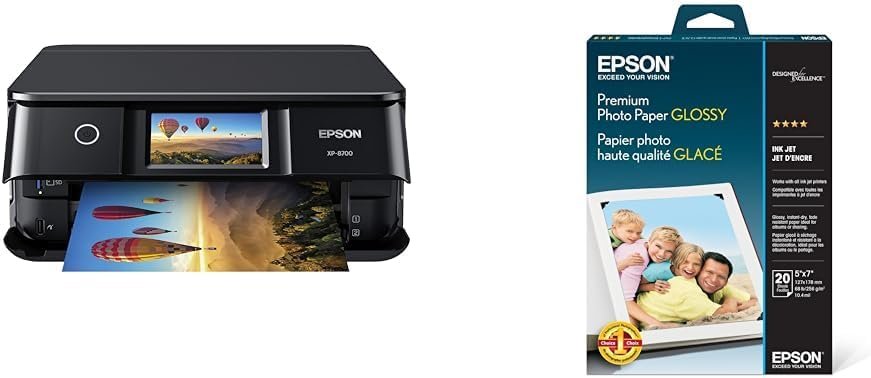
The Epson XP-8700 leverages a 6-color Claria inkjet system to deliver sharp text and detailed graphics, making it well-suited for both everyday documents and creative projects. Its maximum print resolution of 5760 x 1440 dpi ensures fine detail in both text and images, which is critical for professional-grade outputs. The printer’s ability to handle a wide range of media, including standard paper and premium photo paper, allows users to customize their printing needs based on the task at hand. For instance, the inclusion of 68 lb. high-gloss photo paper in the bundle enables borderless prints up to 8.5 x 11 inches, which is ideal for photographers or graphic designers who require vivid, smudge-free results. This flexibility in media selection helps users achieve optimal print quality without the need for additional equipment.
Premium Photo Paper for Enhanced Visual Impact
The bundled 68 lb. high-gloss photo paper is specifically engineered to enhance the visual impact of printed images. Its smooth surface and quick-dry properties ensure that ink adheres evenly, producing vibrant colors and sharp details. The paper’s water-resistant coating also provides durability, making it suitable for environments where prints may be exposed to minor moisture. This feature is particularly beneficial for users who frequently print photographs or artistic prints, as it minimizes the risk of ink bleeding or smudging. The printer’s ability to produce borderless prints further expands its utility for creative applications, such as creating personalized photo albums or promotional materials.
Connectivity and Device Compatibility

Wireless Printing for Seamless Integration
The Epson XP-8700’s Wi-Fi connectivity simplifies the printing process by eliminating the need for physical cables, making it an attractive option for users who prioritize convenience. This feature allows for seamless integration with mobile devices, enabling users to print from smartphones and tablets without the need for additional hardware. The printer’s compatibility with a wide range of devices ensures that it can be easily incorporated into existing workflows, whether for home use or small business operations. However, the reliance on a stable wireless network may introduce potential connectivity issues in environments with limited Wi-Fi coverage or frequent signal interference.
Mobile App Integration for Enhanced Control
The printer’s mobile app compatibility enhances user experience by providing remote access to printing functions and settings. Users can manage print jobs, adjust print settings, and monitor ink levels directly from their mobile devices, which is particularly useful for those who frequently print on the go. The app’s intuitive interface ensures that even users with limited technical expertise can navigate its features without difficulty. This level of control is especially beneficial for small business owners or remote workers who need to manage printing tasks from multiple locations.
Performance and Operational Considerations

Duty Cycle and Volume Capacity
The Epson XP-8700 is designed for moderate-volume use, making it ideal for home users and small offices that do not require high-speed, high-volume printing. Its duty cycle specifications indicate that it is optimized for daily tasks such as printing documents, photos, and scanning, rather than continuous, heavy-duty operations. Users who frequently print large volumes of documents or require 24/7 availability may find the printer’s capacity insufficient, as it is not built for industrial or high-throughput environments. This limitation makes it less suitable for large-scale print shops or corporate settings with high print demands.
Ink System and Consumable Management
The 6-color Claria ink system in the Epson XP-8700 is engineered to provide consistent color accuracy and longevity, which is essential for maintaining print quality over time. The ink’s formulation reduces the risk of clogging, ensuring reliable performance even with infrequent use. However, the printer’s ink consumption rates are relatively standard, which means users may need to replace cartridges more frequently compared to printers with more efficient ink systems. The inclusion of a dedicated ink cartridge in the bundle simplifies initial setup, but ongoing maintenance costs should be considered for long-term usage.
Pros & Cons
Pros
- High-Resolution Printing: The 5760 x 1440 dpi resolution ensures sharp text and detailed images, suitable for both everyday documents and creative projects.
- Versatile Media Support: Compatibility with standard paper, glossy media, and high-gloss photo paper allows customization based on printing needs.
- Wireless Connectivity: Wi-Fi integration simplifies printing from mobile devices, reducing the need for physical cables.
- User-Friendly Interface: The 4.3″ touchscreen and mobile app compatibility enhance ease of use for both novice and experienced users.
- Smudge-Free Photo Paper: The bundled high-gloss paper ensures vibrant, water-resistant prints that are ideal for photographers and artists.
Cons
- Limited Duty Cycle: Designed for moderate-volume use, making it less suitable for high-throughput environments.
- Ink Replacement Frequency: Standard ink consumption rates may require more frequent cartridge replacements compared to more efficient systems.
- Connectivity Reliance: Performance is dependent on a stable wireless network, which may be a limitation in areas with poor Wi-Fi coverage.
- No Fax Functionality: The absence of a fax feature may be a drawback for users requiring traditional fax capabilities.
- Limited Color Options: The 6-color ink system is well-suited for most tasks but may not meet the needs of users requiring expanded color palettes.
Final Verdict: Who This Printer Is Best For (and Who Should Skip It)
The Epson XP-8700 is an excellent choice for home users and small businesses that require a balance of print quality, versatility, and ease of use. Its high-resolution printing capabilities, support for premium photo paper, and wireless connectivity make it ideal for tasks such as document printing, photo production, and mobile printing. The intuitive touchscreen and mobile app integration further enhance its usability for users who value convenience and control. However, the printer’s design for moderate-volume use and standard ink consumption rates make it less suitable for high-throughput environments or users requiring 24/7 availability. Additionally, the absence of fax functionality and limited color options may deter users who need specialized features or expanded color capabilities. Overall, the XP-8700 is a reliable, user-friendly option for those seeking a versatile all-in-one printer without the complexities of industrial-grade equipment.
Frequently Asked Questions (FAQs)
What types of media can the Epson XP-8700 handle?
The Epson XP-8700 supports a variety of media types, including standard paper, glossy media, and the bundled 68 lb. high-gloss photo paper. This versatility allows users to customize printing based on their specific needs, from everyday documents to professional-grade photographs.
How does the Epson XP-8700 ensure high-quality photo prints?
The printer utilizes a 6-color Claria inkjet system and 68 lb. high-gloss photo paper to produce vibrant, smudge-free prints. The combination of high-resolution printing and quick-dry, water-resistant paper ensures sharp details and durability for photographic outputs.
Can the Epson XP-8700 print wirelessly from mobile devices?
Yes, the Epson XP-8700 features Wi-Fi connectivity, enabling seamless wireless printing from smartphones and tablets. This eliminates the need for physical cables and allows users to manage print jobs remotely through the mobile app.
What are the limitations of the Epson XP-8700’s duty cycle?
The Epson XP-8700 is designed for moderate-volume use, making it suitable for home users and small offices. It is not optimized for high-throughput environments or continuous, heavy-duty printing, which may limit its effectiveness in large-scale operations.
How does the Epson XP-8700’s ink system affect print longevity?
The 6-color Claria ink system is formulated to reduce clogging and maintain consistent color accuracy over time. However, standard ink consumption rates may require more frequent cartridge replacements compared to more efficient systems, impacting long-term cost considerations.
Is the Epson XP-8700 suitable for users requiring fax functionality?
The Epson XP-8700 does not include fax capabilities, making it unsuitable for users who require traditional fax features. This limitation may be a drawback for those needing to send and receive faxes as part of their workflow.
What are the connectivity options for the Epson XP-8700?
The Epson XP-8700 offers Wi-Fi connectivity for wireless printing and compatibility with mobile apps for remote management. While this simplifies integration with modern devices, reliance on a stable network may pose challenges in areas with limited Wi-Fi coverage.
How does the Epson XP-8700 compare to other all-in-one printers in 2026?
The Epson XP-8700 stands out for its balance of print quality, versatility, and ease of use, making it a strong contender for home and small office users. However, its moderate-duty cycle and standard ink system position it as a mid-tier option, less suitable for high-volume or specialized printing needs.