Inkless Portable Printer for Travel: Thermal Printing, Bluetooth Connectivity, and Compact Design
Why Choosing the Right Printer Matters in 2026
In 2026, the demand for efficient, reliable, and versatile printing solutions has grown significantly across home, office, and mobile environments. Whether you’re a busy professional, a student, or a remote worker, the right printer can streamline document creation, reduce time spent on manual tasks, and ensure consistent output quality. With the rise of digital workflows, printers must balance speed, portability, and cost-effectiveness without compromising performance. For users who require on-the-go printing—such as travelers, field workers, or small business owners—the ability to print without ink, toner, or ribbons becomes a critical factor. Thermal printing technology, which relies on heat to produce images, offers a unique advantage: it eliminates the need for consumables, reducing long-term costs and maintenance. However, this technology also has limitations, such as its dependency on specialized paper and its suitability for specific use cases. Understanding these trade-offs is essential for selecting a printer that aligns with your workflow, whether you prioritize speed, durability, or ease of use. This review evaluates the Gloryang PD-A4 inkless portable printer, focusing on its thermal printing capabilities, Bluetooth connectivity, and compact design to determine its value for users with varying printing needs.
Quick Overview
| Feature | Details |
|---|---|
| Printer Type | Thermal Printer |
| Printing Technology | Inkless Thermal |
| Supported Functions | Print Only |
| Print Resolution | 300 dpi (Black & White) |
| Media Sizes | 8.5 x 11 inches (Letter) |
| Connectivity | Bluetooth (iOS/Android) |
| Duty Cycle | 360 Sheets |
| Ink System | None (Inkless) |
| Warranty | Limited Warranty |
| Dimensions | 11″D x 4″W x 4″H |
| Weight | 3.12 pounds |
| Included Components | 3 Rolls Thermal Paper, Carry Case, USB Cable, Manual |
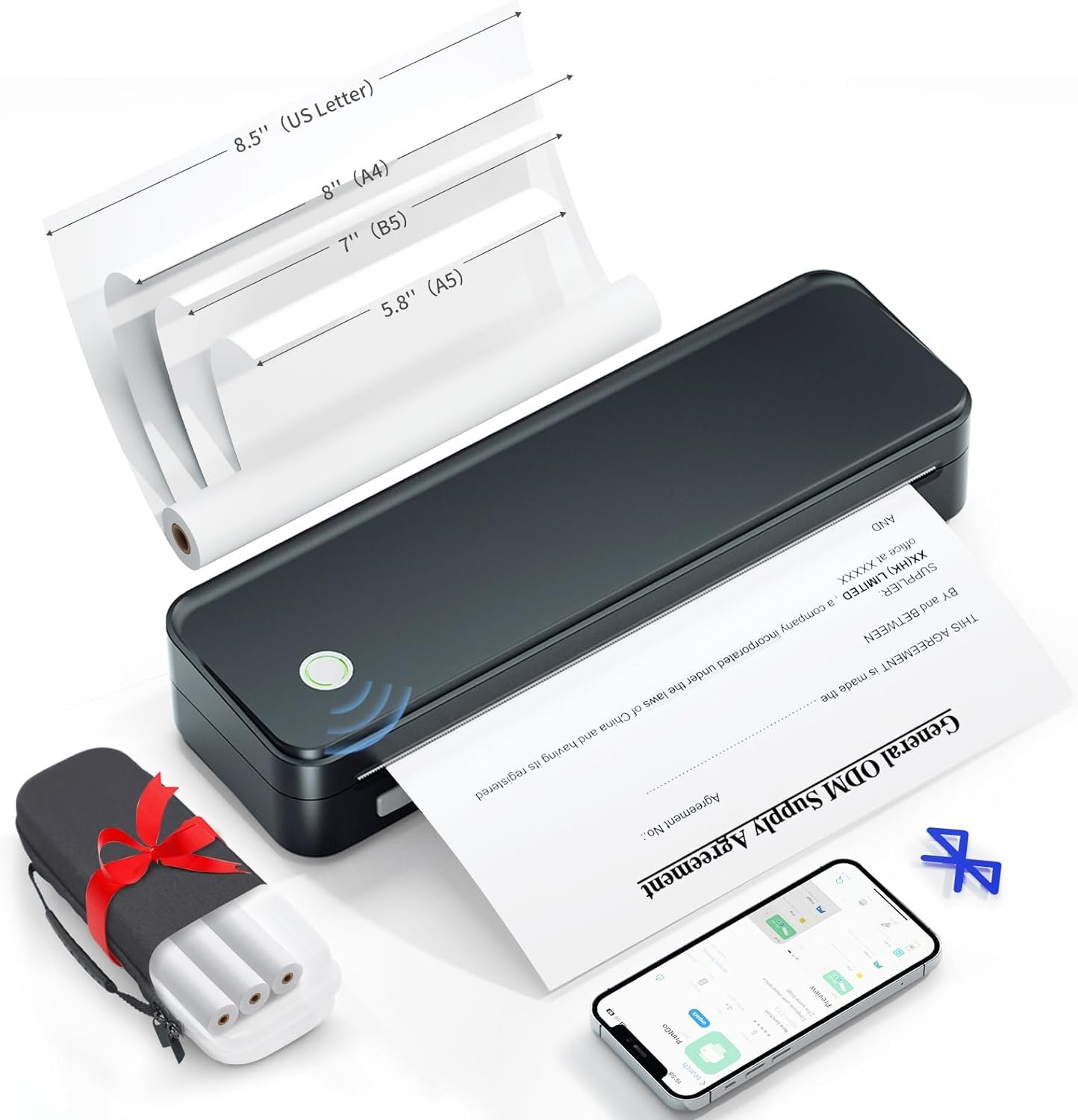
The Gloryang PD-A4 combines thermal printing with Bluetooth connectivity, making it ideal for users who need to print documents on the go. Its inkless design eliminates the need for consumables, while the built-in paper bin and compact size enhance portability. These features make it a strong contender for travelers, students, and professionals requiring quick, reliable printing without the hassle of refilling ink or replacing toner.

Thermal Printing Technology: Benefits and Limitations
Thermal printing technology, which the Gloryang PD-A4 employs, offers a unique advantage by eliminating the need for ink, toner, or ribbons. This inkless system uses heat to create images on thermal paper, resulting in a cost-effective solution for users who prioritize low maintenance and reduced consumable costs. The absence of moving parts in thermal printers also contributes to their durability, making them suitable for environments where frequent use is required. Additionally, the PD-A4’s ability to print on 8.5 x 11-inch thermal paper ensures compatibility with standard letter-sized documents, which is particularly beneficial for users who need to print contracts, receipts, or other formal paperwork.

Print Quality and Resolution
The PD-A4 delivers black-and-white prints at a resolution of 300 dpi, which is sufficient for most text-based documents and basic graphics. While this resolution may not rival the clarity of laser or inkjet printers for high-quality images or detailed graphics, it is well-suited for applications such as receipts, invoices, and simple reports. The thermal printing process ensures consistent output without the risk of smudging or fading, as long as the paper is stored properly. However, users should be aware that thermal paper is sensitive to light and heat, which could affect long-term document preservation.
Paper Compatibility and Environmental Factors
The PD-A4 is designed to work exclusively with Gloryang thermal paper, which is optimized for the printer’s heat-based printing process. This exclusivity ensures optimal print quality but also limits the user’s ability to use alternative paper types. Additionally, thermal paper is more susceptible to degradation when exposed to sunlight or high temperatures, which may impact the longevity of printed documents. For users who require long-term archival storage, this limitation could be a significant drawback. The printer’s built-in paper bin helps manage thermal paper storage, but it does not provide environmental protection for the printed output.
Duty Cycle and Workload Capacity
The PD-A4 is rated for a duty cycle of 360 sheets, which indicates its ability to handle continuous printing without overheating or mechanical failure. This capacity is suitable for moderate usage, such as printing receipts or small batches of documents. However, users who require high-volume printing—such as those in a commercial setting—may find the printer’s workload capacity insufficient. The printer’s reliance on thermal paper also means that it cannot accommodate large print jobs, as the paper rolls are limited to a single sheet capacity. This makes the PD-A4 more appropriate for intermittent use rather than heavy-duty, continuous printing.
Bluetooth Connectivity and Device Compatibility
The Gloryang PD-A4’s Bluetooth connectivity simplifies the printing process by enabling seamless communication with iOS and Android devices. Users can connect the printer to their smartphones or tablets via the “Jadens Printer” app, eliminating the need for physical cables or complex setup procedures. This wireless feature is particularly advantageous for users who frequently move between locations or work in environments where cable management is impractical. The printer’s compatibility with laptops and computers further expands its usability, as it can function as a compact, portable printer for on-the-go document printing.

Setup and Configuration Process
Setting up the PD-A4 involves a straightforward process that requires users to turn on the printer first and then install the necessary driver through the “Jadens Printer” app. This setup ensures that the printer is recognized by the connected device and can be used immediately for printing. The absence of a physical control panel means that all operations, including paper loading and print initiation, are managed through the app. While this streamlined approach enhances convenience, it may pose challenges for users who prefer manual controls or have limited familiarity with mobile applications.
Device Compatibility and Limitations
The PD-A4’s Bluetooth connectivity is limited to iOS and Android devices, which means it cannot be used with Windows-based laptops or other operating systems without additional software. This restriction may affect users who rely on desktop environments for document creation. Additionally, the printer’s reliance on Bluetooth rather than Wi-Fi or USB connections could introduce latency or connectivity issues in environments with multiple wireless devices. For users who require more robust connectivity options, this limitation may necessitate the use of alternative printing solutions.
App Functionality and User Experience
The “Jadens Printer” app provides a user-friendly interface for managing print jobs, adjusting settings, and monitoring the printer’s status. The app’s simplicity ensures that users can quickly initiate printing without extensive configuration. However, the lack of advanced features such as print job scheduling or multi-page printing may be a drawback for users who require more complex printing capabilities. The app’s functionality is well-suited for basic printing needs but may fall short for users who need more sophisticated document management tools.

Pros and Cons
Pros
- Inkless Design: Eliminates the need for ink, toner, or ribbons, reducing long-term costs and maintenance.
- Bluetooth Connectivity: Enables wireless printing from iOS and Android devices without the need for cables or complex setup.
- Compact and Portable: Weighs 3.12 pounds and measures 11″D x 4″W x 4″H, making it ideal for travel and on-the-go use.
- Built-in Paper Bin: Keeps the workspace tidy by storing thermal paper internally, reducing clutter.
- High Print Resolution: Delivers 300 dpi black-and-white prints, suitable for text documents and basic graphics.
- User-Friendly App: The “Jadens Printer” app simplifies print job management and setup for mobile users.
Cons
- Limited Paper Compatibility: Requires Gloryang thermal paper, which may not be readily available in all regions.
- Environmental Sensitivity: Thermal paper is prone to degradation from light, heat, and humidity, affecting long-term document preservation.
- Single-Sheet Output: The printer can only handle one sheet at a time, limiting its suitability for large print jobs.
- No Advanced Features: Lacks multi-page printing, scheduling, or duplex printing capabilities, which may be necessary for complex workflows.
- Bluetooth Limitations: Only supports iOS and Android devices, excluding Windows-based systems without additional software.
- Duty Cycle Constraints: Rated for 360 sheets, making it less suitable for high-volume or continuous printing needs.
Final Verdict: Who This Printer Is Best For (and Who Should Skip It)
The Gloryang PD-A4 is best suited for users who require a lightweight, portable printing solution for occasional use. Its inkless design, Bluetooth connectivity, and compact size make it an excellent choice for travelers, students, and professionals who need to print documents on the go. The printer’s 300 dpi resolution is sufficient for text-based documents and basic graphics, while the built-in paper bin helps maintain a tidy workspace. However, users who require high-volume printing, advanced document management features, or compatibility with Windows-based systems may find the PD-A4 inadequate. Additionally, the printer’s reliance on thermal paper and its sensitivity to environmental factors may limit its appeal for long-term archival or industrial applications. For users prioritizing portability and simplicity, the PD-A4 offers a convenient solution. However, those with more demanding printing needs should consider alternative options that better match their workflow requirements.

Frequently Asked Questions (FAQs)
Can the Gloryang PD-A4 print on regular paper?
No, the Gloryang PD-A4 is specifically designed for thermal paper and cannot use regular, inkjet, or plain paper. It requires Gloryang thermal paper for optimal performance and print quality.
How does the Bluetooth connectivity work with the Gloryang PD-A4?
The Gloryang PD-A4 connects to iOS and Android devices via Bluetooth using the “Jadens Printer” app. This wireless setup allows users to print documents without cables, though it is limited to mobile devices.
Is the Gloryang PD-A4 suitable for high-volume printing?
The PD-A4 is rated for a duty cycle of 360 sheets, making it suitable for moderate use. It is not recommended for high-volume or continuous printing, as it is designed for intermittent, on-the-go printing needs.
What are the limitations of thermal printing technology?
Thermal printing requires specialized paper that is sensitive to light, heat, and humidity. This can affect the longevity of printed documents. Additionally, thermal paper is not suitable for long-term archival storage or high-contrast graphics.
Can the Gloryang PD-A4 be used with Windows-based systems?
The PD-A4 supports Bluetooth connectivity for iOS and Android devices. For Windows-based systems, users may need additional software or a USB connection to utilize the printer, which is not natively supported.
What is the print resolution of the Gloryang PD-A4?
The Gloryang PD-A4 delivers black-and-white prints at a resolution of 300 dpi, which is adequate for text documents and basic graphics but may not meet the requirements for high-quality images or detailed graphics.
How does the built-in paper bin benefit users?
The built-in paper bin of the PD-A4 helps keep the workspace organized by storing thermal paper internally. This feature reduces clutter and ensures that paper is readily available for printing, even when the printer is in use.
What are the environmental considerations for using thermal paper?
Thermal paper is sensitive to light, heat, and humidity, which can cause degradation over time. Users should store printed documents in a cool, dark environment to preserve their quality and longevity.