Portable Bluetooth Thermal Printer for Travel & Office Use
The Importance of Choosing the Right Printer for Modern Workflows
In today’s fast-paced environments, the ability to print efficiently and reliably can significantly impact productivity. Whether managing documents in an office, handling receipts during travel, or creating labels for home use, the right printer can streamline workflows and reduce frustration. Printers vary widely in technology, connectivity, and output capabilities, making it essential to evaluate factors like print quality, speed, media compatibility, and portability. For users who prioritize mobility, a compact printer with wireless connectivity and low-maintenance operation can be a game-changer. However, these benefits must be balanced against limitations such as restricted media types or print resolution. Understanding how different printer technologies—like thermal printing—perform in various scenarios helps users make informed decisions. This review examines a portable thermal printer designed for wireless printing, focusing on its suitability for travel, home, and office environments. By analyzing its technical specifications, connectivity options, and media compatibility, we’ll determine whether it meets the needs of users seeking a lightweight, inkless solution for everyday printing tasks.
Quick Overview
| Feature | Details |
|---|---|
| Printer Type | Thermal, inkless, portable |
| Connectivity | Bluetooth, Wi-Fi (via SharpFox app) |
| Print Technology | Thermal printing (monochrome) |
| Print Resolution | 300 dots per inch (black/white) |
| Media Sizes | US Letter (8.5″x11″), Legal (8.5″x14″), A4, A5, narrow rolls (2″/3″/4″) |
| Print Speed | Not specified; depends on media type and content |
| Duty Cycle | Not specified; designed for intermittent use |
| Ink System | No ink cartridges required; thermal paper only |
| Battery Life | 12V battery included; estimated runtime depends on usage |
| Weight | 3.03 pounds (1.38 kilograms) |
| Dimensions | 2.5 x 11.3 x 8.8 inches |
This printer’s thermal printing technology and compact design make it ideal for users who need to print receipts, labels, or simple documents without the hassle of ink cartridges. Its support for multiple paper sizes and wireless connectivity ensures flexibility for both home and on-the-go printing. However, the lack of color printing and limited media compatibility may restrict its use in certain environments.

Portability and Design for Mobile Users
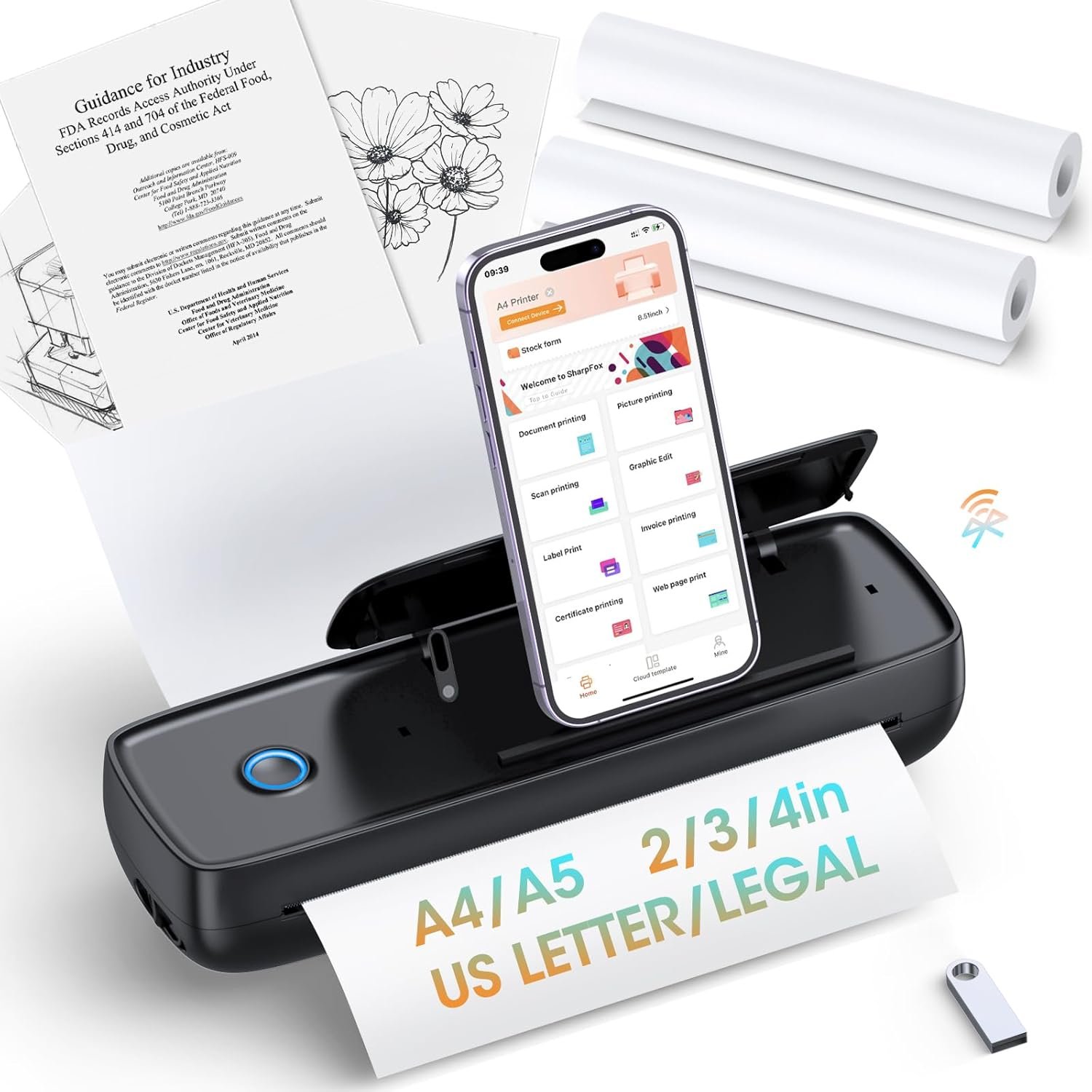
The printer’s ultra-compact design and lightweight construction are among its most notable features, making it highly suitable for users who prioritize portability. Weighing just 3.03 pounds, it fits easily into a backpack or laptop bag, and its size—comparable to two smartphones—ensures it doesn’t take up excessive space. The included phone holder for hands-free printing adds convenience for users who need to print on the go, such as during travel or fieldwork. This design aligns with the growing demand for mobile printing solutions, particularly among remote workers and small business owners who require a printer that can be used in multiple locations without requiring a dedicated workspace.

Lightweight and Space-Efficient Design
The printer’s compact dimensions (2.5 x 11.3 x 8.8 inches) and low weight make it ideal for users with limited storage space. Its streamlined form factor reduces the need for additional accessories, such as separate paper trays or power adapters. This is particularly beneficial for travelers who need to carry a minimal load. The absence of ink cartridges also contributes to its lightweight profile, eliminating the need to transport heavy ink supplies. However, the reliance on thermal paper means users must carry replacement rolls, which may add to the overall weight depending on the quantity needed.
Hands-Free Printing and Accessories
The included phone holder is a practical addition that enhances usability for users who print frequently on mobile devices. By allowing hands-free operation, it reduces the need to handle the printer while using a smartphone or tablet, which can be especially useful in busy environments. The holder’s design ensures stability during printing, minimizing the risk of accidental drops or misalignment. While this feature is a significant advantage for mobile users, it may not be as useful for those who primarily print from desktop computers or laptops.
Connectivity and Device Compatibility
The printer’s wireless and Bluetooth capabilities provide flexibility in how users interact with it, making it well-suited for environments where multiple devices are in use. Its support for iOS, Android, and laptop connections via the SharpFox app and drivers ensures compatibility with a wide range of devices. This is particularly advantageous for users who need to print from smartphones, tablets, or computers without the need for physical cables. However, the requirement to download drivers for laptop use may be a minor inconvenience for some users, though it is standard for many wireless printers.

Bluetooth and Wi-Fi Printing Options
The printer’s Bluetooth connectivity allows for direct pairing with mobile devices, simplifying the printing process for users who prefer wireless convenience. The SharpFox app provides a user-friendly interface for managing print jobs and adjusting settings, which is beneficial for those unfamiliar with complex printer configurations. For users who need more advanced features or greater control, the Wi-Fi connectivity option offers additional flexibility, though it requires a stable network connection to function properly.
Cross-Platform Compatibility
The printer’s support for both iOS and Android devices ensures that users can print from smartphones and tablets without compatibility issues. However, the need to download drivers for laptop use may be a drawback for users who prefer a more seamless experience. While driver installation is a common requirement for printers with Wi-Fi connectivity, it may add an extra step for users who are less technically inclined. Overall, the printer’s cross-platform compatibility is a strong selling point, though it is not without its limitations.
Print Quality and Media Compatibility
As a thermal printer, this model delivers monochrome output with a resolution of 300 dots per inch, which is sufficient for text documents, labels, and receipts. The absence of ink cartridges simplifies maintenance and reduces long-term costs, making it an attractive option for users who prioritize low-maintenance printing. However, the reliance on thermal paper limits its use for tasks requiring higher print quality or color output. This trade-off is important to consider when evaluating the printer’s suitability for specific applications.

Monochrome Print Resolution
The printer’s 300 dots per inch resolution is adequate for most text-based printing tasks, such as invoices, receipts, and simple labels. This level of detail ensures that text remains legible and fonts are crisp, which is essential for documents that require clarity. However, the resolution may not be sufficient for more complex graphics or images, which are typically better suited for inkjet or laser printers. Users who require high-quality text output will find this printer suitable, but those needing more detailed graphics should consider alternative technologies.
Thermal Paper and Media Limitations
The printer’s reliance on thermal paper means it cannot produce color prints or use traditional inkjet paper. This limitation is inherent to thermal printing technology, which uses heat to create images on specially coated paper. While this reduces maintenance and costs, it also restricts the types of documents that can be printed. Users should be aware that thermal paper is more sensitive to light and heat compared to standard paper, which may affect long-term document storage. For applications requiring color or high durability, this printer may not be the best choice.
Durability and Long-Term Reliability
The printer’s design and specifications suggest it is built for moderate use rather than high-volume commercial printing. Its duty cycle and recommended usage volume are not explicitly stated, but the absence of ink cartridges and the use of thermal paper indicate it is intended for intermittent or light-duty applications. This makes it well-suited for personal or small business use, where frequent printing is not a primary requirement. However, users who require continuous operation or high-volume printing should consider more robust alternatives.

Intended Use and Workload Capacity
The printer’s specifications imply it is designed for occasional use rather than continuous, high-volume printing. While it can handle multiple print jobs, its performance may degrade under heavy workloads due to the limitations of thermal printing technology. This makes it ideal for users who print infrequently, such as for receipts, labels, or simple documents. However, for environments requiring frequent printing, such as retail or warehouse operations, a more durable and high-capacity printer would be more appropriate.
Maintenance and Consumable Considerations
The printer’s inkless design reduces maintenance requirements, as there are no ink cartridges to replace or refill. However, users must manage thermal paper supplies, which can be a consideration for frequent users. The need to replace paper rolls regularly may add to the overall cost and inconvenience compared to printers that use standard paper. Additionally, the reliance on thermal paper may limit the printer’s suitability for long-term document storage, as thermal paper can fade over time when exposed to light or heat.
Pros & Cons
Pros
- Ultra-Portable Design: Weighing 3.03 pounds and measuring 2.5 x 11.3 x 8.8 inches, it is compact enough to fit in a backpack or laptop bag, ideal for travel and on-the-go printing.
- No Ink Cartridges Required: The thermal printing technology eliminates the need for ink, reducing maintenance and long-term costs.
- Multi-Size Media Compatibility: Supports a wide range of paper sizes, including US Letter, Legal, A4, A5, and narrow rolls, offering flexibility for different printing needs.
- Wireless & Bluetooth Connectivity: Allows printing from iOS, Android, and laptops via the SharpFox app, enhancing convenience for mobile users.
- Eco-Friendly Operation: Thermal printing is a low-maintenance, energy-efficient solution that minimizes environmental impact.
- Hands-Free Printing: The included phone holder enables convenient, one-handed printing for users on the go.
Cons
- Limited Color Output: Only supports monochrome printing, which may not be suitable for tasks requiring color or detailed graphics.
- Thermal Paper Dependency: Requires thermal paper, which is more sensitive to light and heat and may fade over time.
- No Duplex Printing: Cannot print on both sides of the paper, which may increase paper usage for multi-page documents.
- Driver Requirements for Laptops: Requires driver installation for laptop connectivity, which may be inconvenient for some users.
- No Built-In Storage: Relies on external devices for print job management, which may limit its use in environments without nearby computers or smartphones.
Final Verdict: Who This Printer Is Best For (and Who Should Skip It)
This portable thermal printer is best suited for users who prioritize lightweight, low-maintenance printing for text-based tasks such as receipts, labels, and simple documents. Its compact design, wireless connectivity, and lack of ink cartridges make it an excellent choice for travelers, remote workers, and small business owners who need a printer that can be used in multiple locations without requiring a dedicated workspace. However, users who require color printing, high-volume output, or long-term document storage should consider alternative technologies. The printer’s reliance on thermal paper and its limitations in handling complex graphics or multi-page documents further restrict its use in environments where these features are essential. For those seeking a reliable, eco-friendly solution for occasional printing needs, this printer offers a convenient and cost-effective option.
Frequently Asked Questions (FAQs)
Can this printer print color documents?
No, this printer uses thermal printing technology, which only supports monochrome output. It is designed for black-and-white text, labels, and receipts but cannot produce color prints or detailed graphics.
What types of paper can I use with this printer?
The printer is compatible with thermal paper rolls in sizes including US Letter (8.5″x11″), Legal (8.5″x14″), A4, A5, and narrow widths (2″/3″/4″). It does not support standard inkjet or laser paper.
How long does the battery last?
The printer uses a 12V battery included in the package, with runtime dependent on usage patterns. For optimal performance, it is recommended to use it with a power source when printing frequently.
Can I print from my laptop?
Yes, the printer supports Wi-Fi connectivity and requires a driver download for laptop use. It also works with Bluetooth for direct printing from iOS and Android devices.
Is this printer suitable for high-volume printing?
This printer is designed for intermittent use rather than continuous, high-volume printing. Its thermal printing technology and lack of built-in storage make it better suited for occasional tasks like receipts and labels.
Does the printer require regular maintenance?
The printer requires minimal maintenance due to its inkless design. However, users must replace thermal paper rolls regularly, and the printer should be kept clean to ensure optimal performance.
Can I print on both sides of the paper?
No, the printer only supports simplex printing. It cannot print on both sides of the paper, which may increase paper usage for multi-page documents.
What is the print resolution?
The printer produces monochrome output at 300 dots per inch, which is suitable for text documents, labels, and receipts but not for detailed graphics or images.