80mm Bluetooth Thermal Receipt Printer for Android Users
The Importance of Selecting the Right Printer for Small Business Needs
In today’s fast-paced business environment, the reliability and efficiency of printing solutions can significantly impact operational success. Whether managing a retail store, restaurant, or service-based enterprise, the ability to produce clear, timely receipts and invoices is critical. A printer must balance speed, durability, and compatibility with the devices and workflows it supports. For small businesses relying on Android-based systems, the GZGYNADAST P8001 presents a compelling option. Its thermal printing technology, compact design, and Bluetooth connectivity offer advantages for environments requiring mobility and minimal maintenance. However, understanding the nuances of its compatibility, performance, and limitations is essential for making an informed decision. This review evaluates the printer’s features against industry benchmarks, focusing on how it aligns with the specific needs of users prioritizing Android integration and thermal printing.
Quick Overview
| Feature | Details |
|---|---|
| Printer Type | Thermal receipt printer |
| Connectivity | Bluetooth 4.0, USB |
| Print Technology | Thermal |
| Media Size | 80mm width |
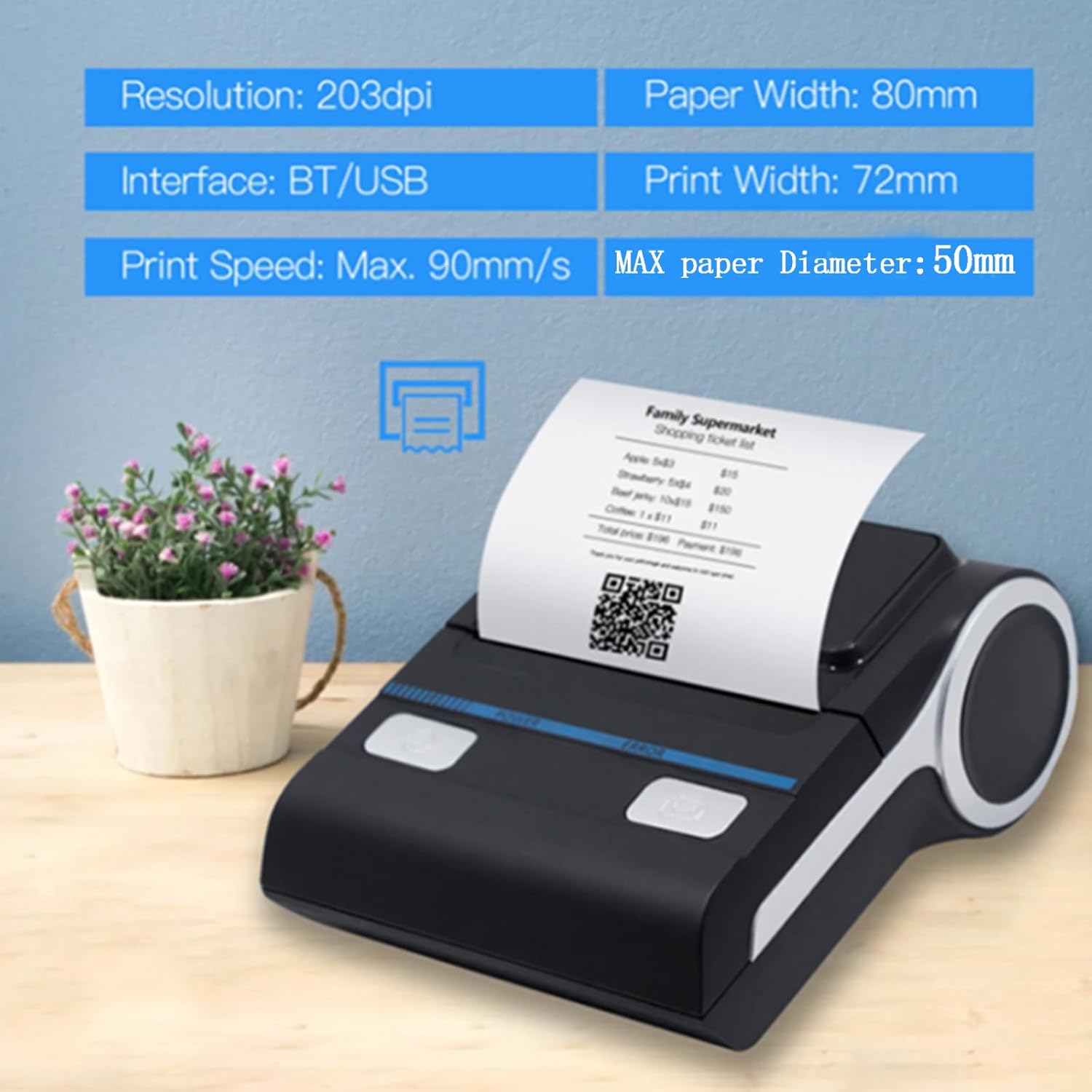
| Print Speed | 80mm/s monochrome |
| Battery | 7.2V 1800mAh lithium polymer |
| Dimensions | 5″D x 4″W x 6″H |
| Weight | 1.19 pounds |
| Warranty | Lifetime |
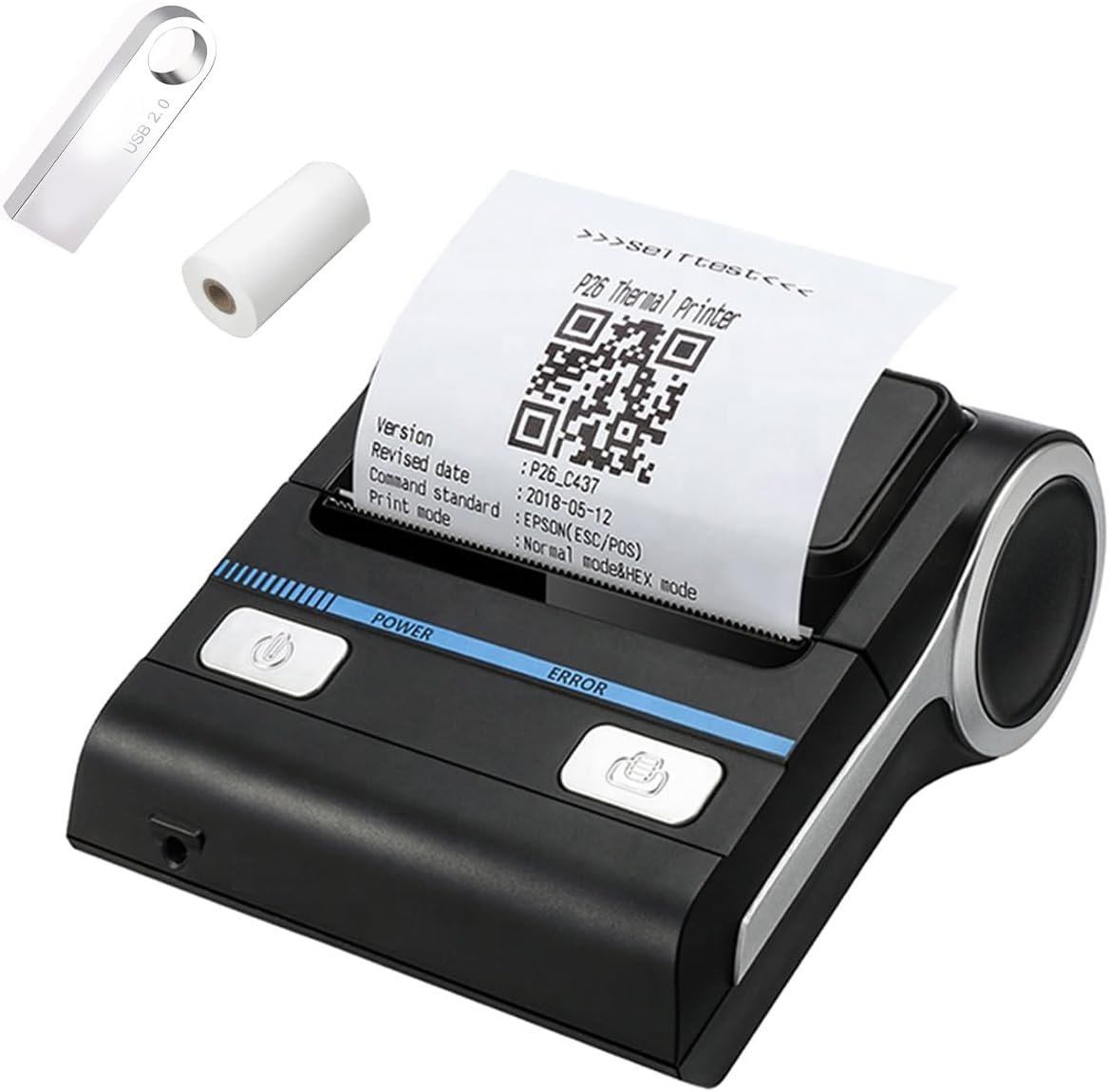
| Included Accessories | U disk, charger, USB cable, thermal paper |
This printer is designed for Android and Windows users requiring portable, low-maintenance printing. Its thermal technology eliminates the need for ink or toner, relying instead on heat-sensitive paper. The built-in Bluetooth 4.0 enables wireless connectivity, while the included U disk provides essential drivers and software for setup. The compact form factor and battery-powered operation make it suitable for environments where mobility and minimal setup are priorities.

Connectivity and Compatibility Considerations
The GZGYNADAST P8001’s Bluetooth 4.0 connectivity simplifies wireless printing for Android and Windows devices, eliminating the need for physical cables. This feature is particularly advantageous for users managing multiple terminals or requiring flexibility in print location. The printer’s compatibility with Android systems ensures seamless integration with mobile POS applications, while USB connectivity offers a reliable alternative for desktop setups. However, its exclusion of iOS, macOS, and certain POS platforms such as Square or Clover may limit its appeal for users relying on these ecosystems. The requirement to peel off an insulating sticker before use highlights a minor usability hurdle, though it is a standard safety measure for lithium batteries.

Bluetooth Setup and Device Compatibility
Establishing a Bluetooth connection requires users to enable location services and pair the printer through a dedicated app. The printer’s Bluetooth name appears on its self-test page, guiding users through the pairing process. While this method is straightforward, the lack of native support for iOS and macOS may necessitate additional workarounds for users with mixed device environments. The printer’s compatibility with Windows 7 through 11 and Android devices ensures broad access, but its exclusion of macOS and iOS platforms could be a significant drawback for businesses using these operating systems.
App Integration and POS System Support
The printer’s support for apps like Utak, Loyverse, and CashSale positions it well for small businesses utilizing mobile POS solutions. However, its incompatibility with popular platforms such as Clover, Open Table, and Shopify may require users to seek alternative software or integrate through third-party solutions. The absence of native support for credit card readers like PayPal or Shopify’s payment systems could complicate workflows for businesses requiring seamless transaction processing. These limitations underscore the importance of verifying compatibility with existing POS infrastructure before adoption.
Battery Life and Mobility
The 1800mAh lithium battery provides extended operation without recharging, making the printer ideal for environments where power outlets are limited. Its portability allows for use in kitchens, retail floors, or outdoor settings, reducing the need for fixed printing stations. However, the battery’s capacity may not suffice for high-volume operations requiring continuous printing, necessitating regular recharging or access to power sources. The printer’s reliance on thermal paper instead of ink or toner further enhances its mobility by eliminating the need for consumable replacements.
Print Quality and Performance Specifications
The GZGYNADAST P8001’s thermal printing technology delivers monochrome output with a resolution of 118 dots per inch, ensuring legible text and clear formatting for receipts and invoices. This resolution meets industry standards for thermal receipts, balancing clarity with the limitations of heat-sensitive paper. The printer’s maximum print speed of 80mm/s supports efficient processing of transactions, though its performance may lag behind laser or inkjet printers in high-volume environments. The absence of color printing capabilities is a notable limitation, as thermal paper cannot reproduce colored graphics or logos, restricting its use to monochrome outputs.

Thermal Paper Usage and Durability
Thermal paper, while convenient for its lack of consumables, has inherent limitations. Exposure to heat, light, or moisture can cause fading or smudging, potentially compromising receipt readability. This makes the printer less suitable for environments with harsh conditions or long-term archival needs. However, for short-term transactions where immediate printing is critical, the printer’s reliance on thermal paper aligns with the practical demands of small businesses. The included thermal paper provides a starting point, though users may need to purchase additional rolls for sustained use.
Print Speed and Duty Cycle
The printer’s 80mm/s print speed is adequate for most small business applications, allowing for quick receipt generation without significant delays. However, its performance may not scale effectively for high-volume operations exceeding 1250 sheets per day, as indicated by its maximum input capacity. The printer’s duty cycle, while not explicitly specified, suggests it is designed for moderate use rather than continuous, high-throughput environments. This makes it well-suited for retail or service-based businesses with predictable transaction volumes but less ideal for industrial or warehouse settings requiring heavy printing.
Portability and Design Features
The GZGYNADAST P8001’s compact dimensions (5″D x 4″W x 6″H) and lightweight design (1.19 pounds) make it highly portable, suitable for use in kitchens, retail counters, or mobile setups. Its battery-powered operation eliminates the need for a power outlet, enhancing flexibility in deployment. The included USB cable and charger provide convenient options for wired connectivity when needed. However, the printer’s lack of built-in storage or memory for print jobs means users must rely on connected devices for data management, which could be a drawback for businesses requiring offline printing capabilities.

Battery Life and Power Management
The 7.2V 1800mAh lithium battery offers several hours of operation on a single charge, though exact duration depends on usage patterns. For businesses requiring extended uptime, regular charging or access to power sources is necessary. The battery’s capacity is sufficient for intermittent use but may not meet the demands of continuous, high-volume printing. The absence of a power-saving mode or automatic shutdown feature could lead to unnecessary battery drain if the printer is left idle for extended periods.
Physical Design and User Experience
The printer’s straightforward design minimizes complexity, though the requirement to remove an insulating sticker before use may be unfamiliar to some users. The included manual and U disk provide essential guidance for setup and operation, reducing the learning curve. However, the lack of a built-in display or status indicators may require users to rely on the printer’s self-test page for troubleshooting, which could be inconvenient for less tech-savvy users.
Pros and Cons
Pros
- No Ink or Toner Required: The thermal printing technology eliminates the need for consumables, reducing long-term costs and maintenance.
- Bluetooth Connectivity: Wireless printing simplifies setup and allows for flexible placement without cables.
- Compact and Portable Design: The lightweight, battery-powered form factor suits mobile and space-constrained environments.
- Included Accessories: The U disk provides essential drivers and software, streamlining the initial setup process.
- Lifetime Warranty: The manufacturer’s commitment to long-term support adds value for users seeking reliability.
- Compatibility with Android and Windows: Seamless integration with these operating systems enhances usability for small business owners.
Cons
- Limited Device Compatibility: Exclusion of iOS, macOS, and certain POS systems may restrict its use in mixed-device environments.
- Thermal Paper Dependency: The reliance on heat-sensitive paper introduces risks of fading or smudging, limiting long-term archival quality.
- No Color Printing: Monochrome output restricts the ability to produce colored graphics or logos, affecting branding potential.
- Battery Life Constraints: While sufficient for moderate use, the battery may not sustain high-volume operations without frequent recharging.
- Lack of Offline Printing: The absence of built-in storage means print jobs must be managed through connected devices, limiting flexibility.
- No Duplex Printing: Single-sided output may be less efficient for certain applications requiring double-sided printing.
Final Verdict: Who This Printer Is Best For (and Who Should Skip It)
The GZGYNADAST P8001 is an excellent choice for small businesses prioritizing Android integration, portability, and minimal maintenance. Its thermal printing technology, Bluetooth connectivity, and lifetime warranty make it ideal for retail, food service, and service-based operations with predictable transaction volumes. The included U disk and thermal paper simplify setup, while the compact design allows for use in kitchens or mobile setups. However, its exclusion of iOS, macOS, and popular POS platforms such as Clover or Shopify may deter users relying on these ecosystems. Additionally, the reliance on thermal paper and lack of color printing capabilities limit its versatility for businesses requiring archival-quality outputs or branding elements. For users seeking a reliable, low-maintenance solution with Android compatibility, this printer offers a compelling option. Conversely, businesses requiring broader device support, color printing, or high-volume capabilities should consider alternative models.

Frequently Asked Questions (FAQs)
Is this printer compatible with iOS or macOS devices?
No, the GZGYNADAST P8001 is not compatible with iOS or macOS devices. It is specifically designed for Android and Windows systems, with limited support for certain POS applications.
Does this printer require ink or toner?
No, the printer uses thermal paper instead of ink or toner. It relies on heat-sensitive paper to produce monochrome prints, eliminating the need for consumables.
How do I connect this printer to my Android device via Bluetooth?
To connect, enable Bluetooth on your Android device, download the compatible app, and pair the printer using its Bluetooth name displayed on the self-test page. Ensure location services are enabled for proper pairing.
What is the battery life of the printer?
The printer is powered by a 7.2V 1800mAh lithium battery, providing several hours of operation. However, continuous high-volume printing may require frequent recharging.
Can this printer handle color printing?
No, the printer only supports monochrome printing. Thermal paper cannot reproduce colored graphics or logos, limiting its use to black-and-white receipts and invoices.
What are the dimensions and weight of the printer?
The printer measures 5″D x 4″W x 6″H and weighs 1.19 pounds, making it compact and lightweight for portability in various environments.
Does the printer have a lifetime warranty?
Yes, the manufacturer offers a lifetime warranty, providing long-term support and reliability for users seeking durable, low-maintenance printing solutions.
What types of thermal paper can I use with this printer?
The printer is designed for standard 80mm thermal receipt paper. Users should ensure the paper is compatible with thermal printing technology to avoid issues with print quality or readability.