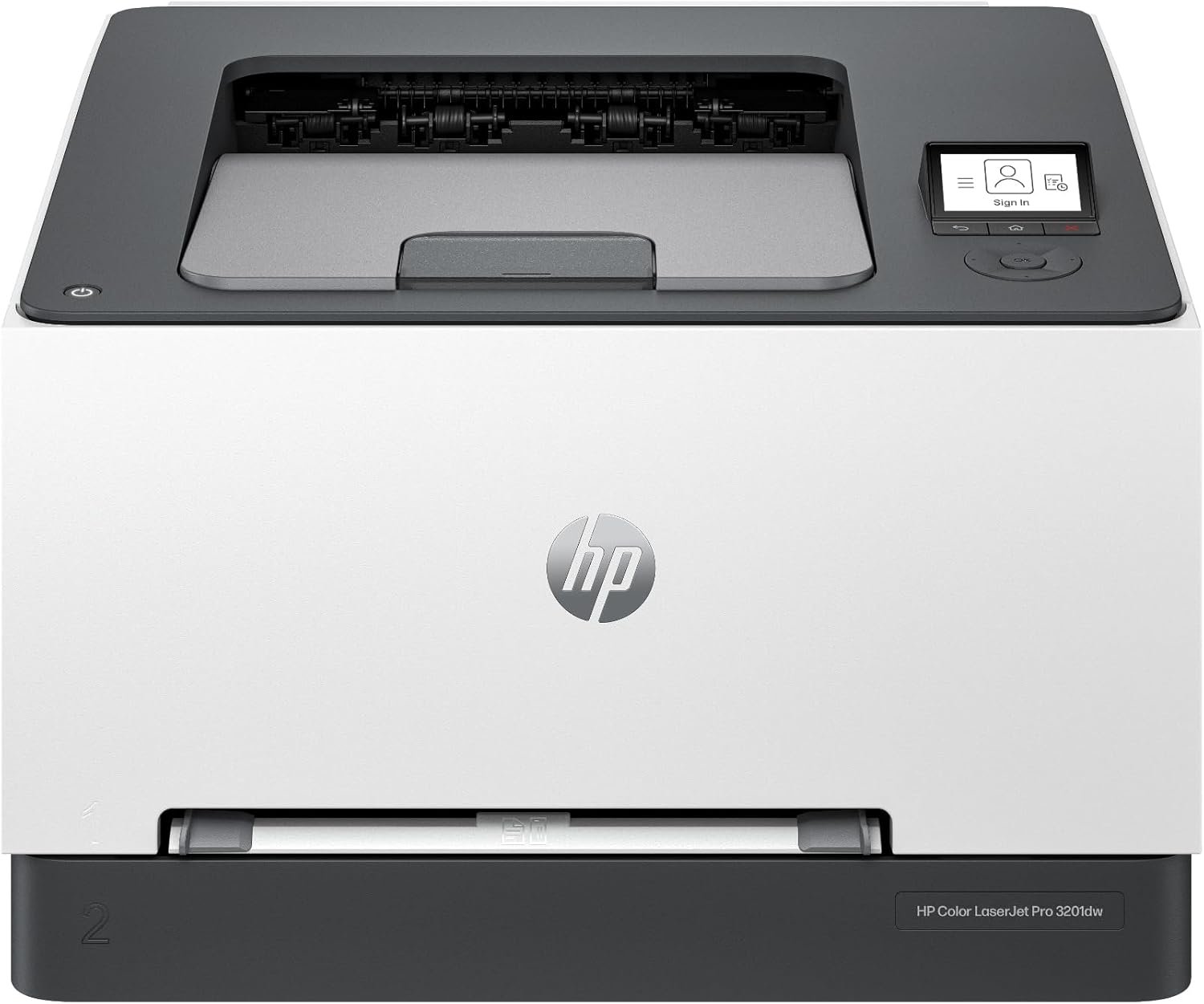
HP Color LaserJet Pro 3201dw Printer Review: Print Quality, Speed, and Office Use
The Importance of Choosing the Right Printer
In today’s fast-paced business environment, selecting the right printer can significantly impact productivity and operational efficiency. Whether managing a small team or handling high-volume office tasks, the performance of a printer directly affects workflow, document quality, and long-term costs. Modern office environments demand reliable equipment that can handle complex print jobs, maintain consistent output, and adapt to evolving technological needs. Printers must balance speed, resolution, and durability while supporting connectivity options that integrate seamlessly with existing workflows. For businesses prioritizing sustainability, energy efficiency and eco-friendly practices have become critical considerations. Additionally, security features are increasingly important as organizations seek to protect sensitive data across digital and physical workflows. Understanding these factors helps users make informed decisions that align with their specific requirements, whether they need a compact solution for home use or a robust system for large-scale commercial operations. The right printer not only meets immediate needs but also supports future growth and adaptability in an ever-changing market.
Quick Overview
| Feature | Details |
|---|---|
| Printer Type | Color laser printer |
| Printing Technology | Laser |
| Print Speed (Color) | 26 pages per minute |
| Print Speed (Monochrome) | 26 pages per minute |
| Maximum Media Size | 8.5 x 14 inches (Legal) |
| Connectivity Options | Bluetooth, Ethernet, USB, Wi-Fi |
| Duplex Printing | Automatic |
| Toner System | HP TerraJet toner |
| Media Compatibility | Paper (plain) |
| Input Tray Capacity | 250 sheets |
| Print Resolution | 600 x 600 dpi (color and monochrome) |
| Security Features | HP Wolf Pro Security |
| Sustainability | Energy Star and EPEAT certified |
| Warranty | 90-day limited warranty |
The HP Color LaserJet Pro 3201dw is designed for environments requiring consistent color output and high-speed printing. Its combination of laser technology, automatic duplex printing, and dual-band Wi-Fi connectivity makes it suitable for small to mid-sized offices. The printer’s energy efficiency and security features align with modern business priorities, while its toner system ensures reliable performance for daily print tasks.

Print Quality and Color Accuracy
The HP Color LaserJet Pro 3201dw delivers professional-grade color output through its TerraJet toner system, which enhances vibrancy and detail in printed documents. This technology ensures consistent color reproduction across multiple print jobs, making it ideal for businesses that require precise color matching for reports, presentations, and marketing materials. The printer’s 600 x 600 dpi resolution provides sharp text and clear graphics, supporting both high-quality color prints and standard black-and-white documents. Its ability to maintain consistent color accuracy over time reduces the need for frequent calibration, which is particularly beneficial for users who print large volumes of color content. However, the printer’s color output is optimized for standard paper sizes and may not fully support specialized media types such as glossy or textured paper, which could limit its versatility for creative or graphic design applications.

Color Vibrancy and Detail
The TerraJet toner system enhances color vibrancy by using advanced toner formulation and precise fusing technology. This ensures that printed colors remain consistent and vivid, even after extended use. The printer’s ability to maintain color accuracy across multiple print jobs reduces the need for manual adjustments, making it suitable for environments with high print volumes. However, the printer’s color output is best suited for standard office paper and may not fully support specialized media types such as glossy or textured paper, which could limit its versatility for creative or graphic design applications.
Text and Graphics Clarity
The 600 x 600 dpi resolution ensures sharp text and clear graphics, making the HP Color LaserJet Pro 3201dw suitable for both professional and administrative documents. Its laser printing technology produces crisp, clean text with minimal smudging, which is particularly beneficial for reports, spreadsheets, and presentations. The printer’s ability to handle complex graphics and images without compromising clarity supports its use in environments where visual content is critical. However, the printer’s performance with high-resolution images may be limited by its standard paper feed system, which could affect the quality of large-format or high-detail graphics.
Print Speed and Throughput Capacity
The HP Color LaserJet Pro 3201dw offers a maximum print speed of 26 pages per minute for both color and monochrome prints, making it well-suited for environments with moderate to high-volume printing needs. This speed ensures that print jobs are completed efficiently without causing delays in workflow. The printer’s dual-band Wi-Fi connectivity and USB port support seamless integration with multiple devices, allowing users to send print jobs from various sources simultaneously. However, the printer’s throughput capacity is optimized for standard office tasks and may not fully support the demands of high-volume commercial printing environments. The 250-sheet input tray provides sufficient capacity for most office settings, but users requiring larger print volumes may need to invest in additional trays or a higher-capacity model.

Handling Large Print Jobs
The printer’s 250-sheet input tray allows for continuous printing without frequent refilling, which is beneficial for environments with regular print demands. Its automated duplex printing feature further enhances efficiency by reducing paper usage and minimizing the need for manual intervention. However, the printer’s performance with very large print jobs may be limited by its standard paper feed system, which could affect the speed and reliability of high-volume printing tasks. Users requiring extended print runs should consider the printer’s duty cycle specifications to ensure it can handle the workload without degradation in performance.
Connectivity and Device Compatibility
The HP Color LaserJet Pro 3201dw supports multiple connectivity options, including Bluetooth, Ethernet, USB, and dual-band Wi-Fi, ensuring compatibility with a wide range of devices and networks. This flexibility allows users to print from computers, mobile devices, and cloud-based platforms without the need for additional hardware. The printer’s self-resetting Wi-Fi feature helps maintain stable connections by automatically detecting and resolving network issues, which is particularly useful in environments with fluctuating network conditions. However, the printer’s reliance on standard connectivity protocols may limit its compatibility with older or less common devices, which could be a consideration for users with specialized equipment.
Sustainability and Energy Efficiency
The HP Color LaserJet Pro 3201dw is designed with sustainability in mind, featuring energy-efficient components and eco-friendly materials. Its Energy Star and EPEAT certification indicates that it meets strict energy consumption standards, reducing the environmental impact of daily operations. The printer’s toner system is engineered to minimize plastic use and energy consumption, aligning with corporate sustainability goals. Additionally, the inclusion of HP Planet Partners recycling programs encourages responsible disposal of toner cartridges, further supporting environmental initiatives. However, the printer’s sustainability features are best suited for office environments with a focus on eco-conscious practices, and users requiring more advanced sustainability options may need to explore alternative models with additional green certifications.

Eco-Friendly Design and Materials
The printer’s design incorporates materials and manufacturing processes aimed at reducing environmental impact. Its energy-efficient components help lower electricity consumption, contributing to cost savings and reduced carbon footprints. The use of recyclable materials in the printer’s construction supports waste reduction efforts, while the HP Planet Partners program facilitates the proper disposal of toner cartridges. These features make the HP Color LaserJet Pro 3201dw an attractive option for businesses prioritizing sustainability without compromising performance or reliability.
Energy Consumption and Operational Costs
The printer’s energy efficiency is a key factor in its operational cost-effectiveness, as it consumes less power during both active and idle states. This reduces electricity bills and contributes to a lower environmental footprint. However, the printer’s energy-saving features are most effective in environments where it is used consistently, and users requiring intermittent use may benefit from additional power management settings. The combination of energy-efficient design and sustainable materials makes the HP Color LaserJet Pro 3201dw a viable choice for organizations seeking to balance productivity with environmental responsibility.
Security and Data Protection
The HP Color LaserJet Pro 3201dw includes built-in security features through its HP Wolf Pro Security suite, which helps protect against cyber threats and unauthorized access. This system includes customizable tools for managing network security, data encryption, and access controls, making it suitable for environments handling sensitive information. The printer’s ability to detect and resolve network issues automatically enhances its reliability in maintaining secure connections. However, the security features are most effective in environments with established IT infrastructure, and users requiring more advanced security protocols may need to implement additional measures.

Network Security and Threat Mitigation
The HP Wolf Pro Security suite provides a range of tools to safeguard data and network integrity, including encryption for print jobs and access controls to prevent unauthorized use. These features are particularly beneficial for businesses that handle confidential documents or sensitive client information. The printer’s ability to automatically detect and resolve network issues contributes to a more secure and stable printing environment. However, the effectiveness of these security measures depends on the overall network configuration and the presence of additional security protocols, which may require technical expertise to implement effectively.
Data Encryption and Access Controls
The printer’s data encryption capabilities ensure that printed documents remain confidential, even if intercepted during transmission. Access controls allow administrators to restrict printing privileges, preventing unauthorized users from accessing sensitive materials. These features are essential for organizations with strict data protection policies and compliance requirements. However, the implementation of these security features may require additional configuration, which could be a consideration for users with limited IT resources or those seeking more advanced security options.

Pros & Cons
Pros
- High-Speed Printing: The 26 pages per minute print speed ensures efficient handling of moderate to high-volume print jobs, making it suitable for busy office environments.
- Professional Color Output: The TerraJet toner system delivers vibrant and consistent color reproduction, ideal for reports, presentations, and marketing materials.
- Dual-Band Wi-Fi Connectivity: The printer supports dual-band Wi-Fi, enhancing network stability and reducing the risk of connection issues in environments with multiple devices.
- Automatic Duplex Printing: The built-in duplex printing feature reduces paper usage and minimizes manual intervention, improving overall efficiency.
- Energy Efficiency: The Energy Star and EPEAT certifications indicate that the printer meets strict energy consumption standards, contributing to cost savings and environmental responsibility.
- Security Features: HP Wolf Pro Security provides customizable tools for network security, data encryption, and access controls, enhancing data protection in sensitive environments.
Cons
- Limited Media Compatibility: The printer is optimized for standard paper sizes and may not fully support specialized media types such as glossy or textured paper, which could limit its versatility for creative applications.
- No Built-In Scanning: The absence of a built-in scanner may require additional hardware for document management tasks, increasing overall costs and complexity.
- Toner Cartridge Restrictions: The printer is designed to work only with original HP toner cartridges, which may limit cost-effectiveness for users seeking alternative options.
- Smaller Input Tray Capacity: While the 250-sheet input tray is sufficient for many office settings, users requiring larger print volumes may need to invest in additional trays or a higher-capacity model.
- Dependence on HP Ecosystem: The printer’s reliance on HP-specific toner and firmware updates may create dependency on the manufacturer’s ecosystem, potentially limiting flexibility for users with mixed device environments.
Final Verdict: Who This Printer Is Best For (and Who Should Skip It)
The HP Color LaserJet Pro 3201dw is best suited for small to mid-sized offices requiring consistent color output, high-speed printing, and reliable connectivity. Its combination of TerraJet toner, automatic duplex printing, and dual-band Wi-Fi makes it an excellent choice for environments prioritizing productivity and sustainability. The printer’s energy efficiency and security features align with modern business needs, while its professional-grade color output supports tasks such as report generation and marketing materials. However, users requiring advanced media compatibility, built-in scanning, or specialized security protocols may find the printer’s limitations restrictive. Businesses with high-volume printing needs or those seeking more flexible toner options should consider alternative models. Overall, the HP Color LaserJet Pro 3201dw offers a balanced solution for office environments seeking reliable, eco-conscious printing without compromising on performance.

Frequently Asked Questions (FAQs)
What print speeds does the HP Color LaserJet Pro 3201dw offer?
The HP Color LaserJet Pro 3201dw delivers a maximum print speed of 26 pages per minute for both color and monochrome prints, making it suitable for environments with moderate to high-volume printing needs.
Does this printer support automatic duplex printing?
Yes, the HP Color LaserJet Pro 3201dw includes an automatic duplex printing feature, which reduces paper usage and minimizes manual intervention by printing on both sides of the paper automatically.
What connectivity options are available for this printer?
The printer supports Bluetooth, Ethernet, USB, and dual-band Wi-Fi connectivity, ensuring compatibility with a wide range of devices and networks for seamless printing.
Is the HP Color LaserJet Pro 3201dw energy efficient?
Yes, the printer is Energy Star and EPEAT certified, meeting strict energy consumption standards to reduce environmental impact and lower electricity costs.
What security features does this printer include?
The HP Color LaserJet Pro 3201dw features HP Wolf Pro Security, which includes customizable tools for network security, data encryption, and access controls to protect sensitive information.
Can this printer print on specialized media types?
The printer is optimized for standard paper sizes and may not fully support specialized media types such as glossy or textured paper, which could limit its versatility for creative applications.
What are the limitations of the HP Color LaserJet Pro 3201dw?
The printer does not include a built-in scanner, is designed to work only with original HP toner cartridges, and has a 250-sheet input tray that may be insufficient for high-volume printing environments.
Is the HP Color LaserJet Pro 3201dw suitable for small businesses?
Yes, the HP Color LaserJet Pro 3201dw is well-suited for small to mid-sized offices due to its high-speed printing, professional color output, and energy-efficient design.