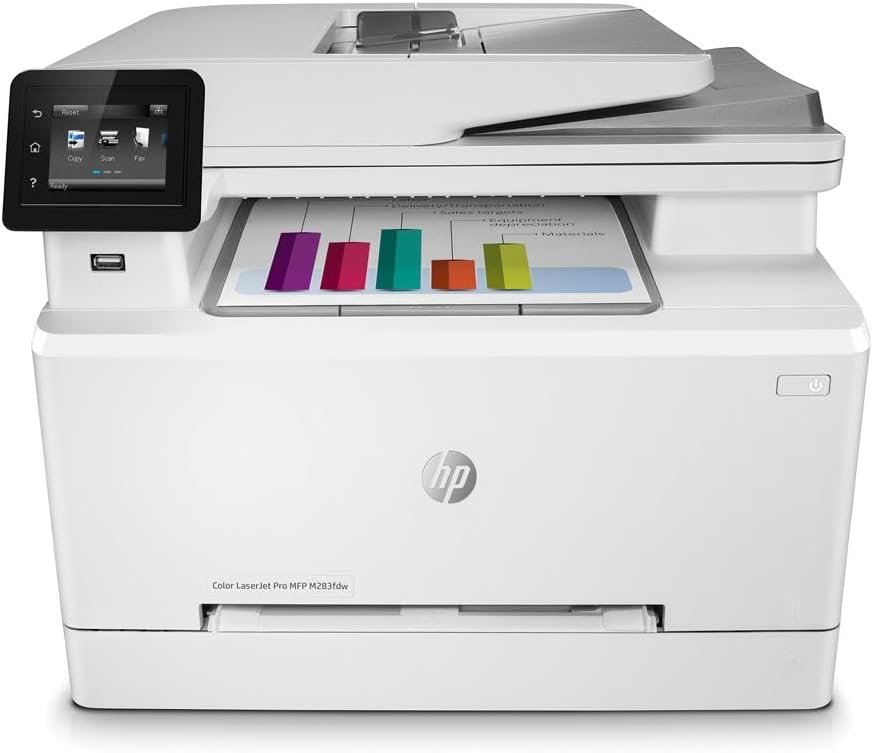
HP Color LaserJet Pro M283fdw: Features, Performance, and Use Cases
The Importance of Choosing the Right Printer
In today’s fast-paced business environment, the selection of a printer can significantly impact productivity and operational efficiency. Whether for small offices, remote teams, or home-based professionals, the right printer must balance speed, reliability, and multifunctionality to meet diverse printing needs. From generating high-quality color documents to managing large print volumes, the capabilities of a printer directly influence workflow efficiency and cost-effectiveness. For organizations requiring color output, laser printers offer superior print quality and durability compared to inkjet alternatives, while wireless connectivity and mobile integration ensure seamless access to printing functions. Understanding the technical specifications, performance benchmarks, and user requirements of a printer is essential for making informed purchasing decisions. This review evaluates the HP Color LaserJet Pro M283fdw, focusing on its ability to deliver consistent color output, support high-volume printing, and integrate with modern office workflows. By analyzing key factors such as print speed, connectivity options, and media versatility, this guide provides insights into whether this printer is suitable for specific use cases and environments.
Quick Overview
| Feature | Details |
|---|---|
| Printer Type | Color laser printer |
| Supported Functions | Print, scan, copy, fax |
| Print Resolution | 600 x 600 dpi (color and black/white) |
| Print Speed | Up to 22 pages per minute (color and monochrome) |
| Media Sizes | 4 x 6 to 8.5 x 14 inches; A4, A5, A6, B5, B6, C5 |
| Connectivity | Wi-Fi (dual-band), Ethernet, USB 2.0 |
| Duty Cycle | Designed for high-volume office use |
| Toner System | Original HP toner cartridges with JetIntelligence |
| Warranty | One-year commercial hardware warranty |
The HP Color LaserJet Pro M283fdw combines color laser printing with multifunctional capabilities, making it suitable for office environments that require consistent, high-quality output. Its dual-band Wi-Fi and Ethernet connectivity ensure reliable network access, while the 250-sheet input tray and 50-page automatic document feeder support efficient document management. The printer’s ability to handle color and black-and-white printing at 22 ppm makes it ideal for tasks such as report generation, marketing materials, and document duplication. Its integration with HP Smart and Alexa compatibility further enhances its usability in modern office setups.

Print Speed and Workload Capacity
The HP Color LaserJet Pro M283fdw delivers robust print performance with a maximum speed of 22 pages per minute for both color and monochrome printing. This speed rating is critical for environments that require rapid output, such as small to mid-sized offices or teams handling frequent document printing. The printer’s duty cycle, designed for high-volume office use, ensures that it can sustain continuous operation without overheating or degrading print quality. For users requiring consistent throughput, the 22 ppm rating aligns with industry benchmarks for color laser printers in its class, making it suitable for tasks such as invoice printing, client reports, and internal documentation. The printer’s ability to handle large print jobs efficiently reduces downtime and minimizes the need for frequent maintenance.

Print Speed and Throughput
The printer’s 22 ppm rating is achieved through a combination of advanced laser technology and optimized print engine design. The laser printer’s print engine processes images and text at a high rate, ensuring that even complex documents are rendered quickly without compromising resolution. The 250-sheet input tray and 50-page automatic document feeder further enhance productivity by reducing manual intervention during large print jobs. For users requiring high-speed output, the printer’s performance is well-suited for environments with consistent print demands, such as accounting departments or marketing teams. However, the printer’s speed may not match the capabilities of higher-end models in the same series, which are designed for even greater throughput.
Duty Cycle and Reliability
The HP Color LaserJet Pro M283fdw is engineered for environments with high print volumes, with a duty cycle that supports continuous operation without performance degradation. This specification is particularly important for businesses that rely on daily printing, as it ensures the printer can handle extended usage without overheating or requiring frequent maintenance. The printer’s reliability is further reinforced by its use of durable hardware components and a one-year commercial warranty, which provides coverage for hardware defects. For users prioritizing long-term stability, the printer’s design aligns with industry standards for office-grade printers, making it a dependable choice for daily operations.
Handling Large Print Jobs
The printer’s 50-page automatic document feeder and 250-sheet input tray are optimized for handling large print jobs efficiently. These features reduce the need for manual document feeding, allowing users to focus on other tasks. The printer’s ability to process multiple pages at once is particularly beneficial for tasks such as printing multi-page reports, invoices, or bulk documents. However, the printer’s capacity may not be sufficient for extremely high-volume environments, such as large-scale manufacturing or enterprise-level offices, which may require more advanced models with higher capacity trays and faster processing capabilities.
Connectivity Options and Device Compatibility
The HP Color LaserJet Pro M283fdw offers versatile connectivity options, including dual-band Wi-Fi, Ethernet, and USB 2.0 ports. This combination of wired and wireless connectivity ensures that the printer can be integrated into a variety of network environments, from small offices to larger enterprises. The dual-band Wi-Fi support enhances network stability by allowing the printer to operate on both 2.4 GHz and 5 GHz frequency bands, reducing interference and improving data transfer rates. For users requiring remote access, the printer’s compatibility with HP Smart and Amazon Alexa enables seamless integration with mobile devices and voice-activated systems. However, the printer’s reliance on wireless connectivity may introduce latency in certain scenarios, particularly in environments with limited network coverage or high interference.

Wireless and Wired Connectivity
The dual-band Wi-Fi capability of the HP Color LaserJet Pro M283fdw ensures stable and secure network performance, which is essential for environments where multiple devices are accessing the printer simultaneously. The Ethernet port provides an additional layer of reliability, making it suitable for users who prioritize wired connectivity for consistent performance. The printer’s ability to connect to both wired and wireless networks makes it adaptable to different office setups, from small workgroups to larger teams requiring centralized printing solutions. However, the absence of a dedicated mobile printing app beyond HP Smart may limit its usability for users who prefer alternative mobile printing platforms.
Mobile and Voice Integration
The printer’s compatibility with HP Smart and Amazon Alexa enhances its usability in modern office environments, allowing users to manage print jobs and access printer functions through mobile devices and voice commands. This integration reduces the need for physical interaction with the printer, improving efficiency for users who frequently work remotely or require hands-free operation. However, the effectiveness of these features depends on the availability of a stable network connection and the compatibility of the user’s devices with the printer’s software. For users who rely on alternative mobile printing solutions, the printer’s integration may not be as seamless as other models in the same category.
Network and Device Compatibility
The HP Color LaserJet Pro M283fdw is designed to work seamlessly with a wide range of devices, including PCs, smartphones, and tablets. Its support for cloud printing and network-ready features ensures that users can access printing functions from multiple locations without the need for physical proximity to the printer. The printer’s ability to connect to both wired and wireless networks makes it suitable for environments with varying connectivity requirements. However, users may need to configure the printer’s network settings manually, which could be a barrier for those unfamiliar with network administration. For businesses requiring advanced network integration, additional configuration may be necessary to optimize performance.
Print Quality and Output Expectations
The HP Color LaserJet Pro M283fdw delivers consistent print quality with a resolution of 600 x 600 dpi for both color and black-and-white printing. This resolution is well-suited for tasks such as generating reports, creating marketing materials, and printing internal documentation, where clarity and precision are essential. The printer’s ability to produce sharp text and vibrant color output makes it a reliable choice for users requiring professional-grade printing. However, the printer’s color output may not match the capabilities of higher-end models in the same series, which are designed for more complex print jobs requiring higher resolution and color accuracy. For users prioritizing print quality, the printer’s performance aligns with industry standards for color laser printers, making it a dependable option for most office environments.

Color and Black-and-White Output
The printer’s 600 x 600 dpi resolution ensures that both color and black-and-white documents are printed with clarity and precision. This makes the HP Color LaserJet Pro M283fdw suitable for tasks such as creating reports, generating marketing materials, and printing internal documentation. The printer’s ability to produce sharp text and vibrant colors enhances its usability for users requiring professional-grade output. However, the printer’s color output may not match the capabilities of higher-end models, which are designed for more complex print jobs requiring higher resolution and color accuracy. For users prioritizing print quality, the printer’s performance aligns with industry standards for color laser printers, making it a dependable option for most office environments.
Text and Graphics Clarity
The printer’s 600 x 600 dpi resolution ensures that both text and graphics are printed with clarity and precision. This is particularly beneficial for users requiring high-quality output for tasks such as creating reports, generating marketing materials, and printing internal documentation. The printer’s ability to produce sharp text and vibrant colors enhances its usability for users who need professional-grade printing. However, the printer’s color output may not match the capabilities of higher-end models, which are designed for more complex print jobs requiring higher resolution and color accuracy. For users prioritizing print quality, the printer’s performance aligns with industry standards for color laser printers, making it a dependable option for most office environments.
Consistency and Reliability
The HP Color LaserJet Pro M283fdw is engineered to deliver consistent print quality over time, with its laser technology and toner system ensuring reliable output. The printer’s ability to maintain high-resolution output across multiple print jobs makes it suitable for environments requiring frequent document printing. However, the printer’s performance may vary depending on the type of media used, with certain paper types potentially affecting print quality. For users requiring consistent output, the printer’s design aligns with industry standards for office-grade printers, making it a reliable choice for daily operations.

Pros & Cons
Pros
- High Print Speed: The 22 ppm rating ensures efficient output for color and black-and-white printing, making it suitable for environments with frequent print demands.
- Dual Connectivity: The dual-band Wi-Fi and Ethernet ports provide reliable network access, supporting both wireless and wired printing needs.
- Auto-Duplex Printing: The built-in automatic duplex printing reduces paper usage and enhances productivity for document duplication tasks.
- Strong Security Features: Built-in security essentials help protect sensitive business data and detect potential network threats.
- Mobile Integration: Compatibility with HP Smart and Amazon Alexa enables seamless remote management and voice-activated printing functions.
- Durable Design: The printer’s construction and duty cycle support high-volume office use without compromising performance.
- Color Laser Output: The 600 x 600 dpi resolution ensures sharp text and vibrant color output for professional-grade printing.
- One-Year Warranty: The included warranty provides coverage for hardware defects, offering peace of mind for users.
Cons
- Limited Media Sizes: While the printer supports a range of media sizes, its maximum capacity may not meet the needs of users requiring larger paper formats.
- Dependence on HP Toner: The printer is designed to work exclusively with original HP toner cartridges, limiting flexibility in consumable choices.
- Manual Network Configuration: Users may need to manually configure network settings, which could be a barrier for those unfamiliar with network administration.
- Weight and Size: The printer’s weight and dimensions may make it less suitable for compact office spaces or mobile setups.
- No Built-In Scan Output: While the printer includes a scanner, it lacks direct output options for scanned documents, requiring additional software or hardware for integration.
- Limited Mobile App Support: The printer’s mobile integration is primarily through HP Smart, which may not support alternative mobile printing platforms.
Final Verdict: Who This Printer Is Best For (and Who Should Skip It)
The HP Color LaserJet Pro M283fdw is best suited for small to mid-sized offices requiring reliable color printing, document management, and mobile integration. Its 22 ppm print speed, dual connectivity options, and auto-duplex printing make it an ideal choice for environments such as accounting departments, marketing teams, and administrative offices. The printer’s security features and compatibility with HP Smart and Alexa further enhance its usability in modern office settings. However, users with high-volume printing needs or those requiring larger media sizes may find the printer’s limitations restrictive. Additionally, the printer’s reliance on original HP toner cartridges and its manual network configuration requirements may deter users seeking more flexible consumable options or advanced network integration. For businesses prioritizing cost-effective, high-speed printing with minimal maintenance, the HP Color LaserJet Pro M283fdw offers a balanced solution that aligns with industry standards for office-grade printers.

Frequently Asked Questions (FAQs)
What is the maximum print speed of the HP Color LaserJet Pro M283fdw?
The HP Color LaserJet Pro M283fdw can print up to 22 pages per minute for both color and monochrome printing. This speed rating is suitable for environments with frequent print demands, though it may not match the capabilities of higher-end models in the same series.
Does the HP Color LaserJet Pro M283fdw support wireless printing?
Yes, the printer supports dual-band Wi-Fi for reliable wireless connectivity. It also includes an Ethernet port for wired connections, making it adaptable to various network environments.
What media sizes does the HP Color LaserJet Pro M283fdw support?
The printer supports media sizes ranging from 4 x 6 inches to 8.5 x 14 inches, including A4, A5, A6, B5, B6, and C5 formats. It is suitable for a wide range of printing tasks but may not accommodate larger paper sizes.
Can the HP Color LaserJet Pro M283fdw be used with non-HP toner cartridges?
No, the printer is designed to work only with original HP toner cartridges. It blocks the use of non-HP cartridges to ensure optimal performance and prevent counterfeits, as stated in the manufacturer’s specifications.
What security features are included in the HP Color LaserJet Pro M283fdw?
The printer includes built-in security essentials to protect sensitive business data and detect potential network threats. These features help ensure the printer remains secure in environments where data privacy is critical.
How does the HP Color LaserJet Pro M283fdw handle large print jobs?
The printer’s 50-page automatic document feeder and 250-sheet input tray are optimized for handling large print jobs efficiently. These features reduce manual intervention, making it suitable for tasks such as printing multi-page reports and bulk documents.
What is the warranty coverage for the HP Color LaserJet Pro M283fdw?
The printer comes with a one-year commercial hardware warranty, providing coverage for hardware defects. Users can also access 24-hour, 7 days a week web support for assistance with technical issues.
Is the HP Color LaserJet Pro M283fdw compatible with mobile printing?
Yes, the printer is compatible with HP Smart and Amazon Alexa, allowing users to manage print jobs and access printer functions through mobile devices and voice commands. This integration enhances usability for remote and hands-free printing.