HP Color LaserJet Pro MFP 3301fdw: Office Printing Performance Review

The Importance of Choosing the Right Printer for Modern Workspaces
In today’s fast-paced business environment, selecting the right printer can significantly impact productivity and operational efficiency. Whether managing a small team or handling large-scale office workflows, the capabilities of a printer directly affect document output quality, speed, and reliability. Modern printers must balance high-volume printing with cost-effective operation while meeting evolving demands for connectivity and multifunctionality. For organizations relying on professional-grade color output, the choice of printer technology—such as laser versus inkjet—can determine the viability of complex print jobs. Additionally, the integration of advanced features like duplex printing, wireless connectivity, and automated document handling can streamline workflows and reduce manual intervention. This review evaluates the HP Color LaserJet Pro MFP 3301fdw as a potential solution for office environments, focusing on its ability to deliver consistent color output, support high-volume printing, and integrate seamlessly with digital workflows. By analyzing technical specifications, supported media types, and performance benchmarks, this assessment provides insights into whether this printer is suitable for small to mid-sized businesses requiring reliable, multifunctional printing solutions.
Quick Overview
| Feature | Details |
|---|---|
| Printer Type | Color Laser Printer |
| Supported Functions | Print, Scan, Copy, Fax, Duplex Printing |
| Print Resolution | 600 x 600 dpi (Color/Black) |
| Print Speed | 26 ppm (Color/Black) |
| Media Sizes | 3 x 5 inches, 8.5 x 14 inches |
| Connectivity | Ethernet, USB, Wi-Fi (Dual-band) |
| Duty Cycle | 15,000 pages per month |
| Toner System | TerraJet Toner |
| Warranty | Limited Warranty |
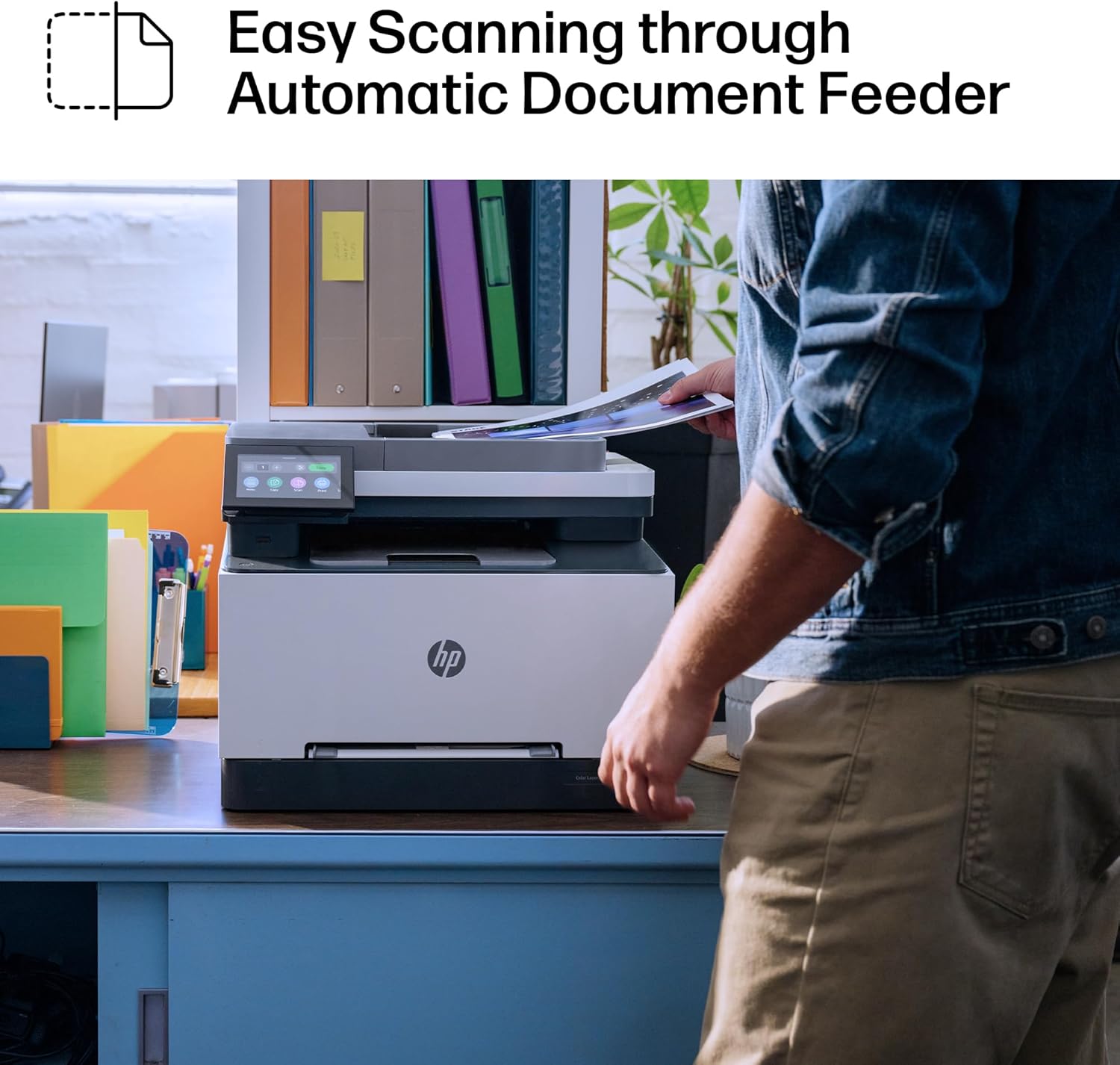
| Input Tray Capacity | 250-sheet ADF |
| Output Capacity | 100-sheet tray |
The HP Color LaserJet Pro MFP 3301fdw combines laser printing precision with multifunctional capabilities, making it suitable for office environments requiring high-volume color output. Its dual-band Wi-Fi connectivity and auto document feeder support efficient document handling, while the TerraJet toner system ensures consistent color reproduction. These features position it as a viable option for businesses prioritizing reliability and multifunctionality in their printing workflows.

Color Output and Print Quality
The HP Color LaserJet Pro MFP 3301fdw employs TerraJet toner technology to deliver professional-grade color output, making it well-suited for businesses requiring accurate color reproduction in reports, presentations, and marketing materials. Laser printing technology inherently provides sharper text and more consistent color density compared to inkjet alternatives, which is critical for maintaining document clarity in high-volume environments. The printer’s maximum color print resolution of 600 x 600 dpi ensures that graphics and text remain crisp, even when printed on standard letter-sized paper. This resolution level is sufficient for most office applications, including data tables, charts, and images, though it may not meet the demands of high-end graphic design workflows. The TerraJet toner system is designed to minimize color bleeding and ensure uniform coverage, which is essential for maintaining document professionalism in shared office spaces.

Toner System and Color Consistency
The TerraJet toner system is a key differentiator for the HP Color LaserJet Pro MFP 3301fdw, offering improved color vibrancy and reduced toner clumping compared to traditional laser printers. This technology ensures that colors remain consistent across multiple print jobs, which is crucial for businesses producing branded materials or standardized reports. The printer’s ability to maintain color accuracy over time is supported by its toner management system, which automatically adjusts toner distribution to prevent uneven coverage. While this system reduces the likelihood of color fading or toner shortages, it may not fully compensate for the inherent limitations of laser printing in producing photographic-quality images. For businesses primarily focused on text and standard graphics, the TerraJet toner system provides a reliable solution for maintaining consistent color output.
Media Compatibility and Print Stability
The HP Color LaserJet Pro MFP 3301fdw supports a range of media types, including standard paper, envelopes, and labels, which enhances its versatility in office environments. The printer’s ability to handle 8.5 x 14-inch media sizes accommodates larger documents such as reports and brochures, making it suitable for businesses requiring varied print formats. However, the printer’s media handling system is optimized for standard office paper, and its performance with specialty media like glossy or textured paper may be limited. The auto document feeder (ADF) and duplex printing capabilities further enhance productivity by reducing manual intervention, though users should be aware that the printer’s media path design may affect print stability when using thicker or irregularly shaped media.
Connectivity and Network Integration
The HP Color LaserJet Pro MFP 3301fdw is equipped with dual-band Wi-Fi connectivity, which allows for seamless integration into modern office networks. This feature ensures that users can print from smartphones, tablets, and computers without relying on physical connections, reducing the need for dedicated network infrastructure. The printer’s self-resetting Wi-Fi system automatically detects and resolves connection issues, which is particularly beneficial in environments with fluctuating network conditions. Additionally, the printer’s Ethernet and USB ports provide alternative connectivity options for users who prefer wired connections or need to integrate the printer into legacy systems. The inclusion of a 250-sheet input tray with an auto document feeder further enhances the printer’s ability to handle large print jobs without requiring frequent manual intervention.

Wireless Printing and Device Compatibility
The dual-band Wi-Fi capability of the HP Color LaserJet Pro MFP 3301fdw ensures compatibility with a wide range of devices, including smartphones, tablets, and computers running various operating systems. This feature is particularly advantageous for remote workers or teams that require access to printing capabilities from multiple devices. The printer’s ability to automatically detect and resolve Wi-Fi connection issues reduces the likelihood of downtime, which is critical in high-volume office environments. However, users should note that the printer’s wireless performance may be affected by network congestion or interference, which could impact print speed and reliability in densely populated office spaces. The printer’s support for mobile printing apps further enhances its usability, though the lack of built-in cloud printing features may limit its appeal to users requiring more advanced connectivity options.
Network Stability and Performance
The HP Color LaserJet Pro MFP 3301fdw’s network integration is designed to support stable printing in environments with multiple users and devices. The printer’s ability to maintain consistent performance across different network conditions is a key advantage, as it minimizes disruptions in print workflows. However, the printer’s reliance on Wi-Fi for wireless printing means that its performance is subject to the quality of the local network. In environments with weak Wi-Fi signals or high network traffic, users may experience delays or print job failures. The printer’s Ethernet port provides a more reliable alternative for users who prioritize stability over convenience, though it may not be as flexible as wireless options for mobile users. Overall, the printer’s connectivity features are well-suited for office environments that require a balance between reliability and ease of use.
Productivity and Workflow Efficiency
The HP Color LaserJet Pro MFP 3301fdw is designed to enhance productivity in office environments by integrating multiple functions into a single device. The printer’s auto document feeder (ADF) and duplex printing capabilities reduce the need for manual intervention, allowing users to process large volumes of documents efficiently. The ability to print on both sides automatically helps conserve paper and reduce printing costs, which is particularly beneficial for businesses with high paper consumption. Additionally, the printer’s support for scanning and faxing functions eliminates the need for separate devices, streamlining office workflows and reducing desk space requirements. However, the printer’s reliance on a single input tray may limit its efficiency for users who require multiple document feeds or specialized media handling.

Duplex Printing and Paper Conservation
The HP Color LaserJet Pro MFP 3301fdw’s automatic duplex printing feature is a significant advantage for businesses looking to reduce paper usage and printing costs. By printing on both sides of a sheet, the printer helps conserve resources while maintaining document readability. This feature is particularly useful for offices with high-volume printing needs, as it can significantly reduce the number of sheets required for reports, forms, and other documents. However, the printer’s duplex printing performance may be affected by the type of media used, with thicker or textured paper potentially causing misalignment or print quality issues. Users should be aware that while the printer’s duplex capabilities are efficient, they may not fully compensate for the limitations of certain media types.
Multifunctionality and Workflow Integration
The HP Color LaserJet Pro MFP 3301fdw’s multifunctional design allows it to handle print, scan, copy, and fax tasks within a single device, reducing the need for multiple machines in an office environment. This integration can improve workflow efficiency by minimizing the time required to switch between different functions. The printer’s ability to support scanning and faxing functions is particularly beneficial for small businesses that require these capabilities without investing in separate devices. However, the printer’s multifunctionality may not be sufficient for businesses with highly specialized printing needs, such as those requiring advanced graphic design capabilities or large-format printing. Overall, the printer’s multifunctional design is well-suited for offices that prioritize efficiency and cost-effectiveness.
Pros & Cons
Pros
- Professional Color Output: The TerraJet toner system ensures consistent and vibrant color reproduction, making it suitable for business reports and presentations.
- High Print Speeds: With a maximum print speed of 26 pages per minute, the printer is capable of handling high-volume office workflows efficiently.
- Dual-band Wi-Fi Connectivity: The printer’s self-resetting Wi-Fi system minimizes connection issues, ensuring reliable wireless printing in office environments.
- Auto Document Feeder: The 250-sheet input tray with an ADF reduces manual intervention, enhancing productivity for large print jobs.
- Duplex Printing: Automatic duplex printing helps conserve paper and reduce printing costs, which is beneficial for businesses with high paper consumption.
- Multifunctionality: The printer’s integration of print, scan, copy, and fax functions streamlines office workflows and reduces the need for multiple devices.
Cons
- Limited Media Compatibility: While the printer supports standard paper and envelopes, its performance with specialty media like glossy or textured paper may be limited.
- Single Input Tray: The reliance on a single 250-sheet tray may limit efficiency for users requiring multiple document feeds or specialized media handling.
- Network Dependency: The printer’s wireless printing capabilities are subject to network stability, which could impact print speed and reliability in congested environments.
- Toner Management Limitations: While the TerraJet system improves color consistency, it may not fully compensate for the inherent limitations of laser printing in producing photographic-quality images.
- Lack of Cloud Printing Features: The absence of built-in cloud printing options may limit its appeal to users requiring more advanced connectivity solutions.
Final Verdict: Who This Printer Is Best For (and Who Should Skip It)
The HP Color LaserJet Pro MFP 3301fdw is best suited for small to mid-sized businesses requiring reliable, multifunctional printing in an office environment. Its high print speeds, professional color output, and dual-band Wi-Fi connectivity make it an ideal choice for teams that need to produce reports, presentations, and marketing materials efficiently. The printer’s auto document feeder and duplex printing capabilities further enhance productivity by reducing manual intervention and conserving resources. However, this printer may not be the best fit for businesses with specialized printing needs, such as those requiring large-format printing or advanced graphic design capabilities. Additionally, users operating in environments with unstable network conditions or requiring more advanced connectivity options may find the printer’s limitations restrictive. Overall, the HP Color LaserJet Pro MFP 3301fdw offers a balanced combination of performance and cost-effectiveness, making it a strong contender for office environments prioritizing reliability and efficiency.

Frequently Asked Questions (FAQs)
What is the maximum print speed of the HP Color LaserJet Pro MFP 3301fdw?
The HP Color LaserJet Pro MFP 3301fdw can print up to 26 pages per minute in both color and black-and-white modes, making it suitable for high-volume office environments.
Does the printer support wireless printing?
Yes, the HP Color LaserJet Pro MFP 3301fdw includes dual-band Wi-Fi connectivity, allowing for seamless wireless printing from smartphones, tablets, and computers.
What types of media can this printer handle?
The printer supports standard paper, envelopes, and labels, with media sizes ranging from 3 x 5 inches to 8.5 x 14 inches. It is optimized for office use but may have limitations with specialty media.
Can the printer handle duplex printing?
Yes, the HP Color LaserJet Pro MFP 3301fdw features automatic duplex printing, which helps conserve paper and reduce printing costs for high-volume workflows.
What connectivity options are available?
The printer offers Ethernet, USB, and dual-band Wi-Fi connectivity, providing flexibility for wired and wireless printing in various office environments.
What is the warranty coverage for this printer?
The HP Color LaserJet Pro MFP 3301fdw comes with a limited warranty, which covers parts and labor for the specified period of ownership.
How does the TerraJet toner system improve print quality?
The TerraJet toner system ensures consistent color reproduction and reduces toner clumping, providing sharper text and more vibrant colors for professional-grade output.
Is the printer suitable for small business use?
Yes, the HP Color LaserJet Pro MFP 3301fdw is well-suited for small to mid-sized businesses, offering reliable color printing, multifunctionality, and efficient workflow capabilities.