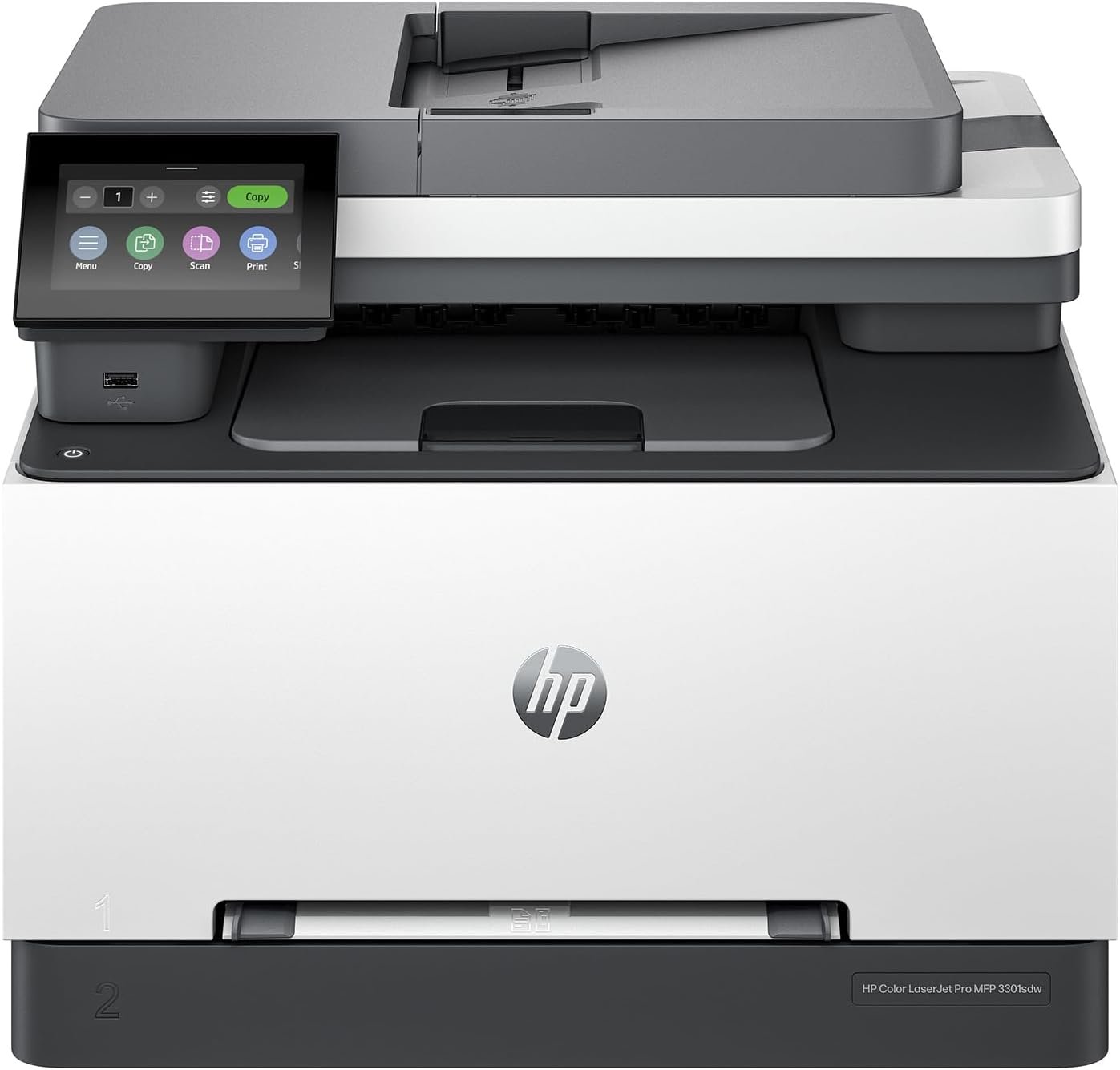
HP Color LaserJet Pro MFP 3301sdw Review: Office-Ready Color Printing & Scanning
The Importance of Choosing the Right Printer for Modern Workflows
In today’s fast-paced business environment, selecting the right printer can significantly impact productivity and operational efficiency. Whether managing a small team or handling complex office tasks, a printer must meet specific requirements for print quality, speed, connectivity, and reliability. The HP Color LaserJet Pro MFP 3301sdw is designed to address these needs with a combination of advanced laser technology, multifunctional capabilities, and scalable performance. From creating professional reports to scanning and copying documents, this printer aims to streamline workflows while maintaining consistent output quality. Understanding the balance between cost-effectiveness, feature set, and long-term usability is critical for businesses evaluating their printing solutions. This review provides an objective analysis of the 3301sdw’s capabilities, helping users determine if it aligns with their specific needs and operational demands.
Quick Overview
| Feature | Details |
|---|---|
| Printer Type | Color Laser Multifunction Printer |
| Supported Functions | Print, Scan, Copy, Duplex Printing |
| Print Resolution | 600×600 Dots Per Inch (Color/Black & White) |
| Print Speed | Up to 30 ppm Color, 30 ppm Monochrome |
| Media Sizes | Legal (8.5 x 14 inches), Letter (8.5 x 11 inches) |
| Connectivity | USB, Wi-Fi, Ethernet |
| Input Tray Capacity | 250-Sheet Automatic Document Feeder |
| Duplex Printing | Automatic |
| Toner System | Original HP 218A/218X LaserJet Toner Cartridges |
| Warranty | Limited Warranty |
The HP Color LaserJet Pro MFP 3301sdw is tailored for office environments requiring reliable color printing, scanning, and copying. Its combination of high-speed output, multifunctional capabilities, and scalable connectivity options makes it a suitable choice for small to mid-sized teams prioritizing efficiency and productivity.

Color Print Quality and Output Consistency
The HP Color LaserJet Pro MFP 3301sdw leverages TerraJet toner technology to deliver vibrant color output suitable for professional documents. This print engine ensures consistent color reproduction across multiple pages, making it ideal for reports, presentations, and marketing materials. The printer’s ability to maintain color accuracy over extended usage is supported by its laser-based imaging system, which minimizes toner wastage and ensures even distribution across media. While it may not rival high-end photo printers in tonal range, its color depth and resolution meet standard office requirements. The 600×600 DPI output provides sufficient detail for text and graphics, though users demanding ultra-high-resolution printing may find it lacking. The printer’s design also includes a 250-sheet input tray and automatic duplex printing, reducing paper handling time and improving overall workflow efficiency.

Laser Technology and Toner System
The TerraJet toner system enhances color vibrancy by using a proprietary blend of toner particles that adhere more effectively to paper surfaces. This results in sharper text and more saturated colors compared to standard laser printers. The printer supports Original HP 218A and 218X toner cartridges, with the high-yield option offering extended print runs for cost-effective long-term use. However, the reliance on HP-branded toner may limit flexibility for users seeking third-party alternatives. The toner’s ability to withstand high-volume printing without compromising quality is a key strength, though frequent cartridge replacements could increase maintenance costs over time.
Media Compatibility and Print Stability
The 3301sdw is designed to handle standard office paper sizes, including letter and legal formats, ensuring compatibility with most business printing needs. Its laser technology ensures minimal smudging and excellent page durability, making it suitable for environments where documents are frequently handled. While the printer supports a range of media types, its focus on standard paper may limit its appeal for users requiring specialized media compatibility. The automatic duplex printing feature further enhances efficiency by reducing paper consumption, though users with unique media requirements may need to consider alternative models.
Connectivity and Integration Capabilities
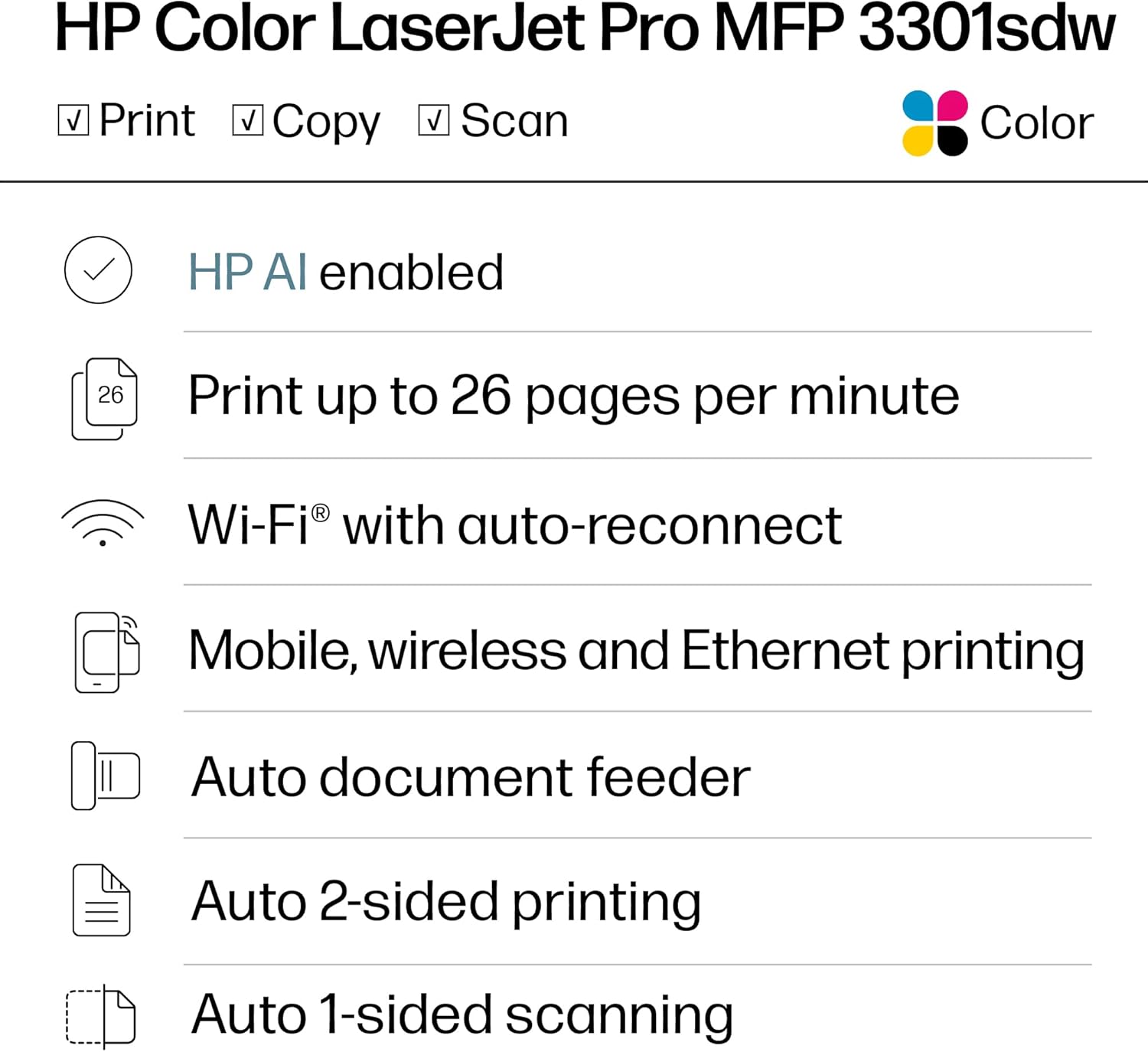
The HP Color LaserJet Pro MFP 3301sdw offers a versatile connectivity suite, including USB, Wi-Fi, and Ethernet ports, enabling seamless integration with modern office environments. This multi-protocol approach allows users to connect the printer to desktops, laptops, and mobile devices, supporting both direct and networked printing scenarios. The inclusion of a dedicated Ethernet port ensures stable performance in larger workspaces, while Wi-Fi connectivity facilitates remote access and mobile printing. The printer’s compatibility with smartphones and tablets enhances its utility for teams relying on mobile workflows. However, the absence of advanced networking features like cloud printing or mobile app integration may limit its appeal for users seeking more sophisticated connectivity options.
Network and Device Compatibility
The printer’s Ethernet port provides a reliable connection for networked environments, allowing multiple users to access shared printing resources without performance degradation. Its Wi-Fi capabilities enable wireless printing from devices within the same local network, though setup may require additional configuration for optimal performance. The printer’s support for a wide range of compatible devices ensures flexibility in integration, though users with specific device requirements may need to verify compatibility with their existing systems. The lack of a dedicated mobile app for direct printing could be a drawback for users prioritizing mobile convenience.
Firmware Updates and Security
Regular firmware updates are essential for maintaining the printer’s performance and security, as noted in the product documentation. These updates ensure continued compatibility with evolving network protocols and address potential vulnerabilities. The printer’s design includes measures to prevent the use of non-HP toner cartridges, which helps maintain print quality and system integrity. While these safeguards enhance reliability, they may restrict customization options for advanced users. The absence of detailed security features for enterprise environments could be a consideration for organizations with heightened cybersecurity requirements.

Pros & Cons
Pros
- High-Speed Color Printing: The 30 ppm color output ensures efficient document production for busy offices.
- Multifunctional Capabilities: Print, scan, copy, and duplex printing functions streamline office workflows.
- TerraJet Toner Technology: Enhanced color vibrancy and consistency for professional-grade output.
- Scalable Connectivity Options: USB, Wi-Fi, and Ethernet ports support diverse integration needs.
- Automatic Duplex Printing: Reduces paper usage and improves sustainability.
- Durable Laser Print Engine: Ensures long-term reliability for high-volume environments.
- 250-Sheet Input Tray: Minimizes paper jams and improves throughput for multi-page documents.
- Original Toner Compatibility: Ensures consistent print quality with HP-branded toner cartridges.
Cons
- Limited Media Compatibility: Focus on standard paper sizes may exclude specialized media types.
- Dependence on HP Toner: Restricts cost-effective third-party cartridge options.
- No Cloud Printing Support: Lacks direct integration with cloud-based printing services.
- Basic Mobile App Features: Limited mobile printing capabilities compared to competitors.
- Higher Toner Costs: Original HP cartridges may increase long-term operational expenses.
- No Advanced Networking Features: Misses out on enterprise-level security and management tools.
- Firmware Update Requirements: Periodic updates may require additional administrative effort.
Final Verdict: Who This Printer Is Best For (and Who Should Skip It)
The HP Color LaserJet Pro MFP 3301sdw is best suited for small to mid-sized offices requiring reliable color printing, scanning, and copying capabilities. Its combination of high-speed output, multifunctional design, and scalable connectivity options makes it ideal for teams prioritizing efficiency and consistency. The TerraJet toner system ensures vibrant color reproduction, while the automatic duplex printing feature enhances sustainability. However, users with specialized media requirements, advanced networking needs, or a preference for third-party toner may find the 3301sdw less suitable. Organizations demanding enterprise-level security, cloud integration, or ultra-high-resolution printing should consider alternative models with more advanced features. For most standard office environments, the 3301sdw offers a balanced solution that meets common productivity needs without compromising on quality or reliability.

Frequently Asked Questions (FAQs)
What print resolution does the HP Color LaserJet Pro MFP 3301sdw offer?
The HP Color LaserJet Pro MFP 3301sdw provides a print resolution of 600×600 dots per inch for both color and black-and-white printing, ensuring clear text and sufficient detail for standard office documents.
Can the HP Color LaserJet Pro MFP 3301sdw handle legal-sized paper?
Yes, the printer supports legal-sized media up to 8.5 x 14 inches, making it suitable for printing documents that require larger paper dimensions.
What connectivity options are available for the HP Color LaserJet Pro MFP 3301sdw?
The printer offers USB, Wi-Fi, and Ethernet connectivity options, enabling flexible integration with desktops, laptops, and networked environments.
Does the HP Color LaserJet Pro MFP 3301sdw support automatic duplex printing?
Yes, the printer includes an automatic duplex printing feature that reduces paper usage and enhances sustainability for multi-page documents.
What types of toner cartridges are compatible with the HP Color LaserJet Pro MFP 3301sdw?
The printer is designed to work exclusively with Original HP 218A standard and 218X high-yield toner cartridges, ensuring consistent print quality and performance.
How many sheets can the HP Color LaserJet Pro MFP 3301sdw handle in its input tray?
The printer features a 250-sheet input tray, which minimizes paper jams and improves throughput for high-volume printing tasks.
Is the HP Color LaserJet Pro MFP 3301sdw suitable for small office environments?
Yes, the printer’s combination of high-speed color printing, multifunctional capabilities, and reliable performance makes it well-suited for small to mid-sized office settings.
What is the maximum print speed of the HP Color LaserJet Pro MFP 3301sdw?
The printer delivers a maximum print speed of 30 pages per minute for both color and black-and-white printing, ensuring efficient document production for busy workloads.