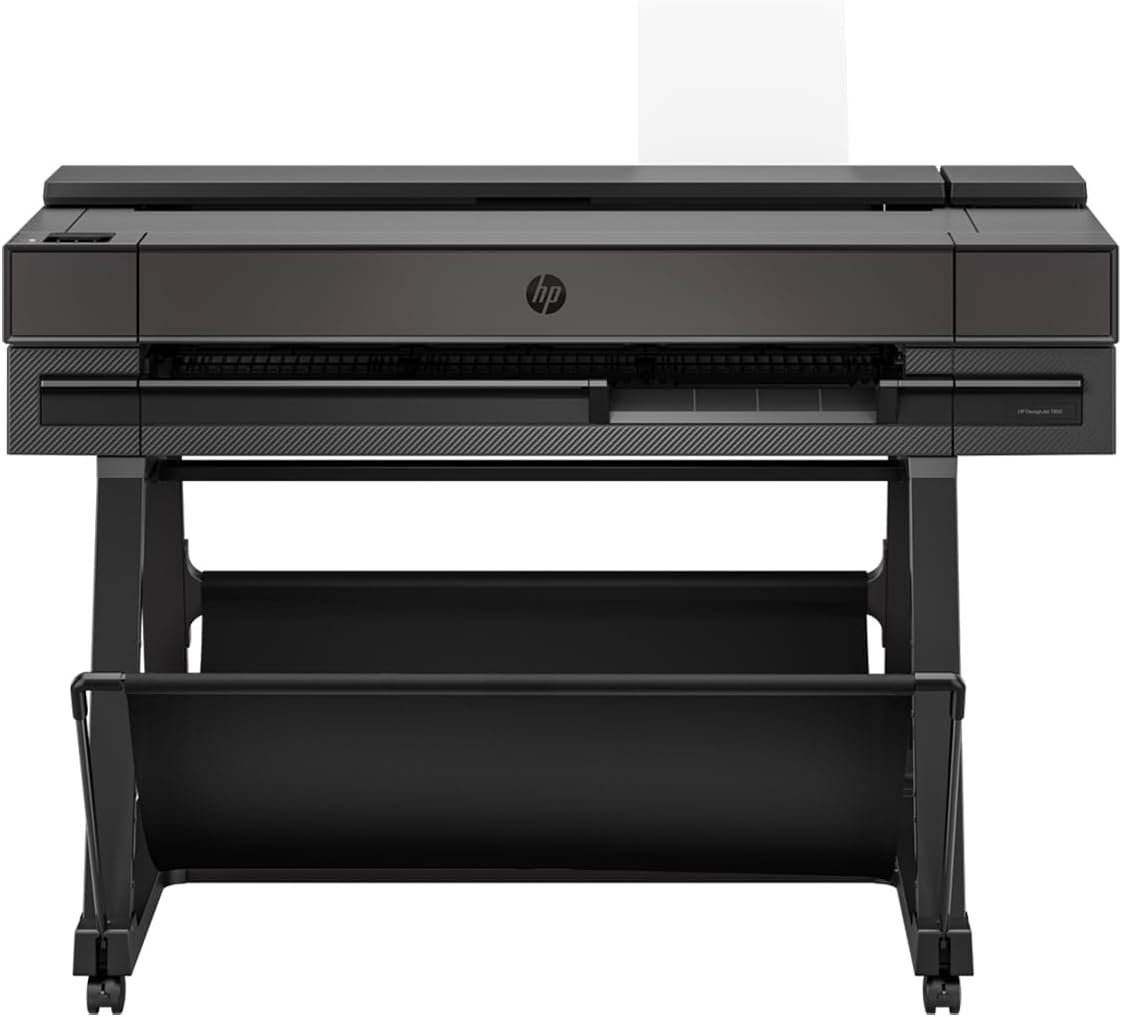
HP DesignJet T850 36-Inch Color Plotter: Print Quality & Performance Guide
The Importance of Choosing the Right Printer for Professional Workflows
In today’s fast-paced professional environments, the right printer can significantly impact productivity, accuracy, and cost efficiency. Whether you’re an architect, engineer, or construction professional, the demand for high-quality, precise output is non-negotiable. Large format printers like the HP DesignJet T850 are designed to meet these rigorous requirements, offering a balance of technical performance, versatility, and reliability. The decision to invest in such a printer involves evaluating factors like print resolution, media compatibility, connectivity options, and long-term maintenance costs. This review provides an in-depth analysis of the HP DesignJet T850, focusing on its specifications, performance benchmarks, and suitability for specific use cases. By examining its capabilities in detail, we can determine whether this printer is the optimal choice for professionals who prioritize precision, speed, and adaptability in their workflows.
Quick Overview
| Feature | Details |
|---|---|
| Printer Type | 36-inch Color Plotter Printer |
| Printing Technology | Thermal Inkjet |
| Print Resolution | Up to 2400 x 1200 Dots Per Inch |
| Print Speed | Up to 25 seconds per D-size page (90 prints per hour) |
| Media Handling | A4 to A0 media rolls and 13 x 19-inch sheets |
| Connectivity | Gigabit Ethernet, Wi-Fi 802.11b/g/n, USB |
| Ink System | 4 pigment-based ink cartridges (C, M, Y, mK) |
| Warranty | Extended 2-year limited warranty |
| Dimensions | 27.6″D x 55.4″W x 38.1″H |
| Weight | 126.7 pounds |
| Supported Media | Banner paper, glossy film, high-resolution paper, glossy photo paper |
| Memory | 1 GB |
| Power Consumption | 35 Watts |
The HP DesignJet T850 is engineered for users who require precise, high-resolution output on large media. Its thermal inkjet technology ensures consistent color accuracy and fine detail reproduction, making it ideal for technical drawings, architectural blueprints, and detailed maps. The printer’s versatility in handling multiple media types and sizes, combined with its robust connectivity options, positions it as a reliable choice for professionals working in environments where adaptability and accuracy are paramount.

Print Quality and Resolution: Precision for Technical Applications
The HP DesignJet T850 delivers exceptional print quality through its advanced thermal inkjet technology, which enables a maximum resolution of 2400 x 1200 dots per inch. This level of detail is critical for technical-line drawings and architectural renderings, where even minor inconsistencies can compromise the integrity of the output. The printer’s pigment-based ink system ensures long-lasting prints that resist fading and maintain vibrancy over time, which is particularly important for documents that may be displayed or archived for extended periods. The inclusion of 4 ink cartridges—cyan, magenta, yellow, and a dedicated black (mK)—allows for a wide color gamut, enabling precise color reproduction that meets industry standards for professional-grade output. For users who rely on sharp text and crisp lines, the T850’s ability to produce high-resolution prints on a variety of media types, including glossy photo paper and high-resolution paper, makes it an attractive option for demanding workflows.

Color Accuracy and Gamut
The printer’s color management system is designed to ensure consistent and accurate color reproduction across different media types. By utilizing a four-color ink set, the T850 can produce a broad range of hues, which is essential for applications such as renderings and maps where color fidelity is crucial. The pigment-based inks used in the T850 are known for their durability and resistance to environmental factors, which helps maintain print quality over time. This characteristic is particularly beneficial for users who need to produce prints that will be used in environments with varying light conditions or exposed to outdoor elements. The printer’s ability to handle both glossy and matte finishes further enhances its versatility, allowing users to select the most appropriate media for their specific project requirements.
Text and Line Quality
For technical drawings and architectural plans, the clarity and precision of text and lines are paramount. The HP DesignJet T850 excels in this regard, producing sharp, legible text even at high resolutions. The thermal inkjet technology ensures that lines are crisp and consistent, reducing the risk of smudging or bleeding, which can be a common issue with lower-quality printers. The printer’s ability to maintain fine detail in both vector and raster graphics makes it well-suited for applications where precision is non-negotiable. This level of detail is particularly important for professionals who need to present their work to clients or colleagues, as it ensures that the final output meets the highest standards of accuracy and professionalism.
Print Speed and Throughput: Balancing Efficiency with Quality
The HP DesignJet T850 is designed to balance high print quality with efficient throughput, making it suitable for environments where both speed and accuracy are required. With a print speed of up to 25 seconds per D-size page, the printer can produce 90 prints per hour, which is a significant advantage for users who need to handle large volumes of output without compromising on quality. This speed is achieved through the printer’s thermal inkjet technology, which allows for rapid ink deposition while maintaining the precision required for technical applications. The ability to process multiple pages quickly is particularly beneficial for professionals who need to produce large-scale projects, such as detailed maps or complex engineering diagrams, within tight deadlines.

Throughput and Workload Capacity
The T850’s workload capacity is another key factor that makes it suitable for high-demand environments. The printer is designed to handle continuous operation, with a duty cycle that accommodates frequent use without significant wear on its components. The inclusion of a 1 GB memory capacity ensures that the printer can manage large print jobs efficiently, reducing the risk of delays or performance degradation. This is particularly important for users who need to process multiple print tasks simultaneously, such as architects who may need to produce several sets of blueprints at once. The printer’s ability to maintain consistent performance under heavy use makes it an ideal choice for professionals who require reliable, high-speed output without compromising on quality.
Print Time and Efficiency
The initial page print time of 25 seconds is a notable feature of the HP DesignJet T850, as it allows users to start their print jobs quickly without significant delays. This efficiency is particularly beneficial for users who need to produce multiple prints in a short period, such as for presentations or client reviews. The printer’s ability to maintain a consistent print speed throughout its operation ensures that users can rely on it to meet their deadlines without interruptions. Additionally, the printer’s connectivity options, including Gigabit Ethernet and Wi-Fi, allow for seamless integration into existing workflows, further enhancing its efficiency. This combination of speed and reliability makes the T850 a strong contender for professionals who need to balance productivity with precision in their printing tasks.
Media Handling and Compatibility: Versatility for Diverse Projects
The HP DesignJet T850 is engineered to handle a wide range of media sizes and types, making it a versatile choice for professionals with diverse printing needs. The printer supports media rolls up to 36 inches wide, as well as sheets up to 13 inches by 19 inches, providing flexibility for different project requirements. This versatility is particularly advantageous for users who need to produce both large-scale maps and detailed technical drawings, as the printer can accommodate the necessary media without requiring frequent adjustments. The inclusion of an input tray and manual feed options further enhances the printer’s adaptability, allowing users to manage various media types with ease.

Supported Media Types
The T850’s compatibility with a variety of media types, including banner paper, glossy film, and high-resolution paper, ensures that users can select the most appropriate material for their specific project. This range of options is particularly beneficial for professionals who need to produce prints for different applications, such as marketing materials, architectural plans, or engineering diagrams. The printer’s ability to handle both glossy and matte finishes adds to its versatility, allowing users to choose the most suitable finish for their output. This flexibility is essential for users who require prints that meet specific aesthetic or functional requirements, such as those used in exhibitions or client presentations.
Media Handling Features
The printer’s media handling features are designed to simplify the printing process, reducing the need for manual intervention. The input tray and manual feed options allow users to load media quickly and efficiently, minimizing the time spent on setup and preparation. Additionally, the printer’s ability to manage large media rolls ensures that users can process extensive projects without frequent reloading. This feature is particularly beneficial for professionals who need to produce large-scale prints, such as maps or detailed engineering diagrams, as it reduces the risk of errors associated with manual handling. The combination of these features makes the T850 a practical choice for users who prioritize efficiency and ease of use in their printing workflows.
Connectivity and Integration: Seamless Workflow for Modern Workspaces
The HP DesignJet T850 is equipped with robust connectivity options that facilitate seamless integration into modern workspaces, ensuring that users can manage their printing tasks efficiently. The printer supports Gigabit Ethernet and Wi-Fi 802.11b/g/n, allowing for flexible placement and easy network connectivity. This dual connectivity option is particularly beneficial for users who need to access the printer from multiple devices or locations, as it ensures that the printer can be integrated into existing network infrastructures without requiring significant modifications. The ability to connect via USB further enhances its versatility, providing an additional option for users who prefer direct device connections.
Network Integration and Flexibility
The T850’s support for Gigabit Ethernet and Wi-Fi enables users to place the printer in a location that best suits their workspace, without being constrained by physical proximity to a network hub. This flexibility is essential for users who operate in environments where space is limited or where the printer needs to be accessible from multiple areas. The printer’s ability to maintain a stable connection through these networking options ensures that users can reliably access and manage their printing tasks without interruptions. This is particularly important for professionals who rely on the printer for time-sensitive projects, as it minimizes the risk of connectivity issues that could delay output.
Device Compatibility and Accessibility
The HP DesignJet T850 is compatible with a range of devices, including PCs, macOS, and iOS devices, as well as smartphones and tablets. This broad compatibility ensures that users can manage their printing tasks from virtually any device, enhancing the printer’s accessibility and convenience. The ability to print from mobile devices is particularly beneficial for professionals who need to produce prints on the go, such as architects who may need to review plans during site visits. The printer’s touch-based control method further simplifies the user experience, allowing users to navigate its features and settings with ease. This combination of connectivity options and device compatibility makes the T850 a practical choice for users who require a flexible and accessible printing solution.
Pros and Cons: Evaluating the HP DesignJet T850’s Strengths and Limitations
Pros
- High Print Resolution: The T850’s 2400 x 1200 dpi resolution ensures exceptional detail, making it ideal for technical drawings and maps.
- Versatile Media Handling: The printer supports a wide range of media sizes and types, including 36-inch rolls and 13 x 19-inch sheets.
- Robust Connectivity Options: Gigabit Ethernet and Wi-Fi provide flexible network integration, allowing for seamless access from multiple devices.
- Pigment-Based Ink System: The use of pigment-based inks ensures long-lasting, fade-resistant prints that maintain vibrancy over time.
- Extended Warranty: The included 2-year warranty provides additional peace of mind for users concerned about long-term reliability.
- Efficient Print Speed: With a print speed of up to 25 seconds per D-size page, the T850 balances speed with high-quality output.
- User-Friendly Interface: The touch-based control method simplifies navigation and management of printing tasks.
- Compatibility with Multiple Devices: The printer supports a wide range of devices, including PCs, macOS, iOS, and Android smartphones.
Cons
- Regular Ink Replacement: The 4-color pigment-based ink system requires frequent cartridge replacements, which may increase ongoing maintenance costs.
- Limited Duplex Printing: The absence of automatic duplex printing means users must manually handle double-sided prints, which can be time-consuming.
- Large Physical Footprint: The printer’s substantial size (126.7 pounds) may pose challenges in spaces with limited room for large equipment.
- Dependence on Media Quality: The printer’s performance is heavily influenced by the quality of the media used, which may require users to invest in higher-grade materials.
- Potential for Media Handling Issues: While the input tray and manual feed options offer versatility, they may also introduce the risk of media jams or misfeeds if not handled carefully.
Final Verdict: Who This Printer Is Best For (and Who Should Skip It)
The HP DesignJet T850 is an excellent choice for professionals who require precise, high-resolution output on large-format media. Its thermal inkjet technology, combined with a pigment-based ink system, ensures that prints maintain their quality over time, making it particularly suitable for applications such as architectural blueprints, engineering diagrams, and detailed maps. The printer’s versatility in handling a wide range of media sizes and types, along with its robust connectivity options, makes it a reliable option for users who need to integrate the printer into existing workflows. Additionally, the included 2-year warranty provides reassurance for long-term use.
However, the T850 may not be the best fit for users who prioritize high-speed monochrome printing or require frequent duplex printing capabilities. The need for regular ink cartridge replacements and the printer’s large physical footprint could also be drawbacks for users with limited space or budget constraints. For professionals who need a printer that can handle high-volume, fast-paced environments without compromising on quality, the T850 is a strong contender. Conversely, those seeking a more compact, cost-effective solution with advanced duplex capabilities may find other models more suitable.
FAQs
Frequently Asked Questions (FAQs)
What is the maximum print resolution of the HP DesignJet T850?
The HP DesignJet T850 delivers up to 2400 x 1200 dots per inch (dpi) resolution, ensuring precise detail and vibrant color reproduction for technical drawings, maps, and architectural blueprints.
Can the HP DesignJet T850 handle large media sizes?
Yes, the printer supports media rolls up to 36 inches wide and sheets up to 13 x 19 inches. This versatility allows it to accommodate a wide range of project requirements, from detailed maps to engineering diagrams.
What connectivity options are available for the HP DesignJet T850?
The printer offers Gigabit Ethernet, Wi-Fi 802.11b/g/n, and USB connectivity. These options provide flexible network integration and allow users to access the printer from multiple devices without physical proximity to a network hub.
How does the ink system affect print quality and longevity?
The HP DesignJet T850 uses 4 pigment-based ink cartridges (C, M, Y, mK) that provide long-lasting, fade-resistant prints. This ink system ensures vibrant color reproduction and durability, making it suitable for projects that require archival quality.
Is the HP DesignJet T850 suitable for high-volume printing?
The printer is designed for continuous operation and can handle high-volume workloads. Its 1 GB memory and thermal inkjet technology support efficient processing of large print jobs, making it suitable for environments with frequent use.
What is the warranty coverage for the HP DesignJet T850?
The HP DesignJet T850 comes with an extended 2-year limited warranty, providing users with additional assurance of reliability and long-term support for their printing needs.
Can the HP DesignJet T850 print on glossy and matte media?
Yes, the printer is compatible with a variety of media types, including glossy film, glossy photo paper, and high-resolution paper. This flexibility allows users to choose the most appropriate finish for their specific project requirements.
What are the limitations of the HP DesignJet T850’s media handling?
While the printer offers versatile media handling with an input tray and manual feed options, it does not support automatic duplex printing. Users must manually handle double-sided prints, which may increase the time required for certain tasks.