VersaCheck HP Deskjet 2755 MXE MICR Printer: Check Printing & Office Use
The Importance of Choosing the Right Printer for Your Workflow
In today’s fast-paced business environment, selecting the right printer can significantly impact productivity and operational efficiency. Whether you’re managing payroll, handling accounts payable, or processing customer payments, the ability to produce accurate, compliant documents is critical. For organizations requiring specialized printing capabilities, such as MICR (Magnetic Ink Character Recognition) for checks, the choice of printer technology and features can determine the reliability and security of financial transactions. This review evaluates the VersaCheck HP Deskjet 2755 MXE MICR All-in-One Printer, a device designed to meet the specific needs of businesses requiring MICR compliance while also handling everyday printing, copying, and scanning tasks. The printer’s integration of VersaCheck X1 Gold software, support for blank check paper, and dual-sided printing capabilities make it a compelling option for small to mid-sized offices. However, its suitability depends on factors like print volume, connectivity requirements, and the need for MICR-compliant output. Understanding these considerations will help users determine whether this printer aligns with their operational demands and workflow requirements.
Quick Overview
| Feature | Details |
|---|---|
| Printer Type | Inkjet All-in-One |
| Print Technology | VersaInk MICR Black & Color Inkjet |
| Supported Functions | Print, Copy, Scan |
| Print Resolution | 600 x 600 dpi (Black/White), 600 x 600 dpi (Color) |
| Media Sizes | Legal (8.5 x 14 inches) |
| Connectivity | USB, Wi-Fi |
| Duty Cycle | 150 sheets per minute |
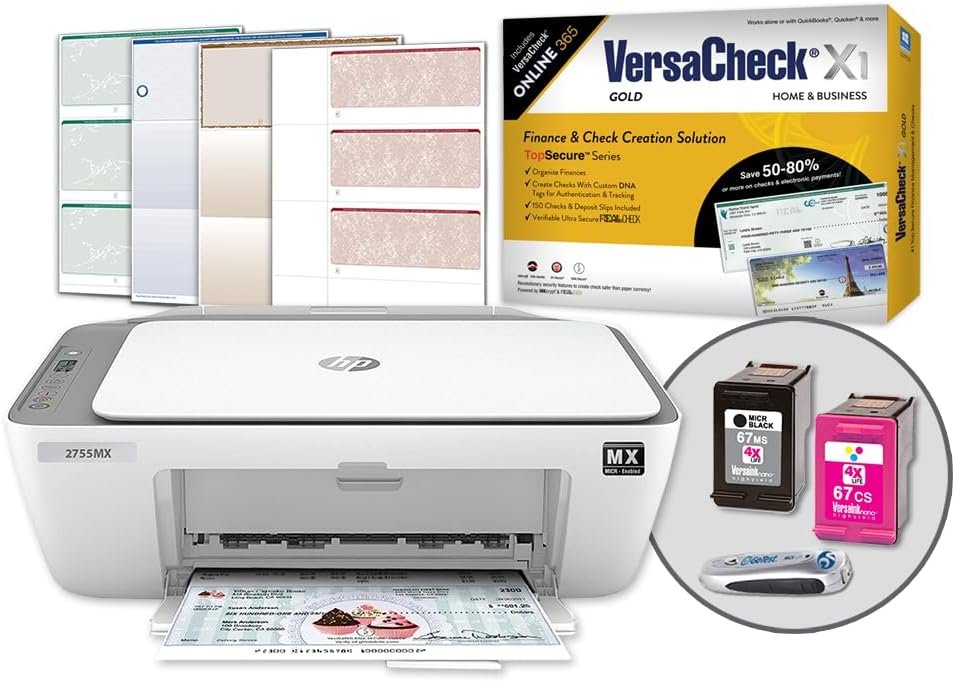
| Ink System | VersaInk-nano HP 67 MS (MICR Black), HP 67 CS (Color) |
| Warranty | Limited warranty |
| Additional Features | Dual-sided printing, GoTest MICR & UV Scanner |
The VersaCheck HP Deskjet 2755 MXE combines MICR compliance with all-in-one functionality, making it suitable for businesses that require secure check printing alongside general document management. Its support for blank check paper and integration with accounting software like QuickBooks and Sage enhances its utility for financial workflows. However, the printer’s performance and reliability depend on factors like network connectivity, media compatibility, and the specific needs of the user’s environment.

MICR Compliance and Financial Document Security
The VersaCheck HP Deskjet 2755 MXE is specifically engineered for MICR-compliant check printing, a critical requirement for businesses handling financial transactions. MICR technology ensures that checks are readable by automated systems, reducing errors and fraud risks. The printer’s VersaInk magnetic black ink cartridge is designed to meet ANSI X9 banking standards, providing the precise magnetic properties needed for secure check processing. This feature is particularly valuable for organizations that need to generate checks for payroll, accounts payable, or internal financial records. The included blank check paper starter pack further simplifies compliance, as it is pre-formatted with security features like erasure protection, micro print lines, and artificial watermarks. These elements collectively ensure that printed checks meet industry standards and reduce the risk of counterfeit fraud. However, users must verify that their specific check design requirements align with the printer’s capabilities, as customization options may be limited.

ANSI X9 Compliance and Security Features
The printer’s compliance with ANSI X9 standards is a key differentiator in the MICR check printing market. This standard ensures that checks are formatted correctly for magnetic ink recognition, which is essential for processing through banking systems. The included blank check paper features security measures such as micro print lines and security screens, which are designed to deter unauthorized alterations. These features are particularly important for businesses that handle sensitive financial documents, as they help prevent fraud and ensure the integrity of printed checks. The artificial watermarks on the paper further enhance security by making it difficult to reproduce checks without detection. However, users should note that the printer’s ability to produce fully compliant checks depends on the accuracy of the VersaCheck X1 Gold software, which must be properly configured to match the required check formats.
VersaCheck Software Integration and Customization
The VersaCheck X1 Gold software included with the printer allows users to design and print checks tailored to their specific needs. This software is compatible with various accounting systems, including QuickBooks, Sage, and NetSuite, making it a versatile tool for businesses that integrate financial workflows with other software. The software’s ability to generate checks with embedded security features ensures that printed documents meet both regulatory and organizational requirements. However, users should be aware that while the software provides a robust framework for check design, advanced customization may require additional configuration or third-party tools. The ease of use of the software is a significant advantage, as it simplifies the process of generating compliant checks without requiring extensive technical expertise.
Print Speed and Workload Capacity
For businesses that require frequent check printing, the VersaCheck HP Deskjet 2755 MXE’s print speed and workload capacity are important considerations. The printer’s maximum print speed for monochrome documents is 7.5 pages per minute (ppm), while color printing is slightly slower at 5.5 ppm. These speeds are adequate for moderate to low-volume check printing but may not be sufficient for high-volume environments that require faster output. The printer’s duty cycle of 150 sheets per minute indicates that it is designed for regular use rather than continuous, high-intensity printing. This makes it well-suited for small to mid-sized offices where check printing is a regular but not overwhelming task. However, users with very high print volumes should consider whether the printer’s speed and workload capacity can meet their operational demands without compromising reliability or performance.

Dual-Sided Printing and Efficiency
The printer’s support for dual-sided printing adds to its efficiency in handling check production. This feature allows users to print on both sides of the paper, reducing the need for additional paper and minimizing waste. For businesses that print large volumes of checks, dual-sided printing can also help streamline the process by reducing the number of sheets required. However, the effectiveness of this feature depends on the specific workflow and whether the printer can maintain consistent quality on both sides of the paper. The printer’s ability to handle dual-sided printing without compromising MICR compliance is a key factor in its suitability for financial workflows. Users should also consider the impact of dual-sided printing on the printer’s overall workload and whether it affects the longevity of the ink cartridges or the print head.
Media Compatibility and Paper Handling
The VersaCheck HP Deskjet 2755 MXE is designed to handle a variety of media types, including standard plain paper and the included blank check paper. The maximum media size supported by the printer is 8.5 x 14 inches, which is suitable for legal-sized checks and documents. The printer’s paper tray can accommodate up to 150 sheets, which is adequate for most office environments. However, users should be aware that the printer’s media compatibility may be limited to specific paper types, and using non-recommended paper could affect print quality or cause feeding issues. The printer’s ability to handle different paper weights and textures is another consideration, as thicker or textured paper may require adjustments to the print settings to ensure optimal results. Overall, the printer’s media handling capabilities are sufficient for its intended use, but users should ensure that they are using compatible paper to avoid potential issues.
Connectivity and Device Compatibility
The VersaCheck HP Deskjet 2755 MXE offers both USB and Wi-Fi connectivity options, providing flexibility in how users interact with the printer. The Wi-Fi connectivity allows for seamless printing from mobile devices, tablets, and laptops, which is particularly useful for businesses that require remote or on-the-go printing. However, setting up the wireless connection requires a stable internet connection, which may be a consideration for users in areas with unreliable network coverage. The printer’s compatibility with a range of devices, including iOS and Android smartphones, enhances its usability in modern office environments. Additionally, the printer’s support for integration with accounting software like QuickBooks and Sage ensures that it can be seamlessly incorporated into existing financial workflows. However, users should verify that their specific software or device compatibility requirements are supported by the printer’s connectivity options.

Network Setup and Wireless Printing
The printer’s wireless printing capability is a significant advantage for businesses that need to print from multiple devices without the need for physical connections. Setting up the wireless connection requires a stable internet connection, which is a standard requirement for most modern printers. The printer’s ability to print from tablets and smartphones adds to its versatility, making it suitable for users who prefer mobile printing. However, users should be aware that wireless printing may introduce potential latency or connectivity issues, particularly in environments with high network traffic or interference. The printer’s support for both USB and Wi-Fi connectivity provides a backup option in case of wireless connectivity problems, ensuring that printing can continue without interruption. Overall, the printer’s connectivity options are well-suited for most office environments, but users should ensure that their network infrastructure can support the required wireless printing capabilities.
Compatibility with Accounting Software
The VersaCheck HP Deskjet 2755 MXE is designed to integrate with a wide range of accounting software, including QuickBooks, Sage, NetSuite, and XERO. This compatibility is a key advantage for businesses that use these platforms to manage their financial operations. The printer’s integration with these software systems allows for streamlined check printing, reducing the need for manual data entry and minimizing errors. However, users should verify that their specific software version is compatible with the printer’s features, as some older versions may require additional configuration or updates. The printer’s ability to handle check design and printing through the VersaCheck X1 Gold software further enhances its compatibility with accounting systems, making it a valuable tool for businesses that rely on digital financial workflows.

Pros & Cons
Pros
- MICR Compliance: The printer’s VersaInk magnetic black ink and ANSI X9-compliant check paper ensure secure, bank-ready check printing.
- All-in-One Functionality: Supports printing, copying, and scanning, making it suitable for general office tasks beyond check production.
- Software Integration: VersaCheck X1 Gold software is compatible with accounting systems like QuickBooks and Sage, streamlining financial workflows.
- Dual-Sided Printing: Reduces paper waste and enhances efficiency for check production.
- Wireless Connectivity: Allows printing from mobile devices and tablets, improving flexibility in modern office environments.
- Security Features: Blank check paper includes erasure protection, micro print lines, and artificial watermarks to deter fraud.
- Compatibility with Multiple Devices: Supports USB and Wi-Fi, ensuring versatility in device usage.
- Included Components: Comes with a starter pack of blank check paper and a GoTest MICR & UV scanner for verification.
Cons
- Limited Print Speed: Monochrome printing at 7.5 ppm and color at 5.5 ppm may not meet high-volume check printing demands.
- Wireless Setup Requirements: Requires a stable internet connection for wireless printing, which may be a challenge in some environments.
- Media Compatibility Restrictions: May not handle all paper types optimally, potentially affecting print quality or causing feeding issues.
- Duty Cycle Limitations: Designed for regular use rather than continuous, high-intensity printing, which may be a drawback for very high-volume operations.
- Software Customization Constraints: While VersaCheck X1 Gold offers robust check design, advanced customization may require additional configuration or third-party tools.
- Weight and Portability: The printer’s 12.97-pound weight and fixed tray design may limit its suitability for mobile or space-constrained environments.
- No Fax Capability: Lacks a built-in fax function, which may be a disadvantage for businesses requiring this feature.
Final Verdict: Who This Printer Is Best For (and Who Should Skip It)
The VersaCheck HP Deskjet 2755 MXE is an excellent choice for small to mid-sized businesses that require MICR-compliant check printing alongside general office tasks. Its integration with accounting software, support for blank check paper, and wireless connectivity make it a versatile option for financial workflows. The printer’s dual-sided printing and security features further enhance its suitability for environments where document integrity and fraud prevention are critical. However, businesses with high-volume check printing needs or those requiring faster print speeds may find this printer insufficient. Additionally, organizations that rely on fax capabilities or require more advanced media compatibility may need to consider alternative solutions. For users seeking a balance between secure check printing and general office use, the HP Deskjet 2755 MXE offers a reliable and feature-rich option that meets the demands of most small to mid-sized operations.
Frequently Asked Questions (FAQs)
Can the VersaCheck HP Deskjet 2755 MXE print bank-compliant checks?
Yes, the printer is designed for MICR-compliant check printing using ANSI X9 standards. It includes a VersaInk magnetic black ink cartridge and blank check paper with security features like erasure protection and artificial watermarks to meet banking requirements.
Is the printer compatible with accounting software like QuickBooks?
The printer integrates with QuickBooks, Sage, NetSuite, XERO, and other accounting systems through the included VersaCheck X1 Gold software, allowing for streamlined check design and printing within financial workflows.
What media sizes does the printer support?
The VersaCheck HP Deskjet 2755 MXE supports legal-sized paper (8.5 x 14 inches) and is compatible with standard plain paper, though it is optimized for use with the included blank check paper for MICR compliance.
How does the printer handle dual-sided printing?
The printer supports dual-sided printing, which reduces paper waste and allows for efficient check production. This feature is particularly useful for printing on both sides of legal-sized check paper without compromising MICR compliance.
Can the printer be used wirelessly with mobile devices?
Yes, the printer offers Wi-Fi connectivity, enabling printing from tablets, smartphones, and laptops. A stable internet connection is required for wireless setup and operation.
What are the print speeds for monochrome and color printing?
The printer produces monochrome documents at 7.5 pages per minute (ppm) and color prints at 5.5 ppm, which is suitable for moderate to low-volume check printing but may not meet high-speed requirements.
Does the printer include a check verification tool?
Yes, the printer comes with a GoTest MICR & UV scanner to verify the authenticity of printed checks, ensuring they meet banking standards and security requirements.