VersaCheck HP DeskJet 4155 MXE MICR Printer 2026: Print Quality, Speed, and Compatibility
The Importance of Choosing the Right Printer
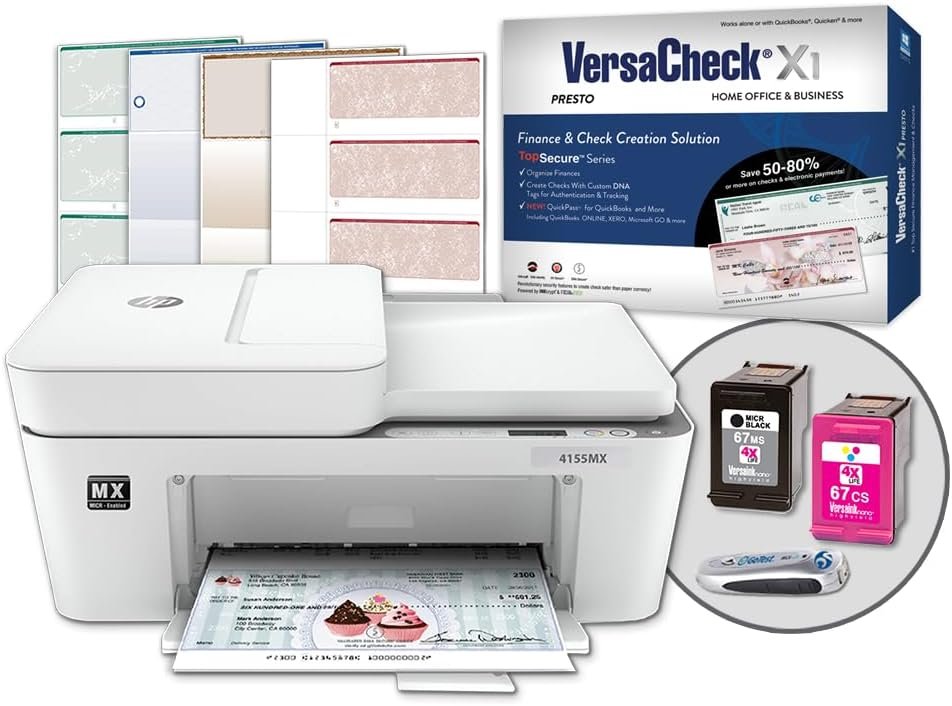
In today’s fast-paced business environment, selecting the right printer is more than a convenience—it’s a critical operational decision. Whether managing financial workflows, handling document management, or supporting remote teams, the performance of your printing solution directly impacts productivity and compliance. For institutions requiring precise, bank-compliant check printing, the VersaCheck HP DeskJet 4155 MXE MICR All-in-One Printer represents a specialized tool designed to meet these exacting demands. Its integration of MICR (Magnetic Ink Character Recognition) technology, combined with color printing capabilities, positions it as a viable option for financial institutions, accounting firms, and small businesses. However, the decision to adopt this printer requires careful evaluation of its technical specifications, connectivity options, and long-term maintenance requirements. This review provides an objective analysis of the printer’s performance characteristics, helping users determine if it aligns with their specific printing needs and operational constraints.
Quick Overview
| Feature | Details |
|---|---|
| Printer Type | Inkjet All-in-One Printer |
| Supported Functions | Print, Copy, Scan |
| Print Resolution | 4800 x 1200 dpi (color), 600 dpi (black and white) |
| Media Sizes | Legal (8.5 x 14 inches) |
| Connectivity Options | USB, Wi-Fi |
| Duty Cycle | 1,500 pages per month (recommended) |
| Ink System | VersaInk-nano HP 67 MICR Black & Color Cartridges |
| Warranty | Limited warranty |
The VersaCheck HP DeskJet 4155 MXE combines MICR inkjet technology with standard color printing capabilities, making it suitable for environments requiring both financial document accuracy and general-purpose output. Its wireless connectivity and built-in scanner support streamline workflows for users managing multiple tasks. However, its design prioritizes MICR compliance over high-speed color printing, which may influence its suitability for certain applications.

Print Quality and MICR Compliance

Bank-Compliant MICR Technology
The printer’s core functionality centers on its MICR inkjet technology, which is essential for producing checks that meet banking standards. The VersaInk-nano HP 67 MICR Black Cartridge contains specialized inks designed to generate magnetic ink characters that can be read by automated banking systems. This ensures that printed checks are accepted by financial institutions without requiring additional verification steps. The printer’s ability to produce MICR lines with precise alignment and consistent tonal variation is critical for compliance, as deviations can result in check rejections.
Color Accuracy and Resolution
For non-MICR documents, the printer delivers color output at 4800 x 1200 dpi, which is suitable for producing professional-quality graphics and text. The 24-bit color depth ensures a wide range of color representation, though it may not match the precision of laser printers for high-volume color printing. The 600 dpi black-and-white resolution is adequate for standard text documents but may lack the sharpness required for detailed black-and-white graphics. Users prioritizing color accuracy should consider the printer’s intended use cases, as its color output is optimized for general business documents rather than photographic quality.
MICR Line Calibration and Consistency
The printer’s MICR functionality relies on precise calibration of the magnetic ink line, which is critical for ensuring readability. The included GoTest MICR and UV scanner allows users to verify the accuracy of printed checks, though this process is not automatic. The printer’s design does not include built-in calibration tools, which may require users to manually verify MICR line quality. This could be a limitation for organizations requiring frequent check printing, as manual verification increases the potential for human error.
Print Speed and Workload Capacity

Base Print Speeds and Throughput
The VersaCheck HP DeskJet 4155 MXE is rated for a maximum color print speed of 5.5 pages per minute (ppm) and 8.5 ppm for monochrome printing. These speeds are suitable for moderate-volume environments but may fall short for high-throughput operations. The recommended duty cycle of 1,500 pages per month suggests it is designed for small to mid-sized businesses rather than large-scale printing operations. Users requiring faster output should consider printers with higher ppm ratings, though the VersaCheck model’s speed is adequate for its intended purpose of MICR check printing and general business documents.
Duplex Printing and Paper Handling
The printer supports manual duplex printing, which allows for double-sided output without requiring a dedicated duplex unit. While this feature reduces paper consumption, it may not be as efficient as automatic duplex printing found in some all-in-one printers. The maximum media size of 8.5 x 14 inches accommodates legal-sized paper, which is essential for check printing. However, the single tray design may limit the ability to handle multiple paper types simultaneously, requiring users to manually load different media for each print job.
Network Connectivity and Wireless Performance
The printer’s Wi-Fi connectivity enables printing from mobile devices and networked computers, which is a significant advantage for remote workers and distributed teams. However, wireless printing performance depends on network stability and interference, which can affect print reliability. The printer’s USB port provides a direct connection for users prioritizing faster data transfer, though this is a single-port design that may not accommodate multiple devices simultaneously. For environments with high print volume, a wired connection may offer more consistent performance.
Connectivity and Device Compatibility

Wireless Printing and Network Integration
The printer’s built-in Wi-Fi capability allows users to print from smartphones, tablets, and computers without physical connections. This feature is particularly beneficial for small businesses and remote teams that require flexible printing options. However, wireless printing performance is contingent on the stability of the local network, which may introduce latency or connectivity issues. The printer’s compatibility with Windows 11, 10, and 8.1 ensures broad support for modern operating systems, though it does not include macOS or Linux compatibility, which may be a consideration for users on alternative platforms.
Mobile and Cloud Integration
While the printer does not explicitly support cloud printing services like Google Cloud Print or Apple AirPrint, its VersaCheck Presto software enables check design and printing through a downloadable application. This software is compatible with Windows-based systems, providing a streamlined workflow for users who need to create and print checks. The lack of native cloud integration may be a drawback for users who rely on cloud-based document management systems, though the included software offers a viable alternative for check printing tasks.
Device Compatibility and Setup Requirements
The printer requires a wireless internet connection for setup, which is a standard requirement for modern wireless printers. This ensures that users can access online resources for software updates and printer configuration. However, the absence of a built-in Ethernet port means that wired connections are not an option, which may limit its suitability for environments with strict network security requirements. Users should also consider the printer’s compatibility with third-party software or integration with existing document management systems, as these factors can influence its overall usability.
Pros & Cons
Pros
- MICR Compliance: The printer’s specialized MICR ink and calibration tools ensure checks meet banking standards, reducing the risk of rejections.
- All-in-One Functionality: Print, copy, and scan capabilities streamline document management without requiring multiple devices.
- Wireless Connectivity: Built-in Wi-Fi enables printing from mobile devices and networked computers, enhancing flexibility.
- Color Printing: The 4800 x 1200 dpi color resolution is suitable for producing professional-quality business documents.
- Included Accessories: The starter pack and GoTest scanner provide a comprehensive solution for check verification and printing.
- Scalable for Small to Mid-Sized Businesses: The 1,500-page monthly duty cycle is appropriate for environments with moderate print volumes.
Cons
- Limited Color Output: While color printing is adequate for general use, it may not match the precision of laser printers for high-volume color work.
- Manual Duplex Printing: The lack of automatic duplex printing may increase paper handling time and consumption.
- Single Tray Design: The single paper tray limits the ability to handle multiple media types simultaneously, requiring manual loading.
- No macOS/Linux Compatibility: The printer’s software is only available for Windows, which may be a drawback for users on alternative platforms.
- Wireless Dependency: Reliance on Wi-Fi for setup and printing may introduce connectivity issues in unstable networks.
- No Built-In Calibration Tools: Users must manually verify MICR line quality, increasing the potential for human error.
Final Verdict: Who This Printer Is Best For (and Who Should Skip It)
The VersaCheck HP DeskJet 4155 MXE MICR All-in-One Printer is best suited for small to mid-sized businesses that require bank-compliant check printing alongside general document management. Its MICR capabilities, combined with color printing and wireless connectivity, make it an ideal choice for financial institutions, accounting firms, and businesses with moderate print volumes. The included software and accessories provide a comprehensive solution for check creation and verification, reducing the need for additional peripherals.
However, this printer may not be suitable for users prioritizing high-speed color printing, as its 5.5 ppm color output is relatively slow compared to dedicated color printers. Organizations with heavy print demands or those requiring automatic duplex printing should consider alternatives with higher throughput and more advanced paper handling. Additionally, users on non-Windows platforms or those requiring cloud integration may find the printer’s limitations restrictive. For environments where MICR compliance is critical and general printing needs are moderate, the VersaCheck HP DeskJet 4155 MXE offers a reliable and cost-effective solution.
Frequently Asked Questions (FAQs)
What is the VersaCheck HP DeskJet 4155 MXE best suited for?
This printer is ideal for small to mid-sized businesses requiring MICR-compliant check printing and general document management. Its combination of MICR technology, color printing, and wireless connectivity makes it suitable for financial institutions, accounting firms, and businesses with moderate print volumes.
Can the printer handle both MICR checks and color documents?
Yes, the printer supports both MICR check printing and color document output. The MICR inkjet technology ensures compliance for checks, while the 4800 x 1200 dpi color resolution is suitable for producing professional-quality business documents.
Is the printer compatible with macOS or Linux systems?
No, the VersaCheck HP DeskJet 4155 MXE is only compatible with Windows operating systems. The included VersaCheck Presto software is designed for Windows 11, 10, and 8.1, and does not support macOS or Linux.
What is the recommended monthly print volume for this printer?
The printer is rated for a maximum monthly print volume of 1,500 pages, making it suitable for small to mid-sized businesses. Exceeding this volume may affect print quality and longevity.
Does the printer support automatic duplex printing?
No, the printer supports manual duplex printing. Users must manually feed paper for double-sided printing, which may increase paper handling time and consumption compared to automatic duplex units.
How does the printer ensure MICR line accuracy?
The printer uses specialized MICR ink and requires manual verification through the included GoTest MICR and UV scanner. Users must periodically check printed checks to ensure magnetic ink lines meet banking standards.
Can the printer be used with cloud printing services?
The printer does not support native cloud printing services like Google Cloud Print or Apple AirPrint. However, the VersaCheck Presto software enables check design and printing through a downloadable application compatible with Windows-based systems.
What are the connectivity options for this printer?
The printer offers both USB and Wi-Fi connectivity. Wi-Fi enables printing from mobile devices and networked computers, while USB provides a direct connection for faster data transfer. A built-in Ethernet port is not included.