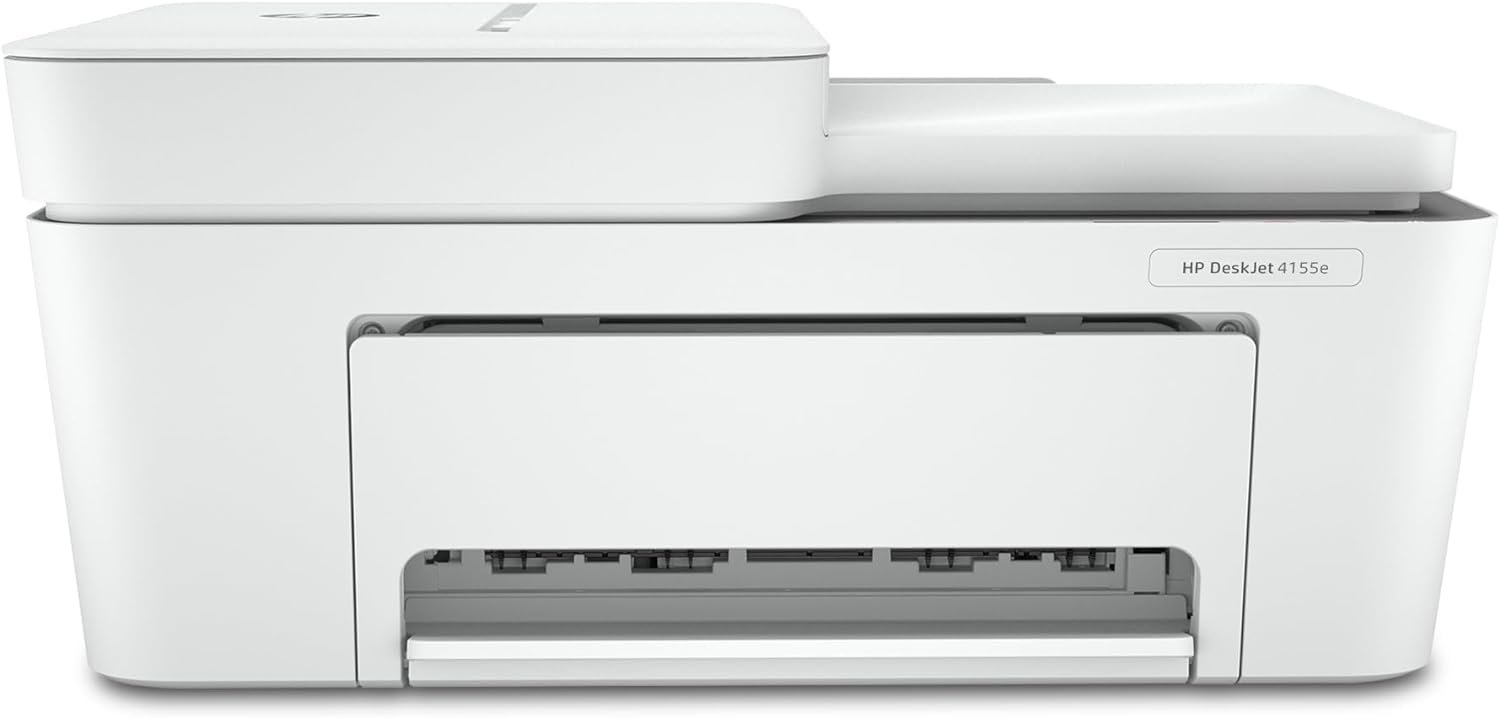
HP DeskJet 4155e Wireless Color Inkjet Printer Review
The Importance of Choosing the Right Printer for Home and Small Office Use
Selecting the appropriate printer for home or small office environments requires careful consideration of print quality, speed, connectivity, and maintenance requirements. Modern households and professionals often need a versatile device capable of handling basic color documents, forms, and occasional photo printing while maintaining ease of use and reliability. A printer’s ability to integrate with mobile devices, support wireless connectivity, and deliver consistent output quality can significantly impact user satisfaction. For users prioritizing simplicity and cost-effectiveness, a printer with built-in features like automatic updates, cloud printing, and mobile compatibility can streamline workflows. However, performance expectations vary depending on usage patterns—whether it’s printing school projects, managing personal finances, or creating travel documents. This review evaluates the HP DeskJet 4155e’s ability to meet these diverse needs through its technical specifications, supported media types, and connectivity options, providing insights for buyers seeking a balance between functionality and affordability.
Quick Overview
| Feature | Details |
|---|---|
| Printer Type | Inkjet, All-in-One |
| Print Technology | Dye-based inkjet |
| Print Speeds | 8.5 ppm black, 5.5 ppm color |
| Media Sizes | 3 x 5 to 8.5 x 14 inches |
| Connectivity | USB 2.0, dual-band Wi-Fi |
| Print Resolution | 1200 x 1200 dpi black/white, 4800 x 1200 dpi color |
| Supported Media | Paper, envelopes, glossy photo paper, labels |
| Ink System | HP Ink with 3-month trial |
| Warranty | Limited warranty |
| Duty Cycle | Designed for home use |
The HP DeskJet 4155e is tailored for users requiring basic color printing, scanning, and copying capabilities. Its dual connectivity options and mobile printing features make it suitable for home environments where wireless access and cloud integration are preferred. The included ink trial and automatic updates enhance usability, though its performance is optimized for low-to-moderate volume tasks rather than high-speed commercial printing.

Print Quality and Resolution Performance
The HP DeskJet 4155e delivers consistent print quality suitable for everyday home use, with resolution specifications that balance clarity and efficiency. For text and line art, the printer achieves 1200 x 1200 dots per inch (dpi) in black and white, ensuring sharp, legible output for documents and forms. Color printing at 4800 x 1200 dpi provides vibrant, detailed results for photos and graphics, though the dye-based ink system may result in slightly less fade resistance compared to pigment-based alternatives. This resolution profile is ideal for users prioritizing clarity over professional-grade photo printing, making it well-suited for school projects, personal photos, and basic color documents. The printer’s ability to handle glossy photo paper and labels expands its versatility, though users requiring archival-quality prints may need to consider alternative media types or ink systems.

Color Print Resolution and Media Compatibility
The 4800 x 1200 dpi color resolution enables the HP DeskJet 4155e to produce sharp, vivid color prints for everyday use. This resolution is particularly effective for printing photos, graphics, and color forms, ensuring that details like text and images remain clear. The printer supports a range of media types, including glossy photo paper, labels, and envelopes, allowing users to customize output for different tasks. However, the dye-based ink system may result in color fading over time, which could be a consideration for users requiring long-term archival prints. The supported media sizes, ranging from 3 x 5 inches to 8.5 x 14 inches, provide flexibility for standard paper and specialty sheets, though the lack of automatic duplex printing means users must manually flip pages for double-sided output.
Black and White Print Resolution and Text Clarity
For black and white printing, the HP DeskJet 4155e offers 1200 x 1200 dpi resolution, which ensures crisp, professional-looking text and line art. This level of detail is particularly beneficial for printing documents, forms, and spreadsheets where clarity is essential. The printer’s ability to maintain consistent tonal depth and sharpness across different paper types makes it suitable for both everyday use and occasional professional tasks. However, the absence of advanced print modes for specialized text formatting may limit its appeal to users requiring high-end document production. The printer’s performance in black and white is well-suited for home environments where simplicity and reliability are prioritized over complex print settings.
Media Support and Output Flexibility
The HP DeskJet 4155e’s support for a variety of media types, including envelopes, labels, and glossy photo paper, enhances its adaptability for different printing needs. The inclusion of an auto document feeder and flatbed scanner further improves usability for tasks like scanning documents or copying pages. While the printer’s media compatibility covers most common use cases, users requiring specialized paper types or advanced media handling may find its capabilities limited. The printer’s design for home use means it is optimized for moderate print volumes rather than high-speed commercial printing, making it a practical choice for users with straightforward printing requirements.
Connectivity Options and Mobile Printing Integration
The HP DeskJet 4155e offers a combination of wired and wireless connectivity to accommodate different user preferences and environments. Its dual-band Wi-Fi capability ensures stable, high-speed connections for cloud-based printing and mobile access, while the USB 2.0 port provides a reliable alternative for direct device transfers. The printer’s integration with HP+ Smart Printing System allows users to manage updates, security settings, and mobile printing features through the HP Smart app, streamlining the printing process for home users. However, the reliance on an HP account and internet connection may pose challenges for users without consistent connectivity. The printer’s support for mobile printing and cloud services makes it well-suited for users who frequently print from smartphones or tablets, though its performance in high-traffic networks may vary based on environmental factors.

Wireless Connectivity and Network Stability
The dual-band Wi-Fi connectivity of the HP DeskJet 4155e enhances its ability to maintain stable, fast connections for wireless printing. This feature is particularly beneficial for users with multiple devices or those requiring remote access to the printer. The printer’s self-resetting network capabilities help resolve connectivity issues without manual intervention, improving reliability for home users. However, the effectiveness of wireless printing may depend on the user’s network environment, with potential latency or interference affecting performance in crowded or unstable networks. The inclusion of a USB 2.0 port ensures compatibility with older devices and provides a fallback option for users without wireless access.
Mobile Printing and Cloud Integration
The HP DeskJet 4155e’s support for mobile printing and cloud integration simplifies the printing process for users who frequently access documents from smartphones or tablets. The HP Smart app enables seamless setup and management of printing tasks, with features like mobile fax and advanced scanning capabilities enhancing its utility for home users. The printer’s ability to receive automatic updates ensures that security and functionality remain up-to-date without requiring manual intervention. However, the reliance on an HP account and internet connection may limit accessibility for users without consistent connectivity. The integration of cloud printing services makes the printer a practical choice for users seeking convenient, on-the-go printing options.
Compatibility with Smart Devices and Operating Systems
The HP DeskJet 4155e is designed to work seamlessly with a range of smart devices and operating systems, including laptops, PCs, and smartphones. Its compatibility with HP+ Smart Printing System ensures that users can manage printing tasks through the HP Smart app, which provides a user-friendly interface for setup and management. The printer’s support for mobile printing and cloud services makes it well-suited for users who require flexibility in accessing and printing documents from different devices. However, the printer’s performance may vary depending on the specific operating system or device used, with potential limitations in older or less common platforms. The inclusion of a USB 2.0 port ensures backward compatibility with legacy systems, expanding its usability across different environments.

Pros and Cons
Pros
- Easy Setup and Mobile Integration: The HP DeskJet 4155e features a guided setup process through the HP Smart app, simplifying installation for home users. Its mobile printing capabilities allow users to print from smartphones and tablets, enhancing convenience for on-the-go printing.
- Included Ink Trial and Automatic Updates: The printer comes with a 3-month ink trial, reducing initial costs for users. The HP+ Smart Printing System ensures automatic updates and security features, maintaining optimal performance without manual intervention.
- Versatile Media Support: The printer supports a range of media types, including glossy photo paper, labels, and envelopes, making it suitable for various printing tasks. The auto document feeder and flatbed scanner improve efficiency for scanning and copying.
- Dual Connectivity Options: The combination of USB 2.0 and dual-band Wi-Fi provides flexibility for users with different connectivity needs. The self-resetting network feature helps resolve wireless issues without manual troubleshooting.
Cons
- Limited Color Print Speed: While the printer produces high-quality color output, its 5.5 pages per minute color print speed may be slower compared to more advanced models, potentially affecting efficiency for high-volume color printing.
- Manual Duplex Printing: The absence of automatic duplex printing requires users to manually flip pages for double-sided output, which may be inconvenient for users requiring frequent double-sided printing.
- Dependence on HP Account and Internet: The HP+ Smart Printing System requires an HP account and internet connection, which may pose challenges for users without reliable connectivity. This reliance could limit accessibility for certain users.
- Dye-Based Ink Limitations: The use of dye-based ink may result in reduced color longevity compared to pigment-based alternatives, which could be a consideration for users requiring long-term archival prints.
Final Verdict: Who This Printer Is Best For (and Who Should Skip It)
The HP DeskJet 4155e is an excellent choice for home users and small offices requiring basic color printing, scanning, and copying capabilities. Its ease of setup, mobile printing integration, and included ink trial make it ideal for users prioritizing simplicity and cost-effectiveness. The printer’s dual connectivity options and support for a variety of media types enhance its versatility for everyday tasks like printing school projects, personal photos, and forms. However, it is not well-suited for high-volume printing or professional-grade photo production due to its slower color print speed and reliance on dye-based ink. Users seeking advanced features like automatic duplex printing or higher print speeds may find this printer limiting. Overall, the HP DeskJet 4155e offers a balanced solution for users with straightforward printing needs, making it a practical choice for home environments where reliability and ease of use are paramount.

Frequently Asked Questions (FAQs)
Does the HP DeskJet 4155e support wireless printing?
Yes, the HP DeskJet 4155e includes dual-band Wi-Fi for stable wireless printing. It also features a USB 2.0 port for wired connectivity, ensuring compatibility with a range of devices.
What is the print speed of the HP DeskJet 4155e?
The printer offers 8.5 pages per minute in black and 5.5 pages per minute in color, suitable for basic home and small office printing tasks.
Can I print from my smartphone with this printer?
Yes, the HP DeskJet 4155e supports mobile printing through the HP Smart app, allowing users to print from smartphones and tablets with an internet connection.
What types of media can the HP DeskJet 4155e handle?
The printer supports paper, envelopes, glossy photo paper, and labels. It can print on media sizes ranging from 3 x 5 inches to 8.5 x 14 inches.
Does the HP DeskJet 4155e have automatic duplex printing?
No, the printer requires manual duplex printing. Users must flip pages for double-sided output, which may be inconvenient for frequent double-sided printing.
What ink system does the HP DeskJet 4155e use?
The printer uses HP dye-based ink, which provides vibrant color output but may have reduced longevity compared to pigment-based inks.
Is there a trial period for ink with the HP DeskJet 4155e?
Yes, the printer includes a 3-month trial of HP Ink when activated with the HP+ Smart Printing System, reducing initial printing costs.
Can I use non-HP ink cartridges with this printer?
No, the HP DeskJet 4155e is designed to work only with HP ink cartridges. It blocks non-HP cartridges to ensure optimal performance and reliability.