HP Envy 6455e Inkjet Printer Review: Home Printing Performance and Features in 2026
The Importance of Choosing the Right Printer
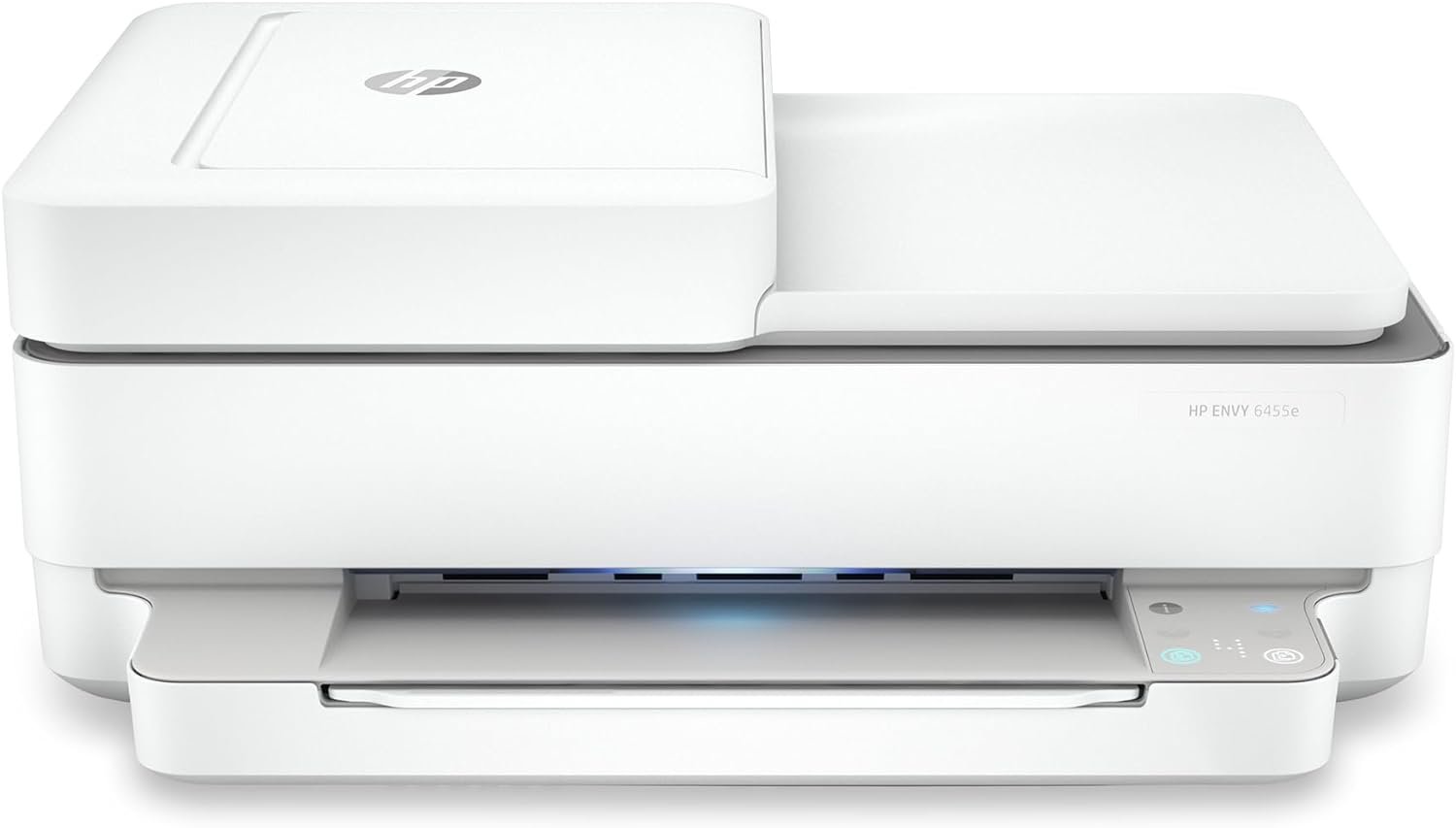
Selecting an appropriate printer can significantly impact productivity and convenience in both personal and professional environments. Whether for home use, small business operations, or educational settings, the right printer must balance print quality, speed, connectivity, and maintenance requirements. Modern printing needs often demand versatility, with users requiring color output for creative projects, high-speed printing for document workflows, and reliable connectivity for mobile access. The HP Envy 6455e represents a targeted solution for home users seeking an all-in-one printer that combines essential functions with intuitive features. Its design addresses common printing challenges, such as document management, media compatibility, and energy efficiency, while catering to families and remote workers who need seamless integration with digital workflows. Understanding the technical specifications and user-centric features of this model enables informed decisions about its suitability for specific printing environments.
Quick Overview
| Feature | Details |
|---|---|
| Printer Type | Inkjet All-in-One |
| Supported Functions | Print, Scan, Copy |
| Print Resolution | 4800 x 1200 dpi (color), 300 x 300 dpi (black-and-white) |
| Print Speed | 7 pages per minute (color), 10 pages per minute (black) |
| Media Sizes | 3 x 5 to 8.5 x 14 inches |
| Connectivity | USB 2.0, Wireless |
| Duty Cycle | Designed for home use with moderate volume |
| Ink System | HP Ink with HP+ subscription |
| Warranty | Limited warranty |
The HP Envy 6455e’s combination of inkjet technology and multifunctional capabilities makes it well-suited for home environments where users require basic printing, scanning, and copying tasks. Its support for borderless printing and auto document feeder enhances usability for creative and administrative workflows, while the wireless connectivity simplifies device integration.

Print Quality and Resolution

Color Output and Detail Retention
The HP Envy 6455e delivers color prints with a resolution of 4800 x 1200 dpi, which ensures sharp text and vibrant graphics. This resolution is particularly effective for printing photos, documents with intricate details, and creative projects that require color accuracy. The printer’s inkjet technology allows for fine droplet placement, contributing to consistent color reproduction across different media types, including glossy photo paper and standard paper. However, the resolution may not match the capabilities of high-end photo printers, making it more suitable for everyday use rather than professional photography.
Black-and-White Print Clarity
For monochrome printing, the printer maintains a resolution of 300 x 300 dpi, which is adequate for standard text documents and forms. While this resolution is sufficient for most home and office applications, users requiring higher clarity for technical drawings or detailed reports may find it limiting. The printer’s ability to produce clear, legible text makes it a practical choice for school projects, invoices, and basic administrative tasks.
Media Compatibility and Output Consistency
The HP Envy 6455e supports a variety of media types, including envelopes, labels, and specialty papers, which broadens its utility for different printing needs. However, the printer’s maximum media size of 8.5 x 14 inches may restrict its use for larger-format printing. The consistency of output quality across different paper types is generally reliable, though users should ensure proper calibration and alignment to maintain optimal results.
Connectivity and Device Integration

Wireless and USB Options
The printer offers both USB 2.0 and wireless connectivity, providing flexibility for different user preferences. Wireless printing is particularly advantageous for mobile users who need to print from smartphones or tablets without physical connections. The HP+ Smart Features enhance this experience by enabling mobile printing, automatic updates, and security enhancements through an HP account. USB connectivity remains a reliable option for users who prefer direct, wired connections for faster data transfer.
Mobile and Cloud Printing Capabilities
The HP Envy 6455e’s support for cloud printing and mobile apps simplifies the printing process for users who manage documents across multiple devices. The HP Print app allows for seamless printing, scanning, and copying from iOS and Android devices, reducing the need for manual setup. However, the reliance on an internet connection for certain features may pose challenges in areas with limited connectivity. The printer’s compatibility with cloud services like HP Smart app ensures that users can access their documents from anywhere.
Network-Ready and Security Features
As a network-ready printer, the HP Envy 6455e can be integrated into home or small office networks, enabling shared printing among multiple users. The inclusion of security features such as automatic updates and firmware protection helps safeguard against potential vulnerabilities. While these features are standard for modern printers, they contribute to the printer’s reliability and long-term performance in environments where data security is a concern.
Print Speed and Workload Capacity

Base Print Speeds and Task Efficiency
The HP Envy 6455e’s base print speeds of 7 pages per minute for color and 10 pages per minute for black are suitable for most home and small office workflows. These speeds are adequate for printing documents, school projects, and occasional photos, though they may not meet the demands of high-volume printing environments. The printer’s ability to handle mixed print jobs efficiently makes it a practical choice for users who require a balance between speed and functionality.
Duty Cycle and Recommended Volume
Designed for home use, the printer’s duty cycle is optimized for moderate printing volumes. While it can handle occasional large print jobs, users should avoid continuous, high-volume printing to prevent wear on the print engine and ink system. The recommended volume for optimal performance aligns with typical home usage patterns, making it less suitable for commercial or industrial applications where higher throughput is required.
Handling of Multi-Page and Complex Documents
The printer’s auto document feeder and duplex printing capabilities enhance its ability to manage multi-page documents and reduce paper usage. However, the lack of advanced paper trays or specialized feeding mechanisms may limit its effectiveness for printing very long documents or those with specific formatting requirements. The printer’s performance with complex documents is generally reliable, though users should be mindful of file size and formatting to avoid potential delays.
Maintenance and Consumable Considerations

Ink System and HP+ Subscription
The HP Envy 6455e uses HP Ink cartridges, which are designed for efficient use and compatibility with the printer’s print engine. The inclusion of a 3-month HP+ trial subscription provides users with a risk-free opportunity to evaluate the ink system’s performance. However, the ongoing cost of ink, particularly for color printing, may be a consideration for users with high print volumes. The HP+ service ensures timely ink delivery, reducing the risk of print interruptions, though it requires a subscription commitment beyond the initial trial period.
Consumable Costs and Long-Term Expenses
While the initial cost of the printer is competitive within its target market, the long-term expenses associated with ink and maintenance should be factored into the total cost of ownership. The printer’s design encourages the use of HP-branded consumables, which may limit options for third-party alternatives. Users should assess their printing frequency and color requirements to determine whether the ink costs are sustainable within their budget.
Maintenance Requirements and Reliability
The HP Envy 6455e’s maintenance requirements are relatively low, with routine tasks such as cleaning the print head and checking ink levels being straightforward. The printer’s self-healing Wi-Fi feature helps maintain connectivity without manual intervention, contributing to its reliability. However, the lack of advanced diagnostic tools or error reporting may make troubleshooting more challenging for users unfamiliar with printer maintenance procedures.
Durability and Longevity Expectations
Build Quality and Component Durability
The HP Envy 6455e’s build quality reflects its intended use as a home printer, with a focus on reliability rather than industrial robustness. The printer’s components, including the print head and paper feed mechanism, are designed for moderate use and may not withstand the demands of high-volume or continuous printing. The inclusion of an energy-efficient power consumption rating (4 watts) suggests a design that prioritizes operational efficiency over extended durability.
Expected Lifespan and Warranty Coverage
The printer’s limited warranty provides basic coverage for manufacturing defects, though it does not extend to wear and tear from normal use. Users should consider the printer’s expected lifespan based on its intended workload and maintenance practices. While the printer is suitable for home environments, its longevity may be shorter in settings with higher printing demands, necessitating careful evaluation of usage patterns before purchase.
Environmental and Operational Factors
The printer’s performance is influenced by environmental factors such as temperature and humidity, which can affect ink flow and print quality. The printer’s design includes features to mitigate these effects, but users in extreme climates may need additional measures to ensure consistent performance. The printer’s energy efficiency aligns with modern sustainability standards, making it a suitable choice for environmentally conscious consumers.
Pros & Cons
Pros
- High print resolution for color and black-and-white output ensures clear text and vibrant graphics for home use.
- Wireless and USB connectivity options provide flexibility for different printing scenarios and device integration.
- Included HP+ trial subscription offers a risk-free period to assess ink usage and print quality.
- Auto document feeder and borderless printing enhance usability for creative and administrative tasks.
- Energy-efficient design reduces power consumption and aligns with sustainability goals.
- Mobile printing capabilities via the HP Print app simplify access to documents across multiple devices.
- Automatic updates and security features contribute to long-term reliability and protection against vulnerabilities.
- Dual-sided printing reduces paper usage and supports eco-friendly printing practices.
Cons
- Limited media size support (up to 8.5 x 14 inches) may restrict use for larger-format printing needs.
- Ongoing ink costs for color printing could accumulate over time, affecting long-term affordability.
- Base print speeds may not meet the demands of high-volume or commercial printing environments.
- Dependence on HP+ subscription for advanced features may deter users who prefer standalone operation.
- Lack of advanced paper trays or feeding mechanisms may limit handling of complex or long documents.
- Limited diagnostic tools for troubleshooting may require more user intervention for maintenance tasks.
- Build quality focused on home use may not withstand continuous or heavy-duty operations.
- Environmental factors such as temperature and humidity could impact print consistency and longevity.
Final Verdict: Who This Printer Is Best For (and Who Should Skip It)
The HP Envy 6455e is an ideal choice for home users, families, and remote workers who require a reliable, multifunctional printer for everyday printing tasks. Its combination of color and black-and-white print quality, wireless connectivity, and mobile printing capabilities makes it well-suited for environments where simplicity and ease of use are priorities. The included HP+ trial subscription provides a practical way to evaluate the printer’s ink system without upfront costs, making it an attractive option for budget-conscious consumers.
However, the printer may not be the best fit for users with high-volume printing needs, commercial operations, or those requiring advanced paper handling capabilities. Its limited media size support and slower print speeds compared to dedicated office printers may also be drawbacks for users with specific formatting or throughput requirements. For individuals seeking a printer that balances versatility with cost-effective operation in a home setting, the HP Envy 6455e offers a solid, practical solution.

Frequently Asked Questions (FAQs)
Does the HP Envy 6455e support borderless printing?
Yes, the HP Envy 6455e is designed for borderless printing, allowing users to print photos and documents without visible borders. This feature is particularly useful for creative projects and personal use.
What connectivity options are available for the HP Envy 6455e?
The HP Envy 6455e offers both USB 2.0 and wireless connectivity, providing flexibility for users who prefer wired or wireless printing. Wireless connectivity is especially beneficial for mobile users.
How does the HP+ subscription service work with the HP Envy 6455e?
The HP+ subscription service provides a 3-month free ink trial, ensuring users have enough ink for their initial printing needs. After the trial, a monthly fee applies unless canceled, which helps maintain consistent ink supply.
Can the HP Envy 6455e handle large media sizes?
The HP Envy 6455e supports media sizes up to 8.5 x 14 inches, making it suitable for standard paper and envelopes. However, it may not accommodate larger formats required for specialized printing tasks.
What is the print speed of the HP Envy 6455e?
The HP Envy 6455e prints at 7 pages per minute in color and 10 pages per minute in black, which is adequate for most home and small office printing tasks.
Is the HP Envy 6455e suitable for commercial use?
The HP Envy 6455e is designed for home use and may not be suitable for commercial environments with high-volume printing needs. Its performance and durability are optimized for moderate usage rather than continuous, heavy-duty operations.
What are the ink costs for the HP Envy 6455e?
The HP Envy 6455e uses HP-branded ink cartridges, which are designed for efficient use. While the initial ink cost is competitive, ongoing expenses for color printing may accumulate over time, affecting long-term affordability.
Does the HP Envy 6455e have automatic duplex printing?
Yes, the HP Envy 6455e features automatic duplex printing, which reduces paper usage and supports eco-friendly printing practices by printing on both sides of the paper.