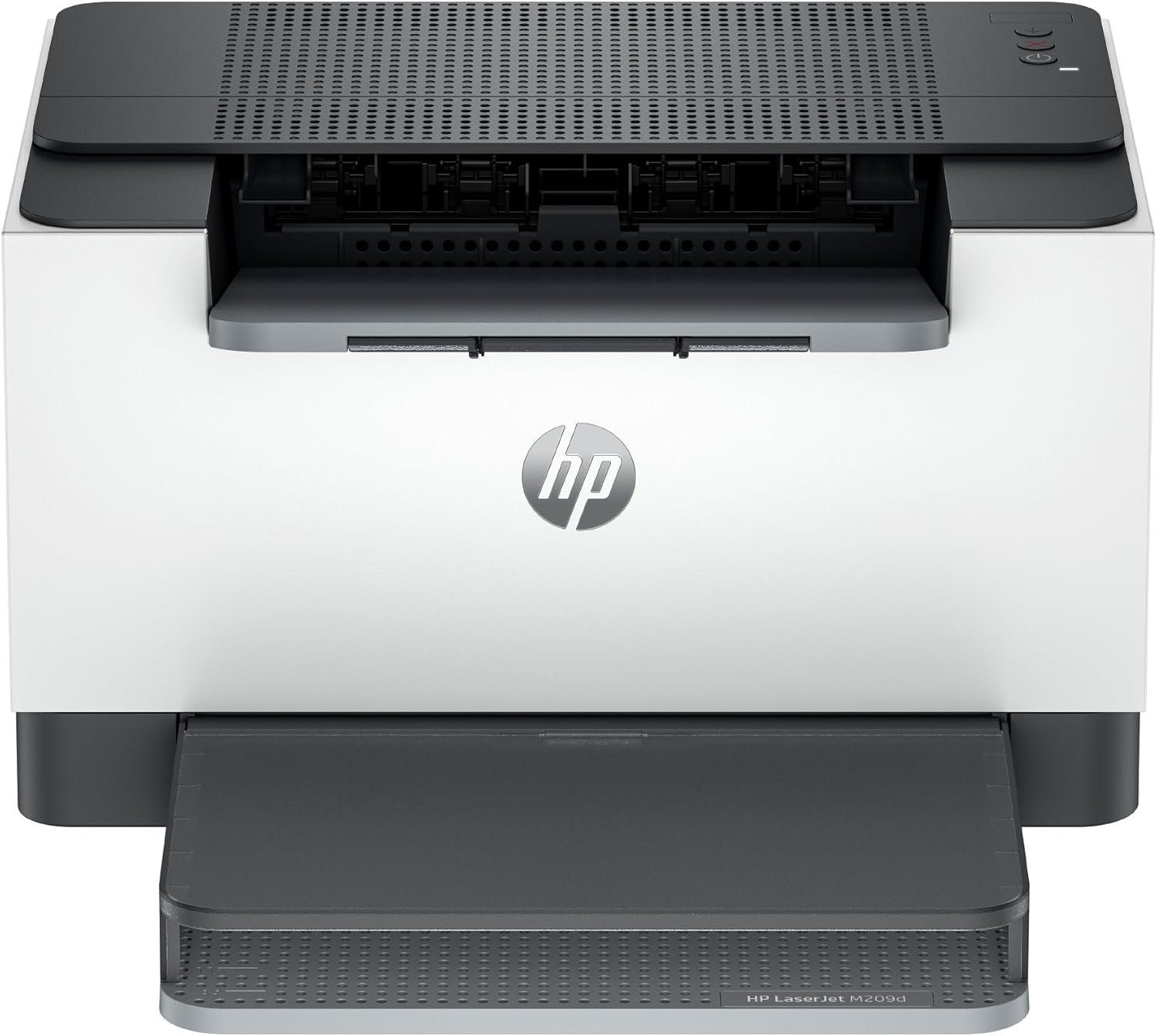
HP LaserJet M209d Laser Printer Review: Monochrome Printing for Home and Office
The Importance of Choosing the Right Printer for Your Workflow
Selecting the appropriate printer can significantly impact productivity and operational efficiency in both home and office environments. Whether you’re managing daily administrative tasks, creating professional documents, or handling high-volume print jobs, the right printer must align with your specific needs. Modern printing demands often require a balance between speed, reliability, and cost-effectiveness, making it essential to evaluate features such as print resolution, connectivity options, and media compatibility. For small businesses and home offices, a compact yet powerful printer that delivers consistent output while minimizing maintenance requirements is critical. The HP LaserJet M209d Laser Printer is designed to meet these challenges, offering a combination of performance, versatility, and energy efficiency. Its ability to handle monochrome printing with high clarity, support automatic duplexing, and integrate seamlessly with USB devices makes it a strong contender for users prioritizing simplicity and reliability. Understanding the technical specifications and usage scenarios of such a printer is crucial for making an informed decision that aligns with your workflow demands.
Quick Overview
| Feature | Details |
|---|---|
| Printer Type | Laser Printer |
| Printing Technology | Laser |
| Print Resolution | 600 dpi (black and white) |
| Print Speed | Up to 30 pages per minute (monochrome) |
| Media Sizes | 4 x 6 to 8.5 x 14 inches |
| Connectivity | USB 2.0 |
| Duplex Printing | Automatic |
| Input Tray Capacity | 150 sheets |
| Output Capacity | 150 sheets |
| Toner System | HP LaserJet toner |
| Warranty | Limited |
| Dimensions | 13.98″D x 8.07″W x 11″H |
| Weight | 16.37 pounds |
The HP LaserJet M209d combines compact design with robust performance, making it suitable for environments where space is limited but consistent, high-quality printing is required. Its USB connectivity simplifies setup, while automatic duplexing reduces paper usage. These features collectively enhance efficiency for users focused on monochrome printing tasks.

Print Speed and Throughput Performance
The HP LaserJet M209d delivers fast monochrome printing at up to 30 pages per minute, positioning it as a competitive option for users requiring quick output. This speed is achieved through advanced laser technology that efficiently processes print jobs, ensuring minimal delays in high-volume scenarios. The printer’s duty cycle, which refers to its ability to handle continuous printing without overheating or mechanical failure, is optimized for moderate to heavy usage, making it ideal for small offices or home environments with regular print demands. While it may not match the speed of higher-end commercial printers, its performance aligns with typical home and office workflows. The printer’s ability to manage a 150-sheet input tray ensures that users can handle multiple print jobs without frequent refills, enhancing workflow continuity. This combination of speed and capacity makes the M209d a practical choice for users prioritizing efficiency without compromising on reliability.

Laser Technology and Print Quality
Laser printing technology is renowned for its ability to produce sharp, consistent text and graphics, and the HP LaserJet M209d is no exception. The printer utilizes a laser imaging system that precisely transfers toner onto paper, resulting in high-resolution output at 600 dpi. This level of detail is particularly beneficial for documents requiring clear, readable text, such as reports, forms, and administrative records. The printer’s toner system ensures that each page maintains consistent quality over time, reducing the risk of smudging or fading. While it is designed for monochrome printing, the clarity and precision of the output make it suitable for a wide range of professional and personal applications. The laser imaging process also contributes to the printer’s energy efficiency, as it minimizes unnecessary power consumption during operation. These factors collectively enhance the printer’s appeal for users seeking reliable, high-quality monochrome printing.
Handling High-Volume Print Jobs
The HP LaserJet M209d is engineered to manage high-volume print tasks efficiently, making it well-suited for environments with frequent printing needs. Its 150-sheet input tray allows users to load a substantial amount of paper at once, reducing the need for frequent refills and interruptions in workflow. The printer’s duty cycle, which refers to its ability to operate continuously without overheating or mechanical failure, is designed to accommodate moderate to heavy usage. This makes it an ideal choice for small businesses or home offices where regular print jobs are part of daily operations. The combination of a high-speed print engine and a reliable toner system ensures that the printer can handle demanding workloads without compromising on output quality. While it may not be suitable for extremely high-volume commercial printing, its performance aligns with the needs of most home and office users.
Connectivity and Setup Simplicity
The HP LaserJet M209d simplifies connectivity and setup through its USB 2.0 interface, eliminating the need for complex network configurations. This direct connection ensures a stable and reliable link between the printer and compatible devices such as laptops and PCs, reducing the potential for connectivity issues. The included USB cable streamlines the installation process, making it an attractive option for users who prefer straightforward, plug-and-play solutions. The printer’s design also supports a user-friendly experience, with intuitive controls that minimize the learning curve for new users. While it lacks wireless or Ethernet connectivity, the USB setup is sufficient for environments where wired connections are preferred or necessary. This simplicity enhances the printer’s appeal for users prioritizing ease of use and minimal technical requirements.

Compatibility with Various Devices
The HP LaserJet M209d is designed to work seamlessly with a range of compatible devices, including laptops and PCs, ensuring broad accessibility for users with different computing setups. Its USB 2.0 interface provides a stable and efficient connection, allowing for quick data transfer and print job execution. This compatibility is particularly advantageous for home users and small businesses where multiple devices may be used for printing tasks. The printer’s support for standard operating systems further enhances its usability, as it eliminates the need for additional software or drivers in most cases. While it does not offer wireless or Ethernet connectivity, the USB setup is sufficient for environments where wired connections are the primary method of data transfer. This makes the M209d a practical choice for users who prioritize simplicity and reliability in their printing workflow.
Media Support and Versatility
The HP LaserJet M209d offers flexibility in media support, accommodating a variety of paper sizes and types to meet different printing needs. It supports media sizes ranging from 4 x 6 inches to 8.5 x 14 inches, making it suitable for both standard and larger document formats. This versatility allows users to handle a wide range of print tasks, from small labels to legal-sized documents, without the need for additional equipment. The printer’s ability to work with plain paper ensures that it remains accessible for users who may not have specialized media requirements. While it is designed for monochrome printing, its compatibility with different paper types and sizes enhances its adaptability for various environments. This media versatility contributes to the printer’s appeal for users seeking a reliable and flexible printing solution.

Handling Different Paper Types
The HP LaserJet M209d is engineered to handle a variety of paper types, including plain paper, which is essential for most office and home printing tasks. Its design ensures that the printer can process different paper weights and textures without compromising print quality or reliability. The inclusion of a 150-sheet input tray allows for efficient handling of multiple paper types in a single print job, reducing the need for frequent tray changes. While the printer is optimized for standard paper, its ability to manage different media types makes it adaptable for users with varying printing needs. This flexibility enhances the printer’s usability, as it can accommodate both everyday tasks and occasional specialized print requirements without the need for additional accessories or modifications.

Pros & Cons
Pros
- Fast Print Speed: The HP LaserJet M209d delivers up to 30 pages per minute in monochrome, making it efficient for high-volume tasks.
- Automatic Duplex Printing: The built-in duplex feature reduces paper usage, contributing to cost savings and environmental benefits.
- Compact Design: Its streamlined form factor is ideal for small offices and home environments where space is limited.
- Energy Efficiency: The printer is designed to minimize power consumption without sacrificing performance, aligning with sustainability goals.
- User-Friendly Setup: The included USB cable and straightforward interface simplify installation and operation for users of all technical backgrounds.
- Reliable Toner System: The HP LaserJet toner ensures consistent print quality over time, reducing the risk of smudging or fading.
- Versatile Media Support: The printer accommodates a range of paper sizes and types, enhancing its adaptability for different printing needs.
Cons
- Limited Connectivity Options: The absence of wireless or Ethernet connectivity may be a drawback for users requiring flexible network setups.
- No Color Printing: As a monochrome printer, it is unsuitable for tasks requiring color output, such as marketing materials or presentations.
- Fixed Input Tray: The 150-sheet input tray, while sufficient for moderate use, may not meet the demands of high-volume commercial printing.
- No Scan or Fax Capabilities: The printer is designed solely for printing, which may limit its utility for users needing additional multifunction features.
- Dependence on HP Toner: The printer is optimized for HP toner cartridges, which may restrict compatibility with third-party alternatives.
Final Verdict: Who This Printer Is Best For (and Who Should Skip It)
The HP LaserJet M209d is best suited for users who prioritize speed, reliability, and simplicity in their monochrome printing needs. It is an excellent choice for small offices, home users, and individuals who require consistent, high-quality black-and-white printing without the complexity of additional features. Its compact design, energy efficiency, and user-friendly setup make it ideal for environments where space is limited and straightforward operation is essential. However, the printer may not be the best fit for users who require color printing, wireless connectivity, or advanced multifunction capabilities such as scanning or faxing. Additionally, those with high-volume printing needs or a preference for third-party toner options may find the M209d less suitable. Overall, the printer offers a balanced combination of performance and practicality for its target audience, making it a reliable option for specific use cases.

Frequently Asked Questions (FAQs)
What is the maximum print speed of the HP LaserJet M209d?
The HP LaserJet M209d delivers up to 30 pages per minute in monochrome, making it suitable for high-volume printing tasks in small offices and home environments.
Does the HP LaserJet M209d support automatic duplex printing?
Yes, the printer includes an automatic duplex feature that reduces paper usage and enhances cost-effectiveness for users requiring double-sided printing.
What connectivity options does the HP LaserJet M209d offer?
The printer uses a USB 2.0 interface, providing a stable and straightforward connection for compatible devices like laptops and PCs without requiring network configurations.
Can the HP LaserJet M209d handle different paper sizes?
The printer supports paper sizes ranging from 4 x 6 inches to 8.5 x 14 inches, offering flexibility for various document formats and printing needs.
What is the maximum input tray capacity for the HP LaserJet M209d?
The printer includes a 150-sheet input tray, allowing users to load a substantial amount of paper at once for efficient handling of multiple print jobs.
Is the HP LaserJet M209d suitable for color printing?
No, the HP LaserJet M209d is a monochrome printer designed for black-and-white printing only, making it unsuitable for color output tasks.
What type of toner does the HP LaserJet M209d use?
The printer is optimized for HP LaserJet toner cartridges, ensuring consistent print quality and reliability over time.
Does the HP LaserJet M209d have wireless connectivity?
No, the printer relies on a USB 2.0 connection, making it ideal for users who prefer a wired setup without additional network requirements.