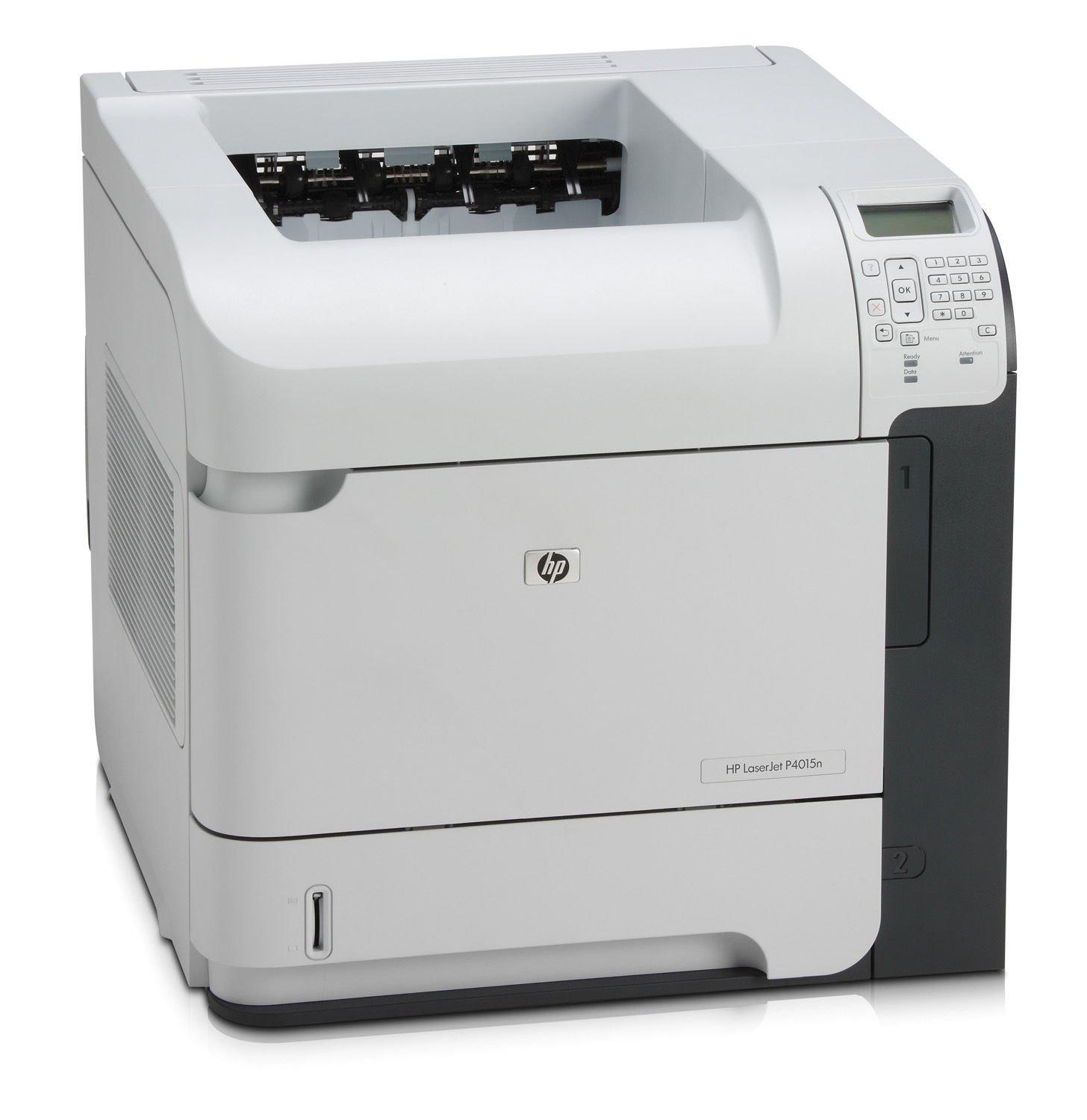
HP LaserJet P4015N Monochrome Laser Printer Review: Speed, Quality, and Use Cases
The Importance of Choosing the Right Printer for Your Workflow
In today’s fast-paced business environment, selecting the right printer can significantly impact productivity and operational efficiency. Whether you’re managing a small office, a large enterprise, or a remote team, the printer you choose must align with your specific printing needs. Monochrome laser printers like the HP LaserJet P4015N are particularly popular for their ability to handle high-volume printing tasks with speed and reliability. These printers are designed to meet the demands of professional environments where text documents, reports, and forms are printed in high volume. However, the decision to invest in such a printer requires careful consideration of factors such as print speed, resolution, connectivity options, media compatibility, and maintenance requirements. This review provides an in-depth analysis of the HP LaserJet P4015N, focusing on its technical specifications, performance benchmarks, and suitability for various usage scenarios. By evaluating these aspects, potential buyers can make informed decisions about whether this printer meets their specific needs.
Quick Overview
| Feature | Details |
|---|---|
| Printer Type | Monochrome Laser Printer |
| Printing Technology | Laser |
| Supported Functions | Print Only |
| Print Resolution | 1200 dpi (Black & White) |
| Print Speed | 52 ppm (Monochrome) |
| Media Sizes | 11 x 17 inches |
| Supported Media | Paper (plain) |
| Connectivity | Ethernet, USB |
| Duty Cycle | High-volume office use |
| Toner System | Black toner |
| Warranty | 90 days limited warranty |
The HP LaserJet P4015N is designed for office environments requiring high-speed, monochrome printing. Its 52 ppm print speed and 1200 dpi resolution ensure efficient document output, while the Ethernet and USB connectivity options provide flexibility in network integration. The printer’s support for 11 x 17-inch media makes it suitable for large-format printing tasks, and its 90-day warranty offers basic support for initial usage. These features collectively position the printer as a reliable solution for businesses with moderate to high printing demands.

Print Speed and Workload Capacity
The HP LaserJet P4015N’s print speed of 52 pages per minute (ppm) is a critical factor for users requiring high-volume output. This speed is particularly beneficial in office settings where large numbers of documents need to be printed quickly. The printer’s ability to handle such workloads is supported by its duty cycle specifications, which are designed for continuous use in high-demand environments. The 1200 dpi resolution ensures that text remains sharp and clear, even when printed at high speeds. However, the printer’s performance is optimized for monochrome printing, which means it is not suitable for color documents. Users should consider whether their workflow requires color output, as this printer does not support it. The printer’s Ethernet and USB connectivity options allow for seamless integration into existing networks, making it a versatile choice for offices with varying printing needs.
High-Speed Output for Office Environments
The 52 ppm print speed of the HP LaserJet P4015N is ideal for office environments where large volumes of monochrome documents are printed regularly. This speed ensures that documents are produced quickly, reducing wait times and improving overall productivity. The printer’s duty cycle is designed to handle continuous use, making it suitable for environments with high printing demands. However, users should be aware that the printer’s performance may be affected by factors such as paper type and environmental conditions. The printer’s Ethernet connectivity allows for remote printing and integration into existing network infrastructures, enhancing its versatility in office settings.
Media Compatibility and Size Support
The HP LaserJet P4015N supports media sizes up to 11 x 17 inches, which is beneficial for users requiring large-format printing. This feature makes the printer suitable for tasks such as printing reports, forms, and other documents that require larger paper sizes. The printer’s support for plain paper is a practical consideration, as it ensures compatibility with a wide range of paper types commonly used in office environments. However, users should note that the printer does not support specialty media such as glossy or textured paper, which may limit its use in certain applications. The printer’s ability to handle a variety of paper sizes and types makes it a flexible choice for businesses with diverse printing needs.
Print Quality and Resolution
The HP LaserJet P4015N delivers high-quality monochrome prints with a resolution of 1200 dpi. This resolution ensures that text is sharp and clear, making it suitable for documents that require precise formatting and readability. The printer’s ability to maintain consistent print quality across different paper types and sizes is a significant advantage for users who frequently print a variety of documents. However, the printer’s resolution is optimized for text documents rather than images or graphics, which may limit its use in applications requiring high-resolution visual output. The printer’s performance in terms of print quality is further enhanced by its laser printing technology, which ensures consistent and accurate output.
Text Clarity and Document Readability
The 1200 dpi resolution of the HP LaserJet P4015N ensures that text is printed with high clarity and readability. This is particularly important for documents such as reports, forms, and correspondence, where precise formatting and legibility are essential. The printer’s ability to maintain consistent text quality across different paper types and sizes makes it a reliable choice for office environments. However, users should be aware that the printer’s resolution is optimized for monochrome text rather than color or high-resolution graphics. This limitation means that the printer is best suited for applications where text clarity is the primary concern.
Consistency in Print Output
The HP LaserJet P4015N is designed to produce consistent print output, which is crucial for maintaining the quality of documents over time. The printer’s laser technology ensures that each print job is produced with the same level of precision and accuracy, reducing the risk of errors or inconsistencies. This consistency is particularly beneficial for users who require regular printing of documents with specific formatting requirements. However, the printer’s performance may be affected by factors such as paper quality and environmental conditions, which can impact the final print output. Users should ensure that they use the recommended paper types to achieve the best results.
Connectivity and Network Integration
The HP LaserJet P4015N offers Ethernet and USB connectivity options, providing flexibility in how users can integrate the printer into their existing network infrastructure. The Ethernet port allows for remote printing and integration into local area networks (LANs), making it a suitable choice for offices with multiple users. The USB port provides a straightforward connection for users who prefer a direct plug-and-play setup. However, the printer’s connectivity options are limited to these two interfaces, which may not be sufficient for users requiring more advanced network features. The printer’s ability to support both wired and wireless connections enhances its versatility, but users should ensure that their network environment is compatible with these connectivity options.
Ethernet Connectivity for Network Integration
The Ethernet connectivity of the HP LaserJet P4015N allows for seamless integration into existing network infrastructures, making it a suitable choice for offices with multiple users. This feature enables users to print documents remotely, reducing the need for physical access to the printer. However, the printer’s Ethernet port does not support wireless connectivity, which may limit its use in environments where wireless printing is preferred. Users should ensure that their network setup includes the necessary hardware and software to support Ethernet printing, as this will affect the printer’s overall performance and usability.
USB Connectivity for Direct Printing
The USB connectivity option of the HP LaserJet P4015N provides a straightforward method for users to connect the printer directly to their computer or laptop. This setup is ideal for users who prefer a simple, plug-and-play solution without the need for network configuration. However, the USB port does not support wireless printing, which may be a limitation for users who require more flexible connectivity options. The printer’s USB connectivity is a practical choice for small offices or users who do not need advanced network features, but it may not be suitable for larger environments with more complex printing requirements.
Maintenance and Consumable Considerations
The HP LaserJet P4015N requires regular maintenance to ensure optimal performance, particularly in high-volume environments. The printer’s toner system is designed for monochrome printing, which means that users should be aware of the toner consumption rates and replacement schedules. The printer’s manual duplexing feature allows for double-sided printing, which can help reduce paper usage and lower operational costs. However, users should be aware that manual duplexing requires additional steps compared to automatic duplexing, which may affect productivity. The printer’s maintenance requirements are generally straightforward, but users should follow the manufacturer’s guidelines to ensure the longevity of the device.
Toner System and Replacement Requirements
The HP LaserJet P4015N uses a black toner system, which is designed for high-volume monochrome printing. The toner system is optimized for efficiency, ensuring that each print job produces high-quality output without excessive waste. However, users should be aware that the toner cartridges have a limited lifespan and may need to be replaced periodically to maintain print quality. The printer’s toner system is compatible with standard toner cartridges, which can be sourced from various suppliers. Users should ensure that they use genuine or compatible toner cartridges to avoid potential issues with print quality and device performance.
Manual Duplexing and Paper Management
The HP LaserJet P4015N includes a manual duplexing feature, which allows users to print on both sides of the paper. This feature can help reduce paper consumption and lower operational costs, making it a cost-effective solution for businesses with high printing volumes. However, manual duplexing requires users to manually flip the paper after the first side is printed, which may affect productivity in environments where speed is a priority. The printer’s paper management capabilities are generally reliable, but users should ensure that they follow the manufacturer’s guidelines to avoid issues with paper jams or misfeeds.
Pros & Cons
Pros
- High Print Speed: The 52 ppm print speed ensures efficient document output, making it suitable for high-volume office environments.
- Reliable Performance: The printer’s laser technology ensures consistent and accurate print output, reducing the risk of errors or inconsistencies.
- Durable Construction: The printer’s robust design is built to handle continuous use in demanding environments.
- Easy Connectivity: The Ethernet and USB ports provide flexible options for integrating the printer into existing network infrastructures.
- Cost-Effective Operation: The manual duplexing feature helps reduce paper usage, lowering long-term operational costs.
- Compatibility with Standard Paper Types: The printer supports a wide range of plain paper types, making it versatile for various printing tasks.
- Clear Text Output: The 1200 dpi resolution ensures sharp and readable text, ideal for documents requiring precise formatting.
- Simple Maintenance Requirements: The printer’s maintenance needs are straightforward, with clear guidelines for toner replacement and paper management.
Cons
- Limited Media Size Support: The printer’s maximum media size is 11 x 17 inches, which may not be suitable for users requiring larger paper sizes.
- No Color Printing Capability: The printer is designed for monochrome printing only, making it unsuitable for color documents or graphics.
- Manual Duplexing Requirement: The lack of automatic duplexing means users must manually flip paper, which may affect productivity in high-speed environments.
- Limited Connectivity Options: The printer only supports Ethernet and USB connectivity, which may not be sufficient for users requiring wireless printing capabilities.
- No Built-In Scanning or Copying Features: The printer is designed for print-only use, which may limit its functionality in environments requiring scanning or copying capabilities.
- Short Warranty Period: The 90-day limited warranty offers minimal support for long-term usage, which may be a concern for users requiring extended warranty coverage.
Final Verdict: Who This Printer Is Best For (and Who Should Skip It)
The HP LaserJet P4015N is best suited for office environments requiring high-speed, monochrome printing with a focus on text documents and forms. Its 52 ppm print speed and 1200 dpi resolution make it an efficient choice for businesses with moderate to high printing demands. The printer’s Ethernet and USB connectivity options provide flexibility in network integration, while its manual duplexing feature helps reduce paper costs. However, the printer is not ideal for users requiring color printing, automatic duplexing, or advanced connectivity features such as wireless printing. Additionally, the 90-day limited warranty may not be sufficient for long-term usage, making it less suitable for users who require extended support. Overall, the HP LaserJet P4015N is a reliable and cost-effective solution for businesses with specific printing needs, but it may not be the best choice for users with more complex requirements.
Frequently Asked Questions (FAQs)
What is the print speed of the HP LaserJet P4015N?
The HP LaserJet P4015N offers a print speed of 52 pages per minute (ppm) for monochrome printing, making it suitable for high-volume office environments. This speed ensures efficient document output while maintaining high-quality text resolution.
What types of media does the HP LaserJet P4015N support?
The printer supports plain paper with a maximum media size of 11 x 17 inches. It is designed for monochrome printing and does not support specialty media such as glossy or textured paper.
Does the HP LaserJet P4015N support color printing?
No, the HP LaserJet P4015N is a monochrome laser printer and does not support color printing. It is optimized for high-quality black-and-white text documents and forms.
What connectivity options are available for the HP LaserJet P4015N?
The printer includes both Ethernet and USB connectivity options, allowing for flexible integration into existing network infrastructures. Ethernet supports remote printing, while USB provides a direct connection for plug-and-play setups.
How does the HP LaserJet P4015N handle duplex printing?
The printer features manual duplexing, which requires users to manually flip the paper after the first side is printed. This option helps reduce paper usage but does not include automatic duplexing capabilities.
What is the warranty period for the HP LaserJet P4015N?
The HP LaserJet P4015N comes with a 90-day limited warranty, which provides basic support for initial usage. Users should consider this warranty period when evaluating long-term maintenance and support needs.
What is the recommended paper type for optimal print quality?
The printer is designed to work best with standard plain paper. Using recommended paper types ensures consistent print quality and reduces the risk of paper jams or misfeeds.
Can the HP LaserJet P4015N be used in a wireless network?
The HP LaserJet P4015N does not support wireless connectivity. It requires either an Ethernet connection or a USB port for network integration, which may limit its use in environments requiring wireless printing capabilities.