HP LaserJet Pro M28w Review: Wireless Monochrome Printer for Home and Office
The Importance of Choosing the Right Printer
In today’s fast-paced work environments, selecting the right printer can significantly impact productivity and efficiency. Whether you’re working from home, managing a small business, or handling remote tasks, a reliable printing solution is essential. Printers serve as critical tools for generating documents, reports, invoices, and more, making their performance and features crucial for daily operations. The right printer must balance speed, print quality, connectivity options, and maintenance requirements to meet varying workload demands. For users who prioritize compact design without compromising functionality, a multi-function printer like the HP LaserJet Pro M28w offers a compelling solution. This device combines printing, copying, and scanning capabilities in a single unit, catering to both personal and professional needs. Its wireless connectivity and app integration further enhance convenience, especially for users who require mobility and remote access. Understanding the technical specifications, performance benchmarks, and user feedback for the HP LaserJet Pro M28w is vital for making an informed decision. By evaluating factors such as print speed, output quality, media compatibility, and connectivity options, potential buyers can determine whether this printer aligns with their specific requirements. This review provides an in-depth analysis of the HP LaserJet Pro M28w, focusing on its strengths, limitations, and suitability for different usage scenarios.
Quick Overview
| Feature | Details |
|---|---|
| Printer Type | Laser printer |
| Print Technology | Laser printing |
| Supported Functions | Printing, copying, scanning |
| Print Resolution | Up to 600 x 600 dpi |
| Print Speed | Up to 19 pages per minute |
| Media Sizes | 8.5 x 11 inches |
| Connectivity Options | Wi-Fi, USB 2.0 |
| Duty Cycle | 20,000 pages per month |
| Ink/Toner System | Toner (monochrome) |
| Warranty | Extended warranty |
| Dimensions | 14.2″ (W) x 10.4″ (D) x 7.8″ (H) |
| Weight | Approx. 11.6 lbs |
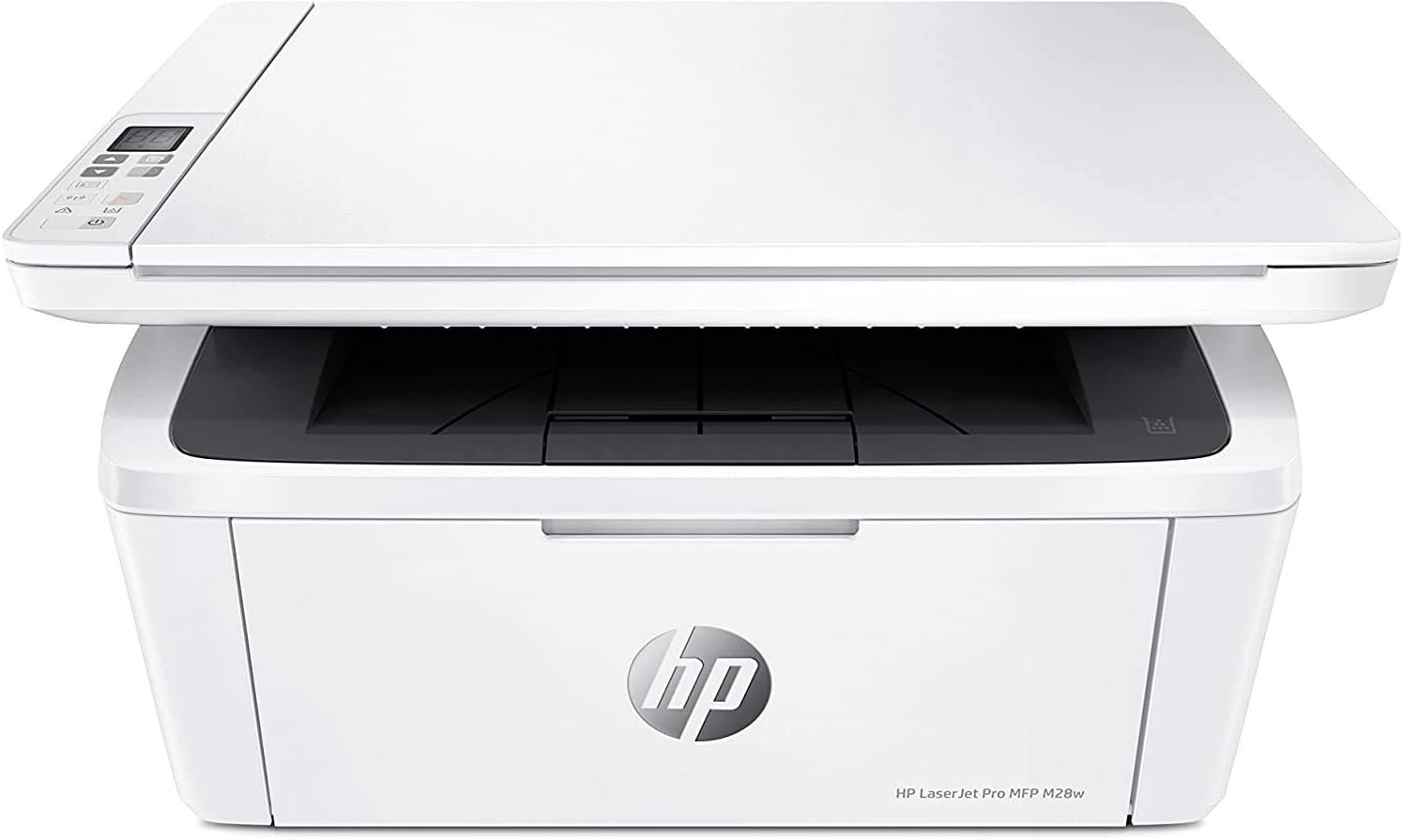
The HP LaserJet Pro M28w is designed for users who require a compact, multifunctional printer that offers wireless connectivity and app integration. Its laser printing technology ensures sharp, high-contrast text and graphics, making it ideal for office documents and reports. The 19 pages per minute print speed supports moderate to high-volume workloads, while the 600 x 600 dpi resolution delivers clear output. The printer’s Wi-Fi and USB 2.0 connectivity options provide flexibility for different environments, and its extended warranty offers long-term reliability. The 150-sheet input tray and 100-sheet output bin accommodate standard paper handling needs, while the monochrome toner system ensures cost-effective, high-volume printing. These features collectively make the HP LaserJet Pro M28w a suitable choice for home offices, small businesses, and remote work setups.

Print Speed and Productivity
The HP LaserJet Pro M28w’s print speed of up to 19 pages per minute is a key consideration for users who require efficient document production. This speed is particularly beneficial for environments with regular printing needs, such as small businesses or home offices that handle reports, invoices, and correspondence. The printer’s laser technology ensures consistent performance, minimizing delays during high-volume printing tasks. For users who prioritize productivity, the 19 ppm speed helps reduce waiting times, allowing for faster turnaround on print jobs. However, it’s important to note that this speed is optimized for standard paper sizes and may vary slightly with different media types or print settings. The printer’s duty cycle of 20,000 pages per month indicates its ability to handle moderate to high workloads without overheating or mechanical stress. This makes the HP LaserJet Pro M28w suitable for users who need reliable performance over extended periods. The combination of speed and durability ensures that the printer can support daily operations without significant downtime, making it an attractive option for those who value efficiency.

Performance in High-Volume Workloads
The HP LaserJet Pro M28w is engineered to handle a duty cycle of 20,000 pages per month, which is ideal for environments with regular printing demands. This specification indicates that the printer can sustain continuous operation without overheating or experiencing mechanical wear, making it suitable for small businesses and home offices that require consistent output. The laser printing technology used in the M28w ensures that each page is printed with precision, maintaining consistent quality even during prolonged use. For users who print large volumes of documents, such as financial reports or invoices, the 19 pages per minute speed helps reduce waiting times and improve workflow efficiency. However, it’s important to note that the printer’s performance may vary slightly depending on the type of media used or the complexity of the print job. The 150-sheet input tray and 100-sheet output bin provide sufficient capacity for most standard printing tasks, reducing the need for frequent refills. Overall, the printer’s design and specifications make it a reliable choice for users who require a balance between speed and durability.
Print Speed Variability with Different Media
The HP LaserJet Pro M28w’s print speed of 19 pages per minute is based on standard paper sizes and print settings. However, the actual speed may vary slightly when using different media types, such as thicker paper or specialty sheets. The printer’s laser technology is optimized for standard 8.5 x 11 inch paper, ensuring consistent performance under normal conditions. For users who occasionally print on different media, such as labels or transparencies, the printer’s ability to handle these materials without significant speed reduction is a notable advantage. The 150-sheet input tray and 100-sheet output bin are designed to accommodate standard paper sizes, but users may need to adjust settings for specialty media to ensure optimal performance. The printer’s duty cycle of 20,000 pages per month indicates that it can handle moderate to high-volume printing without mechanical strain, making it suitable for environments with regular printing needs. Overall, the HP LaserJet Pro M28w offers a reliable balance between speed and versatility for most standard printing tasks.
Connectivity and Wireless Integration
The HP LaserJet Pro M28w’s wireless connectivity and app integration are key features that enhance its usability in modern work environments. The printer supports Wi-Fi connectivity, allowing users to print from smartphones, tablets, and computers without the need for physical cables. This feature is particularly beneficial for remote workers and small businesses that require flexibility in printing from different devices. The HP Smart app provides a convenient interface for managing print jobs, scanning documents, and monitoring printer settings remotely. This integration simplifies the printing process, especially for users who frequently print from mobile devices. However, the printer’s reliance on Wi-Fi connectivity means that users must ensure a stable network connection to avoid print job interruptions. For users who prioritize wired connections for reliability, the USB 2.0 port offers an alternative, although it may limit mobility compared to wireless options. The combination of wireless and wired connectivity options provides a balanced approach, catering to different user preferences and environments.

Wireless Printing and Mobile Compatibility
The HP LaserJet Pro M28w’s wireless printing capability is a significant advantage for users who require mobility and remote access. The printer’s Wi-Fi connectivity allows for seamless printing from smartphones, tablets, and computers, making it ideal for small businesses and home offices that rely on mobile devices. The HP Smart app enhances this functionality by providing a user-friendly interface for managing print jobs, scanning documents, and monitoring printer settings. This integration simplifies the printing process, especially for users who frequently print from mobile devices. However, the effectiveness of wireless printing depends on the stability of the network connection. Users should ensure that their Wi-Fi network is reliable to avoid print job interruptions or delays. The printer’s support for both wireless and wired connectivity offers flexibility, allowing users to choose the most suitable option based on their specific needs and environment.
App Integration and Remote Management
The HP Smart app is an essential component of the HP LaserJet Pro M28w’s connectivity features, providing users with remote management capabilities. This app allows for the management of print jobs, scanning of documents, and monitoring of printer settings without the need for physical access to the printer. The app’s intuitive interface makes it easy for users to navigate through various functions, ensuring a seamless printing experience. Additionally, the app enables users to receive notifications about printer status, ink levels, and potential issues, helping to maintain optimal performance. For users who prioritize remote access and convenience, the HP Smart app is a valuable addition to the printer’s functionality. However, it’s important to note that the app’s effectiveness may depend on the user’s device compatibility and network stability. Overall, the app integration enhances the printer’s usability, making it a versatile choice for users who require flexibility and remote management capabilities.
Print Quality and Output Consistency
The HP LaserJet Pro M28w’s print quality is a key consideration for users who require clear, precise output for documents and reports. The printer produces text and graphics with a resolution of up to 600 x 600 dpi, ensuring sharp and legible results. This level of resolution is suitable for most standard printing tasks, including business documents, invoices, and correspondence. The laser printing technology used in the M28w ensures consistent output quality, minimizing variations in print density and clarity. However, the printer’s monochrome output means that it may not be suitable for users who require color printing. The 600 x 600 dpi resolution is adequate for most text-based documents, but users who require high-quality graphics or photographs may find the printer’s capabilities limited. The printer’s ability to handle different paper types and media sizes also contributes to its overall print quality, making it a versatile option for various printing needs.

Monochrome Output and Text Clarity
The HP LaserJet Pro M28w’s monochrome output is designed to produce clear, high-contrast text and graphics, making it ideal for business documents and reports. The printer’s 600 x 600 dpi resolution ensures that text is sharp and legible, even at smaller font sizes. This level of detail is particularly beneficial for users who require precise formatting and readability in their printed materials. The laser printing technology used in the M28w ensures that each page is printed with consistent density, minimizing variations in print quality. However, the monochrome output means that the printer is not suitable for users who require color printing. For users who prioritize text clarity and precision, the M28w’s output is a reliable choice. The printer’s ability to handle different paper types and media sizes further enhances its versatility, making it a suitable option for a wide range of printing tasks.
Resolution and Graphic Output Capabilities
The HP LaserJet Pro M28w’s 600 x 600 dpi resolution is sufficient for most standard printing tasks, including business documents and reports. However, users who require high-quality graphics or photographs may find the printer’s capabilities limited. The monochrome output means that the printer is not designed for color printing, which may be a drawback for users with specific visual requirements. The printer’s laser technology ensures that text is printed with consistent clarity, but its ability to handle complex graphics or images is constrained by its monochrome output. For users who prioritize text quality and precision, the M28w’s resolution is adequate. However, those with more demanding graphic printing needs may need to consider alternative printers with color capabilities. The printer’s overall print quality is well-suited for most standard use cases, making it a reliable option for users who value clarity and consistency in their printed materials.

Pros & Cons
Pros
- Compact Design: The HP LaserJet Pro M28w’s small footprint makes it ideal for home offices and small businesses with limited space. Its streamlined design ensures it fits easily into any workspace without taking up excessive room.
- Wireless Connectivity: The printer’s Wi-Fi capability allows for seamless printing from smartphones, tablets, and computers, enhancing convenience for users who require mobility and remote access.
- HP Smart App Integration: The HP Smart app provides a user-friendly interface for managing print jobs, scanning documents, and monitoring printer settings remotely, improving overall usability.
- High-Quality Monochrome Output: The 600 x 600 dpi resolution ensures sharp, clear text and graphics, making it suitable for business documents, reports, and invoices.
- Durable Build and Extended Warranty: The printer’s laser technology and extended warranty indicate long-term reliability, making it a cost-effective choice for users who prioritize durability.
- Efficient Print Speed: The 19 pages per minute print speed supports moderate to high-volume printing, reducing waiting times and improving workflow efficiency.
- Versatile Media Handling: The 150-sheet input tray and 100-sheet output bin accommodate standard paper sizes, while the printer’s compatibility with various media types enhances its versatility.
- Easy Maintenance: The printer’s design simplifies maintenance tasks, such as replacing toner cartridges and clearing paper jams, ensuring minimal downtime.
Cons
- Limited Color Printing: The HP LaserJet Pro M28w is a monochrome printer, which may not be suitable for users who require color printing for presentations, marketing materials, or other visual content.
- Dependence on Wi-Fi Connectivity: The printer’s wireless capabilities require a stable network connection, which may pose challenges in environments with unreliable Wi-Fi.
- No Built-In Fax Function: While the printer supports printing, copying, and scanning, it lacks a built-in fax function, which may be a drawback for users who need this feature.
- Print Speed Variability: The 19 pages per minute speed is optimized for standard paper sizes and may vary slightly with different media types or complex print jobs.
- Limited Advanced Features: The printer lacks advanced features such as duplex printing or automatic document feeding, which may be necessary for users with more demanding printing needs.
- Compatibility with Older Devices: While the printer supports USB 2.0 connectivity, users with older devices may experience compatibility issues or slower data transfer rates.
- No Built-In Storage for Print Jobs: The printer does not have internal storage for print jobs, which may be inconvenient for users who need to manage print queues remotely.
Final Verdict: Who This Printer Is Best For (and Who Should Skip It)
The HP LaserJet Pro M28w is an excellent choice for users who prioritize compact design, wireless connectivity, and efficient monochrome printing. Its 19 pages per minute speed and 600 x 600 dpi resolution make it well-suited for small businesses, home offices, and remote work environments that require reliable, high-quality printing. The printer’s wireless capabilities and HP Smart app integration enhance convenience, allowing users to manage print jobs and scan documents from mobile devices. Additionally, the extended warranty and durable build ensure long-term reliability, making it a cost-effective option for users who value durability and consistent performance.
However, the HP LaserJet Pro M28w may not be the best fit for users who require color printing, advanced features such as duplex printing, or a built-in fax function. Its dependence on Wi-Fi connectivity means that users must ensure a stable network environment to avoid print job interruptions. The printer’s limited media handling capabilities and lack of advanced features may also be drawbacks for users with more demanding printing needs. Overall, the HP LaserJet Pro M28w is a versatile and efficient monochrome printer that excels in environments where space is limited and wireless printing is a priority. For users who need color output, advanced functionality, or a more robust printing solution, alternative printers with expanded capabilities may be a better fit.
Frequently Asked Questions (FAQs)
What are the key features of the HP LaserJet Pro M28w?
The HP LaserJet Pro M28w is a compact, multifunctional monochrome printer that combines printing, copying, and scanning capabilities. It supports wireless connectivity via Wi-Fi and includes the HP Smart app for remote management. The printer offers a print speed of up to 19 pages per minute and produces high-quality text and graphics with a resolution of 600 x 600 dpi. Its durable design and extended warranty make it suitable for small businesses and home offices.
Is the HP LaserJet Pro M28w suitable for home use?
Yes, the HP LaserJet Pro M28w is well-suited for home use due to its compact design, wireless connectivity, and efficient monochrome printing. It is ideal for users who need reliable, high-quality printing for documents, reports, and invoices while maintaining a small footprint in limited workspace.
Can the HP LaserJet Pro M28w handle different paper sizes?
The HP LaserJet Pro M28w is designed to accommodate standard 8.5 x 11 inch paper sizes. While it may handle some specialty media, its primary compatibility is with standard paper types, making it suitable for most typical printing tasks.
What connectivity options does the HP LaserJet Pro M28w offer?
The HP LaserJet Pro M28w supports both Wi-Fi and USB 2.0 connectivity. Wi-Fi allows for wireless printing from mobile devices, while USB 2.0 provides a wired connection for devices that require direct printing without network dependency.
Does the HP LaserJet Pro M28w support color printing?
No, the HP LaserJet Pro M28w is a monochrome printer and does not support color printing. It is designed for high-quality black-and-white output, making it suitable for business documents, reports, and invoices.
What is the print speed of the HP LaserJet Pro M28w?
The HP LaserJet Pro M28w can print up to 19 pages per minute, which is suitable for moderate to high-volume printing tasks. This speed ensures efficient document production while maintaining consistent print quality.
How does the HP Smart app enhance the user experience with the HP LaserJet Pro M28w?
The HP Smart app provides a user-friendly interface for managing print jobs, scanning documents, and monitoring printer settings remotely. It allows users to print, scan, and copy from mobile devices, enhancing convenience and flexibility in managing print tasks.
What is the warranty coverage for the HP LaserJet Pro M28w?
The HP LaserJet Pro M28w comes with an extended warranty, ensuring long-term reliability and support. This warranty provides users with peace of mind regarding the printer’s durability and performance over time.