HP LaserJet Pro MFP 3101fdw Review: Best Black & White All-in-One for Small Teams
Choosing the Right Printer for Modern Workflows
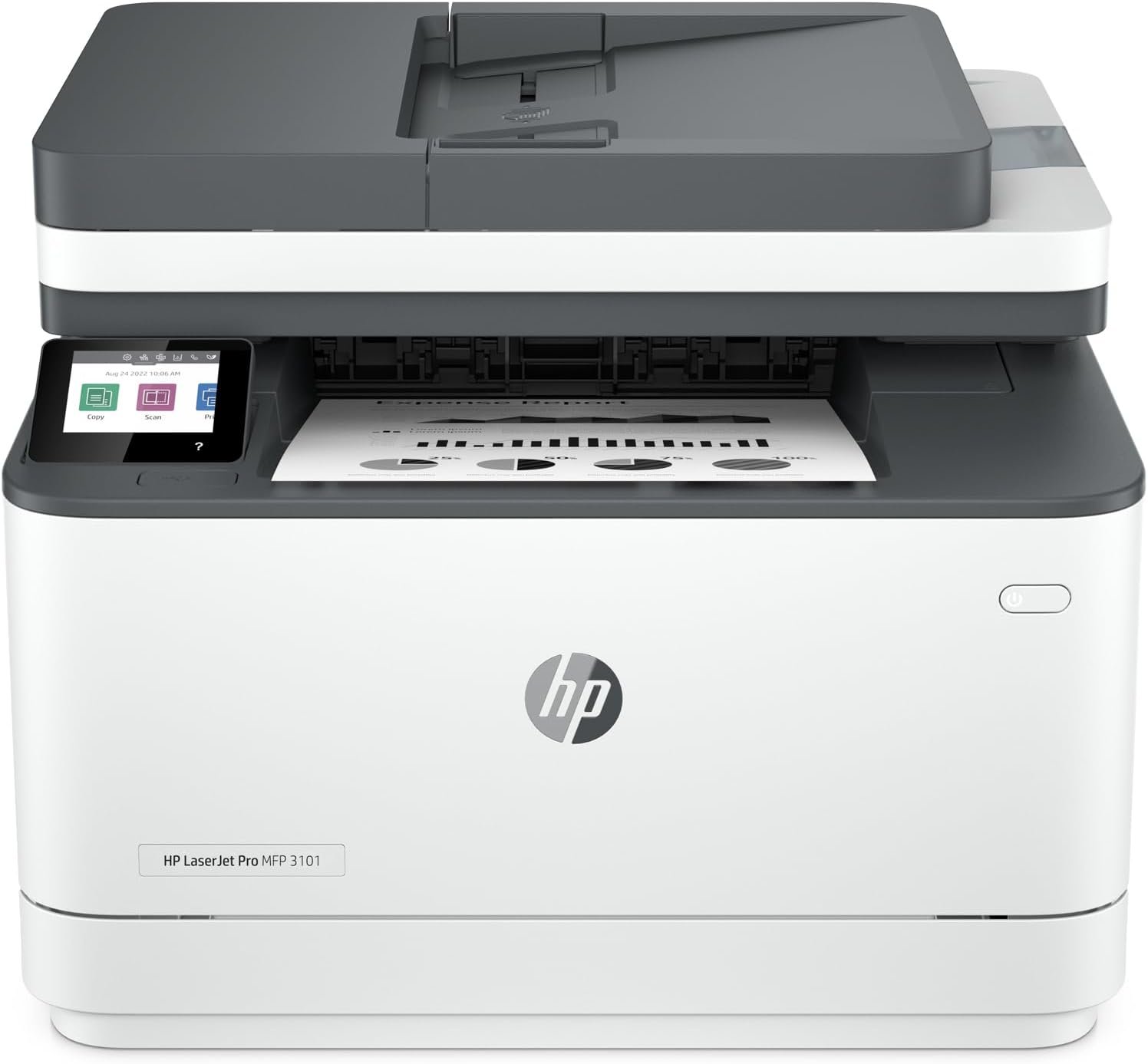
In today’s fast-paced business environment, selecting the right printer is critical for maintaining productivity and efficiency. Small teams and remote workforces rely on printers that can handle high-volume tasks while integrating seamlessly with digital workflows. The HP LaserJet Pro MFP 3101fdw is designed for office environments where speed, security, and multifunctionality are essential. Whether you need to print reports, scan documents, or fax information, this printer offers a comprehensive solution. Its ability to handle up to 35 pages per minute in black-and-white mode makes it suitable for environments with moderate to high print demands. However, the decision to invest in this model depends on factors such as print volume, connectivity requirements, and long-term maintenance costs. Understanding these elements ensures that the printer aligns with specific operational needs. For businesses prioritizing cloud integration and secure data handling, the 3101fdw’s features like HP Wolf Pro Security and Wi-Fi connectivity may be decisive. Conversely, users requiring color printing or advanced photo capabilities may find this model less versatile. Evaluating these aspects helps determine whether the HP LaserJet Pro MFP 3101fdw is the optimal choice for your workspace.
Quick Overview
| Feature | Details |
|---|---|
| Printer Type | Monochrome Laser Multifunction Printer |
| Print Speed | Up to 35 pages per minute (single-sided) |
| Connectivity | Ethernet, USB, Wi-Fi, Bluetooth |
| Print Resolution | 1200 x 1200 dpi (black-and-white) |
| Media Support | Glossy film, glossy photo paper, labels, standard paper |
| Duplex Printing | Automatic (two-sided) |
| Scanner Type | Flatbed |
| Maximum Copy Speed | 35 pages per minute (black-and-white) |
| Supported Functions | Print, scan, copy, fax |
| Duty Cycle | Designed for high-volume office environments |
| Toner System | Original HP toner cartridges |
| Warranty | Limited warranty |
The HP LaserJet Pro MFP 3101fdw combines speed, security, and multifunctionality to meet the demands of small teams and office settings. Its automatic duplex printing and cloud connectivity make it ideal for environments requiring efficient document management. The printer’s support for various media types and its integration with modern device ecosystems enhance its versatility for both traditional and digital workflows.

Print Speed and Efficiency
The HP LaserJet Pro MFP 3101fdw excels in high-speed printing, delivering up to 35 pages per minute in black-and-white mode. This performance is ideal for environments with frequent print tasks, such as small businesses or remote teams. The printer’s laser technology ensures consistent print quality, with a resolution of 1200 x 1200 dpi, which is sufficient for text documents, reports, and basic graphics. The auto-duplex feature reduces paper usage by printing on both sides automatically, contributing to cost savings over time. Additionally, the printer’s ability to handle large print jobs efficiently supports workflows that require high-volume output without compromising speed. For users needing to process multiple documents quickly, the 3101fdw’s print speed and reliability make it a strong contender in the monochrome laser printer category.

High-Volume Workloads
The printer is designed to handle demanding office environments, with a duty cycle that supports continuous printing without overheating or mechanical wear. Its laser technology ensures that each print job is completed swiftly, minimizing downtime. For users who frequently print large batches of documents, the 3101fdw’s performance is well-suited to meet these needs. The printer’s ability to process high-volume workloads efficiently makes it a reliable choice for small teams and businesses with moderate to high print demands. This capability is particularly valuable for environments where time-sensitive tasks require rapid output.
Energy Efficiency
The HP LaserJet Pro MFP 3101fdw incorporates energy-saving features that reduce power consumption during operation. While the printer’s power consumption is relatively high at 436 watts, its intelligent Wi-Fi connectivity ensures that it remains online and ready for printing without unnecessary energy use. This balance between performance and efficiency is crucial for businesses aiming to maintain operational costs while ensuring productivity. The printer’s energy management capabilities contribute to its overall value proposition, especially for organizations with environmental or cost-conscious goals.
Connectivity and Device Compatibility
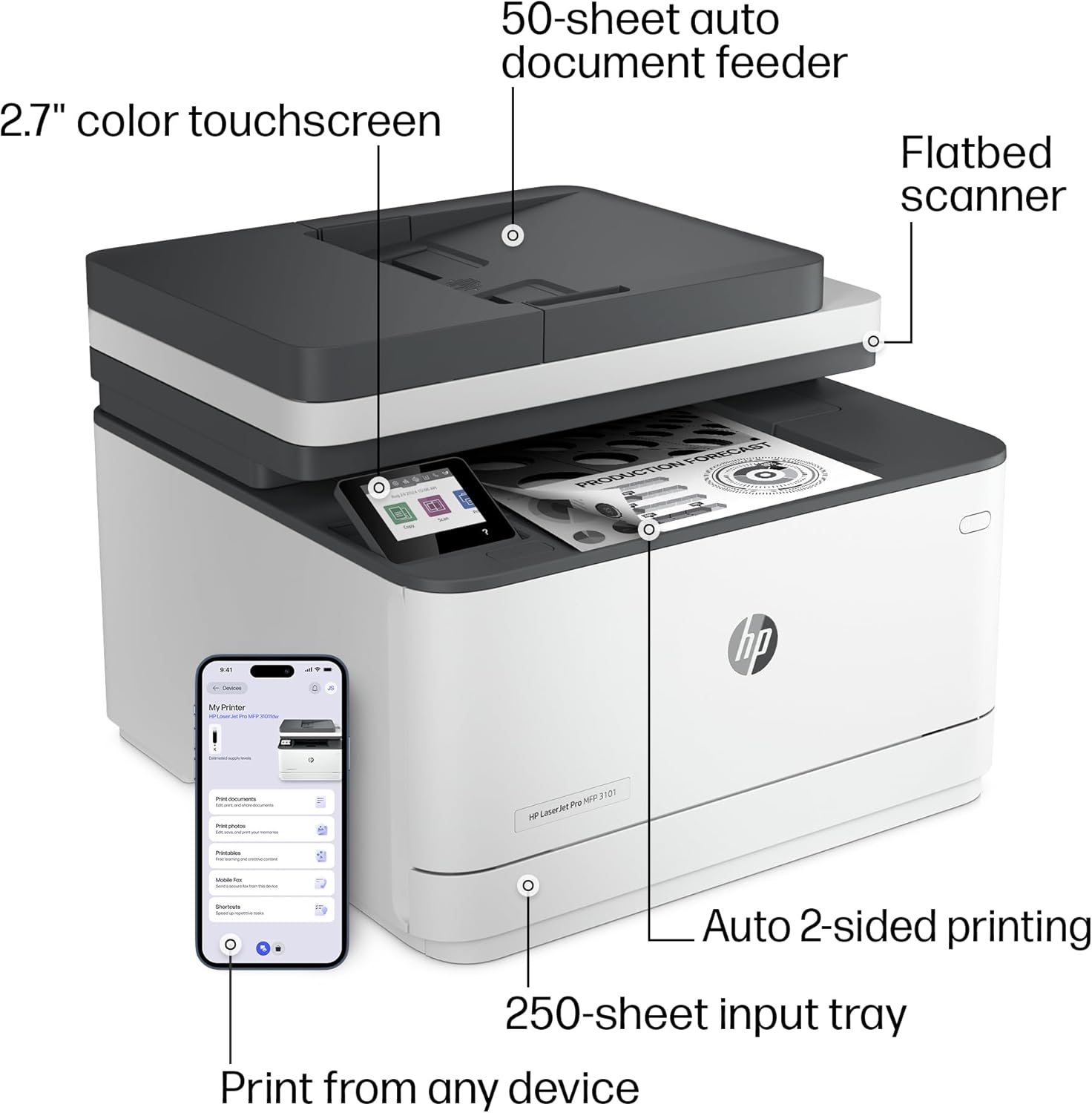
The HP LaserJet Pro MFP 3101fdw offers a range of connectivity options, including Ethernet, USB, Wi-Fi, and Bluetooth, making it compatible with a wide array of devices. This versatility is essential for users who need to print from multiple platforms, such as desktops, laptops, smartphones, and tablets. The printer’s cloud connectivity allows for seamless integration with digital workflows, enabling users to manage print tasks remotely. For small teams, this feature enhances collaboration by allowing employees to access and print documents from any location. The printer’s support for various operating systems, including Windows, macOS, and Android, ensures that it can be easily integrated into existing IT infrastructures. These connectivity features make the 3101fdw a practical choice for environments requiring flexible and reliable device compatibility.
Wireless Printing and Remote Access
The printer’s Wi-Fi connectivity ensures that users can print from any mobile device without the need for physical connections. This feature is particularly beneficial for remote workers who need to access office resources from home or while traveling. The printer’s ability to maintain an optimal Wi-Fi connection enhances its reliability in environments where network stability is a concern. Additionally, the inclusion of Bluetooth support allows for direct printing from devices such as smartphones and tablets, further expanding its usability. These wireless capabilities make the 3101fdw a versatile option for users who prioritize mobility and remote access in their printing workflows.
Cloud Integration and Management
The HP LaserJet Pro MFP 3101fdw’s cloud connectivity simplifies print management for small teams and businesses. Users can access and manage print jobs through the HP Smart app, which provides real-time monitoring and control over the printer’s operations. This integration is particularly useful for organizations that rely on cloud-based workflows, as it allows for centralized management of print tasks without the need for physical access to the printer. The printer’s compatibility with HP Web JetAdmin further enhances its management capabilities, enabling IT administrators to configure and monitor multiple devices efficiently. These features collectively improve the printer’s usability in environments where streamlined print management is essential.
Security and Data Protection
The HP LaserJet Pro MFP 3101fdw includes robust security features to protect sensitive data and prevent unauthorized access. HP Wolf Pro Security is a key component of the printer’s security framework, offering customizable settings to ensure that print jobs are handled securely. This feature is particularly important for businesses that deal with confidential information, as it helps prevent data leaks and unauthorized printing. The printer’s PIN/pull option allows users to authenticate print jobs only when they are present, adding an extra layer of security. Additionally, the printer’s firmware updates ensure that security measures remain up-to-date, addressing potential vulnerabilities as they arise. These security features make the 3101fdw a reliable choice for organizations that prioritize data protection and compliance with security standards.

Data Encryption and Compliance
The printer’s support for data encryption ensures that sensitive information is protected during transmission and storage. This feature is essential for businesses that handle confidential documents or comply with data protection regulations such as GDPR. The printer’s ability to maintain secure print jobs and prevent unauthorized access aligns with the growing demand for secure printing solutions in modern work environments. By incorporating these security measures, the 3101fdw helps organizations meet regulatory requirements while safeguarding their data from potential breaches.
Firmware Updates and Maintenance
Regular firmware updates are critical for maintaining the effectiveness of the printer’s security features. These updates ensure that the printer remains protected against emerging threats and vulnerabilities. The printer’s design allows for seamless firmware updates without disrupting ongoing operations, making it easier for IT administrators to maintain security standards. This proactive approach to security management is a significant advantage for businesses that require continuous protection without compromising productivity. The ability to update security measures periodically ensures that the printer remains a secure and reliable option for data-sensitive environments.
Media Support and Versatility
The HP LaserJet Pro MFP 3101fdw is designed to handle a variety of media types, making it suitable for different printing needs. It supports glossy film, glossy photo paper, labels, and standard paper, allowing users to produce high-quality prints for various applications. This versatility is particularly beneficial for businesses that require printing on different materials, such as marketing materials or product labels. The printer’s ability to handle diverse media types enhances its adaptability for environments with varying print requirements. Additionally, the printer’s support for different paper sizes, including letter, legal, and A4, ensures that it can accommodate a wide range of document formats. These features make the 3101fdw a practical choice for users who need a printer that can adapt to different printing scenarios.

Print Quality and Resolution
The printer’s print resolution of 1200 x 1200 dpi ensures that text documents, reports, and basic graphics are printed with clarity and precision. This level of detail is essential for professional environments where document quality is critical. The printer’s ability to maintain consistent print quality across different media types further enhances its reliability for various applications. For users who need to produce documents with high readability and sharp text, the 3101fdw’s resolution capabilities make it a suitable option. The printer’s performance in this regard supports its use in environments where document accuracy and visual clarity are important.
Media Handling and Compatibility
The printer’s media handling capabilities are designed to accommodate different paper types and sizes, ensuring smooth operation without jams or misfeeds. Its flatbed scanner and auto document feeder support efficient scanning and copying of documents, further enhancing its versatility. The printer’s compatibility with various media types and sizes makes it a practical choice for businesses that require a printer capable of handling diverse printing tasks. These features contribute to the printer’s overall usability in environments with varying print needs and document formats.

Pros & Cons
Pros
- High Print Speed: The 3101fdw delivers up to 35 pages per minute, making it ideal for environments with frequent print tasks.
- Robust Security Features: HP Wolf Pro Security and PIN/pull options protect sensitive data and prevent unauthorized printing.
- Versatile Media Support: The printer handles glossy film, labels, and standard paper, catering to various printing needs.
- Cloud Connectivity: Integration with HP Smart and Web JetAdmin simplifies print management and remote access.
- Energy Efficiency: Intelligent Wi-Fi connectivity reduces unnecessary power consumption while maintaining performance.
- Scalable for Small Teams: Designed for up to 7 users, it supports collaborative workflows in small office settings.
- Automatic Duplex Printing: Reduces paper usage and costs by printing on both sides automatically.
- Firmware Updates: Regular updates ensure security measures remain current and effective.
Cons
- Limited Color Options: The printer is designed for monochrome printing, making it unsuitable for color requirements.
- Dependence on HP Cartridges: Users must use original HP toner cartridges, which may increase long-term costs.
- Higher Power Consumption: The printer’s energy use is relatively high, which may affect operational costs in energy-sensitive environments.
- Firmware Update Dependency: Periodic firmware updates are necessary to maintain security and functionality, which may require IT intervention.
- No Built-In Color Printing: The absence of color capabilities limits its use in environments requiring vibrant or detailed color output.
- Limited Media Compatibility: While the printer supports various media types, it may not handle specialty papers or high-gloss finishes as effectively as dedicated photo printers.
Final Verdict: Who This Printer Is Best For (and Who Should Skip It)
The HP LaserJet Pro MFP 3101fdw is best suited for small teams and office environments that prioritize speed, security, and multifunctionality. Its high print speed, cloud connectivity, and robust security features make it an ideal choice for businesses requiring efficient document management. The printer’s ability to handle various media types and its support for remote access enhance its versatility for modern work environments. However, users requiring color printing or advanced photo capabilities should consider alternative models. Additionally, businesses with strict energy efficiency requirements or those that prefer lower long-term costs may find the 3101fdw less suitable. For organizations that value reliability and seamless integration with digital workflows, the 3101fdw remains a strong option in the monochrome laser printer category.
The printer’s reliance on original HP cartridges and the need for periodic firmware updates may be drawbacks for users seeking cost-effective and low-maintenance solutions. While the 3101fdw excels in high-volume, black-and-white printing scenarios, its limitations in color output and media compatibility should be carefully evaluated. Overall, the HP LaserJet Pro MFP 3101fdw is a reliable choice for businesses that prioritize productivity, security, and efficient document management in a small team or office setting.

Frequently Asked Questions (FAQs)
What is the maximum print speed of the HP LaserJet Pro MFP 3101fdw?
The HP LaserJet Pro MFP 3101fdw can print up to 35 pages per minute in black-and-white mode, making it suitable for environments with high-volume print demands.
Does the printer support color printing?
No, the HP LaserJet Pro MFP 3101fdw is designed for monochrome printing only. It does not support color output, making it ideal for black-and-white document needs.
What security features are included in the HP LaserJet Pro MFP 3101fdw?
The printer includes HP Wolf Pro Security with customizable settings, PIN/pull authentication for print jobs, and regular firmware updates to maintain security standards.
Can the printer be managed remotely?
Yes, the HP LaserJet Pro MFP 3101fdw supports remote management through HP Web JetAdmin and the HP Smart app, allowing IT administrators to configure and monitor the printer from a central dashboard.
What types of media can the printer handle?
The HP LaserJet Pro MFP 3101fdw supports glossy film, glossy photo paper, labels, and standard paper, accommodating a variety of printing needs.
Is the printer compatible with wireless printing?
Yes, the printer includes Wi-Fi connectivity for seamless wireless printing from mobile devices, laptops, and tablets, enhancing its usability in modern work environments.
What is the warranty coverage for the HP LaserJet Pro MFP 3101fdw?
The printer comes with a limited warranty, providing basic coverage for manufacturing defects and ensuring reliability for typical office use.
Does the printer support automatic duplex printing?
Yes, the HP LaserJet Pro MFP 3101fdw includes automatic duplex printing, which prints on both sides of the paper to reduce paper usage and costs.