HP OfficeJet Pro 8135e Review: High-Resolution Color Printing for Home Offices
The Importance of Choosing the Right Printer for Modern Workflows
In today’s fast-paced work environments, the right printer can significantly impact productivity and efficiency. Whether you’re managing a home office, running a small business, or handling academic projects, a printer that meets your specific needs is essential. The HP OfficeJet Pro 8135e represents a compelling option for users requiring a versatile, reliable, and high-performance all-in-one printer. Its design caters to both casual and professional users, offering a balance between speed, quality, and multifunctionality. For those who prioritize color output, fast printing, and seamless connectivity, this model presents a viable solution. However, the decision to invest in this printer should be based on a thorough evaluation of its capabilities relative to your workload demands, media requirements, and long-term maintenance considerations. This review provides an in-depth analysis of the HP OfficeJet Pro 8135e’s technical specifications, performance benchmarks, and user experience factors to help you determine its suitability for your specific needs.
Quick Overview
| Feature | Details |
|---|---|
| Printer Type | Wireless All-in-One Color Inkjet Printer |
| Printing Technology | HP Thermal Inkjet |
| Print Functions | Print, Copy, Scan, Fax |
| Print Resolution | Up to 4800 x 1200 dpi (color), 4800 dots per inch (black and white) |
| Print Speed | 20 ppm (black), 10 ppm (color) |
| Media Sizes | 8.5 x 11, 8.5 x 14, 7.16 x 10.12, 8.27 x 11.7 |
| Connectivity | Ethernet, USB, Wireless (Wi-Fi Direct, Apple AirPrint, Mopria Certified) |
| Ink System | Dye-based ink (HP 923 Setup cartridges) |
| Duty Cycle | 5000 pages per month |
| Warranty | 1-year limited warranty |
| Additional Features | Automatic Duplex Printing, 225-sheet ADF, Touchscreen Interface |
The HP OfficeJet Pro 8135e’s combination of high-resolution printing, multifunctional capabilities, and modern connectivity options makes it well-suited for home offices and small-scale business environments. Its ability to handle color documents, photos, and standard text with precision, along with its streamlined user interface, positions it as a practical choice for users seeking a balance between performance and ease of use.

Print Quality and Resolution: Delivering Professional-Grade Output

Precision in Color and Text
The HP OfficeJet Pro 8135e’s print resolution of up to 4800 x 1200 dpi ensures sharp, detailed output for both text and graphics. This level of resolution is particularly advantageous for producing professional-looking documents, such as reports, presentations, and marketing materials. The printer’s thermal inkjet technology enables precise ink droplet placement, resulting in consistent color reproduction and minimal banding or streaking. For users who require high-quality color prints, such as graphic designers or small business owners, the 4800 x 1200 dpi resolution provides a competitive edge over lower-resolution alternatives.
Text Clarity and Grayscale Performance
In black-and-white printing, the printer’s 4800 dots per inch resolution ensures crisp, clean text that is ideal for academic papers, invoices, and administrative documents. The consistent tonal gradation across grayscale images further enhances readability, making it a reliable option for users who frequently print text-heavy content. While the printer does not support laser-grade text sharpness, its dye-based ink system and high-resolution output make it a strong contender for office environments where clarity is a priority.
Photo and Graphic Output
For users who need to print photos or detailed graphics, the HP OfficeJet Pro 8135e’s color resolution and ink formulation deliver acceptable results. The printer’s ability to maintain color accuracy across different media types, such as glossy or matte paper, ensures that photos retain their vibrancy and detail. However, compared to dedicated photo printers, the HP OfficeJet Pro 8135e may fall short in producing ultra-high-resolution prints for professional photography or large-format graphics. Users with specialized photo printing needs should consider alternative models with dedicated photo inks or larger media support.
Connectivity and Device Compatibility: Seamless Integration for Modern Workflows

Wireless and Mobile Printing Options
The HP OfficeJet Pro 8135e’s support for wireless printing, including Wi-Fi Direct, Apple AirPrint, and Mopria Certified, allows users to print from a variety of devices without the need for a computer. This feature is particularly beneficial for remote workers or those who frequently print from smartphones and tablets. The inclusion of the HP Smart app further enhances user experience by enabling remote monitoring, ink level tracking, and firmware updates. However, the printer’s reliance on a stable Wi-Fi connection may pose challenges for users in areas with inconsistent network coverage.
Ethernet and USB Connectivity
For users who prefer a wired connection, the printer’s Ethernet port provides a reliable alternative for high-speed data transfer and print job management. The USB port allows for direct printing from devices that lack wireless capabilities, ensuring compatibility with older hardware. While the printer does not support USB printing for all functions, its dual connectivity options offer flexibility in setting up the device for different use cases.
Compatibility with Third-Party Devices
The HP OfficeJet Pro 8135e’s adherence to industry-standard printing protocols, such as Mopria Certification, ensures compatibility with a wide range of mobile devices and operating systems. However, users who rely on non-HP printers or third-party ink cartridges may encounter limitations in terms of feature support and print quality. The printer’s reliance on HP-branded ink cartridges also means that users must consider ongoing costs for consumables, which could impact long-term affordability.
Media Support and Versatility: Handling a Range of Print Tasks

Supported Media Sizes and Types
The HP OfficeJet Pro 8135e accommodates a variety of media sizes, including standard letter, legal, and tabloid formats. Its ability to handle 8.5 x 14 inch paper is particularly useful for users who need to print large documents or spreadsheets. The printer’s support for different paper types, such as plain paper, glossy photo paper, and specialty media, ensures that users can tailor their printing to specific tasks. However, the absence of support for thicker media, such as cardstock or fabric, may limit its utility for creative or industrial applications.
Duplex Printing and Automatic Document Feeder
The printer’s automatic duplex printing feature reduces paper usage and enhances document organization, making it an efficient choice for users who frequently print multi-page reports or brochures. The built-in automatic document feeder (ADF) simplifies batch scanning and copying, particularly for users who need to process multiple pages at once. While the ADF’s capacity of 225 sheets is adequate for most home office needs, users with high-volume scanning requirements may find it less suitable compared to dedicated multifunction devices with larger ADF capacities.
Media Compatibility and Print Quality
The HP OfficeJet Pro 8135e’s ability to maintain consistent print quality across different media types is a notable advantage. The printer’s thermal inkjet technology ensures that ink adheres properly to various paper surfaces, minimizing issues such as smudging or bleeding. However, users who print on non-standard media may need to adjust print settings or use specialized paper types to achieve optimal results. The printer’s compatibility with HP Planet Partners recycling programs also adds value for environmentally conscious users.

Pros & Cons
Pros
- High Print Resolution: The 4800 x 1200 dpi resolution ensures sharp, detailed output for both text and graphics, making it suitable for professional documents and photos.
- Versatile Connectivity: Support for wireless printing, Ethernet, and USB ensures compatibility with a wide range of devices and environments.
- Automatic Duplex Printing: Reduces paper usage and enhances document organization, improving efficiency for home office users.
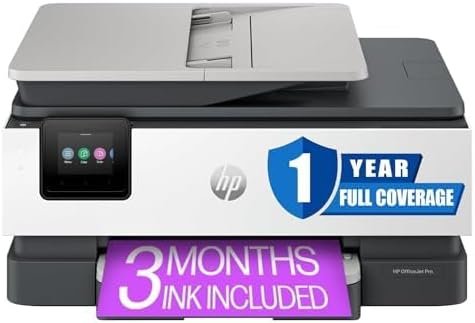
- User-Friendly Interface: The 2.7-inch touchscreen simplifies navigation, settings management, and multifunction tasks.
- Multifunctional Capabilities: Combines printing, scanning, copying, and faxing into a single device, reducing the need for multiple peripherals.
- Sustainable Features: Includes HP Instant Ink eligibility and recyclable packaging, appealing to eco-conscious consumers.
- Reliable Warranty Support: Comes with a 1-year limited warranty, providing peace of mind for users.
- Scalable for Small Workloads: The 5000 pages per month duty cycle is well-suited for home offices and small businesses with moderate printing needs.
Cons
- Ink Cost Considerations: The use of HP-branded ink cartridges may result in higher long-term costs compared to third-party alternatives.
- Limited Photo Printing Capabilities: While the printer produces acceptable color output, it may not meet the demands of professional photographers or graphic designers.
- Media Compatibility Limitations: The absence of support for thicker media types could restrict its use in creative or industrial applications.
- Connectivity Reliance: The printer’s performance depends on a stable Wi-Fi connection, which may be a drawback in areas with unreliable networks.
- ADF Capacity Constraints: The 225-sheet input tray is sufficient for most home office tasks but may fall short for users with high-volume scanning needs.
- No Laser-Grade Text Sharpness: While the printer delivers crisp text, it does not match the sharpness of laser printers for high-volume text printing.
Final Verdict: Who This Printer Is Best For (and Who Should Skip It)
The HP OfficeJet Pro 8135e is an excellent choice for home office users and small businesses that require a versatile, all-in-one printer with high-resolution color output and reliable connectivity. Its ability to handle a wide range of media sizes, combined with features like automatic duplex printing and a touchscreen interface, makes it ideal for tasks such as printing reports, presentations, and photos. The printer’s support for wireless printing and mobile device compatibility further enhances its appeal for users who prioritize convenience and flexibility.
However, users with high-volume printing needs, such as those in commercial or industrial settings, may find the HP OfficeJet Pro 8135e less suitable. The printer’s 5000 pages per month duty cycle is adequate for home offices but may not meet the demands of larger-scale operations. Additionally, users who prioritize laser-grade text sharpness or specialized photo printing capabilities should consider alternative models with dedicated laser or photo printing technologies. Overall, the HP OfficeJet Pro 8135e strikes a balance between performance, versatility, and ease of use, making it a strong contender for its target audience.

Frequently Asked Questions (FAQs)
What is the maximum print resolution of the HP OfficeJet Pro 8135e?
The HP OfficeJet Pro 8135e offers a maximum print resolution of 4800 x 1200 dpi for color prints and 4800 dots per inch for black-and-white prints, ensuring sharp and detailed output for both text and graphics.
How does the HP OfficeJet Pro 8135e handle wireless printing?
The printer supports wireless printing through Wi-Fi Direct, Apple AirPrint, and Mopria Certified protocols, allowing users to print from mobile devices and computers without a physical connection.
What media sizes does the HP OfficeJet Pro 8135e support?
The printer accommodates various media sizes, including standard letter, legal, and tabloid formats (up to 8.5 x 14 inches), as well as specialty sizes like 7.16 x 10.12 inches.
Can the HP OfficeJet Pro 8135e print on thick or specialty media?
While the printer supports a range of media types, it is not designed for thick or specialty media such as cardstock or fabric. Users may need to adjust print settings or use compatible paper types for optimal results.
What is the duty cycle of the HP OfficeJet Pro 8135e?
The printer is rated for a duty cycle of 5000 pages per month, making it suitable for home offices and small businesses with moderate printing needs.
Does the HP OfficeJet Pro 8135e include a touchscreen interface?
Yes, the printer features a 2.7-inch color touchscreen that simplifies navigation, settings management, and multifunction tasks such as copying, scanning, and faxing.
What connectivity options are available for the HP OfficeJet Pro 8135e?
The printer offers Ethernet, USB, and wireless connectivity options, including Wi-Fi Direct, Apple AirPrint, and Mopria Certified, ensuring compatibility with a wide range of devices.
What is the warranty coverage for the HP OfficeJet Pro 8135e?
The HP OfficeJet Pro 8135e comes with a 1-year limited warranty, providing support for hardware and software issues during the initial period of ownership.