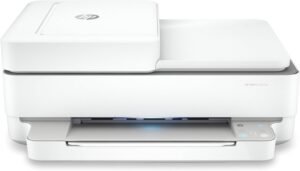
HP OfficeJet Pro 8139e Review: Best-In-Class All-in-One Printer for Home and Small Office Use

The Importance of Choosing the Right Printer for Your Workflow
In today’s fast-paced environments, selecting the right printer is critical for maintaining productivity and efficiency. Whether managing a home office, a small business, or a remote team, the printer you choose must align with your specific workflow requirements. Factors such as print quality, speed, connectivity options, and ongoing maintenance costs significantly impact user satisfaction and operational effectiveness. For example, a printer that delivers high-resolution color output is essential for creating professional marketing materials, while a device with robust security features is crucial for handling sensitive business documents. Additionally, the ability to handle large volumes of print jobs without frequent maintenance or downtime ensures long-term reliability. Understanding these requirements helps users make informed decisions that match their unique needs, whether prioritizing speed, cost-effectiveness, or multifunctionality.
Quick Overview
| Feature | Details |
|---|---|
| Printer Type | Wireless All-in-One Color Inkjet Printer |
| Printing Technology | HP Thermal Inkjet |
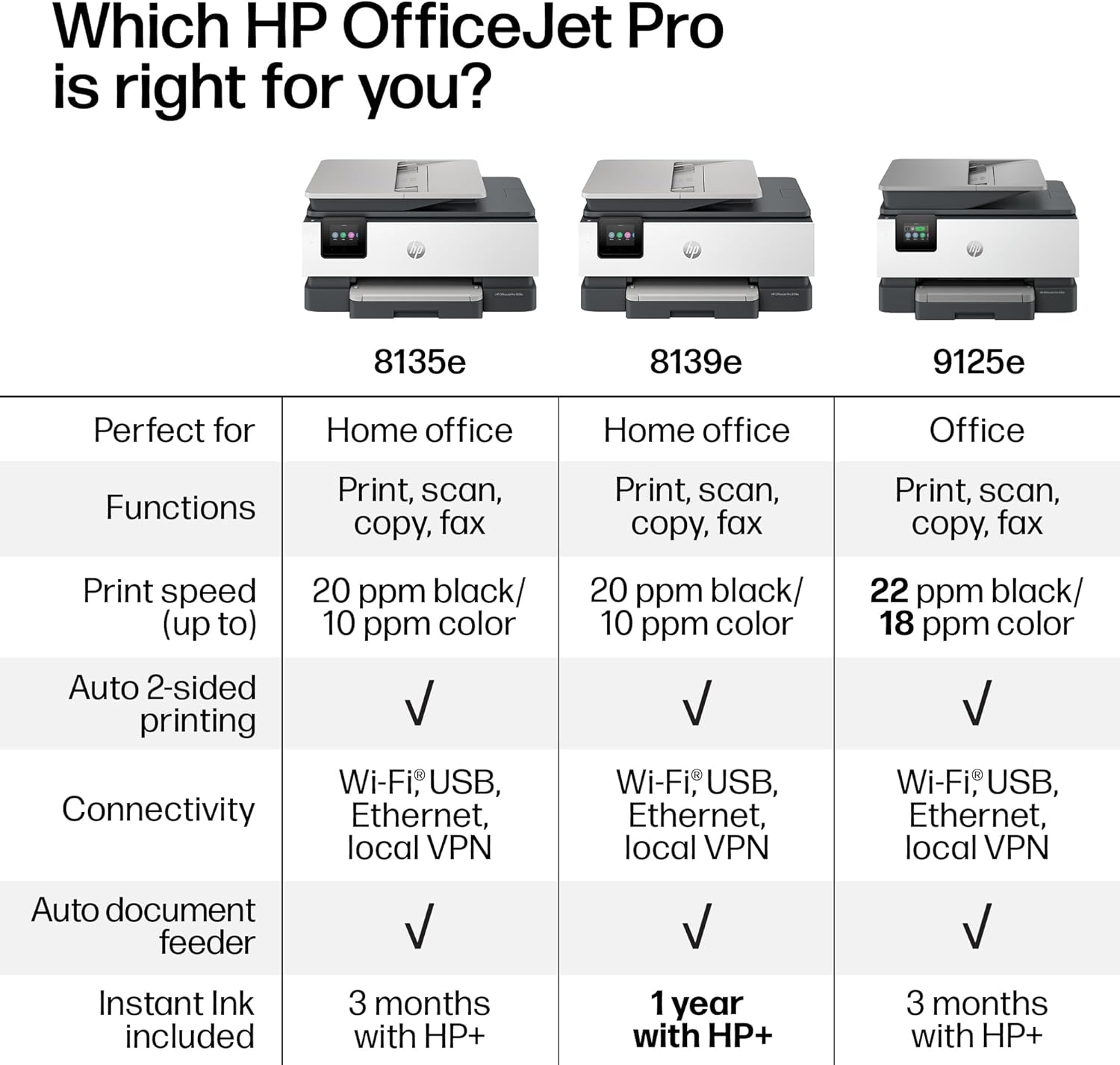
| Supported Functions | Print, Scan, Copy, Fax, Duplex Printing |
| Print Resolution | Up to 4800 x 1200 dpi (color), 1200 x 1200 dpi (black-and-white) |
| Print Speed | 10 ppm color, 20 ppm monochrome |
| Media Sizes | 8.5 x 11, 8.5 x 14, 11 x 14 inches |
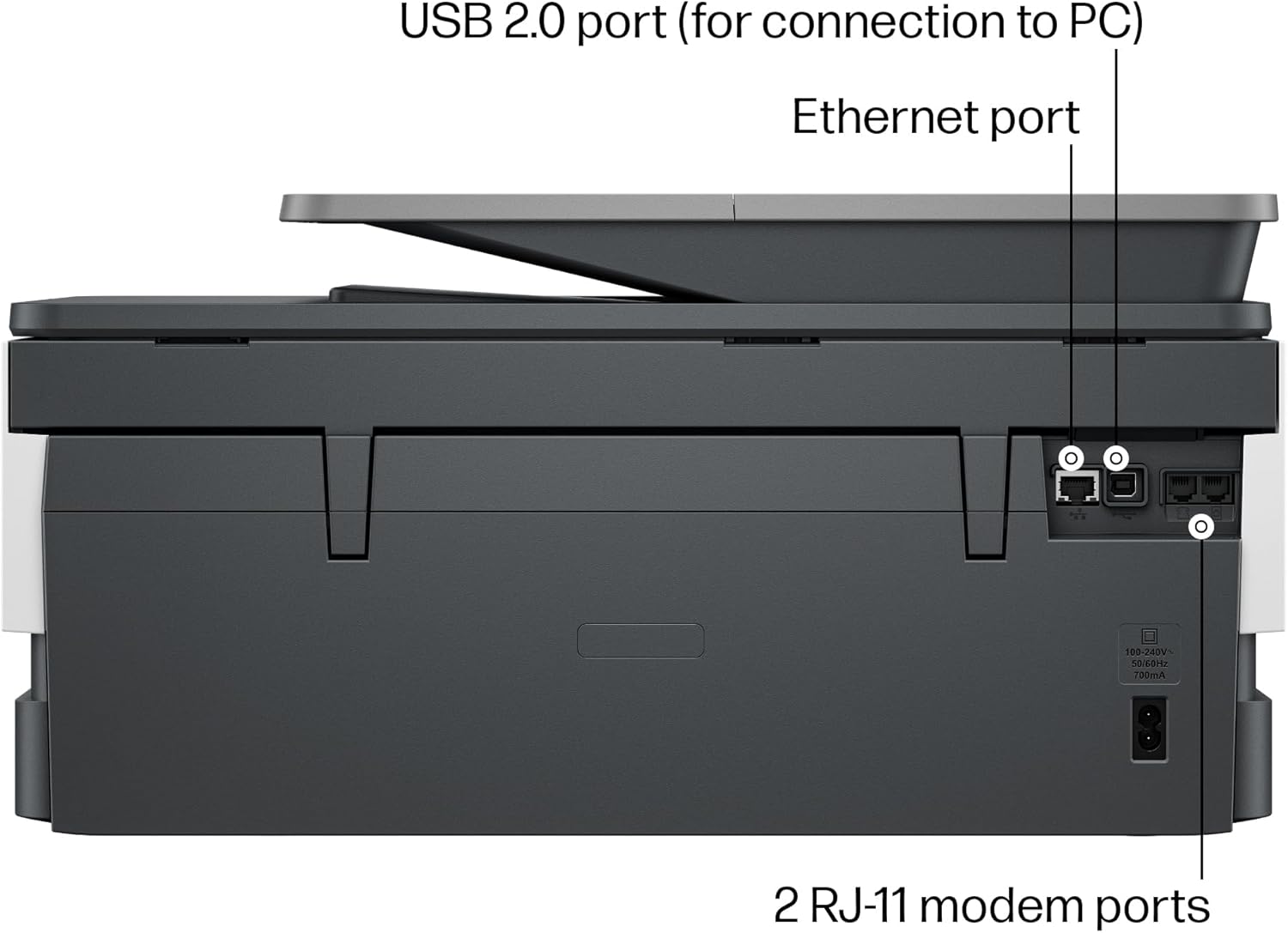
| Connectivity | Ethernet, USB, Wi-Fi (dual-band) |
| Duty Cycle | 1,500 pages per month |
| Ink System | HP 923 Setup Ink Cartridges (black, cyan, magenta, yellow) |
| Warranty | One-year limited hardware warranty |
The HP OfficeJet Pro 8139e combines high-speed printing with multifunctional capabilities, making it suitable for users who require a reliable device for both personal and professional tasks. Its thermal inkjet technology ensures consistent print quality, while the wireless connectivity and automatic document feeder enhance convenience for home and small office environments.
Print Quality and Resolution Performance
The HP OfficeJet Pro 8139e delivers high-resolution output that meets the demands of both text and graphic printing. Its maximum color print resolution of 4800 x 1200 dpi ensures sharp details for photographs and complex graphics, while the black-and-white resolution of 1200 x 1200 dpi provides crisp text for documents and reports. This level of detail is particularly beneficial for users who frequently print marketing materials, presentations, or high-quality images. The printer’s support for HP Advance Photo Paper further enhances color accuracy, making it ideal for users who require professional-grade output.

HP AI-Enabled Print Optimization
The inclusion of HP AI technology significantly improves the printing experience by automatically adjusting layouts to prevent wasted pages and awkward formatting. This feature is especially useful for printing web pages, emails, and other content that may have irregular dimensions. By intelligently removing unwanted content and optimizing page layouts, the printer ensures that final prints are clean and professional-looking without requiring manual adjustments. This automation reduces the time spent on post-print editing, making it a valuable asset for busy professionals.
Media Compatibility and Color Accuracy
The printer’s support for a wide range of media sizes, including 8.5 x 11, 8.5 x 14, and 11 x 14 inches, ensures flexibility for various printing needs. However, its color accuracy is optimized for HP-branded paper, which may slightly affect the results when using third-party media. Users who prioritize consistent color output should consider investing in HP-approved paper to achieve the best results. The printer’s ability to handle both plain paper and specialty media makes it versatile for tasks ranging from everyday documents to high-quality prints.
Durability and Longevity Considerations
While the HP OfficeJet Pro 8139e is designed for moderate to high-volume use, its duty cycle of 1,500 pages per month suggests it is best suited for small to medium-sized offices rather than heavy-duty commercial environments. The printer’s thermal inkjet technology ensures consistent performance over time, but users should be mindful of the ink consumption rate, as frequent printing may lead to higher maintenance costs. Regular cleaning of the print head and proper storage of ink cartridges can help extend the printer’s lifespan and maintain print quality.
Connectivity and Network Integration
The HP OfficeJet Pro 8139e offers robust connectivity options that enhance its usability in both home and office settings. Its dual-band Wi-Fi technology ensures stable and fast wireless printing, automatically resolving connection issues to minimize downtime. This feature is particularly beneficial for users who frequently print from multiple devices, as it allows seamless integration with smartphones, tablets, and computers. The printer’s Ethernet port provides a reliable wired connection for users who prioritize stability over wireless convenience, making it suitable for environments with potential Wi-Fi interference.
Mobile Printing and App Integration
The inclusion of the HP Print App simplifies the printing process by allowing users to print, scan, copy, or fax directly from their mobile devices. This app-based interface is intuitive and user-friendly, reducing the learning curve for new users. The app’s ability to manage print jobs, monitor ink levels, and receive firmware updates ensures that the printer remains up-to-date with the latest features and security enhancements. For remote workers or those who frequently travel, the mobile printing capability provides flexibility without compromising on print quality or reliability.
Security and Data Protection
The printer’s integration with HP Wolf Essential Security helps protect users from cyber threats by monitoring and blocking potential vulnerabilities. This feature is essential for businesses that handle sensitive documents or require compliance with data protection regulations. The printer’s ability to print over a virtual private network (VPN) with HP+ further enhances security, ensuring that confidential information remains protected during transmission. These security measures make the HP OfficeJet Pro 8139e a reliable choice for users who prioritize data privacy and network security.
Compatibility with Multiple Devices
The printer’s support for a wide range of devices, including laptops, PCs, and smartphones, ensures compatibility with various operating systems and platforms. Its USB ports allow for direct connections to computers, while the Ethernet port provides a stable network connection for centralized printing. The ability to manage print jobs from multiple devices simultaneously makes it an efficient solution for small offices or home environments where multiple users may need access to the same printer.
Maintenance and Consumable Costs
The HP OfficeJet Pro 8139e requires regular maintenance to ensure optimal performance, particularly for users who print frequently. The printer’s ink system uses HP 923 Setup cartridges, which are designed for high-capacity printing but may require more frequent replacement compared to standard cartridges. While the included Instant Ink subscription offers convenience by delivering ink directly to the user’s door, the associated monthly fees may impact the overall cost-effectiveness for some users. Proper maintenance, such as cleaning the print head and replacing ink cartridges promptly, can help minimize downtime and extend the printer’s lifespan.

Ink Consumption and Cost Considerations
The printer’s ink consumption rate is influenced by factors such as print density, media type, and the use of HP AI optimization. While the thermal inkjet technology ensures efficient ink usage, users who print high volumes of color documents may find the cost of ink cartridges to be a significant ongoing expense. The included Instant Ink subscription provides a predictable cost structure, but users should consider whether the monthly fee aligns with their printing needs. For those who prefer to manage ink purchases independently, the availability of compatible third-party cartridges can offer cost savings, though it may affect print quality and reliability.
Long-Term Maintenance and Reliability
The HP OfficeJet Pro 8139e is designed for reliability, with a one-year limited hardware warranty that can be extended through the HP+ program. Regular maintenance tasks, such as cleaning the print head and checking for firmware updates, can help prevent common issues such as clogged nozzles or print quality degradation. The printer’s quiet mode reduces noise levels, making it suitable for environments where minimal disruption is required. However, users should be aware that the printer’s performance may degrade over time without proper maintenance, emphasizing the importance of following recommended care guidelines.

Pros & Cons
Pros
- High-Speed Color Printing: The printer delivers up to 10 ppm color prints, making it suitable for quick document production and small office use.
- Multifunctionality: With print, scan, copy, and fax capabilities, the HP OfficeJet Pro 8139e reduces the need for multiple devices, optimizing workspace efficiency.
- Wireless Connectivity: Dual-band Wi-Fi ensures stable and fast printing, even in environments with multiple connected devices.
- HP AI Optimization: The AI-enabled printing feature enhances output quality by automatically adjusting layouts and removing unwanted content, reducing manual post-print edits.
- Security Features: HP Wolf Essential Security and the ability to print over a VPN provide robust protection against cyber threats, making it ideal for businesses handling sensitive data.
- Media Versatility: The printer supports a range of media sizes, including legal and letter dimensions, allowing flexibility for various printing tasks.
- User-Friendly App Integration: The HP Print App simplifies mobile printing and device management, enhancing usability for both home and office environments.
Cons
- Limited Media Compatibility: While the printer supports a variety of media sizes, its color accuracy is optimized for HP-branded paper, which may affect results with third-party media.
- Higher Ink Costs: The use of HP 923 Setup cartridges and the Instant Ink subscription model may lead to higher ongoing expenses compared to standard ink systems.
- Maintenance Requirements: Regular cleaning of the print head and proper storage of ink cartridges are necessary to maintain print quality and prevent clogs.
- Noise Levels: Although the printer includes a quiet mode, it may still produce noticeable noise during high-volume printing, which could be disruptive in certain environments.
- Duty Cycle Limitations: The printer’s 1,500 pages per month duty cycle suggests it is better suited for small to medium-sized offices rather than heavy-duty commercial use.
Final Verdict: Who This Printer Is Best For (and Who Should Skip It)
The HP OfficeJet Pro 8139e is an excellent choice for home office users and small businesses that require a reliable, multifunctional printer for daily tasks. Its high-speed color printing, wireless connectivity, and AI-enabled optimization make it ideal for creating professional documents, marketing materials, and high-quality images. The printer’s security features and compatibility with multiple devices also make it a strong contender for users who prioritize data protection and network stability. However, it may not be the best fit for heavy-duty commercial environments or users who require higher print volumes. Those who prioritize cost-effective ink solutions or prefer to manage consumables independently may find the printer’s ink costs and maintenance requirements to be a drawback. Overall, the HP OfficeJet Pro 8139e is well-suited for users who value convenience, versatility, and reliable performance in a compact all-in-one printer.

Frequently Asked Questions (FAQs)
What print resolution does the HP OfficeJet Pro 8139e offer?
The HP OfficeJet Pro 8139e provides a maximum color print resolution of 4800 x 1200 dpi, ensuring high-quality output for photographs and graphics. For black-and-white printing, it delivers 1200 x 1200 dpi, suitable for crisp text documents and reports.
Can the HP OfficeJet Pro 8139e handle large print jobs?
The printer is designed for moderate to high-volume use with a duty cycle of 1,500 pages per month. While it can manage large print jobs, it is best suited for small to medium-sized offices rather than heavy-duty commercial environments.
How does the HP OfficeJet Pro 8139e’s wireless printing work?
The printer supports dual-band Wi-Fi, which automatically detects and resolves connection issues for stable wireless printing. This ensures reliable connectivity for users printing from smartphones, tablets, and computers.
Is the HP OfficeJet Pro 8139e compatible with mobile printing?
Yes, the printer includes the HP Print App, allowing users to print, scan, copy, or fax directly from their mobile devices. This app-based interface simplifies device management and enhances usability for remote workers.
What security features does the HP OfficeJet Pro 8139e offer?
The printer integrates HP Wolf Essential Security to protect against cyber threats and includes the ability to print over a virtual private network (VPN). These features ensure data protection for users handling sensitive documents.
How does the HP OfficeJet Pro 8139e handle ink consumption?
The printer uses HP 923 Setup ink cartridges with a thermal inkjet system for efficient ink usage. While the included Instant Ink subscription provides convenience, users should consider the monthly fees for ongoing ink costs.
Can the HP OfficeJet Pro 8139e print on specialty media?
The printer supports a range of media sizes, including legal and letter dimensions, but its color accuracy is optimized for HP-branded paper. For consistent results, users should use HP-approved media for high-quality prints.
What is the warranty coverage for the HP OfficeJet Pro 8139e?
The printer comes with a one-year limited hardware warranty, which can be extended through the HP+ program. Regular maintenance, such as cleaning the print head, can help extend its lifespan and maintain performance.