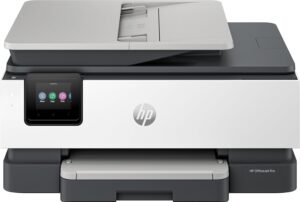
HP Officejet Pro 9110b Color Inkjet Printer Review: Performance and Features

The Importance of Choosing the Right Printer
In today’s fast-paced work environments, selecting the right printer is critical for maintaining productivity and efficiency. Whether managing a small office, handling home printing tasks, or supporting mobile workflows, the right printer can significantly impact workflow speed and output quality. Modern printers must balance speed, reliability, and cost-effectiveness to meet diverse user needs. For businesses and individuals requiring high-volume printing, factors like print speed, duty cycle, and connectivity options become paramount. Meanwhile, users prioritizing cost savings may focus on features like automatic duplex printing or energy efficiency. This review evaluates the HP Officejet Pro 9110b, a color inkjet printer designed for office environments, to determine its suitability for various printing demands. By analyzing its technical specifications, connectivity options, and operational capabilities, we provide an objective assessment of its strengths and limitations for different use cases.
Quick Overview
| Feature | Details |
|---|---|
| Printer Type | Color Inkjet Printer |
| Print Speed | 32 ppm Color / 32 ppm Monochrome |
| Print Resolution | 1200 x 1200 dpi |
| Connectivity | Bluetooth, USB, Wi-Fi, Wireless |
| Media Sizes | 3 x 5 inches to 297mm |
| Duty Cycle | 25,000 Pages |
| Ink Type | Pigment-Based Ink |
| Duplex Printing | Automatic |
| Input Capacity | 250-Sheet Tray |
| Additional Functions | Scan, Copy, Wireless Printing |
| Warranty | Manufacturer Warranty |
The HP Officejet Pro 9110b is designed for office environments requiring reliable, high-speed color printing. Its combination of wireless connectivity, automatic duplex, and pigment-based ink supports efficient document management while minimizing operational costs. These features make it a viable option for small to medium-sized businesses needing consistent output quality and flexibility in printing workflows.

Print Speed and Throughput
The HP Officejet Pro 9110b delivers consistent print speeds of 32 pages per minute in both color and monochrome modes, making it well-suited for environments with moderate to high-volume printing demands. This speed ensures that users can complete print jobs efficiently without significant delays, even when handling multiple tasks simultaneously. The printer’s duty cycle of 25,000 pages provides a robust foundation for long-term use, reducing the need for frequent maintenance or replacement. This specification is particularly advantageous for businesses that require continuous printing without interruptions.

High-Speed Performance for Workflows
The 32 ppm print speed ensures that the HP Officejet Pro 9110b can handle time-sensitive print jobs, such as reports, presentations, and marketing materials, without compromising on quality. This speed is ideal for office environments where quick turnaround times are essential. The printer’s ability to maintain consistent performance across both color and monochrome tasks ensures that users can manage diverse printing needs without reconfiguration.
Duty Cycle and Reliability
With a duty cycle of 25,000 pages, the HP Officejet Pro 9110b is designed for environments requiring sustained printing activity. This specification indicates the printer’s ability to operate reliably over extended periods, reducing the risk of mechanical wear and tear. Users in high-volume settings, such as small to medium-sized businesses, will find this duty cycle particularly beneficial, as it ensures the printer can handle daily print loads without significant degradation in performance.
Comparison to Similar Models
When compared to other printers in its class, the HP Officejet Pro 9110b offers competitive print speeds and a robust duty cycle. Its 32 ppm color speed is comparable to other mid-range color inkjet printers, making it a suitable choice for users requiring consistent output without sacrificing speed. The duty cycle of 25,000 pages also positions it as a reliable option for businesses that rely on continuous printing.
Connectivity and Device Compatibility
The HP Officejet Pro 9110b features a range of connectivity options, including Wi-Fi, Bluetooth, and USB, ensuring compatibility with a wide array of devices. This versatility allows users to print from laptops, desktops, smartphones, and tablets without the need for physical cables, enhancing convenience and flexibility in modern work environments. The printer’s support for Apple AirPrint and Wi-Fi Direct further simplifies the printing process, particularly for users with Apple devices or those requiring direct wireless connections.

Wireless Printing Convenience
The inclusion of Wi-Fi and Wi-Fi Direct enables seamless wireless printing, eliminating the need for additional hardware or complex setup procedures. This feature is particularly beneficial for users who prioritize mobility and flexibility, as it allows printing from remote locations without the constraints of physical connections. The printer’s support for Apple AirPrint ensures that macOS and iOS users can print directly from their devices without additional configuration.
USB and Bluetooth Versatility
While wireless connectivity offers convenience, the inclusion of USB and Bluetooth ports provides additional flexibility for users who prefer wired connections or need to print from older devices. USB connectivity ensures a stable and fast data transfer rate, while Bluetooth enables quick pairing with mobile devices, making it easier to manage print jobs on the go.
Compatibility with Multiple Devices
The HP Officejet Pro 9110b is designed to work with a variety of devices, including laptops, desktops, and smartphones. This compatibility ensures that users can integrate the printer into their existing workflows without compatibility issues. The printer’s support for multiple operating systems and device types makes it an ideal choice for businesses with diverse technological environments.
Print Quality and Resolution
The HP Officejet Pro 9110b produces high-quality prints with a maximum resolution of 1200 x 1200 dpi, ensuring sharp text and detailed graphics. This resolution is suitable for both everyday documents and more complex print jobs, such as marketing materials and presentations. The use of pigment-based ink further enhances the longevity and vibrancy of printed outputs, making it a reliable choice for users requiring consistent color accuracy and durability.

Text and Graphics Clarity
The 1200 x 1200 dpi resolution ensures that text is crisp and legible, even when printed at smaller sizes. This feature is particularly beneficial for users who frequently print documents, reports, or spreadsheets that require clear and professional formatting. The printer’s ability to maintain consistent resolution across different print jobs ensures that users can rely on its output quality for both routine and specialized tasks.
Color Accuracy and Vibrancy
The pigment-based ink system used in the HP Officejet Pro 9110b contributes to vibrant and long-lasting color prints. This ink type is ideal for users who require accurate color reproduction, such as graphic designers or marketing professionals. The printer’s color calibration settings ensure that printed outputs match the intended colors, reducing the need for manual adjustments or reprints.
Media Compatibility and Output Durability
The printer supports plain paper, which is a common media type for most office environments. While it may not offer specialized media compatibility for photo printing or heavy-duty paper, the use of pigment-based ink ensures that printed materials remain durable and resistant to fading over time. This makes the HP Officejet Pro 9110b a suitable choice for users who prioritize long-term print quality and reliability.

Pros & Cons
Pros
- High Print Speed: The 32 ppm color and monochrome print speeds ensure efficient document management for busy offices.
- Automatic Duplex Printing: Reduces paper usage by printing on both sides, lowering operational costs.
- Wireless Connectivity: Supports Wi-Fi, Bluetooth, and USB, offering flexibility in device integration.
- Pigment-Based Ink: Ensures vibrant color output and long-lasting prints, ideal for professional use.
- Robust Duty Cycle: The 25,000-page duty cycle supports continuous printing without significant wear.
- Compatibility with Multiple Devices: Works seamlessly with laptops, desktops, and mobile devices, enhancing user convenience.
Cons
- Limited Media Compatibility: The printer supports only plain paper, which may not suit specialized printing needs.
- Regular Ink Refills Required: Pigment-based ink may require more frequent refills compared to other ink types.
- Weight and Space Consideration: The 13.5-pound design may be less suitable for compact workspaces.
- No Fax Functionality: Lacks a built-in fax feature, which may be a drawback for users requiring multifunction capabilities.
- Limited Media Size Support: The maximum media size of 297mm may restrict printing on larger formats.
Final Verdict: Who This Printer Is Best For (and Who Should Skip It)
The HP Officejet Pro 9110b is best suited for small to medium-sized businesses requiring reliable, high-speed color printing in an office environment. Its combination of wireless connectivity, automatic duplex, and pigment-based ink makes it an excellent choice for users prioritizing efficiency and cost-effectiveness. The printer’s 25,000-page duty cycle ensures long-term reliability, making it ideal for environments with consistent printing demands.
However, users with specialized printing needs, such as those requiring large-format printing or advanced media compatibility, may find the HP Officejet Pro 9110b less suitable. Additionally, individuals or businesses that require fax functionality or more frequent ink refills may need to consider alternative models. Overall, the HP Officejet Pro 9110b offers a balanced set of features for general office use, making it a practical choice for most users seeking a reliable and efficient color printer.

Frequently Asked Questions (FAQs)
What is the print speed of the HP Officejet Pro 9110b?
The HP Officejet Pro 9110b prints at 32 pages per minute in both color and monochrome modes, making it suitable for moderate to high-volume office printing.
Does the HP Officejet Pro 9110b support wireless printing?
Yes, the printer includes Wi-Fi, Wi-Fi Direct, and Bluetooth connectivity, allowing wireless printing from laptops, smartphones, and tablets.
What type of ink does the HP Officejet Pro 9110b use?
The printer uses pigment-based ink, which provides vibrant color output and long-lasting prints suitable for professional use.
What is the duty cycle of the HP Officejet Pro 9110b?
The printer has a 25,000-page duty cycle, making it suitable for continuous use in environments with consistent printing demands.
Can the HP Officejet Pro 9110b print on both sides of the paper?
Yes, the printer features automatic duplex printing, which reduces paper usage by printing on both sides of the sheet.
What connectivity options are available for the HP Officejet Pro 9110b?
The printer supports Wi-Fi, Bluetooth, and USB connectivity, ensuring compatibility with a wide range of devices including laptops, desktops, and mobile phones.
What is the maximum print resolution of the HP Officejet Pro 9110b?
The printer produces high-quality prints with a maximum resolution of 1200 x 1200 dpi, ensuring sharp text and detailed graphics.
Is the HP Officejet Pro 9110b suitable for small business use?
Yes, the printer’s combination of high-speed printing, wireless connectivity, and automatic duplex makes it an ideal choice for small to medium-sized businesses.