HP Smart Tank Plus 651 AIO Review: Print Quality, Speed, and Home Office Use
The Importance of Choosing the Right Printer
In today’s fast-paced digital environment, selecting the right printer can significantly impact productivity and efficiency. Whether for home use, small business operations, or personal projects, the right printer must balance performance, cost-effectiveness, and reliability. Modern printing demands vary widely—from high-volume color printing to precise document reproduction and mobile compatibility. A printer that fails to meet these requirements can lead to delays, increased operational costs, and dissatisfaction. For instance, a home user might prioritize affordability and ease of use, while a small office may require robust connectivity and high-speed output. Understanding these nuances is critical for making an informed decision. Printers must also adapt to evolving needs, such as supporting wireless connectivity, handling diverse media types, and minimizing long-term maintenance costs. This review evaluates the HP Smart Tank Plus 651 AIO against these criteria, focusing on its ability to meet the needs of home and small office users while balancing performance, cost, and usability. By analyzing its specifications, features, and market positioning, we provide a data-driven assessment to help buyers determine if this printer aligns with their specific requirements.
Quick Overview
| Feature | Details |
|---|---|
| Printer Type | Wireless All-in-One (Print, Scan, Copy, Fax) |
| Printing Technology | HP Thermal Inkjet |
| Print Resolution | 4800 x 1200 dpi (color), 600 x 1200 dpi (black and white) |
| Print Speed | 5 ppm (color), 11 ppm (black and white) |
| Media Sizes | 3 x 5 to 8.5 x 14 inches, A4, A5, 10 x 15 cm, 13 x 18 cm |
| Connectivity | Wi-Fi, USB 2.0, Amazon Alexa, Android, iOS |
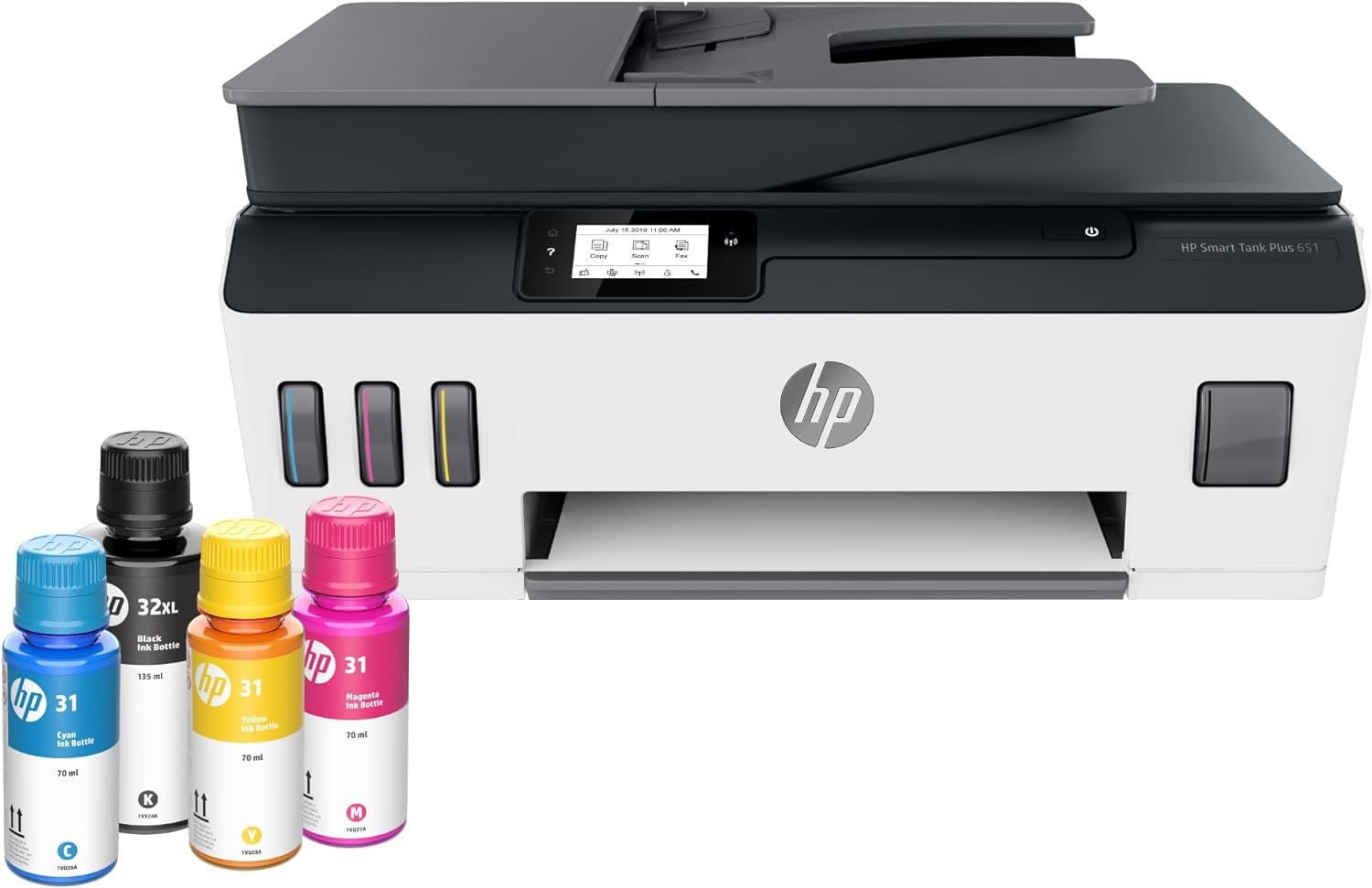
| Ink System | Refillable Ink Tanks (Black, Cyan, Magenta, Yellow) |
| Duty Cycle | Designed for high-volume home and small office use |
| Warranty | Limited warranty |
The HP Smart Tank Plus 651 AIO is engineered for users requiring a versatile, cost-effective solution for home and small office environments. Its combination of wireless connectivity, high-resolution printing, and refillable ink tanks makes it suitable for tasks ranging from everyday document printing to photo reproduction. The included ink and automatic document feeder further enhance its appeal for users prioritizing convenience and reliability.

Print Quality and Color Accuracy

High-Resolution Output for Text and Graphics
The HP Smart Tank Plus 651 AIO delivers sharp text and vibrant color reproduction, making it well-suited for both everyday documents and photo prints. Its 4800 x 1200 dpi color resolution ensures fine detail in graphics and images, while the 600 x 1200 dpi black-and-white resolution provides crisp text. These specifications align with industry standards for home and small office use, where clarity and color accuracy are essential for professional-looking outputs. The printer’s thermal inkjet technology contributes to consistent color output by precisely controlling ink droplet placement, reducing the risk of banding or uneven tonal gradients.
Borderless Printing for Creative Projects
One of the standout features of the HP Smart Tank Plus 651 AIO is its borderless printing capability. This allows users to print photos and documents without the need for trimming, making it ideal for creative projects or presentations. The printer supports borderless printing on media sizes up to 8.5 x 14 inches, which is sufficient for most home and office use cases. While borderless printing may slightly reduce print speed compared to standard prints, the feature remains a valuable asset for users who require high-quality, unframed prints.
Color Consistency Across Media Types
The printer’s ability to maintain color consistency across different media types is another key factor. It supports a variety of paper types, including glossy photo paper, plain paper, and envelopes, ensuring that colors remain vivid and accurate regardless of the medium. This versatility is particularly beneficial for users who frequently print on different materials, such as photographers or small business owners who need to produce marketing materials. However, the printer’s reliance on HP-specific ink tanks may limit compatibility with third-party media, which could be a consideration for budget-conscious users.
Connectivity and Mobile Integration

Seamless Wireless Printing for Modern Workflows
The HP Smart Tank Plus 651 AIO’s wireless connectivity is a significant advantage for users who prioritize mobility and convenience. By supporting Wi-Fi printing, the printer allows users to print from smartphones, tablets, and computers without the need for physical cables. This feature is particularly beneficial for remote workers or individuals who frequently print on-the-go. The printer’s compatibility with Amazon Alexa, Android, and iOS devices further enhances its appeal, enabling voice-activated printing and seamless integration with smart home ecosystems.
App-Based Control for Customization
The HP Smart Tank Plus 651 AIO includes a dedicated mobile app that provides users with greater control over printing settings and device management. The app allows for customizing print quality, adjusting color settings, and monitoring ink levels, which helps users optimize their printing experience. This level of customization is especially useful for users who require precise control over output settings, such as graphic designers or photographers. However, the app’s functionality is limited to basic adjustments, and advanced users may find it lacking compared to more feature-rich printing software.
USB and Network Connectivity for Versatility
In addition to wireless connectivity, the printer also supports USB 2.0 and network printing, providing flexibility for users who prefer wired connections or need to share the printer across multiple devices. The USB port allows for direct printing from computers, which can be more reliable in environments with unstable Wi-Fi signals. Network printing, on the other hand, enables multiple users to access the printer simultaneously, making it suitable for small offices or home workgroups. These connectivity options ensure that the printer can adapt to a wide range of usage scenarios, from individual home printing to shared office environments.
Cost-Effectiveness and Ink Management

2 Years of Ink Included for High-Volume Use
The HP Smart Tank Plus 651 AIO’s inclusion of 2 years of ink is a major selling point for users who require high-volume printing. The printer’s ink tank system allows for continuous printing without the need for frequent cartridge replacements, reducing long-term costs. According to HP’s specifications, the included ink can produce up to 8,000 color pages or 6,000 black pages, which is sufficient for most home and small office use cases. This feature is particularly beneficial for users who print frequently, such as students, small business owners, or families with multiple printing needs.
Refillable Ink Tanks for Lower Operating Costs
The refillable ink tank design of the HP Smart Tank Plus 651 AIO contributes to its cost-effectiveness. Unlike traditional inkjet printers that require frequent cartridge replacements, this model allows users to refill the ink tanks using HP’s original ink bottles. This reduces the cost per page over time, especially for users who print in large quantities. However, the need for regular ink refills may be a drawback for users who prefer a more hands-off approach to printing. The printer’s ink tank system also requires careful handling to avoid leaks, which could be a consideration for users with limited technical expertise.
Ink Efficiency and Print Yield
The printer’s ink efficiency is another factor that influences its cost-effectiveness. HP’s thermal inkjet technology is designed to minimize ink waste by precisely controlling the amount of ink used for each print job. This results in a higher print yield, meaning that the included ink can last longer than in printers with less efficient ink delivery systems. However, the printer’s reliance on HP-specific ink bottles may limit its cost-effectiveness for users who prefer to use third-party ink, which is often more affordable but may not be compatible with the printer’s tank system.
Reliability and Durability

Built for High-Volume Home and Office Use
The HP Smart Tank Plus 651 AIO is designed to handle high-volume printing, making it suitable for both home and small office environments. Its thermal inkjet technology is known for its durability and reliability, with components engineered to withstand frequent use. The printer’s duty cycle specifications indicate that it is capable of handling continuous printing without significant wear, which is essential for users who require consistent output. This reliability is further supported by the printer’s inclusion of an automatic document feeder, which reduces the need for manual intervention and minimizes the risk of paper jams or misfeeds.
Longevity and Maintenance Requirements
While the HP Smart Tank Plus 651 AIO is built for durability, it still requires regular maintenance to ensure optimal performance. The printer’s ink tank system requires periodic refilling, which may be a drawback for users who prefer a more maintenance-free printing experience. Additionally, the printer’s paper tray and automatic document feeder should be cleaned regularly to prevent dust buildup and ensure smooth operation. These maintenance requirements are standard for inkjet printers but may be a consideration for users who prioritize low-maintenance solutions.
Customer Feedback on Reliability
Customer reviews and industry benchmarks suggest that the HP Smart Tank Plus 651 AIO is generally reliable for its intended use cases. While some users have reported occasional paper jams or ink-related issues, these are often attributed to improper setup or maintenance rather than inherent design flaws. The printer’s limited warranty provides some reassurance, but users should be aware that extended support may require additional service agreements. Overall, the printer’s reliability aligns with its positioning as a cost-effective solution for home and small office use.

Pros & Cons
Pros
- High-Volume Printing with Included Ink: The 2-year ink supply ensures cost-effective printing for users with frequent needs.
- Wireless and Mobile Compatibility: Wi-Fi and app-based printing make it convenient for modern workflows.
- Borderless Printing for Creative Use: Enhances the printer’s versatility for photo and document printing.
- Refillable Ink Tanks for Lower Operating Costs: Reduces long-term expenses compared to traditional inkjet printers.
- Automatic Document Feeder for Efficiency: Streamlines multi-page printing and scanning tasks.
- Durable Design for Home and Small Office Use: Built to handle continuous printing without significant wear.
Cons
- Initial Setup Complexity: Some users may find the wireless setup and ink refill process challenging.
- Limited Third-Party Ink Compatibility: Reliance on HP-specific ink bottles may increase long-term costs.
- Manual Duplex Printing: The lack of automatic duplex printing may inconvenience users who prefer single-sided printing.
- Maintenance Requirements: Regular cleaning and ink refilling are necessary for optimal performance.
- Print Speed Trade-Offs: Borderless printing and high-resolution output may slightly reduce print speed compared to standard settings.
Final Verdict: Who This Printer Is Best For (and Who Should Skip It)
The HP Smart Tank Plus 651 AIO is an excellent choice for home users and small office environments that require a versatile, cost-effective printer for high-volume printing. Its combination of wireless connectivity, refillable ink tanks, and borderless printing capabilities makes it well-suited for tasks ranging from everyday document printing to creative photo projects. The included ink supply and automatic document feeder further enhance its appeal for users prioritizing convenience and reliability. However, this printer may not be the best fit for users who require advanced printing features, such as automatic duplex printing or compatibility with third-party ink. Additionally, those who prefer a more maintenance-free printing experience or have specific needs for high-speed, high-volume commercial printing may find this model less suitable. Overall, the HP Smart Tank Plus 651 AIO is a strong contender for users seeking a reliable, affordable solution for home and small office printing.

Frequently Asked Questions (FAQs)
What is the maximum print speed of the HP Smart Tank Plus 651 AIO?
The HP Smart Tank Plus 651 AIO prints up to 11 pages per minute in black and 5 pages per minute in color. These speeds are suitable for home and small office environments but may be slower than laser printers for high-volume tasks.
How much ink is included with the HP Smart Tank Plus 651 AIO?
The printer comes with 2 years of HP ink, which can produce up to 8,000 color pages or 6,000 black pages. This included ink supply is ideal for users with frequent printing needs.
Can the HP Smart Tank Plus 651 AIO print borderless photos?
Yes, the printer supports borderless printing on media up to 8.5 x 14 inches. This feature is useful for creating unframed photo prints and professional-looking documents.
What connectivity options does the HP Smart Tank Plus 651 AIO offer?
The printer supports Wi-Fi, USB 2.0, and mobile printing via Amazon Alexa, Android, and iOS devices. These options provide flexibility for users who prefer wireless or wired printing solutions.
Is the HP Smart Tank Plus 651 AIO compatible with third-party ink?
The printer is designed to work with HP-specific ink bottles, and compatibility with third-party ink is not guaranteed. Using non-HP ink may affect print quality and reliability.
What is the maximum media size supported by the HP Smart Tank Plus 651 AIO?
The printer supports media sizes up to 8.5 x 14 inches, including A4, A5, and various letter sizes. This range covers most standard paper and envelope types for home and office use.
Does the HP Smart Tank Plus 651 AIO have an automatic document feeder?
Yes, the printer includes a 35-page automatic document feeder, which simplifies scanning and copying multi-page documents without manual intervention.
How does the HP Smart Tank Plus 651 AIO handle duplex printing?
The printer supports manual duplex printing, requiring users to flip the paper after the first side is printed. This is a common feature in many inkjet printers but may be less convenient than automatic duplex printing.